In this tutorial, we will show you how to include static resources like JavaScript or CSS in a JSP page.
Summary steps :
- Put static resources like cs, js or images into this folder
webapp\resources - Create a Spring
mvc:resourcesmapping - Include in JSP page via JSTL tag
c:urlor Spring tagspring:url
P.S This project is tested with Spring 4.1.6.RELEASE.
1. Project Directory
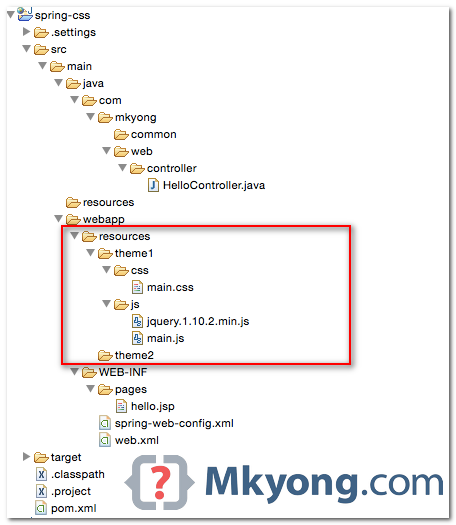
A standard Maven folder structure, puts the static resources like js and css files into the webapp\resources folder.
2. Spring Resource Mapping
Declares mvc:resources, to map “url path” to a physical file path location.
<beans xmlns="http://www.springframework.org/schema/beans"
    xmlns:mvc="http://www.springframework.org/schema/mvc"
	xmlns:context="http://www.springframework.org/schema/context"
	xmlns:xsi="http://www.w3.org/2001/XMLSchema-instance"
	xsi:schemaLocation="
        http://www.springframework.org/schema/beans
        http://www.springframework.org/schema/beans/spring-beans.xsd
        http://www.springframework.org/schema/mvc
        http://www.springframework.org/schema/mvc/spring-mvc.xsd
        http://www.springframework.org/schema/context
        http://www.springframework.org/schema/context/spring-context.xsd">

    <context:component-scan base-package="com.mkyong.web" />

    <bean
	class="org.springframework.web.servlet.view.InternalResourceViewResolver">
	<property name="prefix">
		<value>/WEB-INF/pages/</value>
	</property>
	<property name="suffix">
		<value>.jsp</value>
	</property>
    </bean>

    <mvc:resources mapping="/resources/**" location="/resources/theme1/"
	cache-period="31556926"/>

    <mvc:annotation-driven />

</beans>
In the above example, any requests from this url pattern /resources/**, Spring will look for the resources from the /resources/mytheme1/ instead.
In future, you can easily change to a new theme by updating the mvc:resources
<mvc:resources mapping="/resources/**" location="/resources/theme-new/" />
3. Include in JSP Page
To include CSS or JS in a JSP page, you can use JSTL tag c:url or Spring tag spring:url.
3.1 JSTL tag c:url example.
<%@taglib prefix="c" uri="http://java.sun.com/jsp/jstl/core" %>
<!DOCTYPE html>
<html lang="en">
<head>
    <link href="<c:url value="/resources/css/main.css" />" rel="stylesheet">
    <script src="<c:url value="/resources/js/jquery.1.10.2.min.js" />"></script>
    <script src="<c:url value="/resources/js/main.js" />"></script>
</head>
<body>
<h1>1. Test CSS</h1>

<h2>2. Test JS</h2>
<div id="msg"></div>

</body>
</html>
3.2 Spring tag spring:url example.
<%@ taglib prefix="spring" uri="http://www.springframework.org/tags"%>
<!DOCTYPE html>
<html lang="en">
<head>
	<spring:url value="/resources/css/main.css" var="mainCss" />
	<spring:url value="/resources/js/jquery.1.10.2.min.js" var="jqueryJs" />
	<spring:url value="/resources/js/main.js" var="mainJs" />

	<link href="${mainCss}" rel="stylesheet" />
    <script src="${jqueryJs}"></script>
    <script src="${mainJs}"></script>
</head>
<body>
<h1>1. Test CSS</h1>

<h2>2. Test JS</h2>
<div id="msg"></div>

</body>
</html>
3.3 Javascript file.
jQuery(document).ready(function($) {

	$('#msg').html("This is updated by jQuery")

});
3.4 CSS file.
h1{
	color:red;
}
For those who hates JSTL, you can use the “page context” variable to get the resources like this :
<link href="${pageContext.request.contextPath}/resources/css/main.css" rel="stylesheet" >
4. Demo
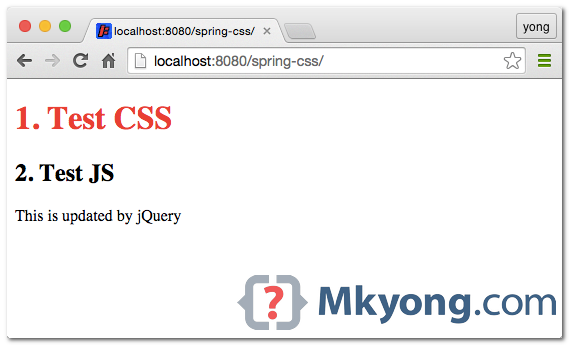
Run the project with Maven command : $ mvn jetty:run
URL : http://localhost:8080/spring-css/
5. Static resources in WEB-INF?
Q : Can I put the static resources in the WEB-INF folder?
A : Yes, you can, the Spring mapping will still work, For example,
<mvc:resources mapping="/resources/**" location="/WEB-INF/resources/theme1/" />
But, this is not a good practice. You can ignore the rule, but many developers and plugins will look for the static resources in the same level of WEB-INF, not inside the WEB-INF.

Hello there!
Example is helpful, but not working.
After path fix, still not work.
App starts, but we see only 2 rows of black colored text.
That means, our static resources not loaded.
And no logs here is present.
In my own project, i have error from dispatcher, who says:
can’t resolve GET /WEB-INF/resources/favicon.ico there is not handler for that.
nothing works
<link href=”${pageContext.request.contextPath}/resources/css/main.css” rel=”stylesheet” >
Thank you it works for me.
In your article, in Section # 3 – Include in Jsp Page, you specify the path as
link href=c:url value=”/resources/css/main.css” />” rel=”stylesheet”>
However, I see that main.css file is located in
location=”/resources/theme1/” (value from xml config file)
So, in above href attribute, why do we
not specify the theme1 subdirectory in the path?
Thanks,
Niki
How can you configure this with java config(no xml)?
thanks sweetie
its not work?? its showing
not in a DispatcherServlet request and no ContextLoaderListener registered?
very helpfull post
Thank you very much for leaving the source code of the example, I did not understand why I did not reference the js and it was because I was calling the page directly and instead of the controller.
This is not at all working ! #yell
Is spring-web-config.xml needed in case of we don’t want to change the themes? Good example! very useful
Is spring-web-config.xml needed in case of we don’t want to change the themes?
Thank You. This example resolved my problem although my project was totally different.
I finally managed to apply style and js to my page. But my img urls are not working. For example I have used the below in my jsp page directly :
dint work. And also within css I have used background image that is also not showing up:
.back-image{
background-image: url(“../../../images/test.jpg”);
}
Please help.
I have a similar setup with my static files inside webapp->resources->static folder. From JSP, I can access css, js and images using <link href="” rel=”stylesheet”> and
.
Now, I need to access this from java file. I tried using ClassPathResource cpr = new ClassPathResource(“resources/static/img/logo.jpg”); but it does not work. What is the right way to access the image in java file?
This is not working for me. I get the below error message- any idea why this is happening and how I can fix it?
The stylesheet http://localhost:8080/MyBudget/resources/css/bootstrap.min.css was not loaded because its MIME type, “text/html”, is not “text/css”.
Andres. May be you will be placing the files by mistake in WEB_INF folder. move the files to web-app->resources/css/….
Thanks friend, you saved my day.from last two days I am searching for this.
Thank you very much
For some reason the resources load extremely slowly when running this over an external network. It takes 1.3 seconds to load the css file but loading the page. However, if I open the css file directly it takes a few ms.
how to do the same thing using annotations without using spring-web-config.xml file..?
Thanks , very well explained . Liked it .
js is not applying in html only css is working
what is we store JS/CSS in main/resources folder? how to access them?
hey i want to add background image but its not loading the url of the image. my css is as follows:
.body{
background-image: url(“resources/img/bg-login.jpg”);
}
if you have css file in /resources/css/css.css
than try
background-image: url(“../img/bg-login.jpg”);
I also had same problem while adding background – image and tried your solution but it still didn’t work
org.springframework.beans.factory.xml.XmlBeanDefinitionStoreException: Line 31 in XML document from ServletContext resource [/WEB-INF/minku-servlet.xml] is invalid; nested exception is org.xml.sax.SAXParseException; lineNumber: 31; columnNumber: 77; cvc-complex-type.2.4.c: The matching wildcard is strict, but no declaration can be found for element ‘mvc:resources’.
how spring controller send data to html using js and knouckout js and ajax ?
Hello!
I made like your example but it isn’t worked.
I have a question.
Why is the path different to the css resource?
The path to the folder – /resources/theme1/css/main.css
On the jsp page you pointed –
i guess it is because he had already mapped– /resources/theme1 to — /resources
in this way, we call indicate the path by using — /resources only whenever we need it.
Do we need to add any maven dependency to use jstl tags? I have spring mvc and spring core dependency but also the jstl tags are not working
Cool..
Can’t we use following steps to complete this task.
You need to set “ as following…
${req.requestURL}
Then You can Import any JS or CSS like below..
HUGE
your segesting is not working on my case. I am using spring mvc, spring security and apache tiles. The project structure in my case a bit different from yours. What is your advice. Please look at the picture of my project structure http://postimg.org/image/6dqu4wb8v/ regards,
If you would give me an insight please. My project is majorly similar, the appplication clearly sees files like /resources/images/Pic.jpg . To depict such files is not a big problem, but I cannot understand by myself or find out in the web how to depict the file like /resources/images/level1DIR/Pic.jpg and even if it is possible at all via static access?
I found the answer by myself. It takes to write tag one more time and to point mapping for one directory level deeper. IIMPORTANT: it must distinct from main mapping to RESOURCES directory and locate before main tag mapped to RESOURCES directory
Thanks for your tutorial. Is possible to have also the configuration files (web.xml) in the zip? I have a 404 error and don’t understand. Thanks
Hi All,
I am pretty new to JSP. The JSP that we are using (at work) does not have header or any html tags. JS are defined in script tags and css is picked up when packaged with the EAR.
if (localStorage != ‘undefined’ && localStorage.dev == “true”) {
document.write(”);
document.write(”);
document.write(”);
}else{
document.write(”);
document.write(”);
document.write(”);
Other Application is picking the css using the same framework. I was asked to work the same way since the css is not getting picked I tried to add this way document.write(”); after the . It does style my page (not completely but better that before). I have added 5 such css files and on top of the page in the browser I am getting “document.write(”);document.write(”);document.write(”);document.write(”);document.write(”);”.
Can you please help me how to define CSS?
is there any tutorial for annotations based for same functionality. i need that urgently
Hi Mkyong It’s Urgent Need Help
I run this example but i have problem on some Javascript & Css i have
Page is working find i view source and it can link to all js and css file no problem.
But! some UI component is not working, I used IOS Rang silder but it show as text input why ?
Thanks you for your answer
Hello Sir, Thank you so much for sharing your knowledge. You are performing a great duty on earth and I wish you could feel the fulfilment of your call. God bless you.
hello, after following every step, i am still getting “No mapping found for HTTP request with URI [/AttendanceApp/resources/main.css] in DispatcherServlet with name ‘dispatcher'” error
please help
Thanks , it works ,in my project ,I got “No mapping found for HTTP request” ,compare to your example,I found I missing in spring-mvc.xml,but I don’t know why,what does do?
Thank you thank you thank you so much! Great tutorial!
Great post! Thank you so much!
Finally It’s Working.It was good for me.
Thanks
Happy hours…
Thankyou sir , it is working,
but my doubt is, can i map resource from url(http:// or ftp://) instead from file://
Thanks Lot sir
OOO I love you!!! 12 hours in a trash and finally solution.
Thanks a lot
was struggling from an hour as my js and css files where not getting loaded
Thank you so much for taking the time to write these instructions up
When i do the resource mapping ( ), i am getting No mapping found for HTTP request with URI [/SpringMvc/home] in DispatcherServlet with name ‘mvc-dispatcher’. This is how my login controller looks.
@Controller
@RequestMapping(“/”)
public class LoginController {
@RequestMapping(method = RequestMethod.GET, value = “/home”)
public String showLogin(ModelMap model) {
return “logIn”;
}
@RequestMapping(method = RequestMethod.POST, value = “/resource”)
public String showResource(ModelMap model) {
return “resourceTracker”;
}
}
When i don’t do the resource mapping, its not able to find my css file with the below error
[Error] Failed to load resource: the server responded with a status of 404 (Not Found) (main.css, line 0) http://localhost:8080/SpringMvc/resources/mytheme/css/main.css
Nothing to do with the @Controller class, the resources mapping is control by the spring config file.
Article and source code is updated, please download the new source code and try it again.
how add .ejs file?
Thanks for this article.
this work fine on tomcat but when i use Glassfish it doesn’t work , any help?
Why should the front end resources be mapped to back end functionality??? Why not just put them in WEB-INF, keep the web and back end separated. Adding them as a servlet dependdency seems to coupled and akward.
Stuff in WEB-INF is unable to access by client directly, and you need to do internal resource mapping as well.
mkyong,How about putting these js and css inside the WEB-INF ?
mkyong ,thanks ,I love Malasiya
Hi mkyong, I’m a newcomer to spring, mongoDB and JQuery. Your site has helped me so much! Thanks to you my project is up and running from scratch! Thank you!
Hello. This tutorial is great but I would like to mention that this didn’t work right off the bat (I was getting 404 on css and js resources). Cause of the error was double double quotes while including css and js files
<link href="” rel=”stylesheet”>. I simply put single quotes on c tag and it worked <link href="” rel=”stylesheet”>
Yeah! Science!!
Thank you man! You’re awesome!!!
Thanks so much !!! ..
Greetings
what about in a portal page with friendly URL
Its is good way to customizing the CSS and JS file to the JSP
Thank you.
specially I like your this comment :
“For those who hates JSTL, you can use the “page context” variable to get the resources like this :” 🙂
If i want a relative path inside a JS file, I have to map my JS resource path in a controller. When it’s called, I fetch the actual file in Java, get the relative path from HttpServletRequest and output modified JS file. Isn’t there a better way? The same thing is with CSS files.
This is child’s play. How about the path problem inside CSS and JS files?
what is maven configuration to include these js and css inside the WEB-INF ?
You can use http://www.webjars.org/ to include the css or js. But, should you include the css or js with Maven? I doubt it.
could you tell me how to include css or js with maven
Thank you.
cool
Well done
Finally, it’s working !!! Thank you very much.
How about putting these js and css inside the WEB-INF ?
Yes, you can, but not recommend. The resources like images, CSS and JS files should puts outside the WEB-INF. Refer step 5 – Should I put static resources in WEB-INF?