This article shows two ways to resize an image (create a thumbnail) in Java.
1. Original Image, 544×184
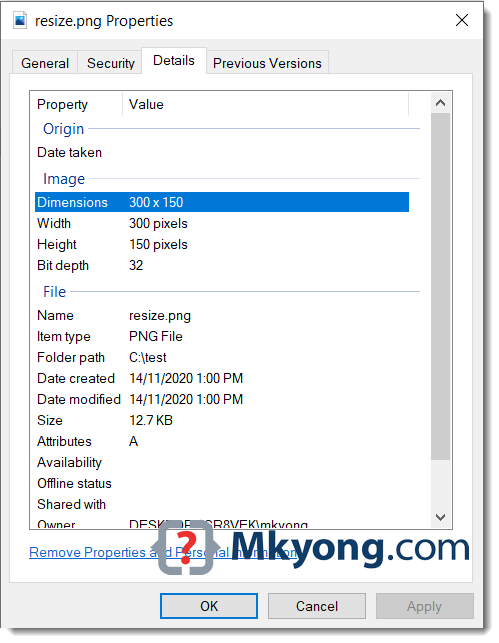
Below is a Google logo image, width, height 544x184, and file size 14k. Later, we will resize the below image to a new width and height 300x150.

2. Resize an image or create a thumbnail.
This Java example uses the bufferedImage.getScaledInstance() API to resize an image, and we can pass in different image’s hints to generate different scaled images.
  BufferedImage bi = ImageIO.read(input);
  Image newResizedImage = bi.getScaledInstance(width, height, Image.SCALE_SMOOTH);
We can configure the quality of the scaled image via the following image’s hints:
SCALE_AREA_AVERAGING– Area Averaging image scaling algorithm.SCALE_DEFAULT– Default image-scaling algorithmSCALE_FAST– Gives priority to scaling speed than the smoothness of the scaled image.SCALE_REPLICATE– Image scaling algorithm embodied in the ReplicateScaleFilter classSCALE_SMOOTH– Gives priority to the smoothness of the scaled image than scaling speed.
The following example shows how to resize the above image (Google logo) to a new width and height of 300x150.
package com.mkyong.io.image;

import javax.imageio.ImageIO;
import java.awt.*;
import java.awt.image.BufferedImage;
import java.io.FileInputStream;
import java.io.IOException;
import java.io.InputStream;
import java.nio.file.Path;
import java.nio.file.Paths;

public class ResizeImage1 {

    private static final int IMG_WIDTH = 300;
    private static final int IMG_HEIGHT = 150;

    public static void main(String[] args) throws IOException {

        Path source = Paths.get("C:\\test\\google.png");
        Path target = Paths.get("C:\\test\\resize.png");

        try (InputStream is = new FileInputStream(source.toFile())) {
            resize(is, target, IMG_WIDTH, IMG_HEIGHT);
        }

    }

    private static void resize(InputStream input, Path target,
                                   int width, int height) throws IOException {

        BufferedImage originalImage = ImageIO.read(input);

        /**
         * SCALE_AREA_AVERAGING
         * SCALE_DEFAULT
         * SCALE_FAST
         * SCALE_REPLICATE
         * SCALE_SMOOTH
         */
        Image newResizedImage = originalImage
              .getScaledInstance(width, height, Image.SCALE_SMOOTH);

        String s = target.getFileName().toString();
        String fileExtension = s.substring(s.lastIndexOf(".") + 1);

        // we want image in png format
        ImageIO.write(convertToBufferedImage(newResizedImage),
                fileExtension, target.toFile());

    }

    public static BufferedImage convertToBufferedImage(Image img) {

        if (img instanceof BufferedImage) {
            return (BufferedImage) img;
        }

        // Create a buffered image with transparency
        BufferedImage bi = new BufferedImage(
                img.getWidth(null), img.getHeight(null),
                BufferedImage.TYPE_INT_ARGB);

        Graphics2D graphics2D = bi.createGraphics();
        graphics2D.drawImage(img, 0, 0, null);
        graphics2D.dispose();

        return bi;
    }

}
Review the following outputs:
Image.SCALE_SMOOTH
bufferedImage.getScaledInstance(width, height, Image.SCALE_SMOOTH);
The below figure shows the use of Image.SCALE_SMOOTH hint, and the new scaled image has a file size of 14kb, the same as the original image, but the quality is excellent.

Image.SCALE_DEFAULT
bufferedImage.getScaledInstance(width, height, Image.SCALE_DEFAULT);
The below figure shows the use of Image.SCALE_DEFAULT hint, and the new scaled image has a file size of 9kb.

Image.SCALE_FAST
bufferedImage.getScaledInstance(width, height, Image.SCALE_FAST);
The below figure shows the use of Image.SCALE_FAST hint, and the new scaled image has a file size of 9kb.

Try different hints to suit your case.
3. Java resizes an image, draw a new image.
This example is more flexible (can customized background, color filtering, or RenderingHints) but needs extra coding to draw a newly resized image.
  BufferedImage originalImage = ImageIO.read(input);

  BufferedImage newResizedImage
        = new BufferedImage(width, height, BufferedImage.TYPE_INT_ARGB);

  Graphics2D g = newResizedImage.createGraphics();

  // background transparent
  g.setComposite(AlphaComposite.Src);
  g.fillRect(0, 0, width, height);

  // configure RenderingHints
  g.setRenderingHint(RenderingHints.KEY_RENDERING,
                        RenderingHints.VALUE_RENDER_QUALITY);

  // draw a new image
  g.drawImage(originalImage, 0, 0, IMG_WIDTH, IMG_HEIGHT, null);
A complete Java example to resize an image.
package com.mkyong.io.image;

import javax.imageio.ImageIO;
import java.awt.*;
import java.awt.image.BufferedImage;
import java.io.FileInputStream;
import java.io.IOException;
import java.io.InputStream;
import java.nio.file.Path;
import java.nio.file.Paths;

public class ResizeImage2 {

    private static final int IMG_WIDTH = 300;
    private static final int IMG_HEIGHT = 150;

    public static void main(String[] args) throws IOException {

        Path source = Paths.get("C:\\test\\google.png");
        Path target = Paths.get("C:\\test\\resize.png");

        try (InputStream is = new FileInputStream(source.toFile())) {
            resize(is, target, IMG_WIDTH, IMG_HEIGHT);
        }

    }

    private static void resize(InputStream input, Path target,
                               int width, int height) throws IOException {

        // read an image to BufferedImage for processing
        BufferedImage originalImage = ImageIO.read(input);

        // create a new BufferedImage for drawing
        BufferedImage newResizedImage
              = new BufferedImage(width, height, BufferedImage.TYPE_INT_ARGB);
        Graphics2D g = newResizedImage.createGraphics();

        //g.setBackground(Color.WHITE);
        //g.setPaint(Color.WHITE);

        // background transparent
        g.setComposite(AlphaComposite.Src);
        g.fillRect(0, 0, width, height);

        /* try addRenderingHints()
        // VALUE_RENDER_DEFAULT = good tradeoff of performance vs quality
        // VALUE_RENDER_SPEED   = prefer speed
        // VALUE_RENDER_QUALITY = prefer quality
        g.setRenderingHint(RenderingHints.KEY_RENDERING,
                              RenderingHints.VALUE_RENDER_QUALITY);

        // controls how image pixels are filtered or resampled
        g.setRenderingHint(RenderingHints.KEY_INTERPOLATION,
                              RenderingHints.VALUE_INTERPOLATION_BILINEAR);

        // antialiasing, on
        g.setRenderingHint(RenderingHints.KEY_ANTIALIASING,
                              RenderingHints.VALUE_ANTIALIAS_ON);*/

        Map<RenderingHints.Key,Object> hints = new HashMap<>();
        hints.put(RenderingHints.KEY_RENDERING, RenderingHints.VALUE_RENDER_QUALITY);
        hints.put(RenderingHints.KEY_INTERPOLATION, RenderingHints.VALUE_INTERPOLATION_BILINEAR);
        hints.put(RenderingHints.KEY_ANTIALIASING, RenderingHints.VALUE_ANTIALIAS_ON);
        g.addRenderingHints(hints);

        // puts the original image into the newResizedImage
        g.drawImage(originalImage, 0, 0, IMG_WIDTH, IMG_HEIGHT, null);
        g.dispose();

        // get file extension
        String s = target.getFileName().toString();
        String fileExtension = s.substring(s.lastIndexOf(".") + 1);

        // we want image in png format
        ImageIO.write(newResizedImage, fileExtension, target.toFile());

    }

}
The file size of the newly scaled image is around 13kb.

New width and height of 300x150
Try different hints to find out the right balance of scaled speed and smoothness of the scaled image.
Download Source Code
$ git clone https://github.com/mkyong/core-java
$ cd java-io


Hi..How to resize multiple images, the above code works well with single image ,but for multiple images how to proceed .Could you please help on that
thanks mkyong ! Resizing method using Graphic2D really work for me.
I have never left any post or comments in any of the tutorial I’ve read before. But I would like to thank you as you have provided me with immense help in solving some of my problems. I am like yourself is a coding junky and love sharing knowledge libraries and learning new things as we go. Again thank you for all the tutorials you provided and for the effort you have put in writing every single one of them. Hats off..
Thank you men. I was making some code to resize a file, but, I have false color in the result. Now I see the solution by your code.
Thank you a lot.
If resizeing does not work to add g.finalize(); before g.dispose() to get a resized image.
Hope this helps.
??GIF?JPG?????????????
?????
public static void reduceImg(String imgsrc, String imgdist, int widthdist,
int heightdist) {
try {
File srcfile = new File(imgsrc);
if (!srcfile.exists()) {
return;
}
Image src = javax.imageio.ImageIO.read(srcfile);
BufferedImage tag= new BufferedImage((int) widthdist, (int) heightdist,
BufferedImage.TYPE_INT_RGB);
tag.getGraphics().drawImage(src.getScaledInstance(widthdist, heightdist, Image.SCALE_SMOOTH), 0, 0, null);
/// tag.getGraphics().drawImage(src.getScaledInstance(widthdist, heightdist, Image.SCALE_AREA_AVERAGING), 0, 0, null);
FileOutputStream out = new FileOutputStream(imgdist);
JPEGImageEncoder encoder = JPEGCodec.createJPEGEncoder(out);
encoder.encode(tag);
out.close();
} catch (IOException ex) {
ex.printStackTrace();
}
}
He utilizado el código, pero he cambiado algunas líneas.
public static void reduceImg(String imgsrc, String imgdist,String type, int widthdist,
int heightdist) {
try {
File srcfile = new File(imgsrc);
if (!srcfile.exists()) {
return;
}
Image src = javax.imageio.ImageIO.read(srcfile);
BufferedImage tag= new BufferedImage((int) widthdist, (int) heightdist,
BufferedImage.TYPE_INT_RGB);
tag.getGraphics().drawImage(src.getScaledInstance(widthdist, heightdist, Image.SCALE_SMOOTH), 0, 0, null);
// tag.getGraphics().drawImage(src.getScaledInstance(widthdist, heightdist, Image.SCALE_AREA_AVERAGING), 0, 0, null);
FileOutputStream out = new FileOutputStream(imgdist);
ImageIO.write(tag, type, out);
out.close();
} catch (IOException ex) {
ex.printStackTrace();
}
}
Great Ivan! This is the best solutions I’ve found.This line does the trick:
tag.getGraphics().drawImage(src.getScaledInstance(widthdist, heightdist, Image.SCALE_SMOOTH), 0, 0, null);
From the doc: Image.SCALE_SMOOTH “Choose an image-scaling algorithm that gives higher priority to image smoothness than scaling speed”.
Infact the image quality is really better than using the other params!
Hi!
I have an implementation to resize an image with rendering hints and converting it to TYPE_BYTE_GRAY. Code works fine until i get an original image having type of TYPE_BYTE_BINARY. Let’s say if i do not convert it to TYPE_BYTE_GRAY but only want to resize it. How am i gonna do that? I have tried it against drawImage(img, 0, 0, null) and drawImage(img, 0, 0, newWidth, newHeight, null) but was not successful. In first case the image gets cropped and in second case it throws exception. So what i want to ask is, Is there any way to resize TYPE_BYTE_BINARY image to customized width and height? Thank you
public static BufferedImage resizeImage(BufferedImage image, int longer, int width, int height, boolean isWithHint) { int oldWidth = image.getWidth(); int oldHeight = image.getHeight(); boolean isWidthLonger = oldWidth > oldHeight; int newWidth = -1; int newHeight = -1; if (longer > 0) { if (isWidthLonger) { newWidth = longer; newHeight = NumberUtil.convert(new double[] { longer * ((double) oldHeight / (double) oldWidth) })[0] .intValue(); } else { newHeight = longer; newWidth = NumberUtil.convert(new double[] { longer * ((double) oldWidth / (double) oldHeight) })[0] .intValue(); } } else { newWidth = width; newHeight = height; } int type = image.getType() == 0? BufferedImage.TYPE_INT_ARGB : image.getType(); return isWithHint ? resizeImageWithHint(image, type, newWidth, newHeight) : resizeImageWithoutHint(image, type, newWidth, newHeight); }Great example!!! thanks Mkyong!!! You are great!!!
Nice short and precise.Thanks a lot.
Great example!!!
Thank you very much. It was really helpful.
This is the really good and perfect discussion as well with no doubt this is the best approach.
Hi,
I think you have set the Hints before drawing, so they will be recognized and you should use the method for g.addHints(..), so you can give them all. In your way I think you will be overwritten every time using the set-Method.
Last but not least you should add some kind of calculation for the image size, because often your picture won’t be 100×100. Often they will be something like 100×67 or so.
So you could calculate which is the greatest length, scale that down to your size you want to have and then use this scale factor to calculate the other length.
Hope this helps a little bit. If you write me an email. 😉
Bye,
Daniel