In this article, we will show you how to create a Spring Boot + Spring Data JPA + Oracle + HikariCP connection pool example.
Tools used in this article :
- Spring Boot 1.5.1.RELEASE
- Spring Data 1.13.0.RELEASE
- Hibernate 5
- Oracle database 11g express
- Oracle JDBC driver ojdbc7.jar
- HikariCP 2.6
- Maven
- Java 8
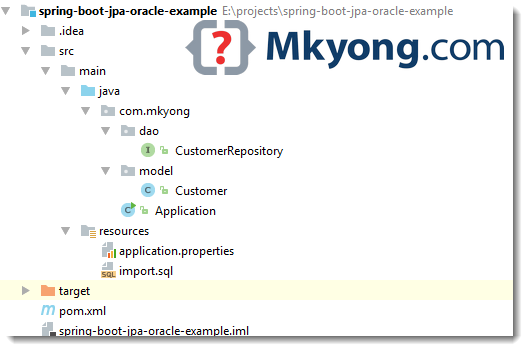
1. Project Structure
A standard Maven project structure.
2. Project Dependency
Declares spring-boot-starter-data-jpa, it grabs Spring Data, Hibernate and JPA related stuff.
pom.xml
<project xmlns="http://maven.apache.org/POM/4.0.0"
         xmlns:xsi="http://www.w3.org/2001/XMLSchema-instance"
         xsi:schemaLocation="http://maven.apache.org/POM/4.0.0
  http://maven.apache.org/maven-v4_0_0.xsd">
    <modelVersion>4.0.0</modelVersion>

    <groupId>com.mkyong</groupId>
    <artifactId>spring-boot-jpa-oracle-example</artifactId>
    <packaging>jar</packaging>
    <version>1.0</version>

    <parent>
        <groupId>org.springframework.boot</groupId>
        <artifactId>spring-boot-starter-parent</artifactId>
        <version>1.5.1.RELEASE</version>
    </parent>

    <properties>
        <java.version>1.8</java.version>
    </properties>

    <dependencies>

        <dependency>
            <groupId>org.springframework.boot</groupId>
            <artifactId>spring-boot-starter</artifactId>
        </dependency>

        <!-- Spring data JPA, default tomcat pool, exclude it -->
        <dependency>
            <groupId>org.springframework.boot</groupId>
            <artifactId>spring-boot-starter-data-jpa</artifactId>
            <exclusions>
                <exclusion>
                    <groupId>org.apache.tomcat</groupId>
                    <artifactId>tomcat-jdbc</artifactId>
                </exclusion>
            </exclusions>
        </dependency>

        <!-- Oracle JDBC driver -->
        <dependency>
            <groupId>com.oracle</groupId>
            <artifactId>ojdbc7</artifactId>
            <version>12.1.0</version>
        </dependency>

        <!-- HikariCP connection pool -->
        <dependency>
            <groupId>com.zaxxer</groupId>
            <artifactId>HikariCP</artifactId>
            <version>2.6.0</version>
        </dependency>

    </dependencies>

    <build>
        <plugins>
            <!-- Package as an executable jar/war -->
            <plugin>
                <groupId>org.springframework.boot</groupId>
                <artifactId>spring-boot-maven-plugin</artifactId>
            </plugin>

        </plugins>
    </build>

</project>
Review the project dependencies in detail.
Terminal
$ mvn dependency:tree
[INFO] ------------------------------------------------------------------------
[INFO] Building spring-boot-jpa-oracle-example 1.0
[INFO] ------------------------------------------------------------------------
[INFO]
[INFO] --- maven-dependency-plugin:2.10:tree (default-cli) @ spring-boot-jpa-oracle-example ---
[INFO] com.mkyong:spring-boot-jpa-oracle-example:jar:1.0
[INFO] +- org.springframework.boot:spring-boot-starter:jar:1.5.1.RELEASE:compile
[INFO] |  +- org.springframework.boot:spring-boot:jar:1.5.1.RELEASE:compile
[INFO] |  |  \- org.springframework:spring-context:jar:4.3.6.RELEASE:compile
[INFO] |  |     \- org.springframework:spring-expression:jar:4.3.6.RELEASE:compile
[INFO] |  +- org.springframework.boot:spring-boot-autoconfigure:jar:1.5.1.RELEASE:compile
[INFO] |  +- org.springframework.boot:spring-boot-starter-logging:jar:1.5.1.RELEASE:compile
[INFO] |  |  +- ch.qos.logback:logback-classic:jar:1.1.9:compile
[INFO] |  |  |  \- ch.qos.logback:logback-core:jar:1.1.9:compile
[INFO] |  |  +- org.slf4j:jcl-over-slf4j:jar:1.7.22:compile
[INFO] |  |  +- org.slf4j:jul-to-slf4j:jar:1.7.22:compile
[INFO] |  |  \- org.slf4j:log4j-over-slf4j:jar:1.7.22:compile
[INFO] |  +- org.springframework:spring-core:jar:4.3.6.RELEASE:compile
[INFO] |  \- org.yaml:snakeyaml:jar:1.17:runtime
[INFO] +- org.springframework.boot:spring-boot-starter-data-jpa:jar:1.5.1.RELEASE:compile
[INFO] |  +- org.springframework.boot:spring-boot-starter-aop:jar:1.5.1.RELEASE:compile
[INFO] |  |  +- org.springframework:spring-aop:jar:4.3.6.RELEASE:compile
[INFO] |  |  \- org.aspectj:aspectjweaver:jar:1.8.9:compile
[INFO] |  +- org.springframework.boot:spring-boot-starter-jdbc:jar:1.5.1.RELEASE:compile
[INFO] |  |  \- org.springframework:spring-jdbc:jar:4.3.6.RELEASE:compile
[INFO] |  +- org.hibernate:hibernate-core:jar:5.0.11.Final:compile
[INFO] |  |  +- org.jboss.logging:jboss-logging:jar:3.3.0.Final:compile
[INFO] |  |  +- org.hibernate.javax.persistence:hibernate-jpa-2.1-api:jar:1.0.0.Final:compile
[INFO] |  |  +- org.javassist:javassist:jar:3.21.0-GA:compile
[INFO] |  |  +- antlr:antlr:jar:2.7.7:compile
[INFO] |  |  +- org.jboss:jandex:jar:2.0.0.Final:compile
[INFO] |  |  +- dom4j:dom4j:jar:1.6.1:compile
[INFO] |  |  \- org.hibernate.common:hibernate-commons-annotations:jar:5.0.1.Final:compile
[INFO] |  +- org.hibernate:hibernate-entitymanager:jar:5.0.11.Final:compile
[INFO] |  +- javax.transaction:javax.transaction-api:jar:1.2:compile
[INFO] |  +- org.springframework.data:spring-data-jpa:jar:1.11.0.RELEASE:compile
[INFO] |  |  +- org.springframework.data:spring-data-commons:jar:1.13.0.RELEASE:compile
[INFO] |  |  +- org.springframework:spring-orm:jar:4.3.6.RELEASE:compile
[INFO] |  |  +- org.springframework:spring-tx:jar:4.3.6.RELEASE:compile
[INFO] |  |  \- org.springframework:spring-beans:jar:4.3.6.RELEASE:compile
[INFO] |  \- org.springframework:spring-aspects:jar:4.3.6.RELEASE:compile
[INFO] +- com.oracle:ojdbc7:jar:12.1.0:compile
[INFO] \- com.zaxxer:HikariCP:jar:2.6.0:compile
[INFO]    \- org.slf4j:slf4j-api:jar:1.7.22:compile
[INFO] ------------------------------------------------------------------------
[INFO] BUILD SUCCESS
[INFO] ------------------------------------------------------------------------
Note
Read this – Maven Install Oracle JDBC driver
Read this – Maven Install Oracle JDBC driver
3. Java Persistence API – JPA
3.1 Customer Model. Add JPA annotations, and use “sequence” to generate the auto increase primary ID.
Customer.java
package com.mkyong.model;

import javax.persistence.*;
import java.util.Date;

@Entity
public class Customer {

	// "customer_seq" is Oracle sequence name.
    @Id
    @GeneratedValue(strategy = GenerationType.SEQUENCE, generator = "CUST_SEQ")
    @SequenceGenerator(sequenceName = "customer_seq", allocationSize = 1, name = "CUST_SEQ")
    Long id;

    String name;

	String email;

    @Column(name = "CREATED_DATE")
    Date date;

    //getters and setters, contructors
}
4. Configuration + Database Initialization
4.1 Configure Oracle data source, HikariCP settings and show Hibernate query.
application.properties
spring.main.banner-mode=off

# create and drop tables and sequences, loads import.sql
spring.jpa.hibernate.ddl-auto=create-drop

# Oracle settings
spring.datasource.url=jdbc:oracle:thin:@localhost:1521:xe
spring.datasource.username=system
spring.datasource.password=password
spring.datasource.driver-class-oracle.jdbc.driver.OracleDriver

# HikariCP settings
# spring.datasource.hikari.*

spring.datasource.hikari.connection-timeout=60000
spring.datasource.hikari.maximum-pool-size=5

# logging
logging.pattern.console=%d{yyyy-MM-dd HH:mm:ss} %-5level %logger{36} - %msg%n
logging.level.org.hibernate.SQL=debug
#logging.level.org.hibernate.type.descriptor.sql=trace
logging.level.=error
4.2 If import.sql is found in the classpath, Hibernate will load it automatically.
import.sql
INSERT INTO "CUSTOMER" (ID, NAME, EMAIL, CREATED_DATE) VALUES(1, 'mkyong','[email protected]', TO_DATE('2017-02-11', 'yyyy-mm-dd'));
INSERT INTO "CUSTOMER" (ID, NAME, EMAIL, CREATED_DATE) VALUES(2, 'yflow','[email protected]', TO_DATE('2017-02-12', 'yyyy-mm-dd'));
INSERT INTO "CUSTOMER" (ID, NAME, EMAIL, CREATED_DATE) VALUES(3, 'zilap','[email protected]', TO_DATE('2017-02-13', 'yyyy-mm-dd'));
Note
Read this – Spring Database initialization
Read this – Spring Database initialization
5. @Repository
5.1 Create an interface and extends Spring Data CrudRepository
CustomerRepository.java
package com.mkyong.dao;

import com.mkyong.model.Customer;
import org.springframework.data.jpa.repository.Query;
import org.springframework.data.repository.CrudRepository;
import org.springframework.data.repository.query.Param;

import java.util.Date;
import java.util.List;
import java.util.stream.Stream;

public interface CustomerRepository extends CrudRepository<Customer, Long> {

    List<Customer> findByEmail(String email);

    List<Customer> findByDate(Date date);

	// custom query example and return a stream
    @Query("select c from Customer c where c.email = :email")
    Stream<Customer> findByEmailReturnStream(@Param("email") String email);

}
Note
No need implementation, Spring data will create the common implementation by field name, like findByfieldName (). Read this working with Spring Data Repositories
No need implementation, Spring data will create the common implementation by field name, like findByfieldName (). Read this working with Spring Data Repositories
6. Spring Boot Starter
Application.java
package com.mkyong;

import com.mkyong.dao.CustomerRepository;
import com.mkyong.model.Customer;
import org.springframework.beans.factory.annotation.Autowired;
import org.springframework.boot.CommandLineRunner;
import org.springframework.boot.SpringApplication;
import org.springframework.boot.autoconfigure.SpringBootApplication;
import org.springframework.transaction.annotation.Transactional;

import javax.sql.DataSource;
import java.text.SimpleDateFormat;
import java.util.stream.Stream;

import static java.lang.System.exit;

@SpringBootApplication
public class Application implements CommandLineRunner {

    private static final SimpleDateFormat sdf = new SimpleDateFormat("yyyy-MM-dd");

    @Autowired
    DataSource dataSource;

    @Autowired
    CustomerRepository customerRepository;

    public static void main(String[] args) throws Exception {
        SpringApplication.run(Application.class, args);
    }

    @Transactional(readOnly = true)
    @Override
    public void run(String... args) throws Exception {

        System.out.println("DATASOURCE = " + dataSource);

        System.out.println("\n1.findAll()...");
        for (Customer customer : customerRepository.findAll()) {
            System.out.println(customer);
        }

        System.out.println("\n2.findByEmail(String email)...");
        for (Customer customer : customerRepository.findByEmail("[email protected]")) {
            System.out.println(customer);
        }

        System.out.println("\n3.findByDate(Date date)...");
        for (Customer customer : customerRepository.findByDate(sdf.parse("2017-02-12"))) {
            System.out.println(customer);
        }

        // For Stream, need @Transactional
        System.out.println("\n4.findByEmailReturnStream(@Param(\"email\") String email)...");
        try (Stream<Customer> stream = customerRepository.findByEmailReturnStream("[email protected]")) {
            stream.forEach(x -> System.out.println(x));
        }

        System.out.println("Done!");

        exit(0);
    }

}
8. DEMO
Run it, read console for self-explanatory.
Terminal
2017-02-22 12:36:49 DEBUG org.hibernate.SQL - drop table customer cascade constraints
2017-02-22 12:36:49 ERROR o.h.tool.hbm2ddl.SchemaExport - HHH000389: Unsuccessful: drop table customer cascade constraints
2017-02-22 12:36:49 ERROR o.h.tool.hbm2ddl.SchemaExport - ORA-00942: table or view does not exist

2017-02-22 12:36:49 DEBUG org.hibernate.SQL - drop sequence customer_seq
2017-02-22 12:36:49 ERROR o.h.tool.hbm2ddl.SchemaExport - HHH000389: Unsuccessful: drop sequence customer_seq
2017-02-22 12:36:49 ERROR o.h.tool.hbm2ddl.SchemaExport - ORA-02289: sequence does not exist

2017-02-22 12:36:49 DEBUG org.hibernate.SQL - create sequence customer_seq start with 1 increment by 1
2017-02-22 12:36:49 DEBUG org.hibernate.SQL - create table customer (id number(19,0) not null, created_date timestamp, email varchar2(255 char), name varchar2(255 char), primary key (id))
DATASOURCE = HikariDataSource (HikariPool-1)

1.findAll()...
2017-02-22 12:36:50 DEBUG org.hibernate.SQL - select customer0_.id as id1_0_, customer0_.created_date as created_date2_0_, customer0_.email as email3_0_, customer0_.name as name4_0_ from customer customer0_
Customer{id=1, name='mkyong', email='[email protected]', date=2017-02-11 00:00:00.0}
Customer{id=2, name='yflow', email='[email protected]', date=2017-02-12 00:00:00.0}
Customer{id=3, name='zilap', email='[email protected]', date=2017-02-13 00:00:00.0}

2.findByEmail(String email)...
2017-02-22 12:36:50 DEBUG org.hibernate.SQL - select customer0_.id as id1_0_, customer0_.created_date as created_date2_0_, customer0_.email as email3_0_, customer0_.name as name4_0_ from customer customer0_ where customer0_.email=?
Customer{id=2, name='yflow', email='[email protected]', date=2017-02-12 00:00:00.0}

3.findByDate(Date date)...
2017-02-22 12:36:50 DEBUG org.hibernate.SQL - select customer0_.id as id1_0_, customer0_.created_date as created_date2_0_, customer0_.email as email3_0_, customer0_.name as name4_0_ from customer customer0_ where customer0_.created_date=?
Customer{id=2, name='yflow', email='[email protected]', date=2017-02-12 00:00:00.0}

4.findByEmailReturnStream(@Param("email") String email)...
2017-02-22 12:36:50 DEBUG org.hibernate.SQL - select customer0_.id as id1_0_, customer0_.created_date as created_date2_0_, customer0_.email as email3_0_, customer0_.name as name4_0_ from customer customer0_ where customer0_.email=?
Customer{id=3, name='zilap', email='[email protected]', date=2017-02-13 00:00:00.0}
Done!
2017-02-22 12:36:50 DEBUG org.hibernate.SQL - drop table customer cascade constraints
2017-02-22 12:36:50 DEBUG org.hibernate.SQL - drop sequence customer_seq

Process finished with exit code 0
Download Source Code
Download – spring-boot-jpa-oracle-example.zip (6 KB)
References
- Maven Install Oracle JDBC driver
- Initialize a database using JPA
- Spring boot ddl auto generator
- Spring Data Commons – Reference Documentation
- Accessing Data with JPA
- TopLink JPA: How to Configure Primary Key Generation
- Oracle / PLSQL: Sequences (Autonumber)
- Spring Boot JDBC + Oracle database + Commons DBCP2 example

Please, help me:
org.hibernate.tool.schema.spi.CommandAcceptanceException: Error executing DDL “drop table customer cascade constraints” via JDBC Statement
I am configuring 2 oracle DB’s in application.properties and even after adding the hikari dependency in pom and required config you have shown in application.properties I get below errors while running my spring boot application:
2020-02-22 11:01:21.705 ERROR 63196 — [ main] com.zaxxer.hikari.HikariConfig : HikariPool-1 – dataSource or dataSourceClassName or jdbcUrl is required.
Have been trying to resolve it for a day now, but cant find any solution. Any idea anyone?
so-so, not impressed. it is for a beginers.
Hi Mkyong,
Your tutorial worked perfectly. But when I added a row on the oracle side and commented out spring.jpa.hibernate.ddl-auto=create-drop. It still only outputs 3 rows ! changes I make in oracle are not reflecting here. Why?
I can’t find a clean/working example on how to configure CAS in Spring Boot + JPA + Thymelaef (or Angular). Just need to configure Spring Boot to do authentication using a CAS (central authority service – which we already have – it is a server that uses LDAP to check your username and password)
HI,
Thanks for the tutorial , Its working for me as it is , but when i try to save a new Customer or update an existing customer via Save method from Crudrepository , its not getting reflected in Oracle DB
hi mkyong
i have 1 problem for run application
———————-
Connected to the target VM, address: ‘127.0.0.1:58988’, transport: ‘socket’
2019-03-03 13:07:02 ERROR o.s.boot.SpringApplication – Application startup failed
org.springframework.beans.factory.UnsatisfiedDependencyException: Error creating bean with name ‘org.springframework.boot.autoconfigure.orm.jpa.HibernateJpaAutoConfiguration’: Unsatisfied dependency expressed through constructor parameter 0; nested exception is org.springframework.beans.factory.BeanCreationException: Error creating bean with name ‘dataSource’ defined in class path resource [org/springframework/boot/autoconfigure/jdbc/DataSourceConfiguration$Hikari.class]: Bean instantiation via factory method failed; nested exception is org.springframework.beans.BeanInstantiationException: Failed to instantiate [com.zaxxer.hikari.HikariDataSource]: Factory method ‘dataSource’ threw exception; nested exception is java.lang.IllegalStateException: Cannot load driver class: oracle.jdbc.driver.OracleDriver
at org.springframework.beans.factory.support.ConstructorResolver.createArgumentArray(ConstructorResolver.java:749)
at org.springframework.beans.factory.support.ConstructorResolver.autowireConstructor(ConstructorResolver.java:189)
at org.springframework.beans.factory.support.AbstractAutowireCapableBeanFactory.autowireConstructor(AbstractAutowireCapableBeanFactory.java:1193)
at org.springframework.beans.factory.support.AbstractAutowireCapableBeanFactory.createBeanInstance(AbstractAutowireCapableBeanFactory.java:1095)
at org.springframework.beans.factory.support.AbstractAutowireCapableBeanFactory.doCreateBean(AbstractAutowireCapableBeanFactory.java:513)
at org.springframework.beans.factory.support.AbstractAutowireCapableBeanFactory.createBean(AbstractAutowireCapableBeanFactory.java:483)
at org.springframework.beans.factory.support.AbstractBeanFactory$1.getObject(AbstractBeanFactory.java:306)
at org.springframework.beans.factory.support.DefaultSingletonBeanRegistry.getSingleton(DefaultSingletonBeanRegistry.java:230)
at org.springframework.beans.factory.support.AbstractBeanFactory.doGetBean(AbstractBeanFactory.java:302)
at org.springframework.beans.factory.support.AbstractBeanFactory.getBean(AbstractBeanFactory.java:197)
at org.springframework.beans.factory.support.ConstructorResolver.instantiateUsingFactoryMethod(ConstructorResolver.java:372)
at org.springframework.beans.factory.support.AbstractAutowireCapableBeanFactory.instantiateUsingFactoryMethod(AbstractAutowireCapableBeanFactory.java:1173)
at org.springframework.beans.factory.support.AbstractAutowireCapableBeanFactory.createBeanInstance(AbstractAutowireCapableBeanFactory.java:1067)
at org.springframework.beans.factory.support.AbstractAutowireCapableBeanFactory.doCreateBean(AbstractAutowireCapableBeanFactory.java:513)
at org.springframework.beans.factory.support.AbstractAutowireCapableBeanFactory.createBean(AbstractAutowireCapableBeanFactory.java:483)
at org.springframework.beans.factory.support.AbstractBeanFactory$1.getObject(AbstractBeanFactory.java:306)
at org.springframework.beans.factory.support.DefaultSingletonBeanRegistry.getSingleton(DefaultSingletonBeanRegistry.java:230)
at org.springframework.beans.factory.support.AbstractBeanFactory.doGetBean(AbstractBeanFactory.java:302)
at org.springframework.beans.factory.support.AbstractBeanFactory.getBean(AbstractBeanFactory.java:197)
at org.springframework.context.support.AbstractApplicationContext.getBean(AbstractApplicationContext.java:1081)
at org.springframework.context.support.AbstractApplicationContext.finishBeanFactoryInitialization(AbstractApplicationContext.java:856)
at org.springframework.context.support.AbstractApplicationContext.refresh(AbstractApplicationContext.java:542)
at org.springframework.boot.SpringApplication.refresh(SpringApplication.java:737)
at org.springframework.boot.SpringApplication.refreshContext(SpringApplication.java:370)
at org.springframework.boot.SpringApplication.run(SpringApplication.java:314)
at org.springframework.boot.SpringApplication.run(SpringApplication.java:1162)
at org.springframework.boot.SpringApplication.run(SpringApplication.java:1151)
at com.melal.Application.main(Application.java:29)
Caused by: org.springframework.beans.factory.BeanCreationException: Error creating bean with name ‘dataSource’ defined in class path resource [org/springframework/boot/autoconfigure/jdbc/DataSourceConfiguration$Hikari.class]: Bean instantiation via factory method failed; nested exception is org.springframework.beans.BeanInstantiationException: Failed to instantiate [com.zaxxer.hikari.HikariDataSource]: Factory method ‘dataSource’ threw exception; nested exception is java.lang.IllegalStateException: Cannot load driver class: oracle.jdbc.driver.OracleDriver
at org.springframework.beans.factory.support.ConstructorResolver.instantiateUsingFactoryMethod(ConstructorResolver.java:599)
at org.springframework.beans.factory.support.AbstractAutowireCapableBeanFactory.instantiateUsingFactoryMethod(AbstractAutowireCapableBeanFactory.java:1173)
at org.springframework.beans.factory.support.AbstractAutowireCapableBeanFactory.createBeanInstance(AbstractAutowireCapableBeanFactory.java:1067)
at org.springframework.beans.factory.support.AbstractAutowireCapableBeanFactory.doCreateBean(AbstractAutowireCapableBeanFactory.java:513)
at org.springframework.beans.factory.support.AbstractAutowireCapableBeanFactory.createBean(AbstractAutowireCapableBeanFactory.java:483)
at org.springframework.beans.factory.support.AbstractBeanFactory$1.getObject(AbstractBeanFactory.java:306)
at org.springframework.beans.factory.support.DefaultSingletonBeanRegistry.getSingleton(DefaultSingletonBeanRegistry.java:230)
at org.springframework.beans.factory.support.AbstractBeanFactory.doGetBean(AbstractBeanFactory.java:302)
at org.springframework.beans.factory.support.AbstractBeanFactory.getBean(AbstractBeanFactory.java:202)
at org.springframework.beans.factory.config.DependencyDescriptor.resolveCandidate(DependencyDescriptor.java:208)
at org.springframework.beans.factory.support.DefaultListableBeanFactory.doResolveDependency(DefaultListableBeanFactory.java:1138)
at org.springframework.beans.factory.support.DefaultListableBeanFactory.resolveDependency(DefaultListableBeanFactory.java:1066)
at org.springframework.beans.factory.support.ConstructorResolver.resolveAutowiredArgument(ConstructorResolver.java:835)
at org.springframework.beans.factory.support.ConstructorResolver.createArgumentArray(ConstructorResolver.java:741)
… 27 common frames omitted
Caused by: org.springframework.beans.BeanInstantiationException: Failed to instantiate [com.zaxxer.hikari.HikariDataSource]: Factory method ‘dataSource’ threw exception; nested exception is java.lang.IllegalStateException: Cannot load driver class: oracle.jdbc.driver.OracleDriver
at org.springframework.beans.factory.support.SimpleInstantiationStrategy.instantiate(SimpleInstantiationStrategy.java:189)
at org.springframework.beans.factory.support.ConstructorResolver.instantiateUsingFactoryMethod(ConstructorResolver.java:588)
… 40 common frames omitted
Caused by: java.lang.IllegalStateException: Cannot load driver class: oracle.jdbc.driver.OracleDriver
at org.springframework.util.Assert.state(Assert.java:392)
at org.springframework.boot.autoconfigure.jdbc.DataSourceProperties.determineDriverClassName(DataSourceProperties.java:231)
at org.springframework.boot.autoconfigure.jdbc.DataSourceProperties.initializeDataSourceBuilder(DataSourceProperties.java:183)
at org.springframework.boot.autoconfigure.jdbc.DataSourceConfiguration.createDataSource(DataSourceConfiguration.java:42)
at org.springframework.boot.autoconfigure.jdbc.DataSourceConfiguration$Hikari.dataSource(DataSourceConfiguration.java:80)
at sun.reflect.NativeMethodAccessorImpl.invoke0(Native Method)
at sun.reflect.NativeMethodAccessorImpl.invoke(NativeMethodAccessorImpl.java:62)
at sun.reflect.DelegatingMethodAccessorImpl.invoke(DelegatingMethodAccessorImpl.java:43)
at java.lang.reflect.Method.invoke(Method.java:497)
at org.springframework.beans.factory.support.SimpleInstantiationStrategy.instantiate(SimpleInstantiationStrategy.java:162)
… 41 common frames omitted
Disconnected from the target VM, address: ‘127.0.0.1:58988’, transport: ‘socket’
Process finished with exit code 1
https://stackoverflow.com/questions/50724325/error-17392-o-s-boot-springapplication-application-startup-failed
check the first answer
Hello sir,
any help or link about : Spring boot + hibernate + jndi + tomcat + certain DB (Oracle)
In the application.properties file the class path of oracle setting needs to be changed to
spring.datasource.driver-class-name=oracle.jdbc.driver.OracleDriver
typo: spring.datasource.driver-class-oracle.jdbc.driver.OracleDriver
Sir,
can you please give me an example for data migration from oracle to Cassandra db using Spring Boot and Spring JPA and Without using spark.
Thanks
Field lpnRepository in com.rest.lpnservices.LpnServices.LpnServicesApplication required a bean of type ‘com.rest.lpnservices.dao.LpnRepository’ that could not be found.
Please help.
could you put the code to github?
Thanks , nice post!
How to call Oracle function in Spring Boot?
Thakns
like that:
HI ORACLE FUNCTION!!! CAN YOU HEAR ME???
helpful sir
2018-02-01 12:27:35 ERROR com.zaxxer.hikari.pool.HikariPool – HikariPool-1 – Exception during pool initialization.
java.sql.SQLException: Io exception: The Network Adapter could not establish the connection
at oracle.jdbc.driver.DatabaseError.throwSqlException(DatabaseError.java:112)
at oracle.jdbc.driver.DatabaseError.throwSqlException(DatabaseError.java:146)
at oracle.jdbc.driver.DatabaseError.throwSqlException(DatabaseError.java:255)
at oracle.jdbc.driver.T4CConnection.logon(T4CConnection.java:387)
at oracle.jdbc.driver.PhysicalConnection.(PhysicalConnection.java:441)…………………………….
You need to debug class: com.zaxxer.hikari.HikariConfig
This configuration class validates your Connection properties. After tracing the exact location of the exception, you can understand the combination of Configuration parameters expected by this configuration class.
Please help me. My application failed to start, giving following error
Parameter 0 of constructor in org.springframework.boot.autoconfigure.orm.jpa.HibernateJpaAutoConfiguration required a bean of type ‘javax.sql.DataSource’ that could not be found.
– Bean method ‘dataSource’ not loaded because @ConditionalOnProperty (spring.datasource.jndi-name) did not find property ‘jndi-name’
– Bean method ‘dataSource’ not loaded because @ConditionalOnBean (types: org.springframework.boot.jta.XADataSourceWrapper; SearchStrategy: all) did not find any beans
Action:
Consider revisiting the conditions above or defining a bean of type ‘javax.sql.DataSource’ in your configuration.
have you been able to solve this issue ? I am facing the same !!
I am also facing this issue. Anybody found a resolution?
did not mean to comment
Hi mkyong,
I am not getting result for Oracle 11g with below query which gets generated with Spring Repo
select count(buddyloadm0_.TRN_ID) as col_0_0_ from lm_table buddyloadm0_ where buddyloadm0_.TRN_MAT_DATE=’05-01-18′;
But when I add TO_DATE() function it works in SQL developer.
Does Spring Repo need any other configuration so that it will match the date ?
How CustomerRepository willbe autowired in Applicaiton.java class, since it was not mentioned @Repository. Please clarify
Hi,
How do you encrypt the DB password in application yaml ? i have seen examples using jasypt but in this example we do not create datasource. spring boot does it for us.
Thanks
Add UI then its good
Need to spring.jpa.database-platform=org.hibernate.dialect.Oracle10gDialect to application.properties
Description:
Field customerRepository in com.mkyong.Application required a bean named ‘entityManagerFactory’ that could not be found.
Action:
Consider defining a bean named ‘entityManagerFactory’ in your configuration. How to solve this ?.
Try to remove
org.apache.tomcat
tomcat-jdbc
It helped me
exclusions>
org.apache.tomcat
tomcat-jdbc
/exclusions>
is this really solved by excluding this ?
Hi,
I am getting resolving issue for @SpringBootApplication
How to do integration testing of this ?
There is error in application.properties:
spring.datasource.driver-class-oracle.jdbc.driver.OracleDriver
should be
spring.datasource.driver-class-name=oracle.jdbc.OracleDriver
That is not an error. That is spring-boot magic. If it sees oracle.jdbc.OracleDriver in classpath it automatically sets spring.datasource.driver property.
spring.datasource.driver-class-name is optional so you don’t need to mention it
How run this application on Jboss eap? Connot create entitymanager