Still busy writing setters and getters method manually? Actually, Eclipse IDE is able to help you generate the setters and getters method automatically, and this feature is bundle with Eclipse IDE long time ago, surprisingly, many Java developers are not aware of it?
See following steps to show you how.
1. Java Pojo
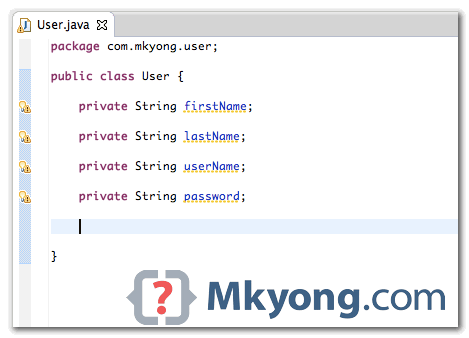
A simple User.java, with 4 fields, but no getters and setters method.
2. Generate It
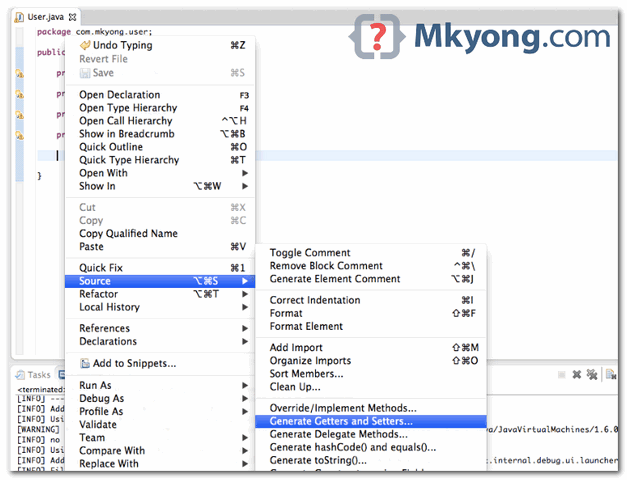
Right click on the file, select “Source” –> “Generate Getters and Setters…”
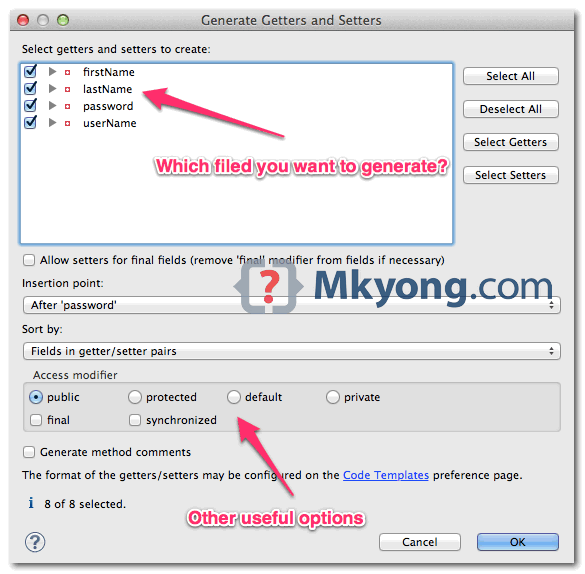
Choose which field you want to generate, and click on “OK” button.
3. Done
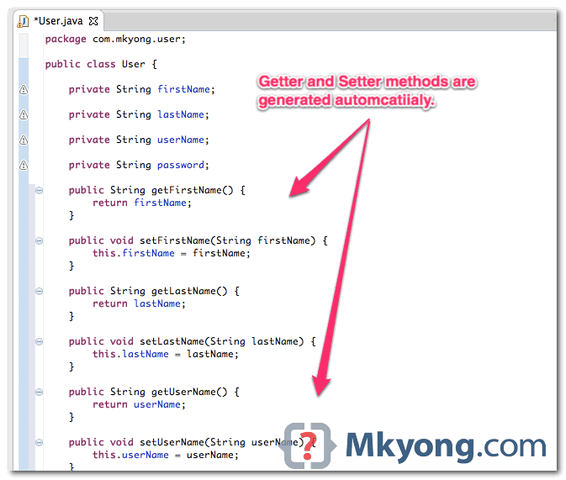
All selected getters and setters methods will be generated automatically.
So, don’t create those methods manually, it waste time, use IDE.

Thank You mamang mkyong ..
Thanks a ton!
U know what real waste of time?
ECLIPSE
Hi mk, nice article, I have a question, is it a plugin which provides getters and setters feature in eclipse??
thanks man 😉
wow, that was so simple and straight to the point. thanks!
Use Lombok
and use @Data as annotation
tanq
There’s an error in part 2, second screenshot. It is “field” and not “filed” in the phrase “which filed you want to generate”.
I mean using java programming language.
Sir how can i write HTML tags in between a html table
for example
line 1 : html table tags
line 2 : data to be written
line 3 : html table tags
Hi Mk Yong, I wonder why you don’t user NetBeans IDE to do this all stuff with java.
WebServices, JSF 2.0, Hibernate is more more more simply with NetBeans
No, I don’t like NetBean, slow and weird interface. I’m big fan of Eclipse ~
are there some shortcut key to do this in batch?
alt + shift + s can open the first window
but how can I do the next without mouse?
With Lombok you don’t even need to generate getters and setters. A couple of class-level annotations and you’re done!
Issit? Mind to share which annotation and is this compatible with others framework? As i Know, most frameworks still required set and get methods, to inject and retrieve the value.
Use Lombok
and use @Data as annotation
Okk man!
ctrl+shift+g
Alt + Shift + S and then press R
Another way:
go over the field then press CTRL + 1, and select “Create getter and setter…”. Done!
Not Working bruh!!!
suppose if we added a new field in table and how can i retrieve a value of newly added column
Or using lombok 😛
+1
Well, the information is correct. I found the post to be useful, however, I am writing for the people who are facing an issue with their Samsung printer. Click this reference samsung printer error code u1-2320 and get the idea about how to resolve it in just one click.