Developing a simple Java program to write a file in the C drive root directory (where Windows is installed), but the program prompts an “access is denied” error. Try to create an empty file in the C drive root directory manually, but no options to create any files, only new folder is allowed.
P.S The logged in user is under administrator group.
Solution
In Windows 7 or 8 (may be Vista), users (even administrators) are not allowed to create files in the C drive root directory, otherwise, an error message like “A required privilege is not held by the client” or “access is denied” will be prompted.
To fix it, just turn off the User Account Control (UAC). In Windows 8, do not turn off the UAC via control panel, it must go through the registry.
- Press keys “Windows Key + R”, type
regedit - Locate
HKEY_LOCAL_MACHINE\SOFTWARE\Microsoft\Windows\CurrentVersion\Policies\System\EnableLUA - Update the
EnableLUAvalue to 0 (turn if off) - Restart Windows.
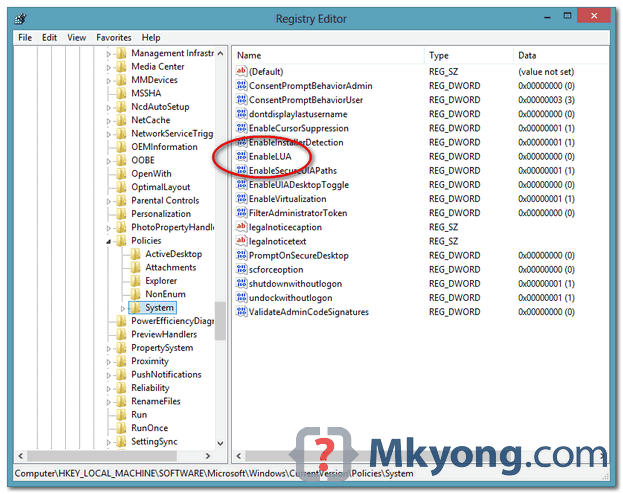
Alternatively
If you think it’s not safe to turn off the UAC feature, then create a new folder under the C drive root directory and put the file inside.
C:\folder\your-file.txt - OK
C:\your-file.txt - NOT OK

helpful thanx so much
thank you im using 8.1 OS and it works!
you nailed it, worked perfectly
Very helpful thank you
Thanks a lot!
I’m not using win10 yet, but I’m collecting important hacks to apply once I install it, and this one is definitely an important one!
This works on Windows 10 as well.
Bro.. I spent about 5 hours on this..at last your solution worked..thanks alot bud..
Worked for Windows 8. Windows 7 is easier to deal with just turn off UAC.
Thank you so much for this tutorial!!!!!
You can also simply open the authoring program (NOTEPAD for example) as Administrator, paste text into it/write out the contents of it and then save to C.
True BUT you should not have to do this IF you are ALREADY an Administrator.
In notepad ++ you can also download a plugin that allows you to save files as an administrator – “Save as Admin” is its name. I believe that this works to save files to the root C. The permissions seem to changed based on OS and even the OS version.
dts quite simple bro.. thanks..
Many thanks, I was searching for solutions two days now. This is very simple and it is working.
Excellent!!
thanks for the tip. since I couldn’t afford restarting my computer I found a way around this – creating the file elsewhere and then just copy it to c: – windows prompts to allow admin privileges, confirm, done
Your advice always marvellous. This fail issue still open on windows support forum. support them all mkyong :))
Thanks for this very useful article !
Thank you mkyong, I found this useful.