Problem
In Hibernate development, contains a model class with JPA @OneToMany annotation :
    @OneToMany(
    cascade=CascadeType.ALL,
    fetch = FetchType.LAZY, mappedBy = "user")
    public Set<Debit> getDebits() {
        return this.debits;
    }
When web application is deployed on WebSphere 7, it hit following error message :
Caused by: java.lang.NoSuchMethodError: javax/persistence/OneToMany.orphanRemoval()Z
	at org.hibernate.cfg.AnnotationBinder.processElementAnnotations(AnnotationBinder.java:1912)
	at org.hibernate.cfg.AnnotationBinder.bindClass(AnnotationBinder.java:707)
	... 118 more
P.S hibernate-jpa-2.0-api-1.0.0.Final.jar is included in the library path.
Solution
The OneToMany.orphanRemoval is specified in JPA 2.0, and look like WebSphere 7 contains older JPA library, which is loaded before your hibernate-jpa-2.0-api-1.0.0.Final.jar.
To fix it, put your JPA 2.0 (hibernate-jpa-2.0-api-1.0.0.Final.jar) library in the WebSphere’s highest priority class loader folder, which is under WAS7_FOLDER\AppServer\java\jre\lib\ext. Restart WebSphere server instance to take effect.
Now access WebSphere web console –> Troubleshooting –> Class loader viewer, make sure your library is loaded.
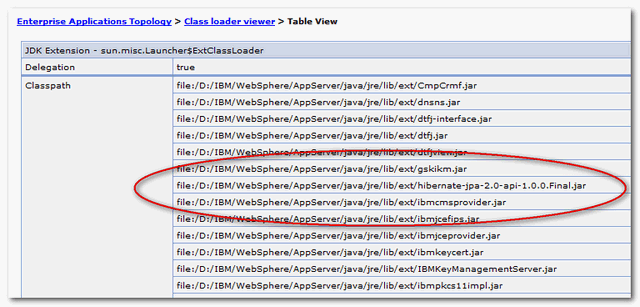
Now, WebSphere 7 will always load your Hibernate JPA 2.0 library.

Thank you very much! Your advice worked perfectly!
Thanks a lot! You helped me!
Thanks. Still relevant after 3 years
i done hibernate JPA project i faced this type of error ::
could not create jpa based configuration hibernate
Thanks a lot this blog has helped me a lot!.
But same application server has been shared by so many application. So what will be the impact with this addition of jar under this folder.
Thanks in Advance!
Hi, but this dependency i have to write it instead of javax.persistence persistence-api dependency?? and i found that someone says that I have to delete the hibernate entity-manager dependency too if i user this dependency
Thanks for your help
Ran into this issue but our WAS admins would not allow a change to the server-wide classloader policy. I found a way to get it so that only an application-level classloader policy change was needed. I posted it here:
http://stackoverflow.com/questions/3189056/hibernate-3-5-x-nosuchmethoderror-javax-persistence-onetomany-orphanremoval/12584204#12584204
Thanks….. This fixed my issue I had using RAD (Eclipse based). New to hibernate so all these posts really help us newbies out.
sorry , my web application is deployed on tomcat 7
i ‘ve got the same question ,would someone give me a hand and sent me a mail? Any help would greatly be appreciated
Cheers for this article posting.Thanks Once more. Truly unique.
I would prefer to avoid cluttering up the lib/ext directory. I have tried setting the class loader policy to “Parent last”, but this has not worked.
I would like to avoid hack WebSphere lib like this if i do have choice, and “Parent last” is never work for me.
Do comment here if you find other solution 🙂
Another solution is declaring shared library with that jar. Then you have to link your application and that shared library.