Often times, JAX-WS always be part of your Java web application. Here we show you how to integrate JAX-WS into Java web application easily.
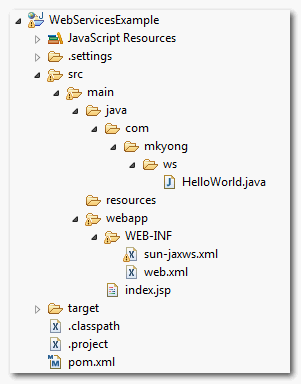
1. Project Folder
First, review this project folder structure.
2. Web Service
A super simple web service. Code is self-explanatory.
File : HelloWorld.java
package com.mkyong.ws;

import javax.jws.WebMethod;
import javax.jws.WebService;

@WebService
public class HelloWorld{

	@WebMethod(operationName="getHelloWorld")
	public String getHelloWorld(String name) {
		return "Hello World JAX-WS " + name;
	}

}
3. Web Service Deployment Descriptor (sun-jaxws.xml)
Create a web service deployment descriptor, named sun-jaxws.xml.
File : sun-jaxws.xml
<?xml version="1.0" encoding="UTF-8"?>
<endpoints
  xmlns="http://java.sun.com/xml/ns/jax-ws/ri/runtime"
  version="2.0">
  <endpoint
      name="HelloWorldWs"
      implementation="com.mkyong.ws.HelloWorld"
      url-pattern="/hello"/>
</endpoints>
4. Web Application Deployment Descriptor (web.xml)
In the standard web.xml,
- Defines “
com.sun.xml.ws.transport.http.servlet.WSServletContextListener” as listener class. - Defines “
com.sun.xml.ws.transport.http.servlet.WSServlet” as your web service (hello) servlet.
File : web.xml
<!DOCTYPE web-app PUBLIC
 "-//Sun Microsystems, Inc.//DTD Web Application 2.3//EN"
 "http://java.sun.com/dtd/web-app_2_3.dtd" >

<web-app>
	<display-name>Archetype Created Web Application</display-name>

	<listener>
		<listener-class>
			com.sun.xml.ws.transport.http.servlet.WSServletContextListener
                </listener-class>
	</listener>
	<servlet>
		<servlet-name>hello</servlet-name>
		<servlet-class>
			com.sun.xml.ws.transport.http.servlet.WSServlet
                </servlet-class>
		<load-on-startup>1</load-on-startup>
	</servlet>
	<servlet-mapping>
		<servlet-name>hello</servlet-name>
		<url-pattern>/hello</url-pattern>
	</servlet-mapping>

</web-app>
5. Done
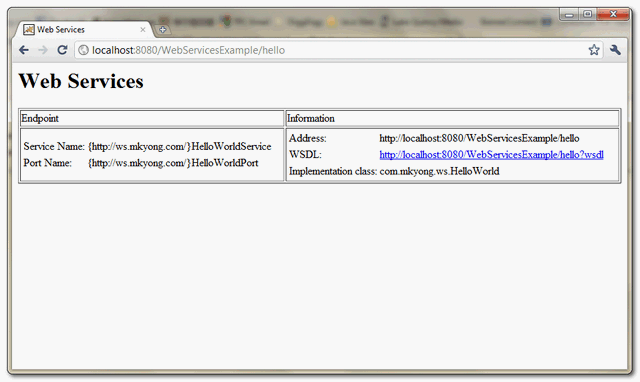
The integration between JAX-WS and web application is done. Deploy it and access via URL : http://localhost:8080/WebServicesExample/hello
Download Source Code
Download it – JAX-WS-Integrate-WebApplication-Example.zip (7KB)

Unfortunately imho this tutorial does not explain:
When i deploy the project in a jboss server, how i can change the endpoint address to another URL than localhost?. I’m using the WSDL for another system, and when it calls a method, it looks for localhost. I need to set the URL to http://123.45.67.89:8080 instead http://localhost:8080.
You have an error here because /hello is mapped both in sun-jaxws.xml for webservice and in web.xml for an index.jsp. Apart of this, it is a little bit strange to call a web service with /hello. I would try to show how to add a web service to a webapp by mapping it as “/webservice” and standard index.jsp on “/hello” .I tried to accomplish this and surprisingly http://localhost:8080/WebServicesExample/hello returns 404, and only http://localhost:8080/WebServicesExample/{optional “index.jsp” suffix} returns HelloWorld!.
Best regards,
Pawel
GOOD!!
Caused by: com.sun.xml.ws.model.RuntimeModelerException: runtime modeler error: Wrapper class com.mkyong.ws.jaxws.GetHelloWorld is not found. Have you run APT to generate them?
iam getting this exception please help me
If I create the web service in this way, All the parameters of a method are required ? (for the consumer)
i got a error when create cfx service ( jax-ws soap) and use webbrowser to test
org.apache.cxf.interceptor.Fault: No binding operation info while invoking unknown method with params unknown.
@WebService()
public interface GovernmentNationalityWebService {
@WebMethod
List findAll();
@WebMethod
GovernmentNationalityDTO findOne(Long id);
@WebMethod
List findAllShtp();
}
plz help me
I did everything as you guided but ones after deployed in the server and started the server, I’m getting an error as requested resource is not available.
I can build project from eclipse to deploy on websphere ?
Can anyone explain me .. what we are trying to do here. I mean what will be the use case for this integration.
list all depend jar please .
Hi Just want to understand the flow.
How the getHelloWorld of the webservice is called
MK can you provide a tutorial on how to read webservice via another web application ? also can you explain how this was published under the hood? also why did we not need wsgen (i thought default was document if not specified) ?
please help explain
Thanks
bumb this!
I am getting this error.
Any help would be higlhy appreciated.
Caused by: com.sun.xml.ws.util.exception.LocatableWebServiceException: class not found in runtime descriptor: com.mkyong.ws.HelloWorld
at line 8 of jndi:/localhost/webservices/WEB-INF/sun-jaxws.xml
~Sudhir
Hi Mkyong,
Thank you for the tutorial this very valuable to me.
And I have a following question please make me understand here.
For the multiple endpoints in the same application, I can change the sun-jaxws.xml
As bellow, I test that is working fine,
But in each interface how can I keep more that one method and can call these methods from the client individually please help me
If there is a way to do this.
In the @WebMethod can I add any other parameter to define the endpoint to the method level
(As similar what available in RESTFUL web service )
Hi Mkyong,
Thank you for the tutorial this very valuable to me.
And I have a following question please make me understand here.
For the multiple endpoints in the same application, I can change the sun-jaxws.xml
As bellow, I test that is working fine,
But in each interface how can I keep more that one method and can call these methods from the client individually please help me
If there is a way to do this.
In the @WebMethod can I add any other parameter to define the endpoint to the method level
(As similar what available in RESTFUL web service )
Lot of you asked how to invoke the web services.
After you developed successfully, you will get the wall.
Download SoapUI 4.5.1. , it’s free, then create a new project, enter the wsdl , you are all set.
You wil see the endpoints listed in the left pane.
I’m trying to deploy the same in weblogic, but I’m getting below error
Caused By: com.sun.xml.ws.util.ServiceConfigurationError: com.sun.xml.ws.api.wsdl.writer.WSDLGeneratorExtension: Provider weblogic.wsee.jaxws.framework.policy.WSDLGeneratorExtension is specified
in jar:file:/C:/app/bea1035/wlserver_10.3/server/lib/weblogic.jar!/META-INF/services/com.sun.xml.ws.api.wsdl.writer.WSDLGeneratorExtensionbut could not be instantiated: java.lang.ClassCastExcepti
on
I have the same problem… any solution?
How to invoke the web service?
I am getting the below exception :
SEVERE: WSSERVLET11: failed to parse runtime descriptor: javax.xml.ws.WebServiceException
Runtime descriptor “/WEB-INF/sun-jaxws.xml” is mising
What is the cause (i.e. the exception that caused that exceptoin) of that exception ?
im getting the following error when performing mvn tomcat:redeploy in tomcat
SEVERE: Error listenerStart
May 17, 2012 12:34:06 AM org.apache.catalina.core.StandardContext start
SEVERE: Context [/WS_mkyong_web] startup failed due to previous errors
any idea, why?
here is the pom.xml that im using..
thanks in advance
<project xmlns="http://maven.apache.org/POM/4.0.0" xmlns:xsi="http://www.w3.org/2001/XMLSchema-instance" xsi:schemaLocation="http://maven.apache.org/POM/4.0.0 http://maven.apache.org/maven-v4_0_0.xsd"> <modelVersion>4.0.0</modelVersion> <groupId>com.mkyong</groupId> <artifactId>WS_mkyong_web</artifactId> <packaging>war</packaging> <version>1.0-SNAPSHOT</version> <name>WS_mkyong_web Maven Webapp</name> <url>http://maven.apache.org</url> <dependencies> <dependency> <groupId>junit</groupId> <artifactId>junit</artifactId> <version>3.8.1</version> <scope>test</scope> </dependency> </dependencies> <build> <finalName>WS_mkyong_web</finalName> <plugins> <!-- Maven Tomcat Plugin --> <plugin> <groupId>org.codehaus.mojo</groupId> <artifactId>tomcat-maven-plugin</artifactId> <configuration> <url>http://127.0.0.1:8080/manager/html</url> <server>TomcatServer</server> <path>/WS_mkyong_web</path> </configuration> </plugin> </plugins> </build> </project>ok, we are missing the following dependency from pom.xml
Thanks MK
Good tutorial. however, I don’t know how to call the web method in the web service.
Do I need to use wsimport tool to generate the artifact and invoke the web method in servlet. THanks.
that would be a helpful tutorial. thanks MK
java.lang.ClassNotFoundException: com.sun.xml.ws.transport.http.servlet.WSServletContextListener
I use:
– JDK 1.6_26
– Eclipse Indigo
Is there no other solutions???
Thanks.
Fernando Aspiazu
https://mkyong.com/webservices/jax-ws/java-lang-classnotfoundexception-com-sun-xml-ws-transport-http-servlet-wsservletcontextlistener/
Attractive portion of content. I just stumbled upon your site and in accession capital to claim that I acquire in fact enjoyed account your blog posts. Any way I’ll be subscribing for your feeds or even I success you get admission to consistently quickly.