In JAX-RS, for user to download a file, annotate the method with @Produces("text/plain") :
- Put @Produces(“text/plain”) on service method, with a
Responsereturn type. It means the output is a text file. - Set “Content-Disposition” in Response header to tell browser pop up a download box for user to download.
1. Download File in JAX-RS
See a full example to download a text file in JAX-RS.
import java.io.File;
import javax.ws.rs.GET;
import javax.ws.rs.Path;
import javax.ws.rs.Produces;
import javax.ws.rs.core.Response;
import javax.ws.rs.core.Response.ResponseBuilder;

@Path("/file")
public class FileService {

	private static final String FILE_PATH = "c:\\file.log";

	@GET
	@Path("/get")
	@Produces("text/plain")
	public Response getFile() {

		File file = new File(FILE_PATH);

		ResponseBuilder response = Response.ok((Object) file);
		response.header("Content-Disposition",
			"attachment; filename=\"file_from_server.log\"");
		return response.build();

	}

}
2. Demo
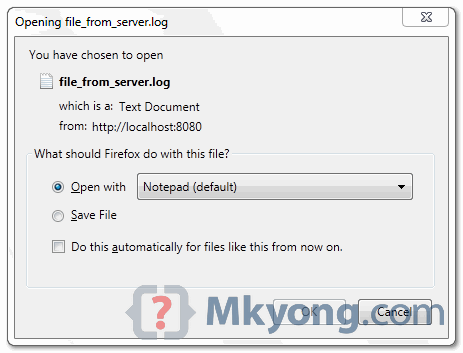
Deploy above JAX-RS service, access this URI pattern : “/file/get“.
Figure : Text file “c:\\test.log” from server is prompt for user to download, with a new file name “file_from_server.log“
Download Source Code
Download it – JAX-RS-Download-TextFile-Example.zip (6 KB)

I am generating the file for serving the user request, how do I delete the temp file, after response is served ? any ideas ?
if you access the uri (http://localhost:8081/jaxrs/rest/file/get) from the browser within ide, it will just display the contents of the file. If you access the same uri from a different browser that is installed on your machine, it will download directly with the name “file_from_server.log”.
unable to hit the uri MKyong
I have learnt so many things from your website. This is one among them.
Thank You Mkyong.