In JAX-RS, for user to download an image file, annotate the method with @Produces("image/image-type") :
- Put @Produces(“image/png”) on service method, for “png” image.
- Set “Content-Disposition” in Response header to prompt a download box.
Note
For other image types, refer to this list of the image types
For other image types, refer to this list of the image types
1. Download Image in JAX-RS
Full example to download an image file from JAX-RS.
import java.io.File;
import javax.ws.rs.GET;
import javax.ws.rs.Path;
import javax.ws.rs.Produces;
import javax.ws.rs.core.Response;
import javax.ws.rs.core.Response.ResponseBuilder;

@Path("/image")
public class ImageService {

	private static final String FILE_PATH = "c:\\mkyong-logo.png";

	@GET
	@Path("/get")
	@Produces("image/png")
	public Response getFile() {

		File file = new File(FILE_PATH);

		ResponseBuilder response = Response.ok((Object) file);
		response.header("Content-Disposition",
			"attachment; filename=image_from_server.png");
		return response.build();

	}

}
2. Demo
Access this URI pattern : “/image/get“.
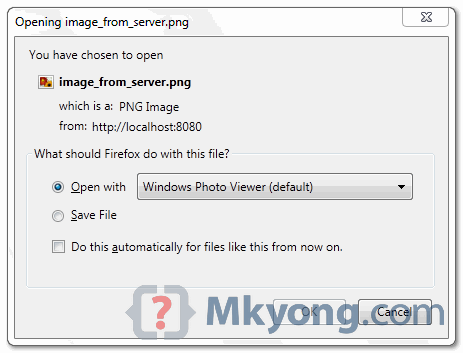
Figure : Image file “c:\\mkyong-logo.png” from server is prompted for user to download, with a new file name “image_from_server.png“
Download Source Code
Download it – JAX-RS-Download-ImageFile-Example.zip (6 KB)

Hi MKyong, thank you for the post. can we open the file in default image viewer, without the prompt when the URL is clicked. Spring rest api does that, but didnot find any document for JaxRS. Please advice.
I need to send a file which is downloadable at client side. My code works fine on localhost as shown here, but not working on web application. Please advise.
bit if i would get a image as stream for show at a web page and not save as file , how i can resolve? Suppose that the image is saved into a DB with JPA entitty . Into the record of table db is saved also the mymetype of image( jpg. bmp. gif, png ). SO i not can use
@Produces(“image/png”)
because the image can be many types .( jpg. bmp. gif, png ).
I not would prompt for user to download, with a new file name “image_from_server.png“, but show into a page web .
I would show the image with tag
tank you for your attention.
Good post. Really helped. Just wondering how good it is to call images via restful service. As for every image it need to do processing, so will it not be extra burden on server.
thank you to post mkyong.Its really perfect but i cant use on global file path.Could you show that ?
Can i use @POST instead of @GET ? For me its not working, when i used @POST
Thanks for the example. It works perfectly.
I tried to enhance it further and added role based security to the service. Now I am unable to download the file. I get a pop-up which says “Internet Explorer was not able to open this Internet site. The requested site is either unavailable or cannot be found. Please try again later.”
Any pointers regarding what I might be missing?
Thanks.
Make sure your file path is correctly placed.
Does this code work?
I dont think so, because file is just “an abstract representation of file and directory pathnames” – no data is read….
Right now I need to upload a file from the server to the client using resteasy.
How can I read data into a File or which kind of java object do I need to return to the client??
Best regards
Above code is tested and working fine. It read the date from local drive and send it to client via “Response.ok”. In your case, try duplicate the concept and replace with your own File IO.
In my case its working fine.
but when try to download a file, new tab is opening after that the popup is coming to download. how can I stop it going to new tab ?