A classic example, show you how to get started with TestNG unit test framework.
Tools used :
- TestNG 6.8.7
- Maven 3
- Eclipse IDE
1. TestNG Dependency
Add TestNG library in the pom.xml.
pom.xml
	<dependency>
		<groupId>org.testng</groupId>
		<artifactId>testng</artifactId>
		<version>6.8.7</version>
		<scope>test</scope>
	</dependency>
2. TestNG Example
Review a simple class, has a method to return a fixed email “[email protected]”.
RandomEmailGenerator.java
package com.mkyong.testng.project.service.email;

import org.springframework.stereotype.Service;

public class RandomEmailGenerator {

	public String generate() {
		return "[email protected]";
	}

}
Create a test case like this :
TestHelloWorld.java
package com.mkyong.testng.examples.helloworld;

import org.testng.Assert;
import org.testng.annotations.Test;
import com.mkyong.testng.project.service.email.RandomEmailGenerator;

public class TestHelloWorld {

	@Test()
	public void testEmailGenerator() {

		RandomEmailGenerator obj = new RandomEmailGenerator();
		String email = obj.generate();

		Assert.assertNotNull(email);
		Assert.assertEquals(email, "[email protected]");

	}

}
Done, a simple TestNG test case is created, this test make sure the RandomEmailGenerator.generate() is always returns “[email protected]”.
3. TestNG Eclipse Plug-In
To run above test in Eclipse IDE, you need to install TestNG Eclipse plug-in. Follow this official TestNG Eclipse plug-in guide for the installation.
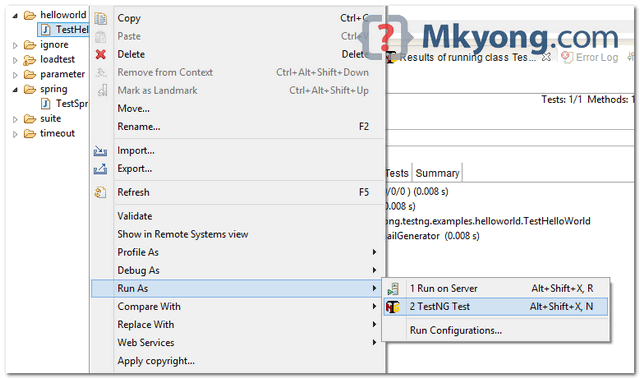
To run TestNG test, right click on the test class and run as “TestNG Test”.
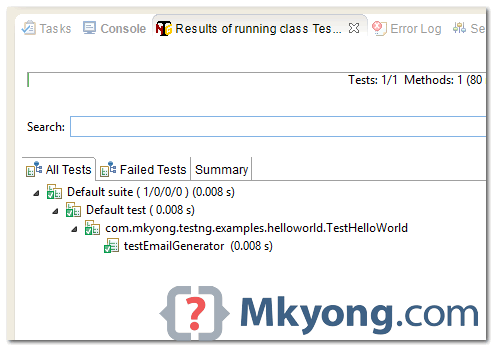
Result

thank mkyong! precise and easy to follow
What Ever you are giving is Very Good.Can you Please Give some explanation For the programs which u have given. Please Explain the topic before which u are Explaining.