What is TabFolder?
In SWT, TabFolder is a subclass of a Composite class. The TabFolder can include composite object into a single container through a tabbed index.
How to create a TabFolder?
Here i create a TabFolder composite, add a sashForm composite into a tab 1 and Group composite into a tab 2.
import org.eclipse.swt.SWT;
import org.eclipse.swt.custom.SashForm;
import org.eclipse.swt.layout.FillLayout;
import org.eclipse.swt.widgets.Button;
import org.eclipse.swt.widgets.Display;
import org.eclipse.swt.widgets.Group;
import org.eclipse.swt.widgets.Label;
import org.eclipse.swt.widgets.Shell;
import org.eclipse.swt.widgets.TabFolder;
import org.eclipse.swt.widgets.TabItem;
import org.eclipse.swt.widgets.Text;

public class SWTTabFolder
{
	public static void main (String [] args) {
		Display display = new Display ();
		Shell shell = new Shell(display);
		shell.setText("SWT TabFolder Example");

		shell.setLayout(new FillLayout());

	    TabFolder folder = new TabFolder(shell, SWT.NONE);

	    //Tab 1
	    TabItem tab1 = new TabItem(folder, SWT.NONE);
	    tab1.setText("Tab 1");

	    // Create the SashForm with HORIZONTAL
	    SashForm sashForm = new SashForm(folder, SWT.HORIZONTAL);
	    new Button(sashForm, SWT.PUSH).setText("Left");
	    new Button(sashForm, SWT.PUSH).setText("Right");

	    tab1.setControl(sashForm);

	    //Tab 2
	    TabItem tab2 = new TabItem(folder, SWT.NONE);
	    tab2.setText("Tab 2");

	    Group group = new Group(folder, SWT.NONE);
	    group.setText("Group in Tab 2");

	    Label label = new Label(group, SWT.BORDER);
	    label.setText("Label in Tab 2");
	    label.setBounds(10, 100, 100, 100);

	    Text text = new Text(group, SWT.NONE);
	    text.setText("Text in Tab 2");
	    text.setBounds(10, 200, 100, 100);

	    tab2.setControl(group);

		shell.open();

		while (!shell.isDisposed ()) {
			if (!display.readAndDispatch ()) display.sleep ();
		}
		display.dispose ();
	}

}
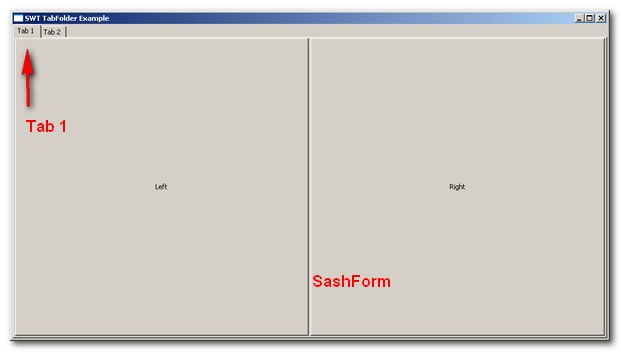
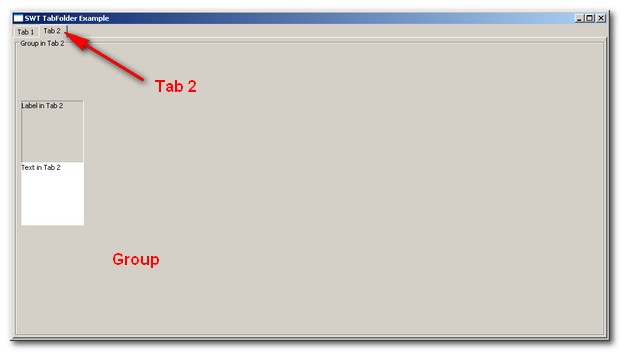

Good Information.
It will be very helpful if you can provide comments to see what is happening in every step.