When we start learn about SWT GUI programming, we always want to figure out how do we positioning the Text field, Label, button and other widget. In SWT, we can use setLocation() or setLocation() method to specify the size and position of a widget or component.
Here is the two methods that SWT use to positioning.
1) setBounds(int x, int y, int witdh, int height) – Sets the widget’s size and location
2) setLocation(int x, int y) – Sets the widget’s location
Position is start from upper-left corner like following
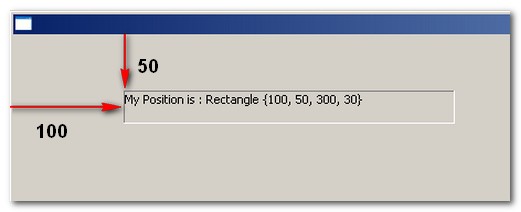
setBounds() example
Create a Label at position x=100, y =50, width=300, height=30
import org.eclipse.swt.SWT;
import org.eclipse.swt.widgets.Display;
import org.eclipse.swt.widgets.Label;
import org.eclipse.swt.widgets.Shell;

public class SWTPosition {

public static void main (String [] args) {
	Display display = new Display ();
	Shell shell = new Shell(display);

	Label positiongLabel = new Label(shell, SWT.BORDER);
	positiongLabel.setBounds(100,50,300,30);

	positiongLabel.setText("My Position is : " + positiongLabel.getBounds());

	shell.open ();
	while (!shell.isDisposed ()) {
		if (!display.readAndDispatch ()) display.sleep ();
	}
	display.dispose ();
}
}
setLocation() example
Create a Label at position x=100, y =50, width=300, height=30
import org.eclipse.swt.SWT;
import org.eclipse.swt.widgets.Display;
import org.eclipse.swt.widgets.Label;
import org.eclipse.swt.widgets.Shell;

public class SWTPosition {

public static void main (String [] args) {
	Display display = new Display ();
	Shell shell = new Shell(display);

	Label positiongLabel = new Label(shell, SWT.BORDER);
	positiongLabel.setSize(300,30);
	positiongLabel.setLocation(100, 50);

	positiongLabel.setText("My Position is : " + positiongLabel.getLocation());

	shell.open ();
	while (!shell.isDisposed ()) {
		if (!display.readAndDispatch ()) display.sleep ();
	}
	display.dispose ();
}
}
What is the different between setBounds() and setLocation()?
As example above, you may notice there is not much different between setBounds() and setLocation() method. Since both also can specify the widget position, why SWT make it duplicated? I have no idea about it, however setLocation() need specify one more setSize() method to specify the widget size. This is the only different i aware of.

sir, can u provide me FieldTalk Library…
Hi, thanks for the useful article.
I have a question which I cannot find online.
If I want to reset or change the position of the button (very often) in my program.
Do I just use setLocation() to redefine the position?
Or are there other methods for redefining the position of the button?
Thank you in advance.
Thanks :).