This tutorial shows you how to create a simple hello world example in Spring 3.0.
Technologies used in this article :
- Spring 3.0.5.RELEASE
- Maven 3.0.3
- Eclipse 3.6
- JDK 1.6.0.13
P.S Spring 3.0, at least JDK 1.5 is required to work.
Spring 3.0 dependencies
In Spring 2.5.x, almost the entire Spring modules are grouped into a single spring.jar file. Since Spring 3.0, every modules are split into an individual jar file, for example, spring-core, spring-expression, spring-context, spring-aop and etc, for detail , please refer to this article – Obtaining Spring 3 Artifacts with Maven.
In Spring 2.5.x, almost the entire Spring modules are grouped into a single spring.jar file. Since Spring 3.0, every modules are split into an individual jar file, for example, spring-core, spring-expression, spring-context, spring-aop and etc, for detail , please refer to this article – Obtaining Spring 3 Artifacts with Maven.
1. Generate project structure with Maven
Issue below Maven command to create a standard Java project structure.
mvn archetype:generate -DgroupId=com.mkyong.core -DartifactId=Spring3Example
	-DarchetypeArtifactId=maven-archetype-quickstart -DinteractiveMode=false
2. Convert to Eclipse project
Convert Maven style project to Eclipse’s style project, and import into Eclipse IDE.
mvn eclipse:eclipse
2. Add Spring 3.0 dependency
Add the Spring 3.0 dependencies listed below in Maven’s pom.xml file. The Spring dependencies are available for download via Maven central repository.
File : pom.xml
<project xmlns="http://maven.apache.org/POM/4.0.0"
	xmlns:xsi="http://www.w3.org/2001/XMLSchema-instance"
	xsi:schemaLocation="http://maven.apache.org/POM/4.0.0
	http://maven.apache.org/maven-v4_0_0.xsd">
	<modelVersion>4.0.0</modelVersion>
	<groupId>com.mkyong.core</groupId>
	<artifactId>Spring3Example</artifactId>
	<packaging>jar</packaging>
	<version>1.0-SNAPSHOT</version>
	<name>Spring3Example</name>
	<url>http://maven.apache.org</url>

	<properties>
		<spring.version>3.0.5.RELEASE</spring.version>
	</properties>

	<dependencies>

		<!-- Spring 3 dependencies -->
		<dependency>
			<groupId>org.springframework</groupId>
			<artifactId>spring-core</artifactId>
			<version>${spring.version}</version>
		</dependency>

		<dependency>
			<groupId>org.springframework</groupId>
			<artifactId>spring-context</artifactId>
			<version>${spring.version}</version>
		</dependency>

	</dependencies>
</project>
3. Spring bean
A simple Spring bean.
package com.mkyong.core;

/**
 * Spring bean
 *
 */
public class HelloWorld {
	private String name;

	public void setName(String name) {
		this.name = name;
	}

	public void printHello() {
		System.out.println("Spring 3 : Hello ! " + name);
	}
}
4. Spring bean configuration file
Create a Spring configuration file, and declare all the available Spring beans.
File : SpringBeans.xml
<beans xmlns="http://www.springframework.org/schema/beans"
	xmlns:xsi="http://www.w3.org/2001/XMLSchema-instance"
	xsi:schemaLocation="http://www.springframework.org/schema/beans
	http://www.springframework.org/schema/beans/spring-beans-3.0.xsd">

	<bean id="helloBean" class="com.mkyong.core.HelloWorld">
		<property name="name" value="Mkyong" />
	</bean>

</beans>
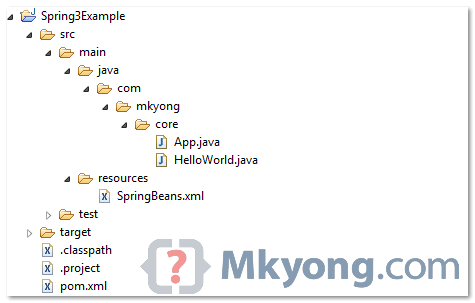
5. Review project structure
Review directory structure as follows
6. Run It
Run it.
package com.mkyong.core;

import org.springframework.context.ApplicationContext;
import org.springframework.context.support.ClassPathXmlApplicationContext;

public class App {
	public static void main(String[] args) {
		ApplicationContext context = new ClassPathXmlApplicationContext(
				"SpringBeans.xml");

		HelloWorld obj = (HelloWorld) context.getBean("helloBean");
		obj.printHello();
	}
}
7. Output
Spring 3 : Hello ! Mkyong
Download Source Code
Download it – Spring3-hello-world-example.zip (5KB)
Try JavaConfig annotation
This may interest you Spring 3 hello world example using JavaConfig annotation.
This may interest you Spring 3 hello world example using JavaConfig annotation.

Thanks. After many many days of effort finally I got a tutorial on this ancient old framework. Can u please tell me if it is possible to integrate RabbitMQ for this spring 3.0.5 using the annotations?
Hi, can any body tell me how to create applicationContext.xml through eclipse(not by copy paste i want eclipse frame work to generate)
If you dont want to set up a Maven project. Use this tool to download the jar files: http://jar-download.com/
to solve problem of missing dependencies
java.net
http://download.java.net/maven/2/
For anyone having problems running this: replace the POM with this updated POM: http://pastebin.com/T6B8ZiYh (it uses the Maven Shade plugin for packaging)
Hi mkyong;
I m getting an exception as
SLF4J: Failed to load class “org.slf4j.impl.StaticLoggerBinder”.
SLF4J: Defaulting to no-operation (NOP) logger implementation
SLF4J: See http://www.slf4j.org/codes.html#StaticLoggerBinder for further details.
[INFO] Scanning for projects…
[INFO]
[INFO] ————————————————————————
[INFO] Building DemoMVC 0.0.1-SNAPSHOT
[INFO] ————————————————————————
[INFO]
[INFO] — maven-resources-plugin:2.5:resources (default-resources) @ DemoMVC —
[debug] execute contextualize
[INFO] Using ‘UTF-8’ encoding to copy filtered resources.
[INFO] Copying 2 resources
[INFO]
[INFO] — maven-compiler-plugin:2.3.2:compile (default-compile) @ DemoMVC —
[INFO] Compiling 1 source file to C:UsersSHIVUworkspaceDemoMVCtargetclasses
[INFO] ————————————————————-
[ERROR] COMPILATION ERROR :
[INFO] ————————————————————-
[ERROR] Unable to locate the Javac Compiler in:
C:Program FilesJavajre7..libtools.jar
Please ensure you are using JDK 1.4 or above and
not a JRE (the com.sun.tools.javac.Main class is required).
In most cases you can change the location of your Java
installation by setting the JAVA_HOME environment variable.
[INFO] 1 error
[INFO] ————————————————————-
[INFO] ————————————————————————
[INFO] BUILD FAILURE
[INFO] ————————————————————————
[INFO] Total time: 55.415s
[INFO] Finished at: Tue Dec 16 10:40:01 IST 2014
[INFO] Final Memory: 5M/15M
[INFO] ————————————————————————
[ERROR] Failed to execute goal org.apache.maven.plugins:maven-compiler-plugin:2.3.2:compile (default-compile) on project DemoMVC: Compilation failure
[ERROR] Unable to locate the Javac Compiler in:
[ERROR] C:Program FilesJavajre7..libtools.jar
[ERROR] Please ensure you are using JDK 1.4 or above and
[ERROR] not a JRE (the com.sun.tools.javac.Main class is required).
[ERROR] In most cases you can change the location of your Java
[ERROR] installation by setting the JAVA_HOME environment variable.
[ERROR] -> [Help 1]
[ERROR]
[ERROR] To see the full stack trace of the errors, re-run Maven with the -e switch.
[ERROR] Re-run Maven using the -X switch to enable full debug logging.
[ERROR]
[ERROR] For more information about the errors and possible solutions, please read the following articles:
[ERROR] [Help 1] http://cwiki.apache.org/confluence/display/MAVEN/MojoFailureException
hii…can anyone tell me how to merge the 2 or more class using tha dependency .
pls reply asap ..
I think its ridiculous forcing use of maven to build a hello world project. The main theme is not maven but SPRING. Think about the inexperienced people! Damn
It worked like a charm. Thank you for such a clear example.
Hi Yong,
I tried implementing the above example on eclipse. But I get the following error: Caused by: java.io.FileNotFoundException: class path resource [SpringBeans.xml] cannot be opened because it does not exist
I also have the SpringBeans.xml under resources folder. I also did the mvn eclipse: clean and mvn eclipse:eclipse.
Can you please help me on this.
Thanks,
Sowji
Never mind got it. I had to make sure the SpringBeans.xml was under src/main/resources and it worked.
Hi,
I am new to Spring and Maven. I have a problem when I’m importing my project to eclipse.
When I do everything manually, and run “mvn install” in the end, my eclipse returned:
Exception in thread “main” java.lang.NoClassDefFoundError: org/springframework/context/ApplicationContextCaused by: java.lang.ClassNotFoundException: org.springframework.context.ApplicationContext
at java.net.URLClassLoader$1.run(URLClassLoader.java:202)
at java.security.AccessController.doPrivileged(Native Method)
at java.net.URLClassLoader.findClass(URLClassLoader.java:190)
at java.lang.ClassLoader.loadClass(ClassLoader.java:306)
at sun.misc.Launcher$AppClassLoader.loadClass(Launcher.java:301)
at java.lang.ClassLoader.loadClass(ClassLoader.java:247)
When I try to load the provided source code, I got:
Error: Could not find or load main class com.mkyong.core.App
Am I missing a plugin, or do I need to downgrade my JDK 7u45 for this tutorial to JDK 6? Thank you so much!
I am getting the same problem as well and I dunno how to fix it =[. Someone please help. I try to run it from command prompt with
java -cp target/Spring3Example-1.0-SNAPSHOT.jar com.mkyong.core
but it says it could not find main class com.mkyong.core
Thanks mkyong! This is really useful and a quick start for newbie like me. Keep up the good work.
I can’t get it work. I even tried to use the source code provided by Mkyong. It already shows there is an error in the project, and when I ran it I got the error:
Error: Could not find or load main class com.mkyong.core.App
I added the folder Spring3Example/src/main/java/com/mkyong/core to the Libraries in the Java build path, but it does not help.
Any idea about what to do? What am I missing?
I get this error when I run.
Exception in thread “main” java.lang.NoClassDefFoundError: org/springframework/context/ApplicationContext
Caused by: java.lang.ClassNotFoundException: org.springframework.context.ApplicationContext
at java.net.URLClassLoader$1.run(URLClassLoader.java:202)
at java.security.AccessController.doPrivileged(Native Method)
at java.net.URLClassLoader.findClass(URLClassLoader.java:190)
at java.lang.ClassLoader.loadClass(ClassLoader.java:306)
at sun.misc.Launcher$AppClassLoader.loadClass(Launcher.java:301)
at java.lang.ClassLoader.loadClass(ClassLoader.java:247)
Thanks.
Im also getting same error. while i have followed as mentioned in the way
This resolved it for me…
http://stackoverflow.com/questions/15065093/an-internal-error-occurred-during-updating-maven-project-unsupported-iclassp/15068384#15068384
After struggling with this for awhile I got it working by doing the following:
-Set you dependencies in pom.xml to work with Spring 3 this way:
3.0.5.RELEASE
org.springframework
spring-core
${org.springframework.version}
org.springframework
spring-beans
${org.springframework.version}
org.springframework
spring-context
${org.springframework.version}
(not sure why this worked for me and the tutorials version didn’t)
-Issue command “mvn install” after first command in tutorial (might not be necessary?)
-Set your eclipse M2_REPO to your maven repository.
Project > Preferences > Java > Build Path > Classpath Variables > New
For me it was C:\Users\\.m2\repository
-Also, because it isn’t a part of this tutorial, be sure to properly set up maven.
This is my first time using Maven and using the Spring framework so I won’t be helpful with any questions.
Thank you Paul. Your post helped a lot in getting the Project to work.
Thanks a lot Mr Paul. It’s working fine after as you mentioned step followed. Great men…..
Hi Yong,
I got below error when i issued the command
D:\spring example\Spring3-hello-world-example\Spring3Example>mvn archetype:generate -DgroupId=com.mkyong.core -DartifactId=Spring3Example -DarchetypeArtifa
ctId=maven-archetype-quickstart -DinteractiveMode=false
[INFO] Scanning for projects…
[INFO]
[INFO] ————————————————————————
[INFO] Building Spring3Example 1.0-SNAPSHOT
[INFO] ————————————————————————
[INFO]
[INFO] >>> maven-archetype-plugin:2.2:generate (default-cli) @ Spring3Example >>>
[INFO]
[INFO] <<< maven-archetype-plugin:2.2:generate (default-cli) @ Spring3Example << [Help 1]
[ERROR]
[ERROR] To see the full stack trace of the errors, re-run Maven with the -e switch.
[ERROR] Re-run Maven using the -X switch to enable full debug logging.
[ERROR]
[ERROR] For more information about the errors and possible solutions, please read the following articles:
[ERROR] [Help 1] http://cwiki.apache.org/confluence/display/MAVEN/MojoFailureException
Hi, your tutorials are awesome – keep it up 🙂 I happened to get errors in this tutorial though in the main method:
Unhandled exception org.springframework.beans.BeansException. It appears in the App class:
ApplicationContext context = new ClassPathXmlApplicationContext("Spring-Module.xml");
HelloWorld obj = (HelloWorld) context.getBean("helloBean");
I tried adding the exception to the signature and also tried a try catch but that didn’t help. Further info:
java: cannot access org.springframework.core.io.DefaultResourceLoader class file for org.springframework.core.io.DefaultResourceLoader not found
and
java: cannot access org.springframework.core.io.support.ResourcePatternResolver class file for org.springframework.core.io.support.ResourcePatternResolver not found
Any ideas? thanks in advance
Hi Yong,
I got the below error when i run the first command.
C:\Spring3Example>mvn archetype:generate -DgroupId=com.mkyong.core -DartifactId=Spring3Example -DarchetypeArtifactId=maven-archetype-quickstart -DinteractiveMode=false
[ERROR] No plugin found for prefix ‘archetype’ in the current project and in the plugin groups [org.apache.maven.plugins, org.codehaus.mojo] available from the repositories [local (C:\repository), central (http://repo1.maven.org/maven2)] -> [Help 1]
Try “mvn -version”, which Maven version you are using?
Hi Yong
thanks for the reply here are the details:
Apache Maven 3.0.3 (r1075438; 2011-02-28 09:31:09-0800)
Maven home: C:\Project\Software\apache-maven-3.0.3
Java version: 1.7.0_13, vendor: Oracle Corporation
Java home: C:\Program Files\Java\jdk1.7.0_13\jre
Default locale: en_US, platform encoding: Cp1252
OS name: “windows 7”, version: “6.1”, arch: “x86”, family: “windows”
Tom
I run the first mvn command at folder where the pom.xml reside
C:\Spring3Example
For newest information you have to go to see world-wide-web
and on web I found this web site as a best web site for most up-to-date
updates.
YOu forgot to mention that after Maven download of SpringExample, one has to change the directory…to..Spring3Example
What is the difference between Maven + Spring Hello World Example & the spring 3.0 example?
Hi mkyong,
Great starting point for a Spring learning student. Expecting more posts in spring 3.
Sorry for my naive question .
I have run packge in Eclipse successful.
but I don’t know how to run it’s in Eclispe.
This mean I can’t get step 7’th of your tutorial.
sorry for my bad english
If your file structure is the same as mentioned in step 5, right click the App.java file in Project Explorer (in eclipse) and select “Run As” and select “Java Application.
git this to work quickly and smoothly thanks so much, just to help
1. step 1 if u cut paste html can be problems with ‘-‘ chars
2. compiled mvn eclipse imported to eclipse, set up pom, exited eclipse compiled mvn eclipse
3. some classpath problems, exited eclipse repeat compiled mvn eclipse
fixed, now have spring again many thanks
How I can build this hello world example on NetBeans [Using 7.1.2].
Nice tutorial! It just simple ans straight
Hi,
Could you please explain a JSF+Spring+Hibernate project without using Maven dependencies?
HI.. sir I am Ankush.. I just downloded Hello spring+maven application.. I imported that application in MyEclipse.. While building application I got following error.. Please Help me out sir as soon as possible..
[INFO] ————————————————————————
[INFO] BUILD FAILURE
[INFO] ————————————————————————
[INFO] Total time: 5:45.473s
[INFO] Finished at: Mon Jul 16 14:32:29 IST 2012
[INFO] Final Memory: 2M/5M
[INFO] ————————————————————————
[ERROR] Failed to execute goal on project Spring3Example: Could not resolve dependencies for project com.mkyong.core:Spring3Example:jar:1.0-SNAPSHOT: Could not transfer artifact org.springframework:spring-core:jar:3.0.5.RELEASE from/to central (http://repo1.maven.org/maven2): No response received after 60000 -> [Help 1]
[ERROR]
[ERROR] To see the full stack trace of the errors, re-run Maven with the -e switch.
[ERROR] Re-run Maven using the -X switch to enable full debug logging.
[ERROR]
[ERROR] For more information about the errors and possible solutions, please read the following articles:
[ERROR] [Help 1] http://cwiki.apache.org/confluence/display/MAVEN/DependencyResolutionException
Try using 3.0.5 instead of 3.0.5.RELEASE in the Properties section.
Wow Super
Mkyong,
You should reverse the order of your “Step 2” instructions. The “mvn eclipse:eclipse” command should be run after the dependencies are added, since the classpath and project files will need to be rebuilt.
Side note, if you’re wanting to add the dependencies through Eclipse IDE, you’ll need to do the “mvn eclipse:eclipse” command before and after adding the dependencies since you won’t be able to import the project before it has a .project file.
I downloaded the project example, clean and install with maven works fine but when I run the project I got the following errors, please help:
Caused by: java.lang.ClassNotFoundException: com.example.core.App
at java.net.URLClassLoader$1.run(URLClassLoader.java:202)
at java.security.AccessController.doPrivileged(Native Method)
at java.net.URLClassLoader.findClass(URLClassLoader.java:190)
at java.lang.ClassLoader.loadClass(ClassLoader.java:306)
at sun.misc.Launcher$AppClassLoader.loadClass(Launcher.java:301)
at java.lang.ClassLoader.loadClass(ClassLoader.java:247)
Also, as I understand, the pom declares dependances and maven will automatically download the required jar files. I followed the URL of the pom and the newest version of spring from that URL is 3.1.1 while the current version is 3.2.0. How can I make it work with3.2.0? Thanks
Hi I m not able to download the maven artifacts for spring 3 ..
Hey,
I think to solve the error shown above you have to add how to compile the project with maven:
mvn clean install (first time)
mvn compile
Finally run the app in eclipse…
Thanks.
I got following error while running the project:
I put the SpringBeans.xml in src/main/resources, but eclipse seems can’t find SpringBeans.xml. Did i miss something? Anyway, thank you for the article.
Solved! It’s typo. 🙂
Hi..i tried to execute this tutorial…
i got the following error..
I placed the springBeans.Xml in the contextroot even then getting the error..i tried changing the location of this file…still no use….
Exception in thread “main” org.springframework.beans.factory.BeanDefinitionStoreException: IOException parsing XML document from class path resource [SpringBeans.xml]; nested exception is java.io.FileNotFoundException: class path resource [SpringBeans.xml] cannot be opened because it does not exist
The springBeans.Xml not found, for Maven, make sure it’s in the “resources” folder
I had the same problem. This worked for me:
put SpringBeans.xml inside src/main/resoureces
run
mvn eclipse:clean
mvn eclipse:eclipse
I don’t really know why that worked yet.
Mkyong,can you please send screen by screen explanation for above example,Maven is new to me and im getting confused.hope you can upload a word document for new people on use of maven and how its used in this example.
Please reply back immediately.
This has refernce to Spring3Example Project .
Please refer to point 5
( Review project structure ). The .classpath pom .project is created but there is no directory called target as reflected in point 5
Also please do refer to point 6 ( Run it )
Where from java file will be executed ….
Please help …..
I am also getting an error when converting it to an eclipse project. Any help would be appreciated:
C:\Users\Jeff>mvn eclipse:eclipse
[INFO] Scanning for projects…
Downloading: http://repo1.maven.org/maven2/org/apache/maven/plugins/maven-eclipse-plugin/maven-metadata.xml
Downloaded: http://repo1.maven.org/maven2/org/apache/maven/plugins/maven-eclipse-plugin/maven-metadata.xml (680 B at 1.0 KB/sec)
Downloading: http://repo1.maven.org/maven2/org/apache/maven/plugins/maven-eclipse-plugin/2.8/maven-eclipse-plugin-2.8.pom
Downloaded: http://repo1.maven.org/maven2/org/apache/maven/plugins/maven-eclipse-plugin/2.8/maven-eclipse-plugin-2.8.pom (12 KB at 30.3 KB/sec)
Downloading: http://repo1.maven.org/maven2/org/apache/maven/plugins/maven-plugins/17/maven-plugins-17.pom
Downloaded: http://repo1.maven.org/maven2/org/apache/maven/plugins/maven-plugins/17/maven-plugins-17.pom (13 KB at 26.2 KB/sec)
Downloading: http://repo1.maven.org/maven2/org/apache/maven/plugins/maven-eclipse-plugin/2.8/maven-eclipse-plugin-2.8.jar
Downloaded: http://repo1.maven.org/maven2/org/apache/maven/plugins/maven-eclipse-plugin/2.8/maven-eclipse-plugin-2.8.jar (202 KB at 280.9 KB/sec)
[INFO]
[INFO] ————————————————————————
[INFO] Building Maven Stub Project (No POM) 1
[INFO] ————————————————————————
[INFO] ————————————————————————
[INFO] BUILD FAILURE
[INFO] ————————————————————————
[INFO] Total time: 2.995s
[INFO] Finished at: Sun Dec 11 00:47:54 EST 2011
[INFO] Final Memory: 8M/114M
[INFO] ————————————————————————
[ERROR] Failed to execute goal org.apache.maven.plugins:maven-eclipse-plugin:2.8:eclipse (default-cli): Goal requires a project to execute but there is no POM in this directory (C:\Users\Jeff). Please verify you invoked Maven from the correct directory. -> [Help 1]
[ERROR]
[ERROR] To see the full stack trace of the errors, re-run Maven with the -e switch.
[ERROR] Re-run Maven using the -X switch to enable full debug logging.
[ERROR]
[ERROR] For more information about the errors and possible solutions, please read the following articles:
[ERROR] [Help 1] http://cwiki.apache.org/confluence/display/MAVEN/MissingProjectException
See above error message :
(C:\Users\Jeff). Please verify you invoked Maven from the correct directory.
Find your project’s
pom.xmlfile, and execute the command on the folder wherepom.xmlfile is stored.Hi
I am trying to follow the tutorial but when i run the first command, its showing me following error.
PS D:\SpringSpring\p1> mvn archetype:generate -DgroupId=com.mkyong.core -DartifactId=Spring3Example -DarchetypeArtifactI
d=maven-archetype-quickstart -DinteractiveMode=false
[INFO] Scanning for projects…
[INFO] ————————————————————————
[INFO] BUILD FAILURE
[INFO] ————————————————————————
[INFO] Total time: 0.270s
[INFO] Finished at: Sun Nov 06 11:52:44 PKT 2011
[INFO] Final Memory: 1M/15M
[INFO] ————————————————————————
[ERROR] The goal you specified requires a project to execute but there is no POM in this directory (D:\SpringSpring\p1).
Please verify you invoked Maven from the correct directory. -> [Help 1]
[ERROR]
[ERROR] To see the full stack trace of the errors, re-run Maven with the -e switch.
[ERROR] Re-run Maven using the -X switch to enable full debug logging.
[ERROR]
[ERROR] For more information about the errors and possible solutions, please read the following articles:
[ERROR] [Help 1] http://cwiki.apache.org/confluence/display/MAVEN/MissingProjectException
PS D:\SpringSpring\p1>
Command tested and working fine.
1. What’s your Maven version?
2. Is “p1” a empty folder?
Thanks dear for another nice tutorial. But I’m also getting the same error as reported by milan. Here is output from my mvn –version command.
mvn –version
Apache Maven 3.0.3 (r1075438; 2011-02-28 23:01:09+0530)
Maven home: F:\Tools\maven-3.0.3\bin\..
Java version: 1.7.0, vendor: Oracle Corporation
Java home: D:\jdk7\jre
Default locale: en_US, platform encoding: Cp1252
OS name: “windows 7”, version: “6.1”, arch: “x86”, family: “windows”
Please help.
It is working. I was running it in powershell and it gave me error, but running in command prompt worked!
This tutorial is clean & clear.
Hi Jk,
Since the tutorial is easy for you.could you attach a word document on how did you achieve the Spring 3 hello world example step by step with screenshots.can you send it to my email id [email protected]
Deepak
Go to the end of the tutorial, download the project’s example and play it.
mkyong , where these statements are getting executed mvn eclipse:eclipse .Appreciate if you can explain the eclipse ide and clearly explain where the maven statements are being executed .Thanks in advance
Try explore and learn what is Maven, it’s a very good build tool. Maven command is execute in command prompt (win) or shell (*nix).
I love reading these articles because they’re short but infrmoavtie.
you should post an example using annotation driven beans.
I believed you are talking about Java config, please visit this – Spring 3 JavaConfig example