Spring IDE is a very useful graphical user interface tool adding support for Spring Framework. In this tutorial, we show you two ways to install Spring IDE in Eclipse.
Version used in this tutorial :
- Spring IDE 2.9
- Eclipse 3.7
Spring IDE or SpringSource Tool Suite (STS)?
Refer to this Spring IDE vs STS pdf file for feature comparison. Personally, I go for Spring IDE for one reason – just can’t let go my existing Eclipse, too many plugins installed.
Refer to this Spring IDE vs STS pdf file for feature comparison. Personally, I go for Spring IDE for one reason – just can’t let go my existing Eclipse, too many plugins installed.
1. Install New Software
Classic way, Eclipse IDE, click “Help” -> “Install New Software…”. Type “http://springide.org/updatesite” to access the Spring IDE update site.
Select all the Spring IDE features you want to install.
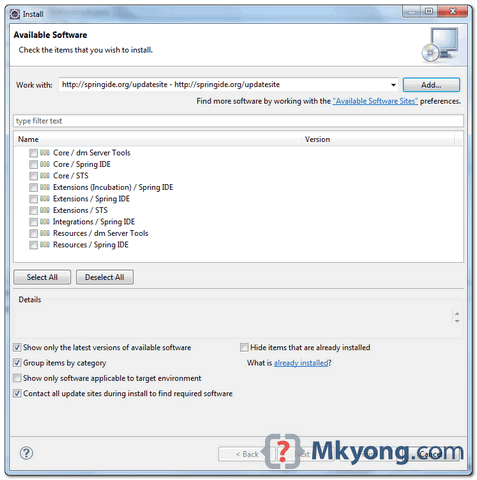
Take long time to install and restart Eclipse after finished.
2. Eclipse Marketplace
This is the prefer way, because you no need to remember the long Spring ide update URL. In Eclipse IDE, click “Help” -> “Eclipse Marketplace“, type “Spring IDE“, follow the wizard to finish the installation.
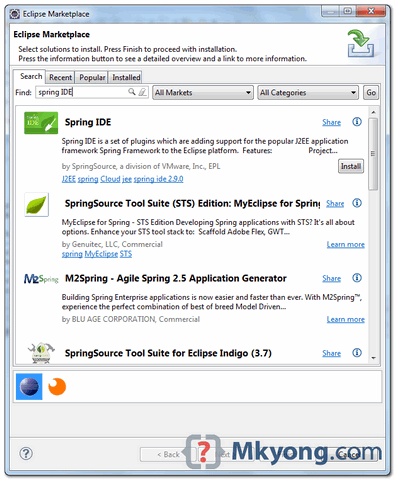
Same, take long time to install and restart Eclipse after finished.

Very Helpful article for those starting to begin with Spring framework.
finally managed to install spring IDE on indigo without sts
Man, I have been learned with your page, its very helpful, greetings!!!
use this if there is some proxy/firewall issue
https://mkyong.com/web-development/how-to-configure-proxy-settings-in-eclipse/
Method 1 After entering URL if it does not work for you setup eclipse proxy first..
https://mkyong.com/web-development/how-to-configure-proxy-settings-in-eclipse/
I think this is among the most important info for me. And i
am glad reading your article. But should remark on
some general things, The web site style is great, the articles
is really nice : D. Good job, cheers
Asking questions are really fastidious thing if you are not
understanding anything completely, but this article offers good understanding yet.
when i m installing the spring IDE the following error is coming
Cannot complete the install because one or more required items could not be found.
Software being installed: SpringSource Tool Suite Runtime Error Analysis Support 2.6.0.201103161000-RELEASE (com.springsource.sts.runtimeerroranalysis.feature.group 2.6.0.201103161000-RELEASE)
Missing requirement: SpringSource Tool Suite Runtime Error Analysis Support 2.6.0.201103161000-RELEASE (com.springsource.sts.runtimeerroranalysis.feature.group 2.6.0.201103161000-RELEASE) requires ‘com.atlassian.connector.eclipse.jira.feature.group 0.0.0’ but it could not be found
Thanxs buddy
I am getting the following error when i type ‘http://dist.springframework.org/release/IDE’ for the Spring IDE update site
Communication with repository at http://dist.springframework.org/release/IDE failed.
Communication with repository at http://dist.springframework.org/release/IDE failed.
Read timed out
Pls suggest .Thanks in advance
please note, that starting from 05/20/2010 to access the Spring IDE update site one must type ‘http://dist.springframework.org/release/IDE’ ‘http://springide.org/updatesite’
one must type ‘http://dist.springframework.org/release/IDE’ INSTEAD OF ‘http://springide.org/updatesite’
I am sorry to be so inaccurate at first 🙂
thanks
Thankou for the tutorial and the web site mkyong
Thanks a lot!
Thanks a lot!!!!!!!!!!!!!!!
thanx a lot
it helped me to integrate spring with eclipse in
a jiffy
Thanks for this information. It is so useful because I am starting with this powerful framework. So long.
Thanks alot..
Working fine….
SpringSource tool suite update sites have been changed have a look at this –> http://goo.gl/jYq3a
Thanks a lot!
Thanks Alottttt
Thanks for it…..!!!
Thank you ! it’ really good one
thanks its really gud…
yup
thanks … i was trying to install spring plugin in eclipse 3.5 .. and was fighting .. but i saw this site i got success. what is your next plugin link…..
I have some query regarding Spring Tool Suite. Does it support struts 1.x and hibernate out of the box? Right now i am using Eclipse galileo with JBOSS Tools, so the support for struts 1.x and hibernate is quite good. So i am wondering if i can get the same support in Spring Tool Suite or not.
Can anybody kindly help me in this regard? Any link will be much appreciated. Thank you.
does this installation include spring 3 ????
thx
Thanks alot , that’s worked with me.
Or just use SpringSource Tool Suite:
http://www.springsource.com/products/sts
It’s free and it already has Spring IDE and many other plugins installed.
Thanks for introduce SpringSource Tool Suite, it look promising :), will try it
Thanx for link obout Spring IDE features. Seen several very interesting things.