Talking about the web technology, Java developers will keep talking about how powerful the Spring , Struts, Wicket, JSF…..When talking about the deployment, they will say using Ant script or Maven to build or deploy. Ironically, without the IDE or technology help, many Java developers do not know either how to create a simple servlet and deploy it , nor about writing the deployment descriptor.
Nowadays , too many Java developers tight coupling with latest technology, do they know loose coupling is a good design for scalability :)? All the lasted technology is come from “Servlet” as foundation, you can not go far without it.
Here’s a quick guide to write, deploy and run a simple servlet in web container, without any IDE help.
Steps of writing your first servlet and deploy
1) Build the directory folder as following
\--projectname
    \--src
         \--com
             \--mkyong
    \--classes
    \--WEB-INF
2) Create a Java file named “ServletDemo1.java”, put in the “projectname/src/com/mkyong/” folder
package com.mkyong;

import java.io.IOException;
import java.io.PrintWriter;
import javax.servlet.http.HttpServlet;
import javax.servlet.http.HttpServletRequest;
import javax.servlet.http.HttpServletResponse;

public class ServletDemo1 extends HttpServlet{

	public void doGe(HttpServletRequest request, HttpServletResponse response)
	throws IOException{
		PrintWriter out = response.getWriter();
		out.println("<html>");
		out.println("<body>");
		out.println("<h1>Hello Servlet Get</h1>");
		out.println("</body>");
		out.println("</html>");
	}
}
3) Create a deployment descriptor named web.xml
<?xml version="1.0" encoding="UTF-8"?>
<web-app version="2.4" xmlns="http://java.sun.com/xml/ns/j2ee"
xmlns:xsi="http://www.w3.org/2001/XMLSchema-instance"
xsi:schemaLocation="http://java.sun.com/xml/ns/j2ee
http://java.sun.com/xml/ns/j2ee/web-app_2_4.xsd">

	<servlet>
		<servlet-name>Servlet Name For Demo1</servlet-name>
		<servlet-class>com.mkyong.ServletDemo1</servlet-class>
	</servlet>

	<servlet-mapping>
		<servlet-name>Servlet Name For Demo1</servlet-name>
		<url-pattern>/Demo1</url-pattern>
	</servlet-mapping>
</web-app>
P.S servlet-name is the alias name for the ServletDemo1 class
P.S url-pattern is the url path you type in browser address bar
4) From the project directory “projectname”, compile it with following command
javac src/com/mkyong/ServletDemo1.java
-classpath "C:\Program Files\Java\j2ee\lib\javaee.jar" -d classes
The “javaee.jar” is required for http servlet , this library is packed with J2EE SDK. In addition, all compiled classes will put in “classes” folder automatically
5) Build the directory folder in Tomcat
\--Tomcat
     \--webapps
          \--servlet (projectname allow to change)
               \--WEB-INF (Do not change this folder name)
                    \--classes
                         \--com
                              \--mkyong
6) Copy all required files to Tomcat\WEB-INF folder
– “ServletDemo1.java” to “Tomcat\WEN-INF\classes\com\mkyong”
– “web.xml” to “Tomcat\WEN-INF\”
\--Tomcat
     \--webapps
          \--servlet
               \--WEB-INF
                   \--web.xml [New file]
                    \--classes
                         \--com
                              \--mkyong
                                   \--ServletDemo1.class [New file]
7) Start Tomcat
Done ~ Launch your browser and type “http://localhost:8080/servlet/Demo1”
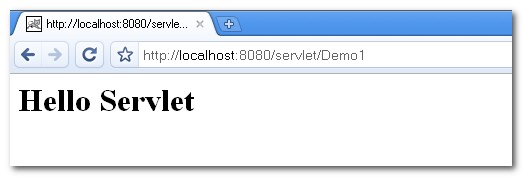
P.S Once the the servlet class is updated, Tomcat have to restart to take effect

Your tutorial is overly complicated and complex to understand.
Do not teach any more.
in addition :
no 6 : “ServletDemo1.java” to “Tomcat\WEN-INF\classes\com\mkyong”
must change to
– “ServletDemo1.class” to “Tomcat\WEN-INF\classes\com\mkyong”
thanks
Can you please give an example of doPut method to upload a file along with meta data in header.
Rest service would be preferable than servlet.
Please correct the method name from doGe to doGet in section 2.
second step is doGet and not doGe… can you fix this for future beginner developers?
Very small, simple and elegant! Thanks
I need to understand some very basic thing, do I need to compile and recompile every time I make some change to the source code? Is it possible to run the code interpretatively without compilation, because the compilation process takes some time. It is not possible to simply run it directly after modifications like PHP?
hi i am trying to design login page but after clicking on login button nothing is getting displayed….can u help me
i am using servlet ,html and mysql…..i want to connect db to login page and doing validation
Please demo me using Netty, thanks 🙂
In step 6, don’t you want to copy the class file ServletDemo1.class to WEB-INF, instead of the source file ServletDemo1.java?
step 2 – doGet
classpath tomcat – servlet-api.jar
http://localhost:8080/PROJECTNAME/Demo1
nice tutorial to start, thanks
thanks.very useful
if you are using TomCat you need to use the servlet-api.jar for your classpath
Just what I was looking for. I like using IDE’s but I like to do things command line first to make sure I understand the technology. Thanks for the concise write up!
I think the second point must implement the method “doGet”, not “doGe”
Also, in step 6, “WEN-INF” should be “WEB-INF”. This mistake was made twice.
Such Doge. WoW
ahahaha! Yeah! Of course, it’s a misprint!
Very Easy Language to Learn . Nice way of guide.
Great tutorial! Your tutorial is simple and beautiful, just exactly what I am looking for to get started quickly.
HTTP Status 405 – HTTP method GET is not supported by this URL
You have to rename the method to ‘doGet’.
Regards
Ozan
I precisely wanted to thank you so much again. I am not sure what I would’ve tried without those tips provided by you about this problem. It was before a very distressing condition for me personally, but considering a new skilled mode you dealt with the issue made me to cry with gladness. I am just happier for the advice as well as expect you recognize what a great job you are always carrying out instructing many people with the aid of your site. I know that you haven’t met any of us.
hey…thanks for the example, served me a lot..!
Mr. Mkyoung, plz correct the spelling of doGet() method, i m a beginner to learn servlet, i had just copied the above code just to check a simple servlet program to run on my machine,had faced a lot to run the code,after sitting 2 days came to know the problem
hiiii
i want to make blog…..with advertisement …….what will i do…
HTTP Status 404 – /servlet/ServletDemo1
——————————————————————————–
type Status report
message /servlet/ServletDemo1
description The requested resource (/servlet/Demo1) is not available.
——————————————————————————–
Apache Tomcat/7.0.8
i used above given example but browser shwoing given ABOVE PLZ HELP ME
Did it compile properly? He has a typo in his example, it should read doGet and *not* doGe
http://localhost:8080/servlet/Demo1
change servlet to your projectname
Thanks a lot, a very basic but useful guide…