Here’s a simple Cookie example in Servlet
Java Source
package com.mkyong;

import java.io.IOException;
import java.io.PrintWriter;
import javax.servlet.http.Cookie;
import javax.servlet.http.HttpServlet;
import javax.servlet.http.HttpServletRequest;
import javax.servlet.http.HttpServletResponse;

public class ServletDemo extends HttpServlet{

	public void doGet(HttpServletRequest request, HttpServletResponse response)
	throws IOException{

		response.setContentType("text/html");
		PrintWriter pw = response.getWriter();

		Cookie cookie = new Cookie("url","mkyong dot com");
		cookie.setMaxAge(60*60); //1 hour
		response.addCookie(cookie);

		pw.println("Cookies created");
	}
}
web.xml
<?xml version="1.0" encoding="UTF-8"?>
<web-app id="WebApp_ID" version="2.4" xmlns="http://java.sun.com/xml/ns/j2ee"
xmlns:xsi="http://www.w3.org/2001/XMLSchema-instance"
xsi:schemaLocation="http://java.sun.com/xml/ns/j2ee
http://java.sun.com/xml/ns/j2ee/web-app_2_4.xsd">

	<display-name>servletdemo</display-name>

	<servlet>
		<servlet-name>ServletName</servlet-name>
		<servlet-class>com.mkyong.ServletDemo</servlet-class>
	</servlet>

	<servlet-mapping>
		<servlet-name>ServletName</servlet-name>
		<url-pattern>/Demo</url-pattern>
	</servlet-mapping>

</web-app>
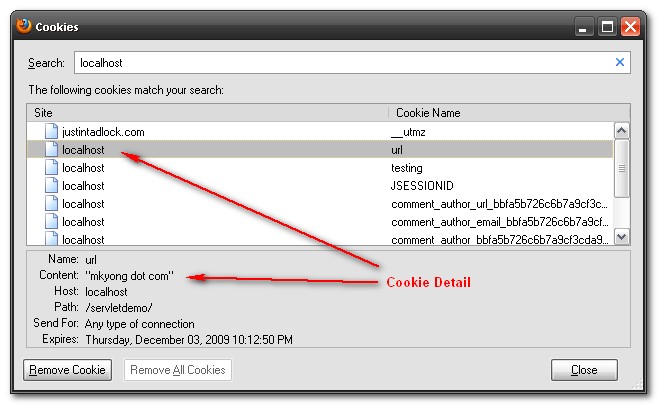
The above example will create a simple Cookie with a name “url” and value “mkyong dot com”, time to live is one hour, and store in client computer.
Run It
Deploy and execute the servlet in Firefox and you can check the Cookies is created in Firefox.
1. Please check here to study where does FireFox stored the Cookies
2. Please check here to study How to access the Cookies

Cookies gives error when add record
“An invalid character [10] was present in the Cookie value”
chutya kay pan pakavato
its awesome tutorial, please send me your gmail or your email account address.
vasanthi
Your Tutorials are simply awsome
but how to fetch created cookies data?
I have a question. This is not related to cookies topic.
how do interface perform some task without having body in java. For example
RequestDispatcher rd=request.getRequestDispatcher(“Login.html”);
rd.include(request, response);
My doubt is include method is not implemented. so how it is performing its tasks?????
I am new to java
Its good……….. but i need abt google chrome….
I feel better to understand this cookie concept….thanks a lot…
nice example… very easy to understand about cooikes.
Thnaks Buddy…For me, This is very useful…
how to create array of cookie and how how to commpare two cookies……..
thank u …………itz an gud example helpd me lot
this good example for me……thanks…..and also post all update topic ….avd*