In this tutorial, we show you how to use “SpringData for MongoDB” framework, to perform CRUD operations in MongoDB, via Spring’s annotation and XML schema.
Article is updated to use latest SpringData v 1.2.0.RELEASE, it was v1.0.0.M2.
Tools and technologies used :
- Spring Data MongoDB – 1.2.0.RELEASE
- Spring Core – 3.2.2.RELEASE
- Java Mongo Driver – 2.11.0
- Eclipse – 4.2
- JDK – 1.6
- Maven – 3.0.3
P.S Spring Data requires JDK 6.0 and above, and Spring Framework 3.0.x and above.
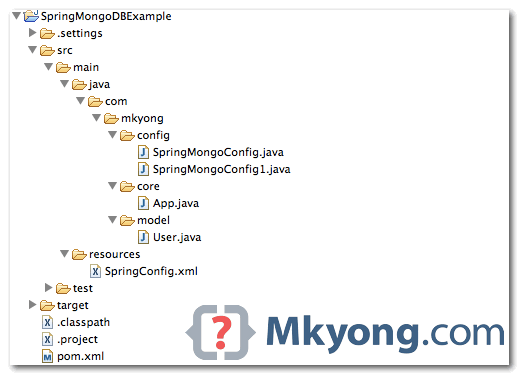
1. Project Structure
A classic Maven’s style Java project directory structure.
2. Dependency
The following libraries are required :
Currently, the “
spring-data-mongodb” jar is only available in “http://maven.springframework.org/milestone“, so, you have to declare this repository also.Updated on 13/09/2012
spring-data-mongodb is available at the Maven central repository, Spring repository is no longer required.
<project xmlns="http://maven.apache.org/POM/4.0.0"
    xmlns:xsi="http://www.w3.org/2001/XMLSchema-instance"
	xsi:schemaLocation="http://maven.apache.org/POM/4.0.0
	http://maven.apache.org/maven-v4_0_0.xsd">
	<modelVersion>4.0.0</modelVersion>
	<groupId>com.mkyong.core</groupId>
	<artifactId>SpringMongoDBExample</artifactId>
	<packaging>jar</packaging>
	<version>1.0</version>
	<name>SpringMongoExample</name>
	<url>http://maven.apache.org</url>

	<dependencies>

		<!-- Spring framework -->
		<dependency>
			<groupId>org.springframework</groupId>
			<artifactId>spring-core</artifactId>
			<version>3.2.2.RELEASE</version>
		</dependency>

		<dependency>
			<groupId>org.springframework</groupId>
			<artifactId>spring-context</artifactId>
			<version>3.2.2.RELEASE</version>
		</dependency>

		<!-- mongodb java driver -->
		<dependency>
			<groupId>org.mongodb</groupId>
			<artifactId>mongo-java-driver</artifactId>
			<version>2.11.0</version>
		</dependency>

		<!-- Spring data mongodb -->
		<dependency>
			<groupId>org.springframework.data</groupId>
			<artifactId>spring-data-mongodb</artifactId>
			<version>1.2.0.RELEASE</version>
		</dependency>

		<dependency>
			<groupId>cglib</groupId>
			<artifactId>cglib</artifactId>
			<version>2.2.2</version>
		</dependency>

	</dependencies>

	<build>
		<plugins>
			<plugin>
				<artifactId>maven-compiler-plugin</artifactId>
				<version>3.0</version>
				<configuration>
					<source>1.6</source>
					<target>1.6</target>
				</configuration>
			</plugin>
			<plugin>
				<groupId>org.apache.maven.plugins</groupId>
				<artifactId>maven-eclipse-plugin</artifactId>
				<version>2.9</version>
				<configuration>
					<downloadSources>true</downloadSources>
					<downloadJavadocs>true</downloadJavadocs>
				</configuration>
			</plugin>
		</plugins>
	</build>

</project>
3. Spring Configuration, Annotation and XML
Here, we show you two ways to configure Spring data and connect to MongoDB, via annotation and XML schema.
Refer to this official reference Connecting to MongoDB with Spring.
3.1 Annotation
Extends the AbstractMongoConfiguration is the fastest way, it helps to configure everything you need to start, like mongoTemplate object.
package com.mkyong.config;

import org.springframework.context.annotation.Bean;
import org.springframework.context.annotation.Configuration;
import org.springframework.data.mongodb.config.AbstractMongoConfiguration;

import com.mongodb.Mongo;
import com.mongodb.MongoClient;

@Configuration
public class SpringMongoConfig extends AbstractMongoConfiguration {

	@Override
	public String getDatabaseName() {
		return "yourdb";
	}

	@Override
	@Bean
	public Mongo mongo() throws Exception {
		return new MongoClient("127.0.0.1");
	}
}
Alternatively, I prefer this one, more flexible to configure everything.
package com.mkyong.config;

import org.springframework.context.annotation.Bean;
import org.springframework.context.annotation.Configuration;
import org.springframework.data.mongodb.MongoDbFactory;
import org.springframework.data.mongodb.core.MongoTemplate;
import org.springframework.data.mongodb.core.SimpleMongoDbFactory;

import com.mongodb.MongoClient;

@Configuration
public class SpringMongoConfig1 {

	public @Bean
	MongoDbFactory mongoDbFactory() throws Exception {
		return new SimpleMongoDbFactory(new MongoClient(), "yourdb");
	}

	public @Bean
	MongoTemplate mongoTemplate() throws Exception {

		MongoTemplate mongoTemplate = new MongoTemplate(mongoDbFactory());

		return mongoTemplate;

	}

}
And load it with AnnotationConfigApplicationContext :
    ApplicationContext ctx = new AnnotationConfigApplicationContext(SpringMongoConfig.class);
    MongoOperations mongoOperation = (MongoOperations)ctx.getBean("mongoTemplate");
3.2 XML Schema
<beans xmlns="http://www.springframework.org/schema/beans"
	xmlns:xsi="http://www.w3.org/2001/XMLSchema-instance"
	xmlns:context="http://www.springframework.org/schema/context"
	xmlns:mongo="http://www.springframework.org/schema/data/mongo"
	xsi:schemaLocation="http://www.springframework.org/schema/context
          http://www.springframework.org/schema/context/spring-context-3.0.xsd
          http://www.springframework.org/schema/data/mongo
          http://www.springframework.org/schema/data/mongo/spring-mongo-1.0.xsd
          http://www.springframework.org/schema/beans
          http://www.springframework.org/schema/beans/spring-beans-3.0.xsd">

	<mongo:mongo host="127.0.0.1" port="27017" />
	<mongo:db-factory dbname="yourdb" />

	<bean id="mongoTemplate" class="org.springframework.data.mongodb.core.MongoTemplate">
		<constructor-arg name="mongoDbFactory" ref="mongoDbFactory" />
	</bean>

</beans>
And include it with Spring’s GenericXmlApplicationContext :
   ApplicationContext ctx = new GenericXmlApplicationContext("SpringConfig.xml");
   MongoOperations mongoOperation = (MongoOperations)ctx.getBean("mongoTemplate");
Actually, both are doing the same thing, it’s just based on personal preferences. Personally, I like XML to configure things.
4. User Model
An User object, annotated @Document – which collection to save. Later, we show you how to use Spring data to bind this object to / from MongoDB.
package com.mkyong.model;

import org.springframework.data.annotation.Id;
import org.springframework.data.mongodb.core.mapping.Document;

@Document(collection = "users")
public class User {

	@Id
	private String id;

	String username;

	String password;

	//getter, setter, toString, Constructors

}
5. Demo – CRUD Operations
Full example to show you how to use Spring data to perform CRUD operations in MongoDB. The Spring data APIs are quite clean and should be self-explanatory.
package com.mkyong.core;

import java.util.List;

import org.springframework.context.ApplicationContext;
import org.springframework.context.annotation.AnnotationConfigApplicationContext;
import org.springframework.data.mongodb.core.MongoOperations;
import org.springframework.data.mongodb.core.query.Criteria;
import org.springframework.data.mongodb.core.query.Query;
import org.springframework.data.mongodb.core.query.Update;

import com.mkyong.config.SpringMongoConfig;
import com.mkyong.model.User;
//import org.springframework.context.support.GenericXmlApplicationContext;

public class App {

    public static void main(String[] args) {

	// For XML
	//ApplicationContext ctx = new GenericXmlApplicationContext("SpringConfig.xml");

	// For Annotation
	ApplicationContext ctx =
             new AnnotationConfigApplicationContext(SpringMongoConfig.class);
	MongoOperations mongoOperation = (MongoOperations) ctx.getBean("mongoTemplate");

	User user = new User("mkyong", "password123");

	// save
	mongoOperation.save(user);

	// now user object got the created id.
	System.out.println("1. user : " + user);

	// query to search user
	Query searchUserQuery = new Query(Criteria.where("username").is("mkyong"));

	// find the saved user again.
	User savedUser = mongoOperation.findOne(searchUserQuery, User.class);
	System.out.println("2. find - savedUser : " + savedUser);

	// update password
	mongoOperation.updateFirst(searchUserQuery,
                         Update.update("password", "new password"),User.class);

	// find the updated user object
	User updatedUser = mongoOperation.findOne(searchUserQuery, User.class);

	System.out.println("3. updatedUser : " + updatedUser);

	// delete
	mongoOperation.remove(searchUserQuery, User.class);

	// List, it should be empty now.
	List<User> listUser = mongoOperation.findAll(User.class);
	System.out.println("4. Number of user = " + listUser.size());

    }

}
Output
1. user : User [id=516627653004953049d9ddf0, username=mkyong, password=password123]
2. find - savedUser : User [id=516627653004953049d9ddf0, username=mkyong, password=password123]
3. updatedUser : User [id=516627653004953049d9ddf0, username=mkyong, password=new password]
4. Number of user = 0

If I have more number of records and I do findAll() …does it too much time to fetch the data
SimpleMongoDbFactory is now depricated. Any idea what is the replacement? SimpleMongoClientDbFactory? How to se?
A few fixes needed:
1. I used the latest version of Spring Data MongoDB ,Spring Core and Java Mongo Driver.
2. In the SpringConfig.xml, I used this instead:
xsi:schemaLocation=”http://www.springframework.org/schema/context
….
http://www.springframework.org/schema/data/mongo/spring-mongo.xsd
…>
Use spring-mongo.xsd instead of spring-mongo-1.0.xsd and mongo:mongo-client instead of mongo:mongo.
I installed the latest version of MongoDB community edition as well.
hello Mkyong,
Thanks . I had put save operation in loop and after some time it stops saving the data and application stops . I think there are too many connections getting open.
how can we close the connection using mongoOperation . I saw this in stackoverflow but could not implement ->
replacing MongoOperations with the implementation MongoTemplate and then on the MongoTemplate call mongoTemplate.getDb().getMongo().close();
could you pls help ?
very nice?it is very help for me!!
gratitude to Mkyong – The only working Spring-MongoDB example I could find.
Hi do you have an example with jndi mongodb with java config? I would like to keep mongo db details outside project in tomcat.
forgot to mention I want spring java rest application where I am using mongodb.
nice!
Thanks for this!
One thing I noticed, there is a typo in the xml configuration.
The host and port are not wired into the mongoTemplate.
It’s only an ussue if your mongo db is not running locally as the template uses the default host and port for mongo.
Could you please add a sample for finding distinct values?
hello mkyong,
would you please share spring data with spring mvc application ?
Is it possible to handle concurrency? Throw an exception when multiple users trying to update same?
this is really confusing, SpringMongoConfig1.java do not specify any connection parameter, should at least put “127.0.0.1” to clarify thing.
This somehow seems anti pattern to me. Since one of the most important feature using MongoDB is to free from predefined schema. We should be able to CRUD like JSONObject to MongoDB without any POJO class, right?
How can we enable SSL connection to a MOngo DB through Spring, can you please explain Mr. Mkyong
how do I make this connection singleton? I’m seeing tons of connections from my app to the mongo db and they never close.
found the issue. Do not load the mongoConfig with AnnotationConfigApplicationContext as shown in the example. Instead use @Autowired to let spring inject it for you. AnnotationConfigApplicationContext creates a new virtual container within and hence it keeps creating a new connection to mongodb which leaves lots of mongodb connections lying around. Autowiring solves this problem by reusing the connections. Good luck!
@Autowired
private MongoDBConfig mongoConfig;
public MongoApplication mongoAppData (String appName) {
try {
MongoOperations mongoOperation = mongoConfig.mongoTemplate();
logger.info(appName);
Query searchAppQuery = new Query(Criteria.where(“canonical_name”).is(appName));
MongoApplication newapp = mongoOperation.findOne(searchAppQuery, MongoApplication.class);
return newapp;
} catch (Exception e) {
logger.error(“Error retrieving app data”);
return null;
}
}
@Hari, that was helpful, thanks to you, mkyong.
When we validate SpringConfig.xml, it is throwing errors by the validation, and it is stoping me to proceed further.
Disable XML validation in your eclipse
http://stackoverflow.com/questions/7489510/disable-xml-validation-in-eclipse
HTTP Status 500 – Servlet.init() for servlet dispatcher threw exception
type Exception report
message Servlet.init() for servlet dispatcher threw exception
description The server encountered an internal error that prevented it from fulfilling this request.
exception
javax.servlet.ServletException: Servlet.init() for servlet dispatcher threw exception
org.apache.catalina.authenticator.AuthenticatorBase.invoke(AuthenticatorBase.java:472)
org.apache.catalina.valves.ErrorReportValve.invoke(ErrorReportValve.java:99)
org.apache.catalina.valves.AccessLogValve.invoke(AccessLogValve.java:929)
org.apache.catalina.connector.CoyoteAdapter.service(CoyoteAdapter.java:407)
org.apache.coyote.http11.AbstractHttp11Processor.process(AbstractHttp11Processor.java:1002)
org.apache.coyote.AbstractProtocol$AbstractConnectionHandler.process(AbstractProtocol.java:585)
org.apache.tomcat.util.net.JIoEndpoint$SocketProcessor.run(JIoEndpoint.java:312)
java.util.concurrent.ThreadPoolExecutor$Worker.runTask(ThreadPoolExecutor.java:885)
java.util.concurrent.ThreadPoolExecutor$Worker.run(ThreadPoolExecutor.java:907)
java.lang.Thread.run(Thread.java:619)
root cause
java.lang.NoClassDefFoundError: com/mongodb/ReadPreference
java.lang.Class.getDeclaredMethods0(Native Method)
java.lang.Class.privateGetDeclaredMethods(Class.java:2427)
java.lang.Class.getDeclaredMethod(Class.java:1935)
org.springframework.core.LocalVariableTableParameterNameDiscoverer$LocalVariableTableVisitor.resolveMember(LocalVariableTableParameterNameDiscoverer.java:236)
org.springframework.core.LocalVariableTableParameterNameDiscoverer$LocalVariableTableVisitor.visitEnd(LocalVariableTableParameterNameDiscoverer.java:219)
org.springframework.asm.ClassReader.accept(Unknown Source)
org.springframework.asm.ClassReader.accept(Unknown Source)
org.springframework.core.LocalVariableTableParameterNameDiscoverer.inspectClass(LocalVariableTableParameterNameDiscoverer.java:114)
org.springframework.core.LocalVariableTableParameterNameDiscoverer.getParameterNames(LocalVariableTableParameterNameDiscoverer.java:86)
org.springframework.beans.factory.support.ConstructorResolver.autowireConstructor(ConstructorResolver.java:193)
org.springframework.beans.factory.support.AbstractAutowireCapableBeanFactory.autowireConstructor(AbstractAutowireCapableBeanFactory.java:1035)
org.springframework.beans.factory.support.AbstractAutowireCapableBeanFactory.createBeanInstance(AbstractAutowireCapableBeanFactory.java:939)
org.springframework.beans.factory.support.AbstractAutowireCapableBeanFactory.doCreateBean(AbstractAutowireCapableBeanFactory.java:485)
org.springframework.beans.factory.support.AbstractAutowireCapableBeanFactory.createBean(AbstractAutowireCapableBeanFactory.java:456)
org.springframework.beans.factory.support.AbstractBeanFactory$1.getObject(AbstractBeanFactory.java:294)
org.springframework.beans.factory.support.DefaultSingletonBeanRegistry.getSingleton(DefaultSingletonBeanRegistry.java:225)
org.springframework.beans.factory.support.AbstractBeanFactory.doGetBean(AbstractBeanFactory.java:291)
org.springframework.beans.factory.support.AbstractBeanFactory.getBean(AbstractBeanFactory.java:193)
org.springframework.beans.factory.support.DefaultListableBeanFactory.preInstantiateSingletons(DefaultListableBeanFactory.java:585)
org.springframework.context.support.AbstractApplicationContext.finishBeanFactoryInitialization(AbstractApplicationContext.java:913)
org.springframework.context.support.AbstractApplicationContext.refresh(AbstractApplicationContext.java:464)
org.springframework.web.servlet.FrameworkServlet.configureAndRefreshWebApplicationContext(FrameworkServlet.java:631)
org.springframework.web.servlet.FrameworkServlet.createWebApplicationContext(FrameworkServlet.java:588)
org.springframework.web.servlet.FrameworkServlet.createWebApplicationContext(FrameworkServlet.java:645)
org.springframework.web.servlet.FrameworkServlet.initWebApplicationContext(FrameworkServlet.java:508)
org.springframework.web.servlet.FrameworkServlet.initServletBean(FrameworkServlet.java:449)
org.springframework.web.servlet.HttpServletBean.init(HttpServletBean.java:133)
javax.servlet.GenericServlet.init(GenericServlet.java:160)
org.apache.catalina.authenticator.AuthenticatorBase.invoke(AuthenticatorBase.java:472)
org.apache.catalina.valves.ErrorReportValve.invoke(ErrorReportValve.java:99)
org.apache.catalina.valves.AccessLogValve.invoke(AccessLogValve.java:929)
org.apache.catalina.connector.CoyoteAdapter.service(CoyoteAdapter.java:407)
org.apache.coyote.http11.AbstractHttp11Processor.process(AbstractHttp11Processor.java:1002)
org.apache.coyote.AbstractProtocol$AbstractConnectionHandler.process(AbstractProtocol.java:585)
org.apache.tomcat.util.net.JIoEndpoint$SocketProcessor.run(JIoEndpoint.java:312)
java.util.concurrent.ThreadPoolExecutor$Worker.runTask(ThreadPoolExecutor.java:885)
java.util.concurrent.ThreadPoolExecutor$Worker.run(ThreadPoolExecutor.java:907)
java.lang.Thread.run(Thread.java:619)
note The full stack trace of the root cause is available in the Apache Tomcat/7.0.30 logs.
Apache Tomcat/7.0.30
Hello,
I am new to MongoDB.
I am getting Error -> The method getBean(String) is undefined for the type ApplicationContext. for the following
MongoOperations mongoOperation = (MongoOperations) ctx.getBean(“mongoTemplate”);
Please let me know which version of JAR do I need to use?
I get org/springframework/dao/InvalidDataAccessApiUsageException. Isn’t this a relic of Spring 2?
seems this is invalid:
there is no ‘mongoDbFactory’
FYI, the link in section 3 is broken (“hhttp”).
Fixed, thanks.
Thank you for the sample,
It is simple and well understandable.
Pls let us know how to close the mongoDB connection.
FYI – we are using Spring Data to connect to mongoDB
If not mistake, SpringData will handle it, no need to close or release the MongoDB connection manually.
persist data? with implementation DataNucleus?
Can you show us how to close the mongoDB connection in this example ?
The Spring XML config isn’t quite correct – its missing a “mongo-ref” attribute. For example, if your Mongo database is on another server. i.e.
It won’t connect (always defaults to localhost) so you have to update the
XML to look like the following: –
Nice example all the same!
what about updating multiple fields at once? I can’t seem to find an example of this anywhere with spring data.
Refer to this Spring Data MongoDB : Update Document
Solid intro tutorial, thank you mkyong. I had to make some updates to get it working with the latest versions. In particular, the package names are now org.springframework.data.mongodb.core and most of the calls require the collection name last, not first. Here is a working version of the “App” class (and note that you have to modify the above spring config to 1) correct the package name, and 2) remove that last constructor parameter!)…:
package com.mkyong.core; import java.util.List; import org.springframework.context.ApplicationContext; import org.springframework.context.annotation.AnnotationConfigApplicationContext; import org.springframework.context.support.GenericXmlApplicationContext; import org.springframework.data.mongodb.core.MongoOperations; import org.springframework.data.mongodb.core.query.Criteria; import org.springframework.data.mongodb.core.query.Query; import org.springframework.data.mongodb.core.query.Update; import com.mkyong.config.SpringMongoConfig; import com.mkyong.model.User; // I changed this to match my own preference public class App { public static final String COLLECTION = "user-info"; public static void main( String[] args ) { //For Annotation //ApplicationContext ctx = new AnnotationConfigApplicationContext(SpringMongoConfig.class); //For XML ApplicationContext ctx = new GenericXmlApplicationContext("spring-config.xml"); MongoOperations mongoOperation = (MongoOperations)ctx.getBean("mongoTemplate"); User user = new User("1001", "first", "name", 40); //save mongoOperation.save(user,COLLECTION); //find User savedUser = mongoOperation.findOne(new Query(Criteria.where("id").is("1001")), User.class,COLLECTION); System.out.println("savedUser : " + savedUser); //update mongoOperation.updateFirst( new Query(Criteria.where("firstname").is("first")), Update.update("lastname", "new lastname"),COLLECTION); //find User updatedUser = mongoOperation.findOne( new Query(Criteria.where("id").is("1001")), User.class,COLLECTION); System.out.println("updatedUser : " + updatedUser); //delete mongoOperation.remove( new Query(Criteria.where("id").is("1001")), COLLECTION); //List List<User> listUser = mongoOperation.findAll(User.class,COLLECTION); System.out.println("Number of user = " + listUser.size()); } }import com.mkyong.config.SpringMongoConfig; import com.mkyong.model.User; // I changed this to match my own preference public class App { public static final String COLLECTION = "user-info"; public static void main( String[] args ) { //For Annotation //ApplicationContext ctx = new AnnotationConfigApplicationContext(SpringMongoConfig.class); //For XML ApplicationContext ctx = new GenericXmlApplicationContext("spring-config.xml"); MongoOperations mongoOperation = (MongoOperations)ctx.getBean("mongoTemplate"); User user = new User("1001", "first", "name", 40); //save mongoOperation.save(user,COLLECTION); //find User savedUser = mongoOperation.findOne(new Query(Criteria.where("id").is("1001")), User.class,COLLECTION); System.out.println("savedUser : " + savedUser); //update mongoOperation.updateFirst( new Query(Criteria.where("firstname").is("first")), Update.update("lastname", "new lastname"),COLLECTION); //find User updatedUser = mongoOperation.findOne( new Query(Criteria.where("id").is("1001")), User.class,COLLECTION); System.out.println("updatedUser : " + updatedUser); //delete mongoOperation.remove( new Query(Criteria.where("id").is("1001")), COLLECTION); //List List listUser = mongoOperation.findAll(User.class,COLLECTION); System.out.println("Number of user = " + listUser.size()); } }Thanks, article is updated to use v1.0.4.RELEASE
Article is updated to SpringData v 1.2.0.RELEASE , APIs are updated very fast…
Ahh!! With the latest release of spring-data-mongo… there exists a serious bug… Check here: https://jira.springsource.org/browse/DATAMONGO-716
I think its better we use the old one. However I am not getting exact mongo tags for the same, can u please update here if you have the backup?
mongoTemplate save does not return the created document. In my case I leave the primary id generation to the mongodb. So I need the created document so that I can get the id that is generated.
Why the insert method does not return the created document.
Refer to above example. The object you saved / inserted will contains the
_idautomatically.Hi,
The _id is being generated, but I want to use the generated id, like you have in the Sysout.
// save
mongoOperation.save(user);
// now user object got the created id.
System.out.println(“1. user : ” + user);
The problem is that persisted object doesn’t have the id, but when I go and check in the DB it has been generated. Could you please tell me if I am missing anything? I want to access that id like you have in the sysout.
FYI, I am using MongoTemplate, not MongoOperation like you have, if that makes any difference.
that is some seriously ugly code.
Welcome to Java!
you are so right!
how to authenticate?
How to authenticate? That’s a good question.
I made an example with the user registration and user authentication and more. When a web service on my PC’s available you can freely test. (Send me a message if service is unavailable.) Hope you will like this example.
You can try demo on address:
http://vanadad.dyndns-web.com:8083/extsecdemo/
Sorry! I changed ports etc. Demo is on address:
http://vanadad.dyndns-web.com/extsecdemo/
Could you open source this so people can see it and not rely on your personal dynamic dns?
May be you should upload to github, it’s free 🙂
can you update the link for authentication