Recently, received many emails for mkyong.com tutorials, about how to deploy the project to Tomcat, build the project with Maven, and also how to import it into Eclipse IDE.
Actually, almost all the mkyong.com tutorials are developed in Eclipse IDE (3.6 or 3.7), build with Maven (version 2 or 3) and deploy to Tomcat.
At the end of the tutorial, the entire Eclipse’s project and source code are zipped and provide user to download.
In this demonstration, we are using this “Struts 2 hello world example” tutorial, to show you how to download the project, build and import it into Eclipse IDE.
Hope this guide will help others to use the mkyong tutorial more easily. For those familiar with Maven and Eclipse, you can skip this guide.
1. Requirement
To use the tutorial, make sure you have following tools installed, and have some basic understanding about it, especially Maven.
- Installed Tomcat
- Installed Maven
- Installed Eclipse
2. Download Project
Scroll down to the end of the article, click on the download link.

3. Project Structure
Extract the downloaded zip file.
In this example, extract the zip files to following folder :
C:\Users\mkyong\Downloads\Struts2Example
See following extracted project structure, a standard Eclipse + Maven project structure.
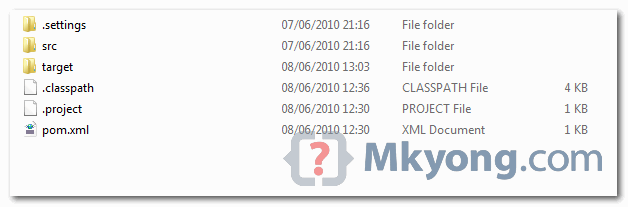
To reduce the zip file size, i deleted all the classes in “target” folder, you need to build it to make it works, see next step.
4. Maven Build
Issue following Maven command to build the project :
mvn eclipse:eclipse -Dwtpversion=2.0
In this example, Windows, command prompt, build like this.
C:\Users\mkyong\Downloads\Struts2Example>mvn eclipse:eclipse -Dwtpversion=2.0
This tell Maven to download the entire project’s dependencies declared in pom.xml, and configure the deployment path in Eclipse properly… it make everything ready for developing and deployment.
5. Import into Eclipse
Everything is ready now, import the project into Eclipse IDE.
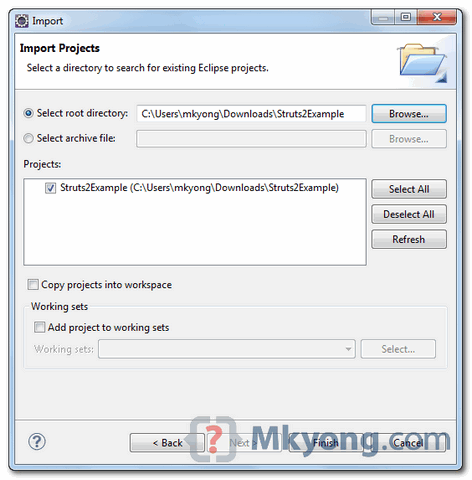
In Eclipse menu, select “File“, “Import…“, “General” –> “Existing Project into Workspace“, select the project file path and import it.
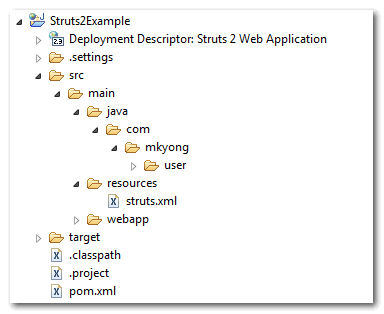
Your project structure should look like this :
6. Deploy to Tomcat
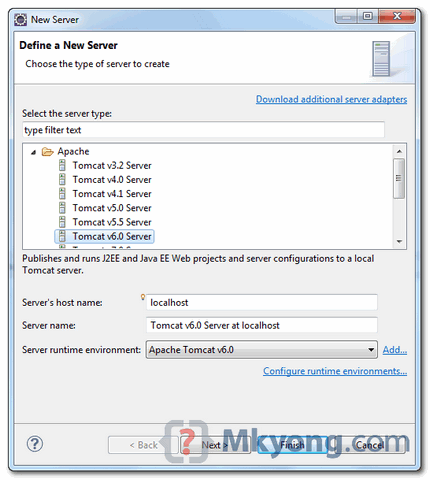
In Eclipse IDE, create a Tomcat instance, add the project and start it.
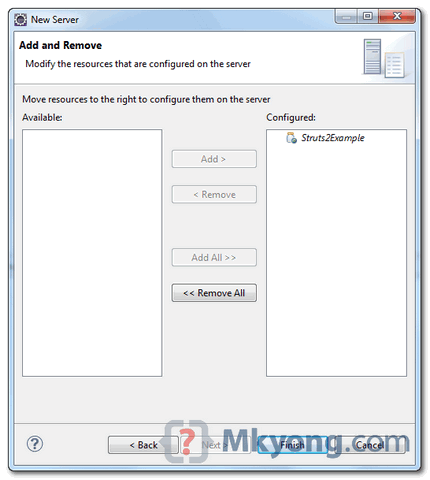
In Eclipse, review the console tab, make sure no error messages displayed, otherwise… send me an email 🙂
Done. Happy coding

I think someone needs to rewrite this tutorial. It simply doesn’t work. I’ve checked here, and I think this tutorial is for struts 1 instead of struts2 since the struts.xml for struts2 should be in WEB-INF/classes:
https://mkyong.com/struts2/there-is-no-action-mapped-for-namespace-and-action-name-youractionname/
can someone please revise this tutorial, including how to run it? Let’s be specific and save many from frustration.
Actually, I’m still having trouble with this hello world example. There’s no instruction as to how I run this. I right click on Struts2Example , run as -> run on server, and tomcat complanis of:
There is no Action mapped for namespace [/] and action name [] associated with context path [/Struts2Example]. – [unknown location]
Can someone fix this hello world example??
I resolved the below issue by adding this to the pom:
javax.servlet
javax.servlet-api
3.1.0
provided
I fixed he below by making sure that I don’t mess with maven’s settings.xml. I was going through the maven tutorial before so that’s why I was making the changes. Right now, I do have one other error, and that is for both login.jsp and welcome_user.jsp, for line “”
eclipse errors saying “‘The superclass javax.servlet.http.HttpServlet’ was not found on the Java Build Path”
Using tomcat7, eclipse Luna 4.40, maven 3.2.1, java 1.7.0_67.
Firstly, both login.jsp and welcome_user.jsp complains about “cannot find the tag library descriptor for /struts-tag at I thought maven would auto download everything for me to get the project to run.
Should your example work on Jetty or tomcat launched by a MVN plugin? right?
Yes, it should.
Hello. First of all, thank you for sharing your knowledge. Your tutorials are invaluable.
I was trying to follow the above tutorial but getting this error:
C:\workspace\StrutsSpringExample> mvn eclipse:eclipse -Dwtpversion
=2.0
[INFO] Scanning for projects…
[INFO] Searching repository for plugin with prefix: ‘eclipse’.
[INFO] org.apache.maven.plugins: checking for updates from central
[WARNING] repository metadata for: ‘org.apache.maven.plugins’ could not be retri
eved from repository: central due to an error: Error transferring file: repo1.ma
ven.org
[INFO] Repository ‘central’ will be blacklisted
[INFO] ————————————————————————
[ERROR] BUILD ERROR
[INFO] ————————————————————————
[INFO] The plugin ‘org.apache.maven.plugins:maven-eclipse-plugin’ does not exist
or no valid version could be found
[INFO] ————————————————————————
[INFO] For more information, run Maven with the -e switch
[INFO] ————————————————————————
[INFO] Total time: < 1 second
[INFO] Finished at: Mon Nov 05 15:54:55 EST 2012
[INFO] Final Memory: 2M/15M
[INFO] ————————————————————————
Any idea what might be causing this?
update the struts.xml
———————————–
welcome_user.jsp
for Tomcat7 ,eclipse 3.7, maven 3.0.3