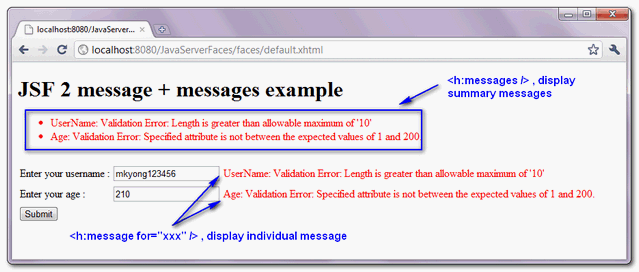
In JSF, you can output message via following two messages tags :
- h:message – Output a single message for a specific component.
- h:messages – Output all messages in current page.
See following JSF 2.0 example to show the use of both “h:message” and “h:messages” tags to display the validation error message.
JSF page…
<?xml version="1.0" encoding="UTF-8"?>
<!DOCTYPE html PUBLIC "-//W3C//DTD XHTML 1.0 Transitional//EN"
"http://www.w3.org/TR/xhtml1/DTD/xhtml1-transitional.dtd">
<html xmlns="http://www.w3.org/1999/xhtml"
      xmlns:h="http://java.sun.com/jsf/html"
      xmlns:f="http://java.sun.com/jsf/core"
      >

    <h:body>

    	<h1>JSF 2 message + messages example</h1>

	<h:form>

	  <h:messages style="color:red;margin:8px;" />

	  <br />

	  <h:panelGrid columns="3">

		Enter your username :

		<h:inputText id="username" value="#{user.username}"
			size="20" required="true"
			label="UserName" >
			<f:validateLength minimum="5" maximum="10" />
		</h:inputText>

		<h:message for="username" style="color:red" />

		Enter your age :
		<h:inputText id="age" value="#{user.age}"
			size="20" required="true"
			label="Age" >
			<f:validateLongRange for="age" minimum="1" maximum="200" />
		</h:inputText>

		<h:message for="age" style="color:red" />

	  </h:panelGrid>

	  <h:commandButton value="Submit" action="result" />

      </h:form>

    </h:body>
</html>
Here’s the output…
Download Source Code
Download It – JSF-2-Message-Example.zip (10KB)

Hi, How can I add one css class for this summary messages. Right now Inside summary class we have the list. Each and every error message I need one class. Is that possible ?
I would expand this example to show how to add message in bean, because it is not as intuitive as people could think. Also you can expand this example to show globalOnly attribute in . then example would be complete and awesome 😉
This saved my life at work! Couldn’t understand where all these #{msgs} were being defined!
Thanks for your posts, very friendly and understable, but i have a question, how do you work when you need an extra message for an especific error?, for example, if you have the login page, with a message for the username field and other for the password, then, when the user write the wrong password you need an extra message to show “Login/password invalid”, but if you do it with messages the other two will show up when you don’t need it, and you can’t use a message since that error doesn’t have a child component. PD: Sorry for my english
How insert one custom message?