Here’s a guide to show you how to integrate JSF 2.0 with database via JDBC. In this example, we are using MySQL database and Tomcat web container.
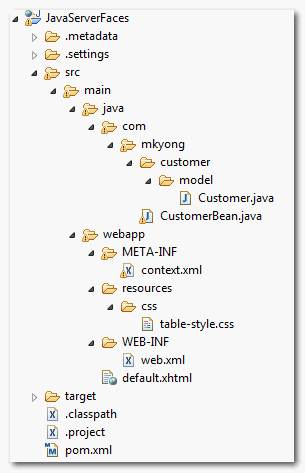
Directory structure of this example
1. Table Structure
Create a “customer” table and insert five dummy records. Later, display it via JSF h:dataTable.
SQL commands
DROP TABLE IF EXISTS `mkyongdb`.`customer`;
CREATE TABLE  `mkyongdb`.`customer` (
  `CUSTOMER_ID` bigint(20) UNSIGNED NOT NULL AUTO_INCREMENT,
  `NAME` varchar(45) NOT NULL,
  `ADDRESS` varchar(255) NOT NULL,
  `CREATED_DATE` datetime NOT NULL,
  PRIMARY KEY (`CUSTOMER_ID`)
) ENGINE=InnoDB AUTO_INCREMENT=17 DEFAULT CHARSET=utf8;

insert into mkyongdb.customer(customer_id, name, address, created_date)
values(1, 'mkyong1', 'address1', now());
insert into mkyongdb.customer(customer_id, name, address, created_date)
values(2, 'mkyong2', 'address2', now());
insert into mkyongdb.customer(customer_id, name, address, created_date)
values(3, 'mkyong3', 'address3', now());
insert into mkyongdb.customer(customer_id, name, address, created_date)
values(4, 'mkyong4', 'address4', now());
insert into mkyongdb.customer(customer_id, name, address, created_date)
values(5, 'mkyong5', 'address5', now());
2. MySQL DataSource
Configure a MySQL datasource named “jdbc/mkyongdb“, follow this article – How to configure MySQL DataSource in Tomcat 6
3. Model Class
Create a “Customer” model class to store the table records.
File : Customer.java
package com.mkyong.customer.model;

import java.util.Date;

public class Customer{

	public long customerID;
	public String name;
	public String address;
	public Date created_date;

	//getter and setter methods
}
4. JDBC Example
A JSF 2.0 managed bean, inject datasource “jdbc/mkyongdb” via @Resource, and uses normal JDBC API to retrieve all the customer records from database and store it into a List.
File : CustomerBean.java
package com.mkyong;

import java.io.Serializable;
import java.sql.Connection;
import java.sql.PreparedStatement;
import java.sql.ResultSet;
import java.sql.SQLException;
import java.util.ArrayList;
import java.util.List;

import javax.annotation.Resource;
import javax.faces.bean.ManagedBean;
import javax.faces.bean.SessionScoped;
import javax.naming.Context;
import javax.naming.InitialContext;
import javax.naming.NamingException;
import javax.sql.DataSource;

import com.mkyong.customer.model.Customer;

@ManagedBean(name="customer")
@SessionScoped
public class CustomerBean implements Serializable{

	//resource injection
	@Resource(name="jdbc/mkyongdb")
	private DataSource ds;

	//if resource injection is not support, you still can get it manually.
	/*public CustomerBean(){
		try {
			Context ctx = new InitialContext();
			ds = (DataSource)ctx.lookup("java:comp/env/jdbc/mkyongdb");
		} catch (NamingException e) {
			e.printStackTrace();
		}

	}*/

	//connect to DB and get customer list
	public List<Customer> getCustomerList() throws SQLException{

		if(ds==null)
			throw new SQLException("Can't get data source");

		//get database connection
		Connection con = ds.getConnection();

		if(con==null)
			throw new SQLException("Can't get database connection");

		PreparedStatement ps
			= con.prepareStatement(
			   "select customer_id, name, address, created_date from customer");

		//get customer data from database
		ResultSet result =  ps.executeQuery();

		List<Customer> list = new ArrayList<Customer>();

		while(result.next()){
			Customer cust = new Customer();

			cust.setCustomerID(result.getLong("customer_id"));
			cust.setName(result.getString("name"));
			cust.setAddress(result.getString("address"));
			cust.setCreated_date(result.getDate("created_date"));

			//store all data into a List
			list.add(cust);
		}

		return list;
	}
}
5. JSF Page dataTable
A JSF 2.0 xhtml page, uses h:dataTable to display all the customer records in table layout format.
<?xml version="1.0" encoding="UTF-8"?>
<!DOCTYPE html PUBLIC "-//W3C//DTD XHTML 1.0 Transitional//EN"
"http://www.w3.org/TR/xhtml1/DTD/xhtml1-transitional.dtd">
<html xmlns="http://www.w3.org/1999/xhtml"
      xmlns:h="http://java.sun.com/jsf/html"
      xmlns:f="http://java.sun.com/jsf/core"
      >
    <h:head>
    	<h:outputStylesheet library="css" name="table-style.css"  />
    </h:head>

    <h:body>

    	<h1>JSF 2.0 + JDBC Example</h1>

 		<h:dataTable value="#{customer.getCustomerList()}" var="c"
    			styleClass="order-table"
    			headerClass="order-table-header"
    			rowClasses="order-table-odd-row,order-table-even-row"
    		>

    		<h:column>
    			<f:facet name="header">
    				Customer ID
    			</f:facet>
    				#{c.customerID}
    		</h:column>

    		<h:column>
    			<f:facet name="header">
    				Name
				</f:facet>
    				#{c.name}
    		</h:column>

 			<h:column>
    			<f:facet name="header">
    				Address
				</f:facet>
    				#{c.address}
    		</h:column>

    		<h:column>
    			<f:facet name="header">
    				Created Date
				</f:facet>
    				#{c.created_date}
    		</h:column>

    	</h:dataTable>

    </h:body>

</html>
6. Demo
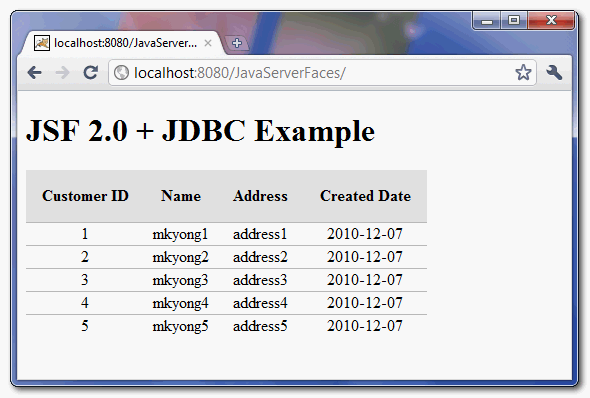
Run it, see output

Can you **PLEASE** add a ‘service’ class that does the JDBC stuff (maybe make a reference to some ‘separation of concerns’ article) and make a reference to maybe use JPA? There are lots of people using your (otherwise good) tutorial that start with this and get off on the wrong foot and (might in the future) blame JSF (or ask how to make a manageBean ALSO a rest service.
Thanks for ur tutorial..
its better to have a save option to each and every row instead of having one save button for entire dataTable.
loophole in your solution::
When you click the save button, you are processing each and every row whether it is updated or not .
example: suppose if we have 1000 rows and we modify only one row. When we click the save button each and every row is being processed instead of processing only the modified row.
I tried to modify the code to have a save button to each and every row and to the complete dataTable. But nothing worked for me..
So i request you to provide a solution that updates only the modified rows.
Thanks for ur help 🙂
Hello friends, I
have to do a project similar to this, but working with a prostgresql
database, which shows me a table of that database, what modification
would you have to do in this program to change the MySQL database By one of postgresql?
Great tutorial mr MKYONG!!
Thank you!!
Greetings from Chile.
I have a problem that I can’t solve.
I have imported this project to Eclipse. I previously had imported another tutorial from this page and had both named “JavaServerFaces” so I deleted the old one with all its files and were able to import this one. I imported this project succesfully but when I run it on server I’m getting old project. What am I doin’ wrong?
I need a jsf registration page with mysql database step by step process.can anyone do this..
Thanks for this tutorial. However when I run, i am getting the following exception
SEVERE: Error Rendering View[/customer.xhtml]
javax.el.ELException: /customer.xhtml @17,60 value=”#{customer.getCustomerList()}”: org.apache.tomcat.dbcp.dbcp.SQLNestedException: Cannot create JDBC driver of class ” for connect URL ‘null’
at com.sun.faces.facelets.el.TagValueExpression.getValue(TagValueExpression.java:114)
at javax.faces.component.ComponentStateHelper.eval(ComponentStateHelper.java:194)
at javax.faces.component.ComponentStateHelper.eval(ComponentStateHelper.java:182)
at javax.faces.component.UIData.getValue(UIData.java:731)
at javax.faces.component.UIData.getDataModel(UIData.java:1798)
at javax.faces.component.UIData.setRowIndexWithoutRowStatePreserved(UIData.java:484)
at javax.faces.component.UIData.setRowIndex(UIData.java:473)
at com.sun.faces.renderkit.html_basic.TableRenderer.encodeBegin(TableRenderer.java:81)
at javax.faces.component.UIComponentBase.encodeBegin(UIComponentBase.java:820)
at javax.faces.component.UIData.encodeBegin(UIData.java:1118)
at javax.faces.component.UIComponent.encodeAll(UIComponent.java:1754)
at javax.faces.component.UIComponent.encodeAll(UIComponent.java:1759)
at javax.faces.component.UIComponent.encodeAll(UIComponent.java:1759)
at com.sun.faces.application.view.FaceletViewHandlingStrategy.renderView(FaceletViewHandlingStrategy.java:401)
at com.sun.faces.application.view.MultiViewHandler.renderView(MultiViewHandler.java:131)
at com.sun.faces.lifecycle.RenderResponsePhase.execute(RenderResponsePhase.java:121)
Any idea why?
I am using
Tomcat 7.0.55
Version: Juno Service Release 2
I have added the following in the TOMCAT/conf/context.xml file
and the following in web.xml file
MySQL Datasource
jdbc/surajdb
javax.sql.DataSource
Container
I have also added the “mysql-connector-java-5.1.32-bin” in TOMCAT/lib folder
good idea
i put mysql-connector-java in project folder webapp/WEB-NF/lib/ now it works
Well I have also spent a few hours on this Exception but the sollution is really simple.
All you need to do is to open CustomerBean and then uncomment the code under following comment:
//if resource inject is not support, you still can get it manually.
public CustomerBean(){
try {
Context ctx = new InitialContext();
ds = (DataSource)ctx.lookup(“java:comp/env/jdbc/mkyongdb”);
} catch (NamingException e) {
e.printStackTrace();
}
}
And that’s it resource injection isn’t supported so we need to do it manually.
Is there a good design pattern?
hello fnds… iam raju…
i developed a simple jsf application to display a table by getting the data from mysql.
i displayed table using datatable.it works fine. but one refreshing using F5 same table adding again to web page. i am not getting how stop creating object twice on refreshing … can u pls help me guys….
Always clear and students oriented. Great!
Thank you so much! 😀
Records no found… why?
I have used your example.
And I’m getting the following error if i access the jsf page frequently.
Suppose I’m calling the bean using parameters from the jsf page. If i call the bean frequently then the error occurred. But if I take some time between two consecutive call then no error happened.
it looks like you where trying to connect to oracle database, example is for mysql, maybe this is the cause
Thanks for the example.
But don’t we need to close the connection by our self?
After using the connection we should close it.
I also have such impression, even in finally clause
hi….i use your codes in intellij IDEA jet brain…it works but do not show me my information that i ensert to my sql….what do i do? i need help…pelease
I get the following error:
/default.xhtml @20,8 value=”#{customer.getCustomerList()}”: The class ‘com.mkyong.CustomerBean’ does not have the property ‘getCustomerList’.
I get similar error..
/default.xhtml @20,8 value=”#{customer.getCustomerList()}” Error Parsing: #{customer.getCustomerList()}
hi mkyong,
the tutorial doesn’t print the list in my browser,
help me ;)))
Cannot create JDBC driver of class ” for connect URL ‘null’
i got an error plz help me out
Hi Mr.Yong,
The above example works fine when I use eclipse configured with tomcat, but when I deploy the project in server, @Resource is not working, what do I miss, please help!
Thanks for your help in advance.
hi mkyong,
the tutorial doesn’t print the list in my browser, but only the thead component…
help me ;)))
Now it’s ok… TNX!
Hi Yong,
It works , great tutorial . Thanks a lot …
hi,
Helpfull tutorial.If we want to retreive any 1 record based on the date how to do it.I tried your tutorial and its working fine,but i am facing problem when i want to retreive record based on a particular date.
Helpfull tutorial.If we want to retreive any 1 record based on the date how to do it.I tried your tutorial and its working fine,but i am facing problem when i want to retreive record based on a particular date.
Hi,,
I followed the steps in the tutorial above but I am not able to deploy the project on Websphere and getting the error below:
Module named ‘JavaServerFaces’ failed to deploy. See Error Log view for more detail.
weblogic.application.ModuleException: Failed to load webapp: ‘JavaServerFaces’
Exception received from deployment driver. See Error Log view for more detail.
Thank you very much, this tutorial was very helpful.
-Asaf
Hi Mkyong, I find your website such a holly grail for those noobs (like me of course) trying to dive into JSF 2.0 – There are plenty of non-friendly-for-noobs web tutorials around the web :S
I have just one curiosity; why does @Resource annotation is not working in my Tomcat 7.0.1? It just works perfect on my GlassFish 3 instance.
Any clue?
Contrats.
Nice demonstration.
May I suggest that you close your connection to the database when you are done with it. Your connection pool (if you are using one) will quickly run out of free connections, if you don’t close the connections your are done with.
Best Regards
Martijn
Where close my connection ??
how to establish a JDBC connection using Oracle database?
I tried to do it the way it is shown here using mysql,but it does not work.
I am able to establish JDBC connection in JSP though by passing Pagecontext to the bean .
For more info, here is my customer bean source code:
package com.mkyong; import java.io.Serializable; import java.sql.Connection; import java.sql.PreparedStatement; import java.sql.ResultSet; import java.sql.SQLException; import java.util.ArrayList; import java.util.List; import javax.annotation.Resource; import javax.faces.bean.ManagedBean; import javax.faces.bean.SessionScoped; //import javax.naming.Context; //import javax.naming.InitialContext; //import javax.naming.NamingException; import javax.naming.Context; import javax.naming.InitialContext; import javax.naming.NamingException; import javax.sql.DataSource; import com.mkyong.customer.model.Customer; @ManagedBean(name="customer") @SessionScoped public class CustomerBean implements Serializable { /** * */ private static final long serialVersionUID = -5063419797864907761L; //resource injection @Resource(name="jdbc/inventorymgt") private DataSource ds; //if resource injection is not support, you still can get it manually. public CustomerBean(){ try { Context ctx = new InitialContext(); ds = (DataSource)ctx.lookup("java:comp/env/jdbc/inventorymgt"); } catch (NamingException e) { e.printStackTrace(); } } //connect to DB and get customer list public List getCustomerList() throws SQLException{ if(ds==null) throw new SQLException("Can't get data source"); //get database connection Connection con = ds.getConnection(); if(con==null) throw new SQLException("Can't get database connection"); PreparedStatement ps = con.prepareStatement( "select productid, productname, description, addeddate from products"); //get customer data from database ResultSet result = ps.executeQuery(); List list = new ArrayList(); while(result.next()){ Customer cust = new Customer(); cust.setCustomerId(result.getString("productid")); cust.setName(result.getString("productname")); cust.setDescription(result.getString("description")); cust.setAddedDate(result.getDate("addeddate")); //store all data into a List list.add(cust); } return list; } }Hi Mykong,
Great job you have done and I’m trying to use it.
I kinda twist the codes a bit and they are fine without errors on the page. I’m using ms sql server.
I created a data source which was ok, connection successful, but when I run it using eclipse galileo:
first it gives a prompt as if I want to download or save a page, then when I click find on the prompt,
I get “File Association: Windows has the following information about this MIME type. This page will help you find software needed to open your file”
on another opened web page and then on Eclipse browser I get “Navigation to the Web Page Cancelled.”
Please help.
What URL you trying to access? What’s your app server? Look like your server doesn’t understand your file extension.
my app server is tomcat, I’m sure sure of the url, the inventorymgr is a data source nut my db is ms sql server based. pls help!
Hey budy, this web app doesnt work , check this error :
/default.xhtml @20,8 value=”#{customer.getCustomerList()}” Error Parsing: #{customer.getCustomerList()}
may be you got the wrong jsf dependency? Are you compile this project with Maven?
Found interface com.mysql.jdbc.Connection, but class was expected now is the error
Sorry, don’t get you.
My server says /ICEfacesPage1.xhtml @22,28 value=”#{leausuario.Userlist}”: Propiedad ‘Userlist’ no hallada en el tipo clases.Leausuario
WHERE leausuario is the bean and Userlist is Customerlist()
PLEASE HELP ME I DON KNOW WHAT DO!!!!
Can u kindly help me in updating the data base(MySQL or SQL Server) with user entered data in JSF 2.0 without using spring and hibernate
Then just use JDBC like this article.
Hi Mkyong,
When I run the example, I have this message: com.sun.faces.context.FacesFileNotFoundException
What I can do?
Thanks.
What’s your last error stack? caused by…
How I can insert data in database using jsf 2.0
Refer to datatable section in this JSF2.0 tutorials –
https://mkyong.com/tutorials/jsf-2-0-tutorials/
Hi Yong,
thanks for your tutorial!
When starting the default.xhtml, I got the following error:
/default.xhtml @26,63 value=”#{customer.getCustomerList()}” Error Parsing: #{customer.getCustomerList()}
could you help me please?
Regards
Olaf
are you using JSF 2.0? Method expression is supported in JSF 2.0 only.
Yes, I think so.
I copied your examples, using tomcat and mysql (and configured them how you described).
Check this example – https://mkyong.com/jsf2/jsf-2-0-hello-world-example/
Make sure you have all the required library for JSF 2.0 development.
And also, check some common errors below :
https://mkyong.com/tutorials/jsf-2-0-tutorials/
Hi mkyong,
How r u. i am getting the same error what Olaf got. I you provide a solution for this.Whta I have to i am using JSF 2.1.6 jar files.
Another thing when I click on ctrl+spacebar It dosnt show the suggestion in default.xhtml.
When I create a Dynamic web project without maven then is shows the suggestion .Can you help me.
I like the way u contributed with these much of examples.Keep the way you are posting the sample examples.
Hi mkyong,Olaf
I am also getting this error:
When starting the default.xhtml, I got the following error:
/default.xhtml @26,63 value=”#{customer.getCustomerList()}” Error Parsing: #{customer.getCustomerList()}
Can you please help!!!
make sure you are using the correct jsf2.0 library, https://mkyong.com/jsf2/how-to-pass-parameters-in-method-expression-jsf-2-0/
@Named(value = “issuedisplay”)
@SessionScoped
public class issuedisplay implements Serializable {
PreparedStatement ps = null;
Connection con = null;
List lists = new ArrayList();
public List getLists() throws SQLException {
return getL();
}
public void setLists(List lists) {
this.lists = lists;
}
ResultSet rs = null;
public issuedisplay() {
}
public List getL() throws SQLException
{
dconnect dds=new dconnect();
con=dds.getLocalConnection();
Statement st=con.createStatement();
rs = st.executeQuery(“select * from issue”);
while(rs.next())
{
issueparameters isp=new issueparameters();
isp.setToken(rs.getInt(“tokenno”));
isp.setDate(rs.getDate(“targetdate”));
isp.setDesc(rs.getString(“priority”));
isp.setFrom(rs.getString(“ifrom”));
isp.setModule(rs.getString(“module”));
isp.setTo(rs.getString(“ito”));
lists.add(isp);
}
return lists;
}
}
Hi Yong.
Please write a tutorial on JSF Pagination using MySQL.
Thanks
JSF is a bit trouble to create a pagination manually, but you can use the existing myface’s component, see below link
http://example.irian.at/myfacesexamples/pagedSortTable.jsf