In JSF 2.0, you can use <h:outputScript /> tag to render a HTML “script” element, and link it to a js file.
For example,
<h:outputScript library="js" name="common.js" />
It will generate following HTML output…
<script type="text/javascript"
  	src="/JavaServerFaces/faces/javax.faces.resource/common.js?ln=js">
</script>
JSF outputScript example
An example to show you how to use <h:outputScript /> to render a “common.js“, see figure below :
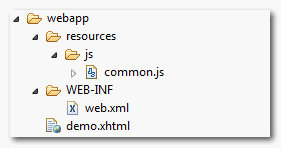
JSF file
<?xml version="1.0" encoding="UTF-8"?>
<!DOCTYPE html PUBLIC "-//W3C//DTD XHTML 1.0 Transitional//EN"
"http://www.w3.org/TR/xhtml1/DTD/xhtml1-transitional.dtd">
<html xmlns="http://www.w3.org/1999/xhtml"
      xmlns:h="http://java.sun.com/jsf/html"
      >
    <h:head></h:head>
    <h:body>

    	<h1>JSF 2 outputScript example</h1>

    	<h:outputScript library="js" name="common.js" />

    </h:body>
</html>
It will generate following HTML output
<?xml version="1.0" encoding="UTF-8"?>
<!DOCTYPE html PUBLIC "-//W3C//DTD XHTML 1.0 Transitional//EN"
"http://www.w3.org/TR/xhtml1/DTD/xhtml1-transitional.dtd">
<html xmlns="http://www.w3.org/1999/xhtml">

   <head></head>

   <body>

     <h1>JSF 2 outputScript example</h1>

     <script type="text/javascript"
       src="/JavaServerFaces/faces/javax.faces.resource/common.js?ln=js">
     </script>

   </body>
</html>
The JS file will render in where JSF <h:outputScript /> tag is placed.
Target Attribute
In addition, you can use “target” attribute to control where to output the js file.
- target=”head” – Display within the top of HTML head tag.
- target=”body” – Display at the end of the body tag.
- no target – Display at where the tag is placed.
For example
<h:outputScript library="js" name="common.js" target="body" />
It will generate following HTML output
<?xml version="1.0" encoding="UTF-8"?>
<!DOCTYPE html PUBLIC "-//W3C//DTD XHTML 1.0 Transitional//EN"
"http://www.w3.org/TR/xhtml1/DTD/xhtml1-transitional.dtd">
<html xmlns="http://www.w3.org/1999/xhtml">

   <head>

   </head>

   <body>
     <h1>JSF 2 outputScript example</h1>

	<script type="text/javascript"
	   src="/JavaServerFaces/faces/javax.faces.resource/common.js?ln=js">
	</script>
   </body>

</html>

how to add async and/or defer?
Thanks, for the explanation
good
Really clear and straight outlines – all you need, nothing you miss ( as far I did read those ;-p )
Hi! Mkyong, Please help me call method bean in javascripts:
$(document).ready(function () {
var $form = $(‘#payment_form’), $accountSelection = $form.find(‘#account’);
$accountSelection.on(‘change’, function () {
alert(#{paymentBean.getAccount($(this).find(“option:selected”).text())});
}); });
But not working! Please, Help me! Thank you!
JSF 2.0
where the location of the js folder is:
c:order-guisrcmainresourcesMETA-INFresourcesjs
—
Explained:
Translates to:
<link rel="stylesheet" href="//javax.faces.resource/accordion.css.html?ln=css” />
which relates to the following server path:
//resources/css/accordion.css
Disk location:
project-rootsrcmainresourcesMETA-INFresourcescss
eg. c:orderorder-guisrcmainresourcesMETA-INFresourcescss
Thanks for sharing!
Hey, in struts, even old struts 1.2, you can do something like the code below. Is there anyway to do this in JSF 2.0? Meaning can you call a bean method directly from Javascript in JSF 2.0?
function expireSession() {
submitAction(“LogoffAction.do?method=logoff”);
}
function submitAction(actionReset) {
var form = document.forms[0];
if (form != null) {
form.action = actionReset;
form.submit();
}
}
how can i use a function in JSF,for exemple i have a data table and i select one rows of this table,how can i show a dialog under the value of one of culumn
any post with and javascript??
with “af: ” (adf)
hi jose
if you are using adf, you can use this tags:
or
alert(“hi”);
🙂
hi jose
if you are using adf, you can use this tags:
or
   <af:resource type="javascript">
       alert("hi");
   </af:resource>
🙂
Muchas gracias, Muy buen post. Me ayudo mucho
Muchas gracias. Que buen blog. De mucha ayuda.
Thanks, it helped me 🙂
Just one observation, not all jsf engines generate the same pattern.
In my case it was:
my suggestion for whom is in trouble with this is to create a css file(e.g. css/jsfcrud.css) in a css folder, than use the bellow tag(with is relative)
check the html source page in your browser and you will find out the pattern your JEE/JSF engine generates.
Thanks that should help.
Is this work?
template.xhtml:
my.xhtml:
How to include js&css files using h:outputScipt tag when using facelets template tech?
How to include js&css files not in the resources directory?
For question not related to the article, try post here – Java Q&A forum
What do you do in JSF 2.0 if you want to inject a remote js file path like the Google Maps API url?
Looks like from http://java.net/jira/browse/JAVASERVERFACES_SPEC_PUBLIC-598 that it isn’t currently possible.
Hi Jaye,
This library exists since Sep 2008 (First release):
https://code.google.com/p/gmaps4jsf/
What java web framework do you use?
Bye!
Hi! This is pretty obvious, but my HTML output contains extra xhtml extension, how can I disable this?
Your code:
src=”/JavaServerFaces/faces/javax.faces.resource/common.js?ln=js”
My code:
src=”/JavaServerFaces/faces/javax.faces.resource/common.js.xhtml?ln=js”
Cheers,
Lukasz