JSF dataTable does not contains any method to display the currently selected row numbers. However, you can hack it with javax.faces.model.DataModel class, which has a getRowIndex() method to return the currently selected row number.
JSF + DataModel
Here’s a JSF 2.0 example to show you how to use DataModel to return the currently selected row number.
1. Managed Bean
A managed bean named “person”, and show the use of DataModel to hold a list of the person object.
package com.mkyong;

import java.io.Serializable;
import javax.faces.bean.ManagedBean;
import javax.faces.bean.SessionScoped;
import javax.faces.model.ArrayDataModel;
import javax.faces.model.DataModel;

@ManagedBean(name="person")
@SessionScoped
public class PersonBean implements Serializable{

	private static final long serialVersionUID = 1L;

	private static final Person[] personList = new Person[]{

		new Person("Person", "A", 10),
		new Person("Person", "B", 20),
		new Person("Person", "C", 30),
		new Person("Person", "D", 40),
		new Person("Person", "E", 50)

	};

	/* To get the row numbers, use dataModel instead
	public Person[] getPersonList() {

		return personList;

	}
	*/

	private DataModel<Person> person = new ArrayDataModel<Person>(personList);

	public DataModel<Person> getPersonList() {

		return person;

	}

	public static class Person{

		String firstName;
		String lastName;
		int age;

		public Person(String firstName, String lastName, int age) {
			super();
			this.firstName = firstName;
			this.lastName = lastName;
			this.age = age;
		}

		//getter and setter methods
	}
}
2. JSF Page
JSP page to show the use of DataModel “rowIndex” to return 0-indexed of the currently selected row number.
<?xml version="1.0" encoding="UTF-8"?>
<!DOCTYPE html PUBLIC "-//W3C//DTD XHTML 1.0 Transitional//EN"
"http://www.w3.org/TR/xhtml1/DTD/xhtml1-transitional.dtd">
<html xmlns="http://www.w3.org/1999/xhtml"
      xmlns:h="http://java.sun.com/jsf/html"
      xmlns:f="http://java.sun.com/jsf/core"
      xmlns:ui="http://java.sun.com/jsf/facelets"
      >
    <h:head>
    	<h:outputStylesheet library="css" name="table-style.css"  />
    </h:head>
    <h:body>

    	<h1>Display dataTable row numbers in JSF</h1>

    	   <h:dataTable value="#{person.personList}" var="p"
    		styleClass="person-table"
    		headerClass="person-table-header"
    		rowClasses="person-table-odd-row,person-table-even-row"
    	   >

		<h:column>

    			<!-- display currently selected row number -->
    			<f:facet name="header">No</f:facet>
    			#{person.personList.rowIndex + 1}

    		</h:column>

    		<h:column>

    			<f:facet name="header">First Name</f:facet>
    			#{p.firstName}

    		</h:column>

    		<h:column>

    			<f:facet name="header">Last Name</f:facet>
    			#{p.lastName}

    		</h:column>

    		<h:column>

    			<f:facet name="header">Age</f:facet>
    			#{p.age}

    		</h:column>

    	   </h:dataTable>

    </h:body>
</html>
3. Demo
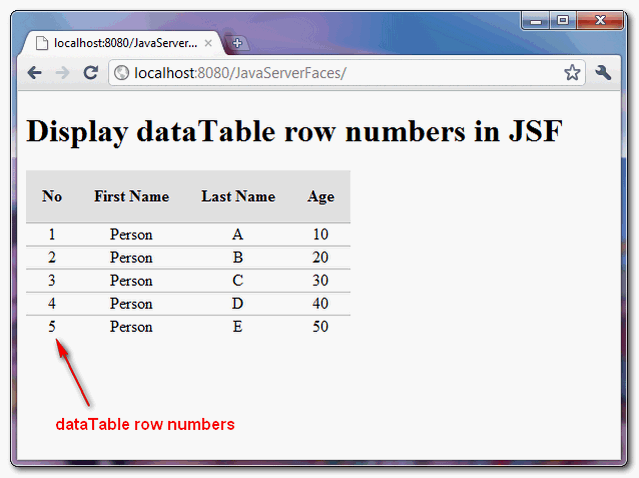
Download Source Code
Download It – JSF-2-DataTable-RowNumbers-Example.zip (10KB)

what hapen if we delete a row the numbers keep the increse order???
How about making specifis rows bold style.
For example i want to make third person highligted.
Thanks for helping.
Hi mykong, i have a question about the following line in the class PersonBean :
private DataModel person = new ArrayDataModel(personList);
i know that ArrayDataModel extend of DataModel, but why don’t use ArrayDataModel instead of DataModel for example:
private ArrayDataModel person = new ArrayDataModel(personList);
if I use DataModel, I should use it like your example?? to use DataModel like your example have some advantage ?? will thanks for your answer
how to get data from row index of datatable in JSF..
will thanks for answers……..