Mashable, best known as social media resources website, created an awesome floating effect while user scrolling the page. Here’s a simple idea to clone this floating effect with jQuery.
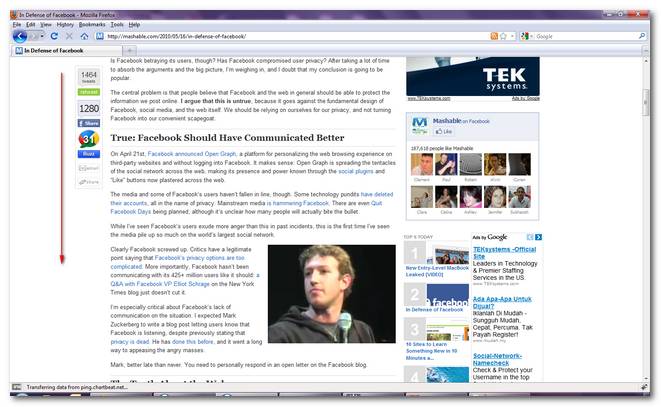
Idea…
- Create a floating box.
- Initial the floating box location, put it beside the body content.
- While user scrolling the page, keep checking the scroll bar position.
- If the scroll bar y position is greater than the floating box y position, change the floating box y position dynamically.
- While the scroll bar y position lesser than the floating box y position, restore the original position.
- Use jQuery, of course.
1. HTML Layout
A simple HTML layout, header, content and footer, put a div “floating-box” above the content.
<div id="page">
  	<div id="header"><h1>header</h1></div>
	<div id="floating-box"></div>
	<div id="body">
		<h1>content</h1>
		<h2>Mashable floating effect example</h2>
	</div>
	<div id="footer"><h1>footer</h1></div>
</div>
2. Floating box 90×200
This is the box that will float smoothly while people scrolling the box. You may need to adjust the “margin-left:-100px;” a bit to suit your need.
#floating-box{
	width:90px;
	height:200px;
	border:1px solid red;
	background-color:#BBBBBB;
	float:left;
	margin-left:-100px;
	margin-right:10px;
	position:absolute;
	z-index:1;
}
3. No conflicts, please
Make sure jQuery has no conflict with other library. Highly recommend to check it.
    //avoid conflict with other script
    $j=jQuery.noConflict();

    $j(document).ready(function($) {
4. Position, position, position
Bind the jQuery scroll() event to keep checking the browser’s scroll bar position.
$(window).scroll(function () {

	var scrollY = $(window).scrollTop();
	var isfixed = $floatingbox.css('position') == 'fixed';

	if($floatingbox.length > 0){

		if ( scrollY > bodyY && !isfixed ) {
			$floatingbox.stop().css({
				position: 'fixed',
				left: '50%',
				top: 20,
				marginLeft: -500
			});
		} else if ( scrollY < bodyY && isfixed ) {
			$floatingbox.css({
				position: 'relative',
				left: 0,
				top: 0,
				marginLeft: originalX
			});
		}
	}
});
If the scroll bar y position is greater than the floating box y position, change the floating box y position to “marginLeft: -500“. You may need to customize this value to suit your need.
	if ( scrollY > bodyY && !isfixed ) {
	   $floatingbox.stop().css({
		position: 'fixed',
		left: '50%',
		top: 20,
		marginLeft: -500
	   });
	 }
If the scroll bar y position lesser than the floating box y position, restore to the original position.
        if ( scrollY < bodyY && isfixed ) {
	   $floatingbox.css({
		position: 'relative',
		left: 0,
		top: 0,
		marginLeft: originalX
	   });
	}
5. Done
Try playing the below example to get an idea of the works.
P.S This floating effect feature is implemented in my DiggDigg WordPress plugin.
Try it yourself
<!DOCTYPE html PUBLIC "-//W3C//DTD XHTML 1.0 Transitional//EN"
"http://www.w3.org/TR/xhtml1/DTD/xhtml1-transitional.dtd">
<html>
<head>
<script type="text/javascript" src="jquery-1.4.2.min.js"></script>

<style type="text/css">
	#floating-box{
		width:90px;
		height:200px;
		border:1px solid red;
		background-color:#BBBBBB;
		float:left;
		margin-left:-100px;
		margin-right:10px;
		position:absolute;
		z-index:1;
	}
	#page{
		width:800px;
    	margin:0 auto;
	}
	#header{
		border:1px solid blue;
		height:100px;
		margin:8px;
	}
	#body{
		border:1px solid blue;
		height:2400px;
		margin:8px;
	}
	#footer{
		border:1px solid blue;
		height:100px;
		margin:8px;
	}
	h1,h2{
		padding:16px;
	}
</style>

</head>
<body>

  <div id="page">
  	<div id="header"><h1>header</h1></div>

	<div id="floating-box">

	</div>

	<div id="body">
		<h1>content</h1>
		<h2>Mashable floating effect example</h2>
	</div>
	<div id="footer"><h1>footer</h1></div>
  </div>


<script type="text/javascript">

    //avoid conflict with other script
    $j=jQuery.noConflict();

    $j(document).ready(function($) {

	//this is the floating content
	var $floatingbox = $('#floating-box');

	if($('#body').length > 0){

	  var bodyY = parseInt($('#body').offset().top) - 20;
	  var originalX = $floatingbox.css('margin-left');

	  $(window).scroll(function () {

	   var scrollY = $(window).scrollTop();
	   var isfixed = $floatingbox.css('position') == 'fixed';

	   if($floatingbox.length > 0){

	      $floatingbox.html("srollY : " + scrollY + ", bodyY : "
                                    + bodyY + ", isfixed : " + isfixed);

	      if ( scrollY > bodyY && !isfixed ) {
			$floatingbox.stop().css({
			  position: 'fixed',
			  left: '50%',
			  top: 20,
			  marginLeft: -500
			});
		} else if ( scrollY < bodyY && isfixed ) {
		 	  $floatingbox.css({
			  position: 'relative',
			  left: 0,
			  top: 0,
			  marginLeft: originalX
		});
	     }
	   }
       });
     }
  });
</script>
</body>
</html>

I know this post is old, but just in case it helps someone else, parseInt() requires a second parameter for the radix. https://developer.mozilla.org/en-US/docs/Web/JavaScript/Reference/Global_Objects/parseInt
hi yor all. me help to send cod. help me
how to use it on html templates?
Hi,
Nice work. Helped me a lot.
Keep it up. However I think
does not work in Safari.
Very nice script. Is there are any chance to run it with jquery 1.3.2?..
Any similar WordPress plugin that can do this?
It works! Nice! Have you it as WP Plugin?
I would really like to have a floating image for “promotions” or “contest” or even social buttons.
Hi.
Allow me to make you a challange. Im 1280×800 browser dimensions increase the footer height to 400px and the floating-box height to 600px. Now, the floating-box can never pass the #body. here’s (http://gestoenergy.dreamlabstudio.com/teste.html) a test I’m trying to develop. I’m having problem when the floating-box reaches the bottom of the #body. I you see the demo, you ‘ll get ir
If you or anyone accomplish let me know
Thanks
Ok, I succeeded. Finally, but I got problem with IE8 and IE7. Is there anyone out there who can help me or this page is dead??
How do you make it so that the “floating-box” holds at a specific X access?
You mention that the “marginLeft: -500” needs to be altered but how do you figure out exactly what it needs to be?
Is there some way to simply calculate it?
An Awesome thinking to add on website or blog thanks
Been trying to get by the jQuery.noConflict(); command.
I am only using jQuery 1.6.2 and jQuery.ui-1.8.1 from the jQuery UI web site and your thingie doesn’t work with it. Sorry but the jQuery UI lib is more important.
Can someone please post a way to prevent the floating box from moving off of the page to the left?
and how to add social facebook button into it
Sorry, I can not add html code in the comment.
I have this example: http://www.discoverdesign.info/div/index.html
and this is my code: http://www.infobuscador.com/example/index.html
I can not get something done well. Anybody can help me, please ?
Thanks
HTML code is filter for security concern. Visited your page, but no idea what you want to do still? May i know what’s your problem?
anyone can help me with this thing. I want to do something like this: http://www.discoverdesign.info/div/index.html
I lost days to find answers. Please help me.
Thanks
I have the code below:
example
body {
background:#999;
}
.container {
width:900px;
background:#FFF;
margin:0px auto;
}
.footer {
width:100%;
height:150px;
background:#06C;
}
.header {
width:100%;
height:150px;
background:#06C;
}
.content {
width:100%;
height:1200px;
background:#FFF;
}
.toolbar {
position:fixed;
bottom:0px;
width:900px;
height:40px;
background:#900;
}
You mentioned about jQuery conflict. Does it mean I cannot use other jquery script in the same webpage? Perhaps, in that case, the solution is to use iframe.
Is there anyway to make this work as a compliment to a footer? My goal’s to have a footer that has a form for the user to fill out. Obviously, because it’s at the bottom of the page, they might overlook the fact it’s there. So I’d like a button on the bottom of the screen that’s like 150px by 150px and about 15px from the bottom, when you reach the footer though, I want that same button to go to the top of the footer (which will be roughly 300px). As if the footer is told, “do not cross over the footer.”
Any suggestions?
Hi, was looking for the same functino and just came across this jquery example menu that stops at the footer, maybe thats what u mean? http://plugins.jquery.com/files/stickyfloat_0.htm
Thanks Andre. That is what i need
any ideas for how to make it fade into position instead of just popping into frame?
Holy shit. Your ads autoplay with audio and have no pause or mute button.
No.
May i know which ads playing the sound?
Thanks for the great tutorial.
There’s one thing though. The script would be even better if the floating box stopped floating when its bottom reached the top of the footer or at least the bottom of the window (the end of the page).
In other words, how do you make it “float” only between certain elements, lets say between the header and the footer?
a quick algorithms in my mind, may be create a ‘div’ tag with an id of ‘float-end’ and put above the footer or when you want the “floating” stop, while scrolling position hit this ‘tag’ then stop scrolling down further…
Hi, I’m new to coding, so I’m experimenting and trying things out. I was so happy when I found this because I’ve been wanting to do something like this. But I’m wondering if you could please explain this ‘float-end’ thing a bit more, because I would also like to make it only float between certain elements.
Thank you!!!
Could you explain this a little further? I don’t know enough about jQuery to solve this on my own. Any help would be greatly appreciated!
Thanks
thank you. I was looking for this trick a long time ago.
Hi there, I have created a plugin for wordpress that does this. It’s still in Beta but its easy to use…give it a try,http://www.tbkcreative.com/the-lab/wordpress-social-media-button-plugin/
how can you make it scroll smoother that default javascript scroll?
jQuery do
i’ve tried to integrate something like scrollto to this
but no luck at all
do you have any good tutorial for it? much appreciate it
thank you
Is jQuery scrollTo function not working? Mind to send me your code?
that’s very cool
Thanks alot
Works fine in Chrome & Firefox (PC), but fails in IE (fixed positioning issues).
Sorry, are you tested in IE6? caused it worked fine in IE 7 & 8
It’s also not working in IE 9.