
In this tutorial, we will show you how to configure Eclipse debugger to support hot deploy, hot swap or hot code replace without restarting the Server, this speed development a lot.
Environment :
- Eclipse 4.4 (Supported in older version as well)
- Eclipse Tomcat Plugin
1. Hot deploy example
Review a simple hot deploy example, code changes without restarting the Tomcat plugin. Assume a simple Spring MVC web project is deployed via the Eclipse-Tomcat plugin :
1.1 Original code
@Controller
public class TaskController {

	@RequestMapping(value = "/task", method = RequestMethod.GET)
	public ModelAndView index() {

		logger.debug("index()");

		ModelAndView model = new ModelAndView();
		model.setViewName("index");
		return model;

	}
Access : http://localhost:8080/project/task
//output
DEBUG c.m.o.web.controller.TaskController - index()
1.2 Change the code, logs something else
@Controller
public class TaskController {

	@RequestMapping(value = "/task", method = RequestMethod.GET)
	public ModelAndView index() {

		logger.debug("index() - NEW - NO RESTART");

		ModelAndView model = new ModelAndView();
		model.setViewName("index");
		return model;

	}
Access again : http://localhost:8080/project/task
//output
DEBUG c.m.o.web.controller.TaskController - index() - NEW - NO RESTART
2. Configure Hot deploy in Eclipse
Some steps are required to make Eclipse supports hot deploy.
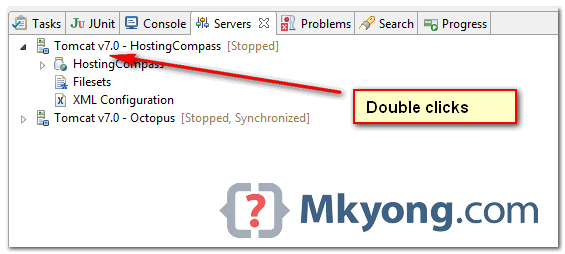
2.1 Double clicks on the Tomcat plugin, refer to publishing tab, make sure Automatically publish when resources change is selected. This should be the default option, to support “hot deploy” resources, for example : JSP, XML and properties files.
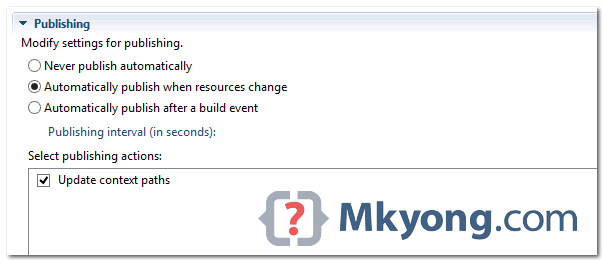
2.2 In the Tomcat Plugin page, clicks on the Module view, make sure Auto Reload is Disabled. Default is enabled.
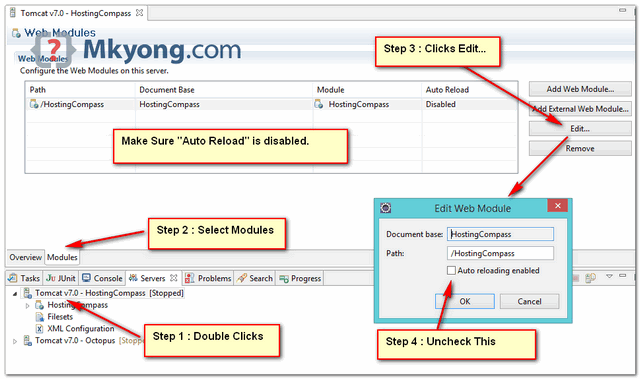
This is an important step, failed to set the auto reload to disabled, the Tomcat server will be restarted every time you modified something!
2.3 Start Project in DEBUG mode. Hot Deploy is supported in DEBUG mode only.
Done.
3. Limitation
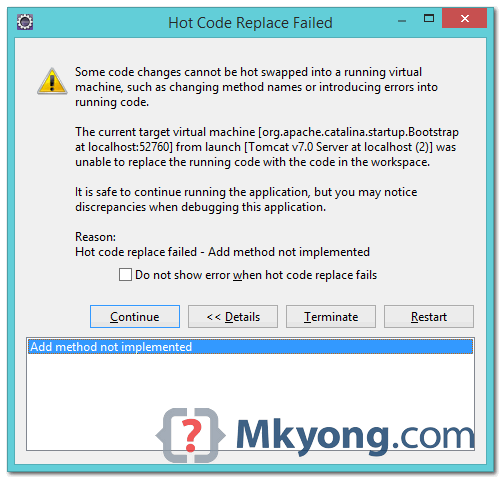
Hot deploy has supported the code changes in the method implementation only. If you add a new class or a new method, restart is still required.
To simulate it, try to add a new method, following pop up screen will be displayed, saying the code changes cannot be hot swapped in the JVM.

Much appreciated topic, sir.
Thanks for this post. This is saving good amount of time during development
Thank a lot, doing this configuration has saved my time. But I am just wondering Isn’t the name in step 4 i.e. “Enable autoreloading enabled” opposite to what it is doing, since we have UNCHECKED this, then ideally we are telling do not enable autorealoading ?
Thank you. This saved me a lot of time, keep sharing java articles. Cheers!
USE DCEVM -The Dynamic Code Evolution Virtual Machine (DCE VM) is a modification of the Java HotSpot(TM) VM that allows unlimited redefinition of loaded classes at runtime. The current hotswapping mechanism of the HotSpot(TM) VM allows only changing method bodies. The enhanced VM allows adding and removing fields and methods as well as changes to the super types of a class.
How can i deploy an exploded war on tomcat using eclipse neon ide and still use the hot deploy option ? Not able to configure this , application doesn’t seem to be deployed on tomcat in eclipse ide
Thank you very much . I have wasted almost 4 hours by doing other changes.
Thank You . This saved my lot of time by letting me to avoid stop and start Tomcat 🙂
Hot-deploy works quite well. But after that my spring context gets reloaded. Every bean of my app hast to be initiated and it takes lot of time. Is there a way to do a code change described in the article but WITHOUT spring context reload?
I believe Tomcat is auto restart, refer step 2.2, make sure Tomcat Plugin, “Auto Reload” is “Disabled“.
have done all the adjustments.
but tomcat starts always again? without clicking “continue”.
you have a clue?
thanks!
Refer step 2.2, make sure Tomcat Plugin, “Auto Reload” is “Disabled“.
Thanks for the tip, I was looking for the way to disable it, as it’s on by default for me. Quite a time consuming every save.
I followed the directions, my Spring application keeps redeploying after I change anything. Not sure what I am doing wrong.
My resolution was to go with http://www.hotswapagent.org/ – It works well for me with my Spring war deployment.
Even with Hotswapagent my application kept reloading every time I modified a .java file when I had auto publish turned on, the fix was to do this in Tomcat’s context.xml file in addition to turning auto reloading off as described by mkyong above:
–
+
It is Tomcat restarted, refer step 2.2, make sure “Auto Reload” is disable..
DCEMV setup for eclipse is there:
http://tirthalpatel.blogspot.in/2014/06/steps-to-setup-hotswap-agent-in-eclipse.html
Make a tutorial for configuring JRebel in Eclipse.
Sorry, I don’t have JRebel license.
Or just simply use JRebel?
JRebel is not free.
JRebel is good – http://zeroturnaround.com/software/jrebel/ , but I can’t afford the $300+/year license 🙂
For non-trivial class changes there is available a modification of HotSpot :
https://github.com/dcevm/dcevm
Together with HotswapAgent :
https://github.com/HotswapProjects/HotswapAgent
it can provide true hotswap not only for debugging!