A desktop computer, Windows 8 is installed, connect to a nearby router via a wireless USB adapter.
- D-Link DWA-132 – Wireless N USB Adapter
- D-Link Wireless N300 Router DIR-615
- Fiber optic internet
If the computer is idle sometime, it will interval drops the wifi connection, and reconnect it again. The desktop computer was installed Windows 7, no problem at all. This wifi dropping issue has happened since upgraded to Windows 8.
Solution 1 – Wifi Coverage
The WiFi signal is too weak or unstable, so, Windows just drop the connection when unable to detect the wifi signal. To identify it, install a wifi analyzer like inssider to check the wifi signal.
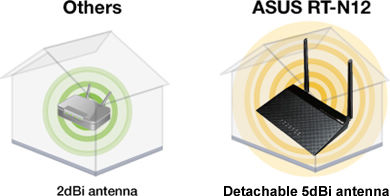
To fix it, just increase the wifi coverage by an upgrade to a more powerful router, move your computer closer to the router, or use the cable. For example, upgrade the D-Link DIR-615 to ASUS wireless router RT-N12, with two 9dBi antennas for wider coverage.
Solution 2 – Power Management
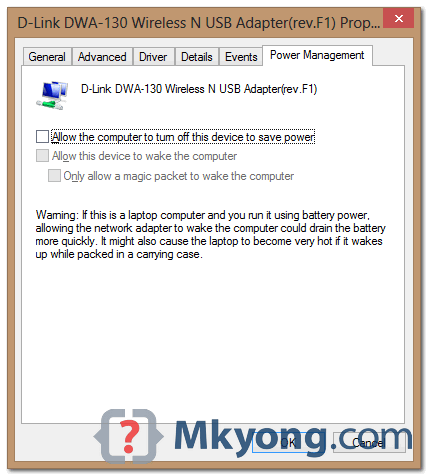
Windows 8 has a default feature to turn off the wireless adapter card to save power. To disable it :
- Control Panel -> Network and Sharing Center -> Change Adapter Settings
- Right click on the connected wifi connection -> properties
- Clicks “Configure…” button -> select “Power Management” tab
- Uncheck this “Allow the computer to turn off this device to save power“
- Ok and restart Windows

Woohoo! Thank you!
Why have Microsoft consistently failed to admit they have a huge problem
with Windows 8 losing internet connectivity? This bollocks about the
issue lying elsewhere is so annoying………… You run their
troubleshooter application and it resolves the issue in the Windows 8
software. BUG fix it now!!!!!
Just as a side note. There was another solution to this a while back was to remove the driver and re-install another driver (I believe the driver was the factory driver). This was in Windows 8 (not 8.1).
– Josh
Mkyong, you just saved me from pulling an “office space” on my laptop. No joke.
Thanks man,
Thank you. I was not aware of this power management feature. Quite informative !!!
Don’t help 🙁
Win8 still drop connection on my Samsung 530
Coverage is OK, power management turned off.
Maybe it a driver/hardware issue?
How about wired cable directly, will it drop still?
Thanks, thats nice and helpfull