In Android, you can use “android.widget.Spinner” class to render a dropdown box selection list.
Spinner is a widget similar to a drop-down list for selecting items.
In this tutorial, we show you how to do the following tasks :
- Render a Spinner in XML, and load the selection items via XML file also.
- Render another Spinner in XML, and load the selection items via code dynamically.
- Attach a listener on Spinner, fire when user select a value in Spinner.
- Render and attach a listener on a normal button, fire when user click on it, and it will display selected value of Spinner.
P.S This project is developed in Eclipse 3.7, and tested with Android 2.3.3.
1. List of Items in Spinner
Open “res/values/strings.xml” file, define the list of items that will display in Spinner (dropdown list).
File : res/values/strings.xml
<?xml version="1.0" encoding="utf-8"?>
<resources>

    <string name="app_name">MyAndroidApp</string>
    <string name="country_prompt">Choose a country</string>

    <string-array name="country_arrays">
        <item>Malaysia</item>
        <item>United States</item>
        <item>Indonesia</item>
        <item>France</item>
        <item>Italy</item>
        <item>Singapore</item>
        <item>New Zealand</item>
        <item>India</item>
    </string-array>

</resources>
2. Spinner (DropDown List)
Open “res/layout/main.xml” file, add two spinner components and a button.
- In “spinner1”, the “
android:entries” represents the selection items in spinner. - In “spinner2”, the selection items will be defined in code later.
File : res/layout/main.xml
<?xml version="1.0" encoding="utf-8"?>
<LinearLayout xmlns:android="http://schemas.android.com/apk/res/android"
    android:layout_width="fill_parent"
    android:layout_height="fill_parent"
    android:orientation="vertical" >

    <Spinner
        android:id="@+id/spinner1"
        android:layout_width="match_parent"
        android:layout_height="wrap_content"
        android:entries="@array/country_arrays"
        android:prompt="@string/country_prompt" />

    <Spinner
        android:id="@+id/spinner2"
        android:layout_width="match_parent"
        android:layout_height="wrap_content" />

    <Button
        android:id="@+id/btnSubmit"
        android:layout_width="wrap_content"
        android:layout_height="wrap_content"
        android:text="Submit" />

</LinearLayout>
3. Code Code
Read the code and also code’s comment, it should be self-explanatory.
File : MyAndroidAppActivity.java
package com.mkyong.android;

import java.util.ArrayList;
import java.util.List;
import android.app.Activity;
import android.os.Bundle;
import android.view.View;
import android.view.View.OnClickListener;
import android.widget.ArrayAdapter;
import android.widget.Button;
import android.widget.Spinner;
import android.widget.Toast;

public class MyAndroidAppActivity extends Activity {

  private Spinner spinner1, spinner2;
  private Button btnSubmit;

  @Override
  public void onCreate(Bundle savedInstanceState) {
	super.onCreate(savedInstanceState);
	setContentView(R.layout.main);

	addItemsOnSpinner2();
	addListenerOnButton();
	addListenerOnSpinnerItemSelection();
  }

  // add items into spinner dynamically
  public void addItemsOnSpinner2() {

	spinner2 = (Spinner) findViewById(R.id.spinner2);
	List<String> list = new ArrayList<String>();
	list.add("list 1");
	list.add("list 2");
	list.add("list 3");
	ArrayAdapter<String> dataAdapter = new ArrayAdapter<String>(this,
		android.R.layout.simple_spinner_item, list);
	dataAdapter.setDropDownViewResource(android.R.layout.simple_spinner_dropdown_item);
	spinner2.setAdapter(dataAdapter);
  }

  public void addListenerOnSpinnerItemSelection() {
	spinner1 = (Spinner) findViewById(R.id.spinner1);
	spinner1.setOnItemSelectedListener(new CustomOnItemSelectedListener());
  }

  // get the selected dropdown list value
  public void addListenerOnButton() {

	spinner1 = (Spinner) findViewById(R.id.spinner1);
	spinner2 = (Spinner) findViewById(R.id.spinner2);
	btnSubmit = (Button) findViewById(R.id.btnSubmit);

	btnSubmit.setOnClickListener(new OnClickListener() {

	  @Override
	  public void onClick(View v) {

	    Toast.makeText(MyAndroidAppActivity.this,
		"OnClickListener : " +
                "\nSpinner 1 : "+ String.valueOf(spinner1.getSelectedItem()) +
                "\nSpinner 2 : "+ String.valueOf(spinner2.getSelectedItem()),
			Toast.LENGTH_SHORT).show();
	  }

	});
  }
}
File : CustomOnItemSelectedListener.java
package com.mkyong.android;

import android.view.View;
import android.widget.AdapterView;
import android.widget.AdapterView.OnItemSelectedListener;
import android.widget.Toast;

public class CustomOnItemSelectedListener implements OnItemSelectedListener {

  public void onItemSelected(AdapterView<?> parent, View view, int pos,long id) {
	Toast.makeText(parent.getContext(),
		"OnItemSelectedListener : " + parent.getItemAtPosition(pos).toString(),
		Toast.LENGTH_SHORT).show();
  }

  @Override
  public void onNothingSelected(AdapterView<?> arg0) {
	// TODO Auto-generated method stub
  }

}
4. Demo
Run the application.
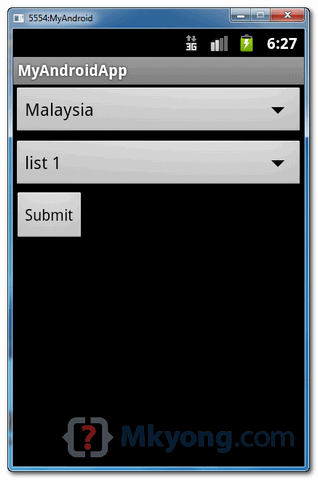
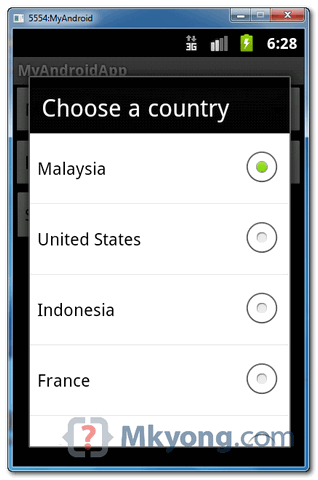
1. Result, two spinners are displayed :
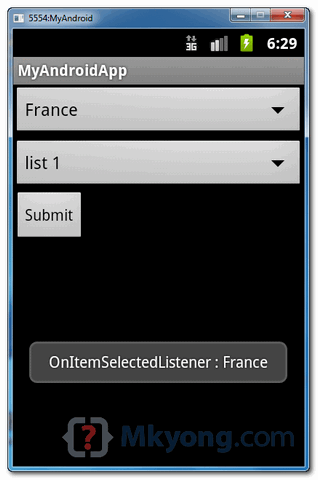
2. Select “France” from spinner1, item selection listener is fired :
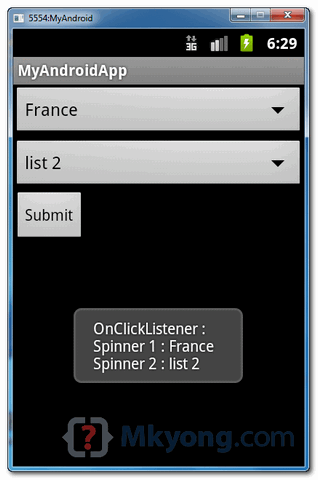
3. Select “list2” from spinner2, and click on the submit button :

my spinner is done. how should I write to code the choose from Listbox and display the details in text view
Hi..
My drop list not including ” import class”
Please advice how can i got it in android studio.
Thanks
awesome bro clear cut codes
Very Thanks to you master, i’m from indonesia,,android dev. beginer
Nice
Anyone, Help me. Why ‘prompt’ in my spinner is “useless”
thanks for the post.. I really appreciate the job you have done.. thanks man!!! 🙂
Very Nice tutorial! Loved it. Make tutorial about all android resources.
Very helpful and easy to understand. Keep it up!
Hi. Thank you.
how to set class path to resources in android studio
This is an awesome tutorial/example. Now i can get this part of my project working. Thank you.
how to start another activity when click on item from spinner items Please provide a
sample code
yes i am father of android studio
Hi, how do i display the spinner from Parse database? Am a student doing a FYP but i have no idea how to display the spinner retrieving data from parse database…
Hi , Do you know how to add spinners to spinner?
Just add to the power of two. You can also use square root for half a spinner.
It’s so funny that I forgot to laugh
Prompt works with Dialog type spinner. Do you have solution for Dropdown spinner? Can we set default text in that?
hi,let me consider my situation. if i selected a country for example “France”, and then submit, i need to call another function with the parameter of country identity. please explain how can i solve…
Thank you buddy!
You rock!
Hi, after clickin’ submit it bugs 🙁
Thanks for providing this example!
This is not a dropdown list! Its a popup menu selection!
if you want a dropdown list, change the xml spinner style into dropdown.
No, I don’t want. I just commented here because he’s leading the people in the wrong terminology.
check this on example http://www.androidinterview.com/android-spinner-dropdown-displaying-a-list-of-items/
You’re right! Got another tutorial with an actual dropdown LIST
http://www.ahotbrew.com/android-dropdown-spinner-example/
We have tried to run the codes above but we have taken an error which indicates that ” R cannot resolved” .How can we fix it ?
Android is constantly evolving – both the SDK and the IDEs. Anytime putting “should be self explanatory” usually means the author doesn’t understand the main concepts or at least not well enough to explain any specifics or nuances. Which versions were you building to in the SDK? How did you generate the CustomOnItemSelectedListener.java?
Well, Kevin. 2019 now and this tutorial sems extremely correct to me. It solved my issues just fine, plain and simple. You should not judge.
And CustomOnItemSelectedListener.java is, as the name says, a custom made class. So it wasn’t self generated, Mkyong must have designed it with this intended purpose.
Great tutorial, helped alot
Thanks, it was really helpful
hello this is demo
Really thank you. This post solved my today-problem!
Thanks admin this tutorial helped me alot… thankssss
thanks admin it helps alot …nice tutorial
Thanks for the source
thanks man!!!..this is what i really need 😀
I am starting to learn Android. I get an error trying to use this code, on this line
spinner1.setOnItemSelectedListener(new CustomOnItemSelectedListener());
Error:CustomOnItemSelectedListener cannot be resolved to a type
The quick fixes suggested by Eclipse dont work. I cant find any way to resolve this thru google search.
I got the error resolved.
how
I get the same error too…Can you please tell me how you resolved it??? Thx
It’s a little late, but make sure the file CustomOnItemSelectedListener.java exists in com.mkyong.android folder.
this is a common problem you need just to import android.widget.AdapterView.OnItemSelectedListener;
Really nice and clean tutorial.
thank you
Muito Obrigado, Foi de grande ajuda!
Thanks a lot, helpfull!
Hi, and thank you a lot for this article, It’s really amazing and helpfull, how is all your website.
So, I need your help, if is possible.
I’m a student and newer in Android’s world, can you solve a problem with me?
I have tryed load a spinner with a previously value selected, but, didn’t work.
Following my code.
/*
…
This code is a part of the method startListener(), implemented on protected void onCreate(Bundle savedInstanceState)
*/
OnItemSelectedListener selecaoConta = new OnItemSelectedListener()
{
@Override
public void onItemSelected(AdapterView adaptador,
View arg1, int arg2, long arg3)
{
contaDTO = (Conta_DTO) adaptador
.getSelectedItem();
}
@Override
public void onNothingSelected(AdapterView arg0)
{
// TODO Auto-generated method stub
}
};
spnConta.setOnItemSelectedListener(selecaoConta);
/*
…
After, when user select the option for UPDATE Registry, I call the method for load the Activity, The spinner shoulded come with the third item loaded, but how I sad, this not happen.
Now, this a a part of the method for LOAD a spinner with a especific value selected.
*/
contaDTO = lancamentoDTO.getObjConta();
int codConta = 3;
spnConta.setSelection(codConta);
Thank you for some help you can give. All help is welcome.
helpfull
Thank you for this and the other useful example.
They are a great help for me.
One question. Is it possible the height of a spinner reduce.
I know how to change the text, but is it possible to change the minimum
height of the box too ?
Thank you
Super helpful. Straightfoward with great explanations. Thank you my friend
Gr8, tks 4 share it!
thanks, this all I need for my code too
final EditText input = (EditText) findViewById(R.id.textView1);
Button chkCmd = (Button) findViewById(R.id.button1);
final ToggleButton passTog = (ToggleButton) findViewById(R.id.toggleButton1);
TextView display = (TextView) findViewById(R.id.textView1);
passTog.setOnClickListener(new View.OnClickListener() {
@Override
public void onClick(View v) {
// TODO Auto-generated method stub
if(passTog.isChecked()){
input.setInputType(InputType.TYPE_CLASS_TEXT | InputType.TYPE_TEXT_VARIATION_PASSWORD);
}else{
input.setInputType(InputType.TYPE_CLASS_TEXT);
}
}
});
Thank you so much.Its simply great
Thank you..I’m really looking for this code.. i want to do about ticket time from where to where. when the submit button is clicked the time table will appear..how can i do this??
thanks, this all I need for my code
exactly what i needed
thank you SIR
I have some doupt can u solve.
Great One , Thank you 🙂
how to get the selected spinner string value??
dfghhhhhhhhhhhhhhhhhhhhhhhhhhhhhhhhhhhhhhhhhhhhhhhhhhhhhhhhhhhhhhhhhhhhhhhhhhhhhhhhhhhhhhhhhhhhhhhhhhhhhhhhhhhhhhhhhhhhhhhhhhhhhhhhhhhhhhhhhhhhhhhhhhhhhhhhhhhhhhhhhhhhhhhhhhhhhhhhhhhhhhhhhhhhhhhhhhhhhhhhhhhhhhhhhhhhhhhhhhhhhhhhhhhhhhhhhhhhhhhhhhhhhhhhhhhhhhhhhhhhhhhhhhhhhhhhhhhhhhhhhhhhhhhhhhhhhhhhhhhhhhhhhhhhhhhhhhhhhhhhhhhhhhhhhhhhhhhhhhhhhhhhhhhhhhhhhhhhhhhhhhhhhhhhhhhhhhhhhhhhhhhhhhhhhhhhhhhhhhhhhhhhhhhhhhhhhhhhhhhhhhhhhhhhhhhhhhhhhhhhhhhhhhhhhhhhhhhhhhhhhhhhhhhhhhhhhhhhhhhhhhhhhhhhhhhhhhhhhhhhhhhhhhhhhhhhhhhhhhhhhhhhhhhhhhhhhhhhhhhhhhhhhhhhhhhhhhhhhhhhhhhhhhhhhhhhhhhhhhhhhhhhhhhhhhhhhhhhhhhhhhhhhhhhhhhhhhhhhhhhhhhhhhhhhhhhhhhhhhhhhhhhhhhhhhhhhhhhhhhhhhhhhhhhhhhhhhhhhhhhhhhhhhhhhhhhh
hgjjjjjjjjjjjjjjjjjjjjjjjjjjjjjjjjjjjjjjjjjjjjjjjjjjjjjjjjjjjjjjjjjjjjjjjjjjjjjjjjjjjjjjjjjjjjjjjjjjjjjjjjjjjjjjjjjjjjjjjjjjjjjjjjjjjjjjjjjjjjjjjjjjjjjjjjjjjjjjjjjjjjjjjjjjjjjjjjjjjjjjjjjjjjjjjjjj
hi…
how to intent a class when I select button submit?
Hi mkyong… good posts as always. Im having a challenge in one of my implementations.
I have an activity which is populated by an array of dynamically created buttons.
I need to implement the pull to refresh feature in order to refresh the list of buttons on the activity but what I have so far is not working as expected.
Examples I have mainly use an array of strings.
Hey this works really well for me. Thanks a lot for this…
Could you also let us know how to create a spinner with multiple selection of objects??
thanks
Your Majesty, thanks lord for your existence, I was this close to dumping all android world.
:))) Your Majesty.
hey your code is very help full for me n every beginner thanks a lol
Hi
Thank you for this tutorial on creating Android Spinners. I have an Android Spinner View board on Verious with this post. I’d like to share it with anyone interested in creating a Drop Down List. Please let me know if there’s anything I can add to make a more comprehensive resource for other developers.
http://www.verious.com/board/Giancarlo-Leonio/creating-an-android-spinner-view-from-developers-like-mkyong-and-sai-geetha
@Veriously
Hey,
M completely new to android!
Please bare with me for asking such a silly question!
Where is the “@array/country_arrays” placed??
in which folder am i supposed to write this file??
you should place it under values/strings folder.He has mentioned it up there.
I wish you had actually filled spinner 2 from an XML file. I cannot find how to parse and get my data out of an XML file into an Array to load the spinner.
Thanks a lot
u helped me very much
thanks bro
can u tel how to append new items to existing hardcoded array list…
Thanks for help….
very cool tuto :), thks mkyong
Awesome, Can you do a tutorial on how once someone selects their options it saves it to a file so they can go back and look through them?
Thanks!!!!
Hey
good post.
Can u show how to show icons with text in the Spinner
hey ur tutorial is excellent & can u tell me how to write for date of birth please
very nice and accurate example….thanks a lot………..Great work…
hello Sir this is absolutely a good example but am searching when i will select a country then automatically the continents of this state will come in another spinner. can you send some solution to me? then i will be grateful to you.
Thank you.
Thanks for your nice and easy to follow tutorial.
It took sometime to me because I made the mistake of mispelling “spinner” instead of “Spinner” in the class definition on the XML file.
From Portugal,
Júlio
If the spinner has an array with cities and each city has its own respective url, how do I pass the value from the spinner to run its respective url in a webview?
Thanks
Thanks – helped me solve a problem I’ve been struggling with for hours!
tanks a lot dude…
Well done.
Thanks Mkyong, it was a great help.
Thanks for posting such a nice self explanatory example
Dear Mkyong,
many THX for this Example!
But i`m very, very new in Android-/Eclipse-Programming and have one big spinner-problem, that i could´nt solve alone. 🙁
Downloading the sample, every works fine! But when i try it with a new project on my machine (Mac + Win7), i wont get a DropDown-Button only a square that is cutted diagonal.
The entries are not shown in a other “window” with option buttons, they will be listed UNDER the spinner.
The Graghical Design is shown in WHITE.
I think, it is a problem of my settings, but i have no idea!
YOU? 😉 (i´m despairing)
sorry, me forget. 🙂
Me use Android 4.1 and Eclipse 4.2.0
(terrible english…)
Thanks, that was just what a needed…life saver…
THank Mkyong, it was such a help.
On the line with:
btnSubmit.setOnClickListener(new OnClickListener() {I get this error message in Eclipse:
The method setOnClickListener(View.OnClickListener) in the type View is not applicable for the arguments (new DialogInterface.OnClickListener(){})what went wrong?
it’s common mistake
btnSubmit.setOnClickListener(new OnClickListener()
-> btnSubmit.setOnClickListener(new View.OnClickListener()
you shoud add View class
nice one cool………….
I want to know how i could implement when select a item in spinner and i clicked the submit button then how could i execute an xml file corresponding to the selected item
can any one help me……. Thanks in advance
Hi Dear:
i want to develop an Android application showing 5 markers/points in google maps. Is there anybody who already has done this task and know about how it will be accomplished.
Please reply as soon as possible if any body know. Thanks.
Examples are very helpful to me..awesome examples
Hello dear i am trying to develop Landrule game….for learning purpose.
I need help to complete my this learning program.
I would like to ask you how to program:
after clicking on New Local Game, how to display
Maps:…….(list of maps)
# Humans:……..(list of counting)
# AI……………..(List of counting)
Difficulty:………..(Easy, Harder)
Assigning Colors to Each Player:…
Please Help me so that i can proceed my task to next level, Please it is urgent
Thank you very much! I didn’t know the correct approach was to use android layouts for the dropdown and dropdownitem unstead of custom made (which i had trouble coding).
in this app use this line facing error remove this line working perfect api level is 8
android:prompt=”@string/country_prompt”
very good examples
Hi Every one….
I want to develop LandRule game. in which i want to use Map editing Functionality.
I need your guidance if you wanted..
I think you are an experienced and talented person and can guide me in a better way.
thanks..this tutorial solved my problem
Thanks. it helps me a lot.
Hi,
Thanks for the tutorial,
Hey in my one application, i need to listen for sound, if sound is of “clap” then i want my android phone to start playing particular song.
Can you help me with this, how can achieve this, how can i compare that the sound is of “clap”.
any inputs/points will be helpful.
How to insert image in drop down list
can the same code when implemented with php files be used for adding the contents of spinner to mysql databse?
great job, but i wanna try making 2 spinner from database, and i not found good tutorial as yours, i thinks i need yours help this time…thanks before
Not many examples on the internet have example with multiple spinners in one activity. Thanks!
Thanks for writing this example. It was very helpful. I hardly found any help with multiple spinners tutorial.