In this tutorial, we show you how to create a simple “hello world” Android project in Eclipse IDE + ADT plugin, and run it with Android Virtual Device (AVD). The Eclipse ADT plugin provided easy Android project creation and management, components drag and drop, auto-complete and many useful features to speed up your Android development cycles.
Summary steps to develop an Android application :
- Install Android SDK
- Install ADT Eclipse plugin
- Create an Android Virtual Device (AVD)
- Create Android Project with Eclipse (Wizard)
- Code it…
- Start it in Android Virtual Device (AVD)
Tools used in this tutorial :
- JDK 1.6
- Eclipse IDE 3.7 , Indigo
- Android SDK
1. Install Android SDK
Visit this Android SDK page, choose which platform and install it.
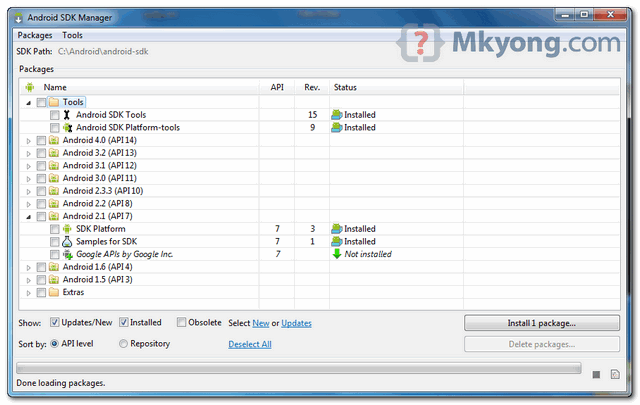
In Android SDK installed folder, run “Android SDK manager”, choose what Android version you want to develop.
2. Install ADT Eclipse plugin
To integrate Android SDK with Eclipse IDE, you need to install Eclipse ADT plugin. Refer to this official guide – “Installing the ADT Plugin“.
In Eclipse IDE, select “Help” -> Install New Software…”, and put below URL :
https://dl-ssl.google.com/android/eclipse/
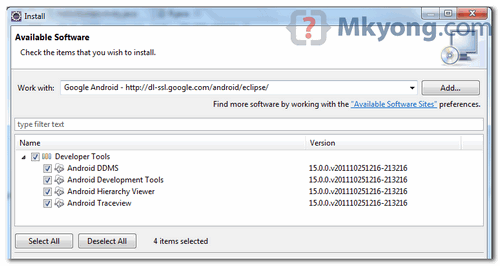
In my case, above ADT plugin is taking years to download, no idea why. If you are facing the similar problem, just download and install the ADT plugin manually, refer to this ADT plugin troubleshooting guide.
3. Create an Android Virtual Device (AVD)
In Eclipse, you can access the “Android Virtual Device (AVD)” in Eclipse toolbar. Click “new” to create a AVD.
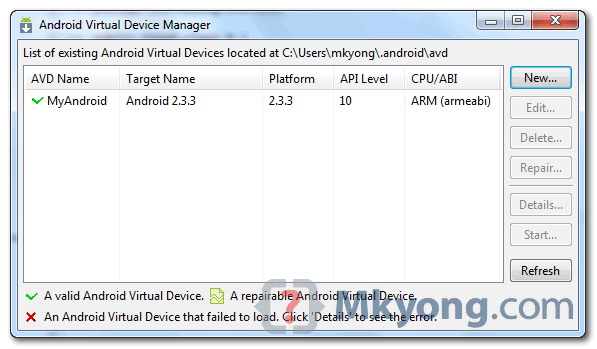
Later, Eclipse will deploy the application into this AVD.
4. Create Android Project
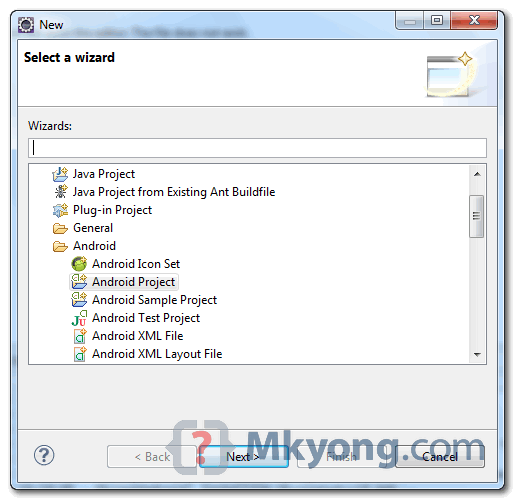
In Eclipse, select “File -> New -> Project….”, “Android Project”, and input your application detail. Eclipse will create all the necessary Android project files and configuration.
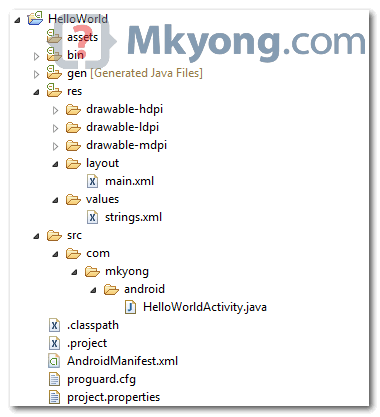
5. Hello World
Locate the generated activity file, and modify a bit to output a string “Hello World”.
File : HelloWorldActivity.java
package com.mkyong.android;

import android.app.Activity;
import android.os.Bundle;
import android.widget.TextView;

public class HelloWorldActivity extends Activity {
    /** Called when the activity is first created. */
    @Override
    public void onCreate(Bundle savedInstanceState) {
        super.onCreate(savedInstanceState);

        TextView text = new TextView(this);
        text.setText("Hello World, Android - mkyong.com");
        setContentView(text);
    }
}
6. Demo
Run it as “Android Application“, see output.
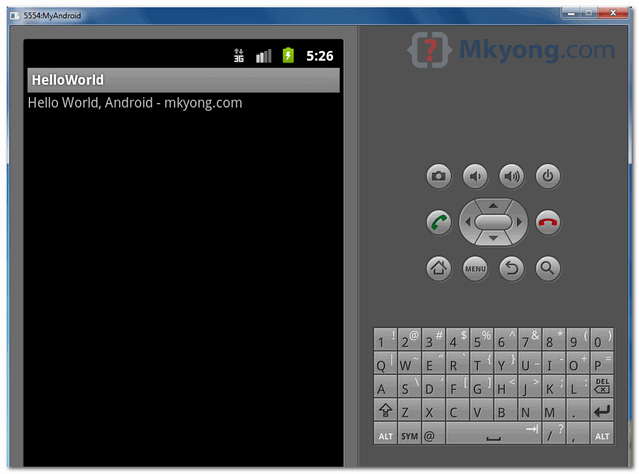
Press “Home” button (on right hand side), and you will noticed that “HelloWorld” application is deployed successfully on the Android virtual device.
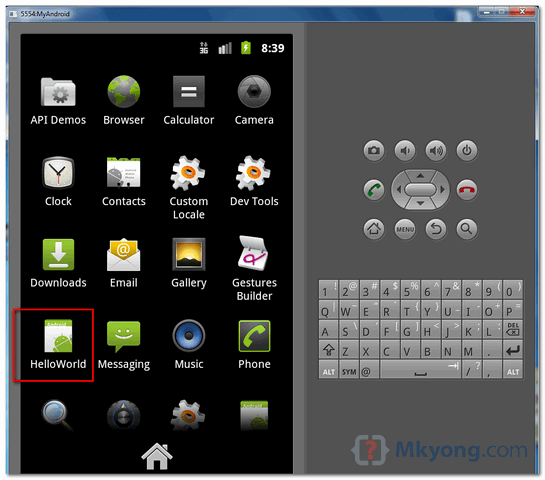
This tutorial is more to example driven, not much explanation. For detail and complete explanation, please refer to the official Android developer hello world tutorial.
In my computer, the COMODO firewall is installed and blocked the deploying process, caused the connection between Eclipse ADT and AVD is blocked and failed to deploy. Just make sure your firewall is configured properly, or just turn it off for Android development 🙂
Sometime, “Android Virtual Device” is not enough to test some real phone functionalities, like led light, sensor and etc. Then you should refer to this how to debug Android application on real device.

i played almost all of these games. except the ones with low graphic art like f-zero, mario kart, castlevania, metroid etc. contra had low graphic but very enjoyable with co-op. earthbound, ff should be top5. idk how many times i’ve replayed crono trigger and earthworm jim. others mostly 75%.
<a href=”https://thefucksites.com/”>Paul Brown</a>
It is not Java it is different.
I was just venturing through your post and found that these are a bit old and outdated. Are you having any plans to update them so that we can use Android Studio and get started. I have really liked your site from a long time and thought of suggesting.
hadbfhbfhs!@#$#%#%#$%#$%
Check out my blog. It provides a video to show you how to create your first Android Hello World app.
http://androidprogrammeringcorner.blogspot.com/2015/02/pak-longs-programming-corner-for.html
Best regards,
Philip
Please post for in this sections. Its really helpful.
Hey mkyong, I m new in android application development.So this tutorial really helped to get all basic things .Thanks man..!!!
http://www.cashlele.com
hi Mkyong…. I am new to android …. ia have serious problem when i creatyed my first application… the virtual device which i created fail to load and emulator launch is failed for simple Hello world applciation… so can u support to rectify the problem
http://androidgameofclones.blogspot.com/p/tranning-course.html
not sufficient info 🙁
http://www.india.dj
thanks sir
i am not able to install the adt packages to eclipse juno in windows 7
Thank you !! The tutorial was very simple for beginners..Thanks again..
Thank u Sir…This is helpful to setup and to complete the first Apps in Android.
sir this is very informative i want to learn that how to earn with android development plz guide
i found a very use full learn4do . com
Need temperature converting program
plss need it urjent!!!
Thanks in advance
FROM ALIET
thanks :):)
android
Great start with android.waiting for more on Android tuts from you sir.
regards,
Sunny
Great start with android.waiting for more on Android tuts from you sir.
http://websnube.com/
regards,
Sunny
Hi,
I am completely new in this and I followed all the above steps but for me under new project –> Android, ‘android project’ is not present. Could you elaborate a little more on each step. How to add AVT (MyAndroid). I have eclipse indigo release 2 and Android 4.2.2. Help me in executing the hello world atleast.
I’ve built a very small game app that has no more than two activities and so two java classes. But the apk that I get out of it is abt 800KB. But I see apps on store that are even lesser than 400 KB. And those apps are definitely no of just two java classes. For example a MP3 cutter is of 400KB. Even Opera browser is of just 804KBs. What do they do to reduce the size of the apk? Do I have any unwanted files/images in my eclipse project that have been created by default?
very nice tutorial you can also check this one
http://pavanhd.blogspot.in/2012/09/android-hello-world-example.html
Thanks for the clean explanation.. This website http://www.compiletimeerror.com/2012/12/creating-first-androidapplication-in.html also addresses something similar.. Have a look, may help..
good tutorial
thank
Hello Friends
If u want run emulator using command prompt then go to c:\program files\android\android_sdk\platform_tools
and keep your apk on platform tools
and issue command on cmd : cd c:\prorgram files\android\android_sdk\platform_tools
then run adb install filename.apk
if u want run directly on your mobile then issue command:
adb -d install filename.apk
hai mkyong…..
i’m using eclipse juno
it’s AVD emulator not working. why?
it’s error code is
PANIC : not open android
(my avd create with name android)
please help me
contact me by email
thanks
See: http://androidtutorialsrkt.blogspot.in/
Hai MkYong,
I am doing Android applications.Thanks for your demo work.Please publish more tutorials.
Thanking you.
With regards,
Sanal
Howdy just wanted to give you a quick heads up. The
text in your article seem to be running off the screen in Safari.
I’m not sure if this is a formatting issue or something to do with web browser compatibility but I thought I’d post to let you know.
The design and style look great though! Hope you get the issue solved soon.
Many thanks
sir,
please give me list of some good free e-book of android to practice more example off-line also .
and i need some example of android database for like login process or to store something.
Hi MkYong,
I have just started programming Android.
I found your tutorials very helpfull and easy to understand.
keep it up the good work.
thank you.
hai sir this is laxman
I started android programing
your snapsorts very useful to me
Thankyou very much sir
when i am trying to install android sdk all the packages r installing except EXTERS package i am clicking on it but it is not opening n installing can u please help me what i should do .
thanks
shilpa
Thanks, It worked for me, Nicely explained.
Hi
when i am trying to create AVD the following error is coming.
Could you please explain me
emulator: WARNING: Could not initialize OpenglES emulation, using software renderer.
could not get wglGetExtensionsStringARB
could not get wglGetExtensionsStringARB
could not get wglGetExtensionsStringARB
could not get wglGetExtensionsStringARB
could not get wglGetExtensionsStringARB
could not get wglGetExtensionsStringARB
could not get wglGetExtensionsStringARB
could not get wglGetExtensionsStringARB
emulator: emulator window was out of view and was recentered
With Regards
Hussain
Thx for your tutorials and sharing your knowledge with us
Instead of using “https://dl-ssl.google.com/android/eclipse/”, “http://dl-ssl.google.com/android/eclipse/” would be preferred for faster download. Hope it works. (Note the change, its http and not https)
hi i need how to install android in ubuntu 10.10 version please explain
hi how to install android in ubuntu 10.10 version
good article…
Hi mkyong ,
Thanks for the awesome tutorial !!!!!!!!!!!!!!
I have installed the Eclipse with ADT plugin and SDK Manager but i m not getting the option called “Android Project” but getting all other options like “Android Test Project”.
Please help……….
first install “Android SDK Tools” and “Android SDK Platform-tools”. You will then get the “Android Project” options. That’s what was with my case. Cheers
The secret in learning, is to follow tutorials like yours, encounter problems, and to resolve those issues.
That way, you know that you are learning and understanding.
Thanks, it didn’t work for me, but now it does!!!!!
This is incomplete. I am trying to create a hello world app for three days, but no luck! What i get error is the diaglog box after selecting the android project. … did not mentioned that diaglogue boxes witch are complex.
An error occurred while installing the items
session context was:(profile=epp.package.jee, phase=org.eclipse.equinox.internal.p2.engine.phases.Install, operand=null –> [R]com.android.ide.eclipse.adt 20.0.2.v201207191942-407447, action=).
Failed to prepare partial IU: [R]com.android.ide.eclipse.adt 20.0.2.v201207191942-407447.
this error occur when i install ADT plugin plz help me to solve this problem
Thanks Mkyong for such nice tutorials. When you get time visit my blog on Android (http://android.programmerguru.com) which also talks about Android tutorials for beginners.
My blog contains lot of hands-on exercises for beginners in all topics of Android.
Welcome your comments Mkyong.
it’s awesome for beginners . with the help of this website , finally i created an android app..Thanks MKYONG sir……..I need more effective tutorials related to android please sir send me the links if u have any … Thanks in advance..
Thanks,
Exactly what I’m looking for. Plain and simple.
Thanks, easy and clear tutorial. Ready for my first Android app now!
Regards,
Peter
hi there, i have an Android application, and a web service Axis2, i want to login on Android, send username and pass to the service, the service will send back the permission for that user, the permission is here is what Activity (screen) that user can open. The same workflow may be look like that Spring Security work. Can u help me please
Plz can u give me the solution that how can i generate the lyrics of songs in Android music player..plz rply me immidetly….recognize my problem and rply me fast as soon as posible
Hi Yong
Great start about Android .
but i need to how drag the object in entire view please give any response
else advice please
thank in advance
Thanks mkyong, it is good for Android starters like me to make the installation and basic steps for programming on Android
Cool post! Its has become so easy to make a simple app now!!.Thanks a Lot! Your Post Helped me out a lot! I have also Put a very simple explanation here for a simple hello world app! http://farasbee.com/blog/2012/03/07/developing-a-android-app-without-a-laptop-or-a-computer/
Hi MkYong,
I followed these steps, however there are couple of issues:
1. When I run the program, the emulator is launched but there is no Hello Word displayed. However I have used TextView widget as you mentioned.
2. This is query I want to ask. The emulator is displayed in a very big size. From where I can reduce its size etc. Also as you mentioned on pressing home page nothing happens.
Sorry for such a silly queries however this is my first day with android. Somehow I managed to setup this environment after sitting for 4-5 hours 🙁
I am using JDK 7, Eclipse – Indigo (Version: 3.7.1)
Also can you please suggest how I can learn Android from here on.
Thanks for your reply in Advance
Try below :
1. Check your console, is there any error message?
2. The screen size is configurable via Android Virtual Device (AVD)
May be you can download the example at the end of the article and compare with yours.
Hi MkYong,
I encountered the same problem as Vivek. The emulator pops up with no “Hello World”. None of the buttons including the “Home” do not work. I checked the console, there aren’t any errors. However there is a couple of warnings which I do not think is an issue. Following is the console output. Please try to look into this give me a solution. Thanks heaps. I am using Eclipse 3.7.2 and Android SDK 4.0.3 and using the same emulator as in this tutorial.
[2012-06-07 04:34:33 – HelloAndroid] ——————————
[2012-06-07 04:34:33 – HelloAndroid] Android Launch!
[2012-06-07 04:34:33 – HelloAndroid] adb is running normally.
[2012-06-07 04:34:33 – HelloAndroid] Performing com.example.helloandroid.HelloAndroid activity launch
[2012-06-07 04:34:33 – HelloAndroid] Automatic Target Mode: launching new emulator with compatible AVD ‘my_avd’
[2012-06-07 04:34:33 – HelloAndroid] Launching a new emulator with Virtual Device ‘my_avd’
[2012-06-07 04:34:33 – HelloAndroid] ——————————
[2012-06-07 04:34:33 – HelloAndroid] Android Launch!
[2012-06-07 04:34:33 – HelloAndroid] adb is running normally.
[2012-06-07 04:34:33 – HelloAndroid] Performing com.example.helloandroid.HelloAndroid activity launch
[2012-06-07 04:34:33 – HelloAndroid] Automatic Target Mode: launching new emulator with compatible AVD ‘my_avd’
[2012-06-07 04:34:33 – HelloAndroid] Launching a new emulator with Virtual Device ‘my_avd’
[2012-06-07 04:34:51 – HelloAndroid] New emulator found: emulator-5554
[2012-06-07 04:34:51 – HelloAndroid] Waiting for HOME (‘android.process.acore’) to be launched…
[2012-06-07 04:35:03 – Emulator] WARNING: Data partition already in use. Changes will not persist!
[2012-06-07 04:35:03 – Emulator] WARNING: Cache partition already in use. Changes will not persist!
[2012-06-07 04:35:06 – HelloAndroid] New emulator found: emulator-5556
[2012-06-07 04:35:06 – HelloAndroid] Waiting for HOME (‘android.process.acore’) to be launched…
[2012-06-07 04:35:24 – HelloAndroid] emulator-5554 disconnected! Cancelling ‘com.example.helloandroid.HelloAndroid activity launch’!
[2012-06-07 04:35:34 – HelloAndroid] emulator-5556 disconnected! Cancelling ‘com.example.helloandroid.HelloAndroid activity launch’!
[2012-06-07 04:36:17 – HelloAndroid] ——————————
[2012-06-07 04:36:17 – HelloAndroid] Android Launch!
[2012-06-07 04:36:17 – HelloAndroid] adb is running normally.
[2012-06-07 04:36:17 – HelloAndroid] Performing com.example.helloandroid.HelloAndroid activity launch
[2012-06-07 04:36:17 – HelloAndroid] Automatic Target Mode: launching new emulator with compatible AVD ‘my_avd’
[2012-06-07 04:36:17 – HelloAndroid] Launching a new emulator with Virtual Device ‘my_avd’
[2012-06-07 04:36:26 – HelloAndroid] New emulator found: emulator-5554
[2012-06-07 04:36:26 – HelloAndroid] Waiting for HOME (‘android.process.acore’) to be launched…
[2012-06-07 04:36:39 – HelloAndroid] emulator-5554 disconnected! Cancelling ‘com.example.helloandroid.HelloAndroid activity launch’!
Cheers bud for the tutorial! Learning Java in uni atm and it really helped to get me started on android development! 😀
Great start with android. Looking for more on Android form you.
you got the best examples on the internet 🙂
Hi Yong
Great start about Android .. Please publish more tutorials in depth. I wanna start my safe journey into “smart” Android world.
Thanks
Sreedhar
Thanks, will continue publish more Android tutorials in coming future.
HI Mkyng,
This is very good tutorial to start. My application failed with below console error. Can you
advise where I goes wrong:
[2012-12-28 07:47:37 – HelloWorld] Launching a new emulator with Virtual Device ‘MyFirstAndriod’
[2012-12-28 07:47:47 – Emulator] Failed to create Context 0x3005
[2012-12-28 07:47:47 – Emulator] emulator: WARNING: Could not initialize OpenglES emulation, using software renderer.
[2012-12-28 07:47:47 – Emulator] could not get wglGetExtensionsStringARB
[2012-12-28 07:47:47 – Emulator] could not get wglGetExtensionsStringARB
[2012-12-28 07:47:47 – Emulator] could not get wglGetExtensionsStringARB
[2012-12-28 07:47:47 – Emulator] could not get wglGetExtensionsStringARB
[2012-12-28 07:47:47 – Emulator] could not get wglGetExtensionsStringARB
[2012-12-28 07:47:47 – Emulator] could not get wglGetExtensionsStringARB
[2012-12-28 07:47:47 – Emulator] could not get wglGetExtensionsStringARB
[2012-12-28 07:47:47 – Emulator] could not get wglGetExtensionsStringARB