In Android, just use “android.widget.Button” class to display a normal button.
In this tutorial, we show you how to display a normal button, add a click listener, when user click on the button, open an URL in your Android’s internet browser.
P.S This project is developed in Eclipse 3.7, and tested with Android 2.3.3.
Note
For more advance function, like image, please refer to this ImageButton example and also this ImageButton selector example.
For more advance function, like image, please refer to this ImageButton example and also this ImageButton selector example.
1. Add Button
Open “res/layout/main.xml” file, add a button.
File : res/layout/main.xml
<?xml version="1.0" encoding="utf-8"?>
<LinearLayout xmlns:android="http://schemas.android.com/apk/res/android"
    android:layout_width="fill_parent"
    android:layout_height="fill_parent"
    android:orientation="vertical" >

    <Button
        android:id="@+id/button1"
        android:layout_width="wrap_content"
        android:layout_height="wrap_content"
        android:text="Button - Go to mkyong.com" />

</LinearLayout>
2. Code Code
Attach a click listener to the button.
When user click on it, open mobile browser and display URL : https://mkyong.com.
File : MyAndroidAppActivity.java
package com.mkyong.android;

import android.app.Activity;
import android.content.Intent;
import android.net.Uri;
import android.os.Bundle;
import android.widget.Button;
import android.view.View;
import android.view.View.OnClickListener;

public class MyAndroidAppActivity extends Activity {

	Button button;

	@Override
	public void onCreate(Bundle savedInstanceState) {
		super.onCreate(savedInstanceState);
		setContentView(R.layout.main);

		addListenerOnButton();

	}

	public void addListenerOnButton() {

		button = (Button) findViewById(R.id.button1);

		button.setOnClickListener(new OnClickListener() {

			@Override
			public void onClick(View arg0) {

			  Intent browserIntent =
                            new Intent(Intent.ACTION_VIEW, Uri.parse("https://mkyong.com"));
			    startActivity(browserIntent);

			}

		});

	}

}
3. Demo
Run the application.
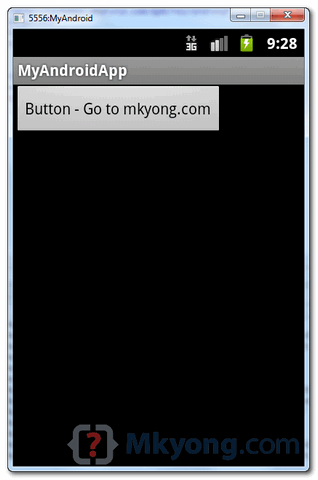
1. Result, a normal button.
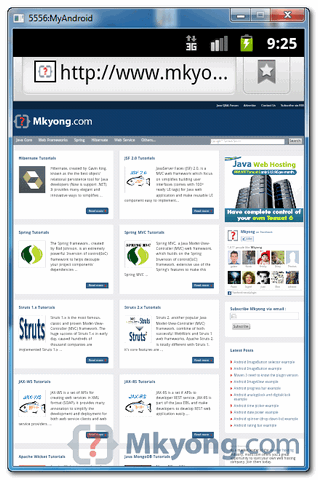
2. Click on the button, display URL in browser.
Download Source Code
Download it – Android-Button-Example.zip (15 KB)

Sir can u tell how to open this url in Webview instead of browser onClick of button
Thanks
i done a calculator program using checkbox and button. if u uncheck the add button. the result will not deleted. help me.
how to change silent to ringer of a mobile by sending sms in adroid eclipse
I have write this lecture about Buttons and its click events . please check this.
http://themasterworld.com/button-and-its-click-events-in-android-studio/
thanks
Check out my blog. The following post includes a video
that shows you how to create an Android smartphone application that displays a
vertically scrolling list of countries on the screen. The application is
created using the Eclipse IDE and Android SDK. It features an “OK” button at
the bottom of the screen that, when pressed, terminates the application.
In the process of making this Android application you will
encounter the following SDK object types, etc: ScrollView, Button, View, TableLayout, TableRow, OnClickListener, TextView, and Colours in Android represented by hexadecimal numbers.
http://androidprogrammeringcorner.blogspot.com/2015/03/pak-longs-android-programming-corner.html
Best regards,
Philip
Check this one code in kotlin
https://tutorial.eyehunt.in/android/android-button-example-onclickcolordesign-kotlin/
Find most useful Android Button Libraries and Resources from http://android-libs.com/search/buttons
how to connect button to the text file?
Helpful.. (Y)
[Software Engineering.. Its Worth]
its a really a good eg.But when i click on button(“Button – Go to mkyong.com” ) its shows all browser of my android mobile which is different browser installed previously.But i want to open website in this form automatically instead of showing the browser list.So what should I do…..Please help.
When i run the code in emulator,i got error of “process stopped unexpectedly,Please try again”
Really helpful. Thanks.
Actually no, completely useless.
I would like to express my thanks to the writer just for rescuing me from this particular
circumstance. Right after looking out throughout the the net and
obtaining notions which are not powerful, I assumed my life was over.
Existing without the strategies to the problems you have solved by way of your good short post is a
critical case, as well as the ones that would have negatively damaged
my career if I had not encountered your blog. Your
own personal competence and kindness in taking care of all things was valuable.
I’m not sure what I would have done if I hadn’t encountered such a step like this.
I am able to at this time look ahead to my future. Thanks a lot very much for the professional and amazing help.
I won’t think twice to suggest your web blog to anyone who should receive counselling on this matter.
Real good in sequence can be present bring into being resting on this blog.
Excellent. Working Perfect.
what is the android coding for go to website when clicking the application icon
Its useful
Hi, of course this paragraph is actually good and I have learned lot of things
from it regarding blogging. thanks.
Very shortly this web page will be famous among all blogging viewers,
due to it’s fastidious posts
Appreciating the dedication you put into your site
and in depth information you provide. It’s good to come across a blog every once in a while that isn’t the same
outdated rehashed material. Fantastic read! I’ve saved your site and I’m adding your RSS feeds to my Google account.
Yes! Finally someone writes about google ranking.
Nice blog! Is your theme custom made or did you download it from somewhere?
A theme like yours with a few simple adjustements would really make my blog shine.
Please let me know where you got your design. Thank you
When I originally commented I clicked the “Notify me when new comments are added” checkbox and now
each time a comment is added I get three e-mails with the same comment.
Is there any way you can remove people from that
service? Cheers!
Nice weblog here! Also your website so much up fast! What host are you the usage of?
Can I am getting your affiliate hyperlink for your host?
I desire my site loaded up as fast as yours lol
Good Example !! Thank u 🙂
As we all know, looks can be deceiving, so I decided to try
out the question tool for myself. Once the number
of back links will increase, web traffic flow will
enhance. The more doors you have the more chances of people finding it.
This can be a great tool when selling products online, as a website can be designed to
offer either luxury or bargain-oriented goods, based
on traffic analysis. SEO must be implemented by following a step by step process.
Enough said. Since keyword analysis is needed for both
SEO (search engine optimization) and SEM,
we often confuse using these terms. This means that they
follow only the steps given to them by Google and
other major search engines. Isn’t that something you and your business should be a part of. What are the advantages of article submission. Use SEM experts to recognize duplicate content as part of your website, and act immediately to have it settled. However, in general, SEO services involve using standard and compliant coding. Effective SEO techniques for Bloggers aren’t any different.
It’s more control than you get In many backlinks and every element of these controls allow you to link a bit more than he would be out of control. These professionals follow ethical SEO strategy and effectively implement it that finally increases your website visibility. G) SEO basics -Image 6: Open Google. Have you been looking at your competitor’s websites to see what kind of keywords they’re using. Once someone clicks on your site, they should see tons of unique informative content. They are looking up the the keywords you did research on to find what they are looking for. SEO requires understanding of various algorithms.
Hi, how are you?
Firstly, I like all your tutorials I see, it’s easy to understand everything.
Secondly, I saw some examples of primefaces on your web, i don’t know if you have some tutorial with primefaces mobile, it would be very helpful.
I will thank you if you can do it.
Another thing i wanted to ask you is: Have you ever seen a NoSuchFieldError Exception?, I like to call some persistence methods from a hibernate project into a primefaces mobile project (both with maven configuration) and i got this exception.
Persistence Project works well and primefaces mobile project works too, if i use persistence method into a bean from web project works well, but if i call a persistence method into a bean method and i use it into a xhtml doesnt work, i test it with an apache tomcat server. Integration Technology that i’m using is Spring.
I hope you understand me what i’m saying you and you can help me with any idea.
“I want to be a Linux user and I tried several times but… 1.) I can’t use it to develop to iOS as it is my way to pay for my bread and milk 2.) I can’t play AAA games on it so… 3.) Many relevant softwares are missing and my laptop drivers were not fully supported (Dolby audio, Trackpad, etc)
I will stay with MacOS and Windows too. Each for their purpose. Linux has just no space for me now”
Ragerds:Moses Brodin
i copied and pasted this over the one that was there
and then copied an pasted this one over the main java
package com.mkyong.android;
import android.app.Activity;
import android.content.Intent;
import android.net.Uri;
import android.os.Bundle;
import android.widget.Button;
import android.view.View;
import android.view.View.OnClickListener;
public class MyAndroidAppActivity extends Activity {
Button button;
@Override
public void onCreate(Bundle savedInstanceState) {
super.onCreate(savedInstanceState);
setContentView(R.layout.main);
addListenerOnButton();
}
public void addListenerOnButton() {
button = (Button) findViewById(R.id.button1);
button.setOnClickListener(new OnClickListener() {
@Override
public void onClick(View arg0) {
Intent browserIntent =
new Intent(Intent.ACTION_VIEW, Uri.parse(“https://mkyong.com”));
startActivity(browserIntent);
}
});
}
}
and when i install it only says hello world!
help please
in the graphical layout you have to drag to make the button you can not just copy the code.
I agree with billy. You cannot just copy and paste the codes in “Eclipse SDK”. Just go to “res” -> layout -> and select activity_main.xml. At the bottom of the .xml file you will see 2 tabs. To drag and drop a button, go to the “Graphical Layout” section and in the “Form Widgets” palette you will find the “button” and other controls. Double click the button and write your code.
Regards
Arun
mkyong = grande! = forte! = bravo! = grazie!
translation from Italian:
mkyong = great! = strong! = good! = thank you!
Is anyone else getting a dialog popping up “Complete Action Using…” and the browser doesn’t launch in the emulator? Why is that happening and how does one fix it? Thank you!
Nice , thank you!
Hi.. I am new to Android.. This Tutorial Make me too feel Android is easy…
its not working yeah!
I hwant develop simple application in Java Eclipse android .here i required to develop single application required user Interface are Text View , Password and Button after submit Next Page moved and displayed message. next another control click move to previous page .
Thanks for share this…its really helpful for fresher android developer…
Great article thanks!
After Click the button i got some msg like this
The Application xxxxxx has stopped unexpectedly.Please try again.
Hi !! Mkyong , nice and lucid example on Button Listener. Worked like a charm 🙂 Modified the above code by adding a toast event and sleepFunction just before Intent is started.. Keeping posting such nice lovely examples 🙂
kindly send me a perfect email address for contact
i m doing a project on android but i m just not able to understand coding for button kindly send me a e-mail for complete of button and text field and there connectivity in android
Hi Sitara,
You can find the source code here:
http://android.programmerguru.com/button-listener
========================================
 @Override
			 public void onClick(View arg0) {

			  Intent browserIntent =
                            new Intent(Intent.ACTION_VIEW, Uri.parse("https://mkyong.com"));
			    startActivity(browserIntent);
.......
======================================
hello mkyong….i tried the code you have presented,,above…but there is an error in the @Override before the onClick() method…but when i deleted the @Override ..i can execute the program successfully…why is this so?…pls enlighten me….tnx
if delete override onClick no inheritance onclick method of so you can’t do anything with event click.
Sorry my skill english verry bad.
What needs to be done with the above code in AppActivity.java file to implement multiple buttons? I can’t seem to get more than one button to work. Thanks.
Anyone?
You just need to add listeners to each button. You will get more understanding if you take a look at this link which has simple example with two buttons:
http://android.programmerguru.com/simple-camera-activity/
i agree with Udhay. if you create one button you can create more, and more.
new Intent(Intent.ACTION_VIEW, Uri.parse(“https://mkyong.com”));
i think the action need to ACTION_WEB_SEARCH…otherwise the activity dose not start
addListenerOnButton() should be a private method, not public.