In this tutorial, we show you how do to file upload with Jersey, JAX-RS implementation.
1. Jersey Multipart Dependency
To support multipart (file upload) in Jersey, you just need to include “jersey-multipart.jar” in Maven pom.xml file.
<project ...>

	<repositories>
		<repository>
			<id>maven2-repository.java.net</id>
			<name>Java.net Repository for Maven</name>
			<url>http://download.java.net/maven/2/</url>
			<layout>default</layout>
		</repository>
	</repositories>

	<dependencies>

		<dependency>
			<groupId>com.sun.jersey</groupId>
			<artifactId>jersey-server</artifactId>
			<version>1.8</version>
		</dependency>

		<dependency>
			<groupId>com.sun.jersey.contribs</groupId>
			<artifactId>jersey-multipart</artifactId>
			<version>1.8</version>
		</dependency>

	</dependencies>

</project>
2. File Upload HTML Form
Simple HTML form to select and upload a file.
<html>
<body>
	<h1>File Upload with Jersey</h1>

	<form action="rest/file/upload" method="post" enctype="multipart/form-data">

	   <p>
		Select a file : <input type="file" name="file" size="45" />
	   </p>

	   <input type="submit" value="Upload It" />
	</form>

</body>
</html>
3. Upload Service with Jersey
In Jersey, use @FormDataParam to receive the uploaded file. To get the uploaded file name or header detail, match it to “FormDataContentDisposition“.
import java.io.File;
import java.io.FileOutputStream;
import java.io.IOException;
import java.io.InputStream;
import java.io.OutputStream;
import javax.ws.rs.Consumes;
import javax.ws.rs.POST;
import javax.ws.rs.Path;
import javax.ws.rs.core.MediaType;
import javax.ws.rs.core.Response;
import com.sun.jersey.core.header.FormDataContentDisposition;
import com.sun.jersey.multipart.FormDataParam;

@Path("/file")
public class UploadFileService {

	@POST
	@Path("/upload")
	@Consumes(MediaType.MULTIPART_FORM_DATA)
	public Response uploadFile(
		@FormDataParam("file") InputStream uploadedInputStream,
		@FormDataParam("file") FormDataContentDisposition fileDetail) {

		String uploadedFileLocation = "d://uploaded/" + fileDetail.getFileName();

		// save it
		writeToFile(uploadedInputStream, uploadedFileLocation);

		String output = "File uploaded to : " + uploadedFileLocation;

		return Response.status(200).entity(output).build();

	}

	// save uploaded file to new location
	private void writeToFile(InputStream uploadedInputStream,
		String uploadedFileLocation) {

		try {
			OutputStream out = new FileOutputStream(new File(
					uploadedFileLocation));
			int read = 0;
			byte[] bytes = new byte[1024];

			out = new FileOutputStream(new File(uploadedFileLocation));
			while ((read = uploadedInputStream.read(bytes)) != -1) {
				out.write(bytes, 0, read);
			}
			out.flush();
			out.close();
		} catch (IOException e) {

			e.printStackTrace();
		}

	}

}
4. Demo
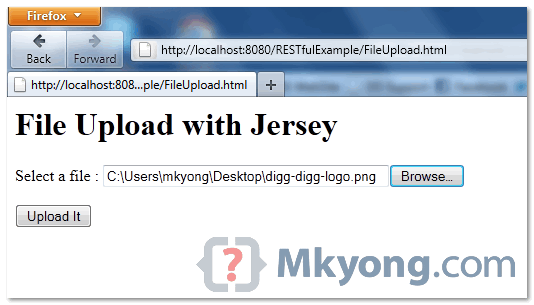
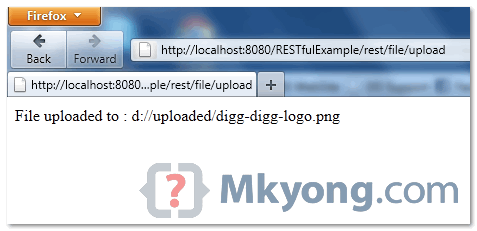
Select a file and click on the upload button, the selected file is uploaded to a pre-defined location.
URL : http://localhost:8080/RESTfulExample/FileUpload.html
URL : http://localhost:8080/RESTfulExample/rest/file/upload
Download Source Code
Download it – JAX-RS-FileUpload-Jersey-Example.zip (6 KB)

This code will not work for large size files.
Hi mkyong,
Hello just a quick question how do you run this locally? mvn spring-boot:run is not working on me kindly help me please
What is FormDataContentDisposition? Why is it used?
hello i am using this code for file upload but not getting enough speed while using tomcat as server can you please help
how to do multiple file uploads
// delete the following line, you already opened the output stream right after the
try.out = new FileOutputStream(new File(uploadedFileLocation));
For me bad request
hello evreybody
when i want upload file i have this message
Etat HTTP 404 – Servlet jersey-serlvet n’est pas disponible.
type Rapport dӎtat
message Servlet jersey-serlvet n’est pas disponible.
description La ressource demandée (Servlet jersey-serlvet n’est pas disponible.) n’est pas disponible.
….
to resume jersey-serlvet not found
can you hlep me?
It Is Showing Unsupported Media Type Please help.
Me too have same problem..
you simply need to add mimepull.jar to your lib
How can I call this via a CURL request in php ?
How to send the fire from Android to this web service?
How to use jersey-multipart in Glassfish 4.1.1?
How to use jersey-multipart in Glassfish server?
I don’t understand how the html file was related to java class, I have tried this example but I don’t use maven anymore, only Java Web Dinamic Project. It does not work, the html file didn’t call the java class anymore
Hi Sir,
How to send json data and uploading file to Rest full web service in a single request?
just now create the file input src foledder kabf rb the frist if we wanto create the the input steream in file uploading in conversion team in that if u want to create the files of application the servce the implementation appalivcation try to understand teach the fil;e the job a
Hi ,
How can we upload .txt file from java application (software) to webservice? I can pass string parameter but can’t do with file or some object. Actually I will have some sql query inside .txt file and want to upload it to server then execute all query inside server. How is it possible?
If anybody know please help me : or email me : [email protected]
For this function my application works perfect public Response uploadFile(@FormDataParam(“file”) InputStream uploadedStream) {
But
When i am writing method like public Response uploadFile(@FormDataParam(“file”) InputStream uploadedStream, @FormDataParam(“ddd”) String ddd, @FormDataParam(“id”) Long id) {
my application stop working any suggestion.
hi i’m new to jquery and webservices… is it possible to upload file using jquery ajax and rest web service.
yes no probelem with processing the uploading file but limit size of kb only
should uploadedInputStream be closed?
When using @FormDataParam(“file”) InputStream uploadedInputStream,does it actually do streamed input? i.e. if we upload a 10GB file, the JAX-RS runtime will not store it into memory first?
how to write the test to this.
it’s difficult to realize.
Hi JerseyMan, I got right now the same problem with the 10kb limit which seems to be appeared from nowhere. Did you found a solution???
[FATAL] No injection source found for a parameter of type public javax.ws.rs.core.Response
With jersey 2.16
any solution? maybe adding parameters to web.xml?
Hi,
It is not working for simultaneous uploading files.
org.glassfish.jersey.servlet.ServletContainer i have this problem
How to apply this example without Maven.. I am using Eclipse + Tomcat 7 + Jersey (no Maven)
I am pretty irritated that someone posted a link to mkyong.com from stackoverflow and didn’t get voted down. This site has always been a misleading place, with bits of valuable information diluted with broken code, examples and lack of real knowledge about any of the subjects covered. Not surprised at all that people had trouble running the code. Please don’t send people to this site…
mkyong the best the java progaraming to the application devaloperment
Hi mkyong ,
Great example . it works for me and got file uploaded to server location but my problem is after file upload any other POST request gives me “415 Unsupported media type” error. i am using jersey multipart 1.8 , mimepull 1.9.4 and all jersey jar with 1.8 versions . i am testing my rest service over advance rest client chrome extension. please help me …..got stuck to it from many days .
I’ve test this and everything seem to be find but when I try to open file that I uploaded the file is corrupted.
Hello, I am not able to get this to work: Caused By: java.lang.IllegalArgumentException: The MultiPartConfig instance we expected is not present. Have you registered the MultiPartConfigProvider class?
How do I fix this?
A simple, and perhaps embarrassing to me, question: The example does not include other form attributes and I’m struggling with finding the best way to collect additional attributes, as for instance a text field including comments about the uploaded file. Any suggestions would be very welcome.
It’s not a good idea to use untrusted information from the client to work out the path to save the file on the file system. This could easily be exploited to attack the system. See https://www.owasp.org/index.php/Unrestricted_File_Upload for more details about why this is extremely bad practise.
It would be great if you could update your example as many people won’t read down to the comments.
Hi !
I had an error 405 : Method not allowed with this tuto and I found a solution, I think… But I don’t know if a good answer.
So, to explain I had an error when I use @PathParam in a other tuto in this website and I read that it was necessary to use @Produces() so I tried to do the same here by putting @Produces(MediaType.TEXT_PLAIN) and it works !
But I wonder if it’s a good way… ?
Thank
It did not work for me.
HTTP Status 415 – Unsupported Media Type
Include the mimepull-X.X.jar to solve the problem with the HTTP Status 415 in your devolpment environment.
Link: http://download.java.net/maven/2/org/jvnet/mimepull/
Do i need to just need to add this on dependecy and then it will work ?
Hi Mkyong,
I need to make a java rest service to upload, process and download the processed image to user. Do you suggest a synchronous or asynchronous service?
Regards,
Iury
hello,
I have a problem with my service and I could not find a solution.
this is the console message.
Grave: A message body reader for Java class com.sun.jersey.multipart.FormDataMultiPart, and Java type class com.sun.jersey.multipart.FormDataMultiPart, and MIME media type application/octet-stream was not found.
if anyone knows how to solve it would greatly appreciate your support
Just put mimepull-1.9.4.jar into WEB-INF/lib directory to solve this issue.
HI,
why do you open the FileOutputStream, initialize the byte array and afterwards overwrite the OutputStream again?
As a result I wasn’t able to open the File after uploading it, because java has still an open Stream to the file.
I commented out the 2nd line and it works like a charm.
After commenting second FileOutputStream code is working file.
//out = new FileOutputStream(new File(uploadedFileLocation));
Hi nice example but in using google app engine java, and not found by
java.lang.SecurityException: Unable to create temporary file
much helpful.
much thanks.
Hi,
Thanks for the good example!
I have an issue when I’m using the code on tomcat linux.
When I upload file which is more than ~10KB I get 400 Bad request.
Any ideas?
10x
JerseyMan
This isn’t working for me. I get the FormDataContentDisposition just fine, but the InputStream comes up null. I’m trying to upload a pdf.
Hi,
How to display the same image into jsp Page?
Thanks
Good example. However, I am running into a Null Pointer Exception when trying to access the fileDetail.getFileName(). I followed the same steps from the example. Any clue why this may be happening? Do we need to explicitly set the content disposition headers?
I used 1.17.1 version of the jersey multipart jar.
com.sun.jersey.contribs
jersey-multipart
1.17.1
Great site BTW:)
I built webservice basing on this example and it worked OK few months, but on Friday something happened and doesn’t work anymore:(
Probably something with Maven, but I can’t figure out.
After clicking Upload button I get exception:
HTTP Status 500 –
type Exception report
message
description The server encountered an internal error () that prevented it from fulfilling this request.
exception
javax.servlet.ServletException: Servlet.init() for servlet jersey-serlvet threw exception
org.apache.catalina.authenticator.AuthenticatorBase.invoke(AuthenticatorBase.java:472)
org.apache.catalina.valves.ErrorReportValve.invoke(ErrorReportValve.java:98)
org.apache.catalina.valves.AccessLogValve.invoke(AccessLogValve.java:927)
org.apache.catalina.connector.CoyoteAdapter.service(CoyoteAdapter.java:407)
org.apache.coyote.http11.AbstractHttp11Processor.process(AbstractHttp11Processor.java:999)
org.apache.coyote.AbstractProtocol$AbstractConnectionHandler.process(AbstractProtocol.java:565)
org.apache.tomcat.util.net.JIoEndpoint$SocketProcessor.run(JIoEndpoint.java:309)
java.util.concurrent.ThreadPoolExecutor$Worker.runTask(ThreadPoolExecutor.java:886)
java.util.concurrent.ThreadPoolExecutor$Worker.run(ThreadPoolExecutor.java:908)
java.lang.Thread.run(Thread.java:662)
root cause
com.sun.jersey.api.container.ContainerException: The ResourceConfig instance does not contain any root resource classes.
com.sun.jersey.server.impl.application.RootResourceUriRules.(RootResourceUriRules.java:99)
com.sun.jersey.server.impl.application.WebApplicationImpl._initiate(WebApplicationImpl.java:1298)
com.sun.jersey.server.impl.application.WebApplicationImpl.access$700(WebApplicationImpl.java:169)
com.sun.jersey.server.impl.application.WebApplicationImpl$13.f(WebApplicationImpl.java:775)
com.sun.jersey.server.impl.application.WebApplicationImpl$13.f(WebApplicationImpl.java:771)
com.sun.jersey.spi.inject.Errors.processWithErrors(Errors.java:193)
com.sun.jersey.server.impl.application.WebApplicationImpl.initiate(WebApplicationImpl.java:771)
com.sun.jersey.server.impl.application.WebApplicationImpl.initiate(WebApplicationImpl.java:766)
com.sun.jersey.spi.container.servlet.ServletContainer.initiate(ServletContainer.java:488)
com.sun.jersey.spi.container.servlet.ServletContainer$InternalWebComponent.initiate(ServletContainer.java:318)
com.sun.jersey.spi.container.servlet.WebComponent.load(WebComponent.java:609)
com.sun.jersey.spi.container.servlet.WebComponent.init(WebComponent.java:210)
com.sun.jersey.spi.container.servlet.ServletContainer.init(ServletContainer.java:373)
com.sun.jersey.spi.container.servlet.ServletContainer.init(ServletContainer.java:556)
javax.servlet.GenericServlet.init(GenericServlet.java:160)
org.apache.catalina.authenticator.AuthenticatorBase.invoke(AuthenticatorBase.java:472)
org.apache.catalina.valves.ErrorReportValve.invoke(ErrorReportValve.java:98)
org.apache.catalina.valves.AccessLogValve.invoke(AccessLogValve.java:927)
org.apache.catalina.connector.CoyoteAdapter.service(CoyoteAdapter.java:407)
org.apache.coyote.http11.AbstractHttp11Processor.process(AbstractHttp11Processor.java:999)
org.apache.coyote.AbstractProtocol$AbstractConnectionHandler.process(AbstractProtocol.java:565)
org.apache.tomcat.util.net.JIoEndpoint$SocketProcessor.run(JIoEndpoint.java:309)
java.util.concurrent.ThreadPoolExecutor$Worker.runTask(ThreadPoolExecutor.java:886)
java.util.concurrent.ThreadPoolExecutor$Worker.run(ThreadPoolExecutor.java:908)
java.lang.Thread.run(Thread.java:662)
note The full stack trace of the root cause is available in the Apache Tomcat/7.0.27 logs.
Apache Tomcat/7.0.27
I found solution:)
There are small problems with maven repo in Your example, this should be fixed quickly, but I’m writing workaround for others, who wrote their webservices basing on this tutorial.
Please just add manually following jars (Java Build Path):
http://mvnrepository.com/artifact/com.sun.jersey/jersey-server/1.17
http://mvnrepository.com/artifact/com.sun.jersey.contribs/jersey-multipart/1.17
And please don’t forget to specify proper version of maven dependencies of course (in pom.xml).
thank you for all of you!
if you have the problem with deploying on tomcat
read this page in detial!??
It works, simple, easy and clear!
Thanks!
Solved the Problem with there error message:
…POST of resource, class com.quantum.dxi.rest.FileUpload, is not recognized as valid resource method.
I just checked all dependencies and found out that there are version conflict. so checkup you project and use same versions of jersey–.jar for als jersey jars
Thanks..you helped me to fix this problem..
Like this:
com.sun.jersey.jersey-core-1.4.0.jar -> jersey-multipart-1.4.jar
please if i want persist on db with JPA on databaase the file uploaded ?
i have a Entity class JPA called Photo for persist it int odatabase .
how i get the byte[] byte from file-upload-example-in-jersey
to set at entity class Photo for persist it?
mauro
Hi!
Deploying your app in Glassfish.
Then it kicks the browser on the following URL:
http://localhost:8080/RESTfulExample/
But the app is running on URL:
http://localhost:8080/RESTfulExample/FileUpload.html
Not confusing the beginner, I guess that one should have to update web.xml.
FileUpload.html
One question, the following in web.xml : I guess it is native to jersey.
com.sun.jersey.config.property.packages
com.mkyong.rest
but is that the package ‘com.mkyong.rest’ that you arae sending in ?
And the second Q:
When running Restful and Servlet / EJB 3.1 – is there anything that I should be concerned about – do you think ? Any pattern that I should pay attention to ?
regards, Ink
I need to upload a file from a C# app and test with SOAPUI, how can I do that?
I’m trying a lot but I could not make work the WS to upload file… I try some codes that gives me some errors like 400, 415 and 500…
Please help!
http://restsharp.org/
I just use that and it’s working great!
It’s possible to make a C# client send Files to this Webservice?
Anyone nows how? Any tip is wellcome… I got some errors when I try to send some data from C# to this WS…
Thanks all!
Very good example. It works fine. Include the mimepull-X.X.jar to solve the problem with the HTTP Status 415 in your devolpment environment.
Link: http://download.java.net/maven/2/org/jvnet/mimepull/
For anyone with the com.sun.jersey.spi.inject.Errors$ exception. I ran into the same issue when deploying to my server. After I get the latest version of Jersey (1.6) the error goes away. Hope this helps someone.
Duong
Your tutorial has been really helpful to me, many thanks for your job!
Hello,
Thanks for the example. I have a little bit different problem and I know, maybe here it isn´t the right place for a big question, but I hope you can help me:
I have a Jersey REST WebService and want to receive a FileUpload from another software.
If I receive the POST just as a complete String, i have a full package of Data including the original file as printed Byte[] in that String. How can I split the FileData Byte[] out of that string and save it as .xml-File?
Java Code:
@POST
@Path(“/deployment”)
@Consumes(MediaType.MULTIPART_FORM_DATA)
public String deploy(@FormDataParam(“upload”) final String upload) {…}
”
–boundary
Content-Disposition: form-data; name=”success”
success
–boundary
Content-Disposition: form-data; name=”failure”
failure
–boundary
Content-Disposition: form-data; name=”deployment”; filename=”filename”);”
…and then the FileData, Hieroglyphes that are created by following lines on the client:
Java Code:
while (bytesRead > 0) {
dos.write(buffer, 0, bufferSize);
bytesAvailable = fileInputStream.available();
bufferSize = Math.min(bytesAvailable, maxBufferSize);
bytesRead = fileInputStream.read(buffer, 0, bufferSize);
}
“–boundary–
”
Another attempt was to get the Data direct into a FormDataMultiPart-Object:
Java Code:
@POST
@Path(“/deployment”)
@Consumes(MediaType.MULTIPART_FORM_DATA)
public String deploy(@FormDataParam(“upload”) final FormDataMultiPart upload) {…}
Then I receive an Error message on the server: “…isn´t compatible with the MIME media type…”.
Adding the mimepull.jar also didn´t solve the problem.
I also tried to split the MultiPart Objekt in a direct way, but no solution for this. Everything is posted in the first StringParam “fileName” like in my first attempt on top:
Java Code:
@POST
@Path(“/deployment”)
@Consumes(MediaType.MULTIPART_FORM_DATA)
public String deploy(@FormDataParam(“fileName”) final String fileName,
@FormDataParam(“success”) final String success,
@FormDataParam(“deployment”) final String deployment,
@FormDataParam(“content”) final InputStream content){
Do you have an idea to get my FileUpload working?
Thanks for your help & Best Regards,
Pascal
Many thanks for the ‘File upload example in Jersey’ which was very clear and also worked fine for me once I’d got hold of the jar files for jersey-multipart and mimepull.
Is there by any chance an example of a client to send over the multipart data to the upload service?
Awesome guide !
Thanks lot for this tutorial it was very helpful
how can i implement a progress bar while file uploading.
Hi all,
Congratulations on the great job Mkyong. Pretty good site and so interesting tutorials. This sample works fine for me.
Maybe my question is out of the scope of this topic. I’m doing a service to recieve a big XML file, this file will be parsed and processed in second stage. This sample can be applied to my needs but I must to send the file by a java client instead http client. Do you have a sample of java client to send the file?
Another question is if I do a client with apache commonshttpdclient.jar the same process (send a file) can be done with another programing language such .net ou delphi?
The common way to implement what I need is using SWA or MTOM, but your sample shows pretty clean and I think it’s very portable. I think REST is more fast than SOAP
Sorry about my english mistakes, I live in south of Brazil.
Best regards,
Cássio
SEVERE: StandardWrapper.Throwable
com.sun.jersey.spi.inject.Errors$ErrorMessagesException
This is thrown by tomcat server
Jersey rest servlet throws the following exception with latest jersey-multipart.
Doesn’t work for me, throwing bad request, can you please help me?
The above example works perfectly just make sure you are using the latest jars for jersey-multipart 1.12 or beyond. Thanks
in this application i have found following errror : any one pls help me
SEVERE: StandardWrapper.Throwable
com.sun.jersey.spi.inject.Errors$ErrorMessagesException
at com.sun.jersey.spi.inject.Errors.processErrorMessages(Errors.java:170)
at com.sun.jersey.spi.inject.Errors.postProcess(Errors.java:136)
Can you post your resource class? and also tell me the jars you have included for your project.
Thank you for taking the time to comnmet.Can you tell me a little more so I can serve you best. Are you already following a slow-carb diet, and wanting specifics about how to stick to it while travelling, or something else?
ok, i have solved my problem , SEVERE: StandardWrapper.Throwable
com.sun.jersey.spi.inject.Errors$ErrorMessagesException
at com.sun.jersey.spi.inject.Errors.processErrorMessages(Errors.java:170)
at com.sun.jersey.spi.inject.Errors.postProcess(Errors.java:136)
I have use latest jar jersey-multipart
I used the latest jersey-multipart too (1.14) and mimepull (1.3), but I still have the same error. Please let me know how to solve this?
Hi , After adding mimepull jar i am getting nullpointer exception. can anybody plz help
Finaly find the workaround for error “HTTP Status 415 – Unsupported Media Type” on http://iambigd.blogspot.com/2011/06/java-upload-file-using-jersey.html (need the servlet-api.jar, (apache) commons-oi.jar and (apache) commons-fileupload.jar)
If using IE6/7/8, then back slash in path is omitted.
e.g., c:\log.txt will be c:log.txt
This problem will be fixed in Jersey v1.14
http://java.net/jira/browse/JERSEY-759
Hi Mkyong,
I want to upload the file to the local server, could you help me in doing this ?? How can i define the path in tomcat server..?? And where can i check the uploaded file in the file system..
Kindly Help Me out. Thank You.
Hey,
I have a problem using this code. I have an 415 error : Unsupported Media Type error
I know i’m not the only one who have it, but can anyone help me to solve it Please?
I tried a lot of things but it doesn’t work 🙁
Thanks in advance.
Paola
Paola you solve your problem?. i have the same problem
You have to include the mimepull-X.X.jar to solve the problem with the HTTP Status 415 in your devolpment environment.
Link: http://download.java.net/maven/2/org/jvnet/mimepull/
Hey,
I have a problem using this code. I have an 415 error : Unsupported Media Type error
I know i’m not the only one who have it, but can anyone help me to solve it Please?
I tried a lot of things but it doesn’t work 🙁
Thanks in advance.
Paola
I ran the demo and I’ve got the following error message:
9-Jul-2012 1:50:48 PM com.sun.jersey.spi.container.ContainerRequest getEntity

SEVERE: A message body reader for Java class com.sun.jersey.core.header.FormDataContentDisposition, and Java type class com.sun.jersey.core.header.FormDataContentDisposition, and MIME media type multipart/form-data;boundary=---------------------------226482744623805 was not found.

The registered message body readers compatible with the MIME media type are:

*/* ->

  com.sun.jersey.core.impl.provider.entity.FormProvider

  com.sun.jersey.core.impl.provider.entity.MimeMultipartProvider

  com.sun.jersey.core.impl.provider.entity.StringProvider

  com.sun.jersey.core.impl.provider.entity.ByteArrayProvider

  com.sun.jersey.core.impl.provider.entity.FileProvider

  com.sun.jersey.core.impl.provider.entity.InputStreamProvider

  com.sun.jersey.core.impl.provider.entity.DataSourceProvider

  com.sun.jersey.core.impl.provider.entity.XMLJAXBElementProvider$General

  com.sun.jersey.core.impl.provider.entity.ReaderProvider

  com.sun.jersey.core.impl.provider.entity.DocumentProvider

  com.sun.jersey.core.impl.provider.entity.SourceProvider$StreamSourceReader

  com.sun.jersey.core.impl.provider.entity.SourceProvider$SAXSourceReader

  com.sun.jersey.core.impl.provider.entity.SourceProvider$DOMSourceReader

  com.sun.jersey.json.impl.provider.entity.JSONJAXBElementProvider$General

  com.sun.jersey.json.impl.provider.entity.JSONArrayProvider$General

  com.sun.jersey.json.impl.provider.entity.JSONObjectProvider$General

  com.sun.jersey.core.impl.provider.entity.XMLRootElementProvider$General

  com.sun.jersey.core.impl.provider.entity.XMLListElementProvider$General

  com.sun.jersey.core.impl.provider.entity.XMLRootObjectProvider$General

  com.sun.jersey.core.impl.provider.entity.EntityHolderReader

  com.sun.jersey.json.impl.provider.entity.JSONRootElementProvider$General

  com.sun.jersey.json.impl.provider.entity.JSONListElementProvider$General

  com.sun.jersey.json.impl.provider.entity.JacksonProviderProxy
Sorry, your code doesn’t work. It get a 415 error, and I have the mimepull jar installed.
If I want to upload several File,
Can I do this :
@FormDataParam("photos") Map<FormDataContentDisposition, InputStream> photosThank you!
Vince
Was anyone able to resolve the following issue.
Jul 2, 2012 3:19:14 PM com.sun.jersey.spi.inject.Errors processErrorMessages
SEVERE: The following errors and warnings have been detected with resource and/or provider classes:
SEVERE: Missing dependency for method public javax.ws.rs.core.Response com.mkyong.rest.UploadFileService.uploadFile(java.io.InputStream,com.sun.jersey.core.header.FormDataContentDisposition) at parameter at index 0
SEVERE: Missing dependency for method public javax.ws.rs.core.Response com.mkyong.rest.UploadFileService.uploadFile(java.io.InputStream,com.sun.jersey.core.header.FormDataContentDisposition) at parameter at index 1
SEVERE: Method, public javax.ws.rs.core.Response com.mkyong.rest.UploadFileService.uploadFile(java.io.InputStream,com.sun.jersey.core.header.FormDataContentDisposition), annotated with POST of resource, class com.mkyong.rest.UploadFileService, is not recognized as valid resource method.
Jul 2, 2012 3:19:14 PM org.apache.catalina.core.ApplicationContext log
SEVERE: StandardWrapper.Throwable
com.sun.jersey.spi.inject.Errors$ErrorMessagesException
at com.sun.jersey.spi.inject.Errors.processErrorMessages(Errors.java:170)
at com.sun.jersey.spi.inject.Errors.postProcess(Errors.java:136)
at com.sun.jersey.spi.inject.Errors.processWithErrors(Errors.java:199)
at com.sun.jersey.server.impl.application.WebApplicationImpl.initiate(WebApplicationImpl.java:771)
at com.sun.jersey.server.impl.application.WebApplicationImpl.initiate(WebApplicationImpl.java:766)
at com.sun.jersey.spi.container.servlet.ServletContainer.initiate(ServletContainer.java:488)
at com.sun.jersey.spi.container.servlet.ServletContainer$InternalWebComponent.initiate(ServletContainer.java:318)
at com.sun.jersey.spi.container.servlet.WebComponent.load(WebComponent.java:609)
at com.sun.jersey.spi.container.servlet.WebComponent.init(WebComponent.java:210)
at com.sun.jersey.spi.container.servlet.ServletContainer.init(ServletContainer.java:373)
at com.sun.jersey.spi.container.servlet.ServletContainer.init(ServletContainer.java:556)
Yes, its a version mismatch problem. See http://stackoverflow.com/questions/8658699/missing-dependency-for-method-when-doing-a-file-upload-rest-web-service
I was changing the version of jersey-multipart from 1.8 to 1.17.1 (dropwizard-0.6.2) and the error disappeared!
Hi,
I am also getting same error.
I am using jersey-multipart1.17.1 with jersey 1.1.
Please help.
The file upload works fine with me for smaller files. But if I try to upload a file which is more than 5KB it throws the following error: Could you please help!
HTTP Status 400 – Bad Request
type Status report
message Bad Request
description The request sent by the client was syntactically incorrect (Bad Request).
Apache Tomcat/7.0.16
I’m facing the same problem. File > 9K are not uploading. Getting 400 – Bad request. Using jersey, multipart 1.15 and mimepull-1.3.
Anyone solved this issue?
Finally resolved the issue.
Need to create jersey-multipart-config.properties and add the following
bufferThreshold = 128000
Does anybody have a solution for:
HTTP Status 415 – Unsupported Media Type
I am using tomcat and did exactly as in the example.
Regards,
LilD
Did you place the right content type in the request header (e.g: application/json)?
Thanks! This was very helpful!
getting HTTP Status 415 – Unsupported Media Type error , anyone know how to fix this ?
please download the mimepull jar available,it will solve the problem.
I tried, useless
Worked for me
How can I upload the file using CURL instead of the HTML webpage ?
It’s possible to perform a file upload and receive a JSON object?
suppose:
@POST
@Path(“/sendCollect”)
@Consumes({MediaType.MULTIPART_FORM_DATA,MediaType.APPLICATION_JSON})
public Response sendCollect( @FormDataParam(“img”) InputStream uploadedInputStream,@FormDataParam(“img”) FormDataContentDisposition fileDetail,CollectBean desc) {
return Response.status(200).entity(“1”).build();
}
Add a @Produces annotation underneath @Consumes. So it looks like this:
@Produces({MediaType.APPLICATION_JSON})For those of you trying the code above and are getting exceptions when you deploy to Tomcat, change the @Path element on the method from
@Path("/upload")to
@Path("upload"). That fixed it for me and it works like a charm.
Thanks,
I spend some time and did not understand what i’m getting the following exception:
SEVERE: A message body reader for Java class com.sun.jersey.multipart.FormDataMultiPart.
This post was very helpful.
I added the following dependency and that solve the problem:
org.jvnet
mimepull
1.3
When i try the above examples i got the below error message, could you please kindly help to resolve this issue….
SEVERE: The following errors and warnings have been detected with resource and/or provider classes:
SEVERE: Missing dependency for method public javax.ws.rs.core.Response com.mkyong.rest.UploadFileService.uploadFile(java.io.InputStream,com.sun.jersey.core.header.FormDataContentDisposition) at parameter at index 0
SEVERE: Missing dependency for method public javax.ws.rs.core.Response com.mkyong.rest.UploadFileService.uploadFile(java.io.InputStream,com.sun.jersey.core.header.FormDataContentDisposition) at parameter at index 1
SEVERE: Method, public javax.ws.rs.core.Response com.mkyong.rest.UploadFileService.uploadFile(java.io.InputStream,com.sun.jersey.core.header.FormDataContentDisposition), annotated with POST of resource, class com.mkyong.rest.UploadFileService, is not recognized as valid resource method.
Mar 1, 2012 12:54:26 PM org.apache.catalina.core.ApplicationContext log
SEVERE: StandardWrapper.Throwable
com.sun.jersey.spi.inject.Errors$ErrorMessagesException
at com.sun.jersey.spi.inject.Errors.processErrorMessages(Errors.java:170)
at com.sun.jersey.spi.inject.Errors.postProcess(Errors.java:136)
Hi,
I was trying to use your example using tomcat server, but it looks some weired error is thrown –>
This is your uploader service class – exact same as yours –>
Also, in web.xml, it shows some error notification
@ tag, which says com.sun.jersey.spi.container.servlet.ServletContainer is not assignable to javax.servlet.Servlet..
Can you please guide, what the error is????
My requirement is to upload a file to a ftp server using a web service and that too without using a http request. because i want my SOA customers to just call the webservice and upload the file.
Hi,
Mee to getting the same error?
Can you please suggest me how to work on this.
thanks.
I am running the sample code only slightly modified. I get the following error when Jetty starts up. I have been unable to determine what is wrong by searching. Anyhelp is appreciated. The source code compiles fine. i am using all jars from version 1.11 of jersey.
SEVERE: The following errors and warnings have been detected with resource and/or provider classes:
SEVERE: Missing dependency for method public java.lang.String com.quantum.dxi.rest.FileUpload.uploadFile(javax.servlet.http.HttpServletRequest,java.io.InputStream,com.sun.jersey.core.header.FormDataContentDisposition) at parameter at index 1
SEVERE: Missing dependency for method public java.lang.String com.quantum.dxi.rest.FileUpload.uploadFile(javax.servlet.http.HttpServletRequest,java.io.InputStream,com.sun.jersey.core.header.FormDataContentDisposition) at parameter at index 2
SEVERE: Method, public java.lang.String com.quantum.dxi.rest.FileUpload.uploadFile(javax.servlet.http.HttpServletRequest,java.io.InputStream,com.sun.jersey.core.header.FormDataContentDisposition), annotated with POST of resource, class com.quantum.dxi.rest.FileUpload, is not recognized as valid resource method.
This was extremely helpful.
Couple of stupid issues I ran into –
1. I wasn’t using the same version of Jersey-server.jar & jersey-multipart.jar – that was stupid but in case someone else has a problem, i’d like to share that as a comment.
2. you need to include mimepull.jar in your classpath. else you get this error:
————-
SEVERE: A message body reader for Java class com.sun.jersey.multipart.FormDataMultiPart, and Java type class com.sun.jersey.multipart.FormDataMultiPart, and MIME media type multipart/form-data; ….
————
Download mimepull.jar from: http://www.java2s.com/Code/Jar/STUVWXYZ/Downloadmimepulljar.htm
Thanks for this post! this helped me lots!
Regards,
Savio
THIS IS A VERY GOOD COMMENT! THANKS
Using the same version of jersey-server and jersey-multipart fixed the same problems I was having with everyone else getting the SEVERE missing dependency errors.
Thanks. I had same issue while mixing different versions of this jars.
see also:
http://stackoverflow.com/questions/9370778/jersey-missing-dependency-for-method
Thank you very much it solved my problem!!
nice. but
what to do with filenames containing umlauts ISO-8859-1 encoded?
all i get are those diamond shaped thinmgumabobs with an question mark inside odr simply questionmarks.
for normal text fields i could solve that with
byte[] fieldValue = getValueAs(byte[].class);
String field = new String(new String(fieldValue, “ISO-88591-1”).getBytes(), “UTF-8”);
but that does not work with the filename (not even filename.getBytes() or filename.getBytes(“ISO-8859-1”)).
it would be nice if you could ping me per mail when you got an answer 😉