In this tutorial, we will show you how to create a fat/uber jar with Maven Assembly Plugin. Which means create a Jar together with its dependency Jars into a single executable Jar file.
Note
Maven assembly plugin is not good in producing fat/uber jar, it may cause name conflict issue, it is better to use other Maven plugins like :
Maven assembly plugin is not good in producing fat/uber jar, it may cause name conflict issue, it is better to use other Maven plugins like :
- Maven shade plugin solve this by using technique like class relocating.
- Maven one-jar plugin, add the dependency jar file directly into project jar, and loads it with custom class loader.
1. Review a Java project
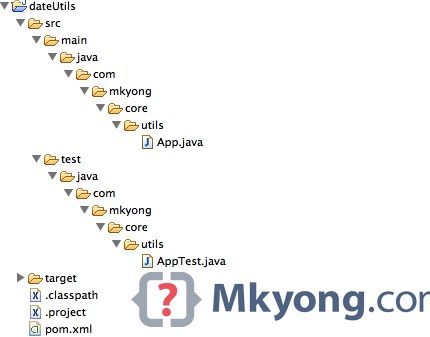
Previous Java project (dateutils) will be reused, see following folder structure
Note
This project has a single dependency –
This project has a single dependency –
joda-time.jar
2. Pom.xml
Read below comment for self-explanatory.
pom.xml
<project xmlns="http://maven.apache.org/POM/4.0.0"
	xmlns:xsi="http://www.w3.org/2001/XMLSchema-instance"
	xsi:schemaLocation="http://maven.apache.org/POM/4.0.0
	http://maven.apache.org/maven-v4_0_0.xsd">
	<modelVersion>4.0.0</modelVersion>
	<groupId>com.mkyong.core.utils</groupId>
	<artifactId>dateUtils</artifactId>
	<packaging>jar</packaging>
	<version>1.0-SNAPSHOT</version>
	<name>dateUtils</name>
	<url>http://maven.apache.org</url>

	<properties>
		<jdk.version>1.7</jdk.version>
		<jodatime.version>2.5</jodatime.version>
		<junit.version>4.11</junit.version>
	</properties>

	<dependencies>
		<dependency>
			<groupId>junit</groupId>
			<artifactId>junit</artifactId>
			<version>${junit.version}</version>
			<scope>test</scope>
		</dependency>
		<dependency>
			<groupId>joda-time</groupId>
			<artifactId>joda-time</artifactId>
			<version>${jodatime.version}</version>
		</dependency>
	</dependencies>

	<build>
		<finalName>dateutils</finalName>
		<plugins>

			<!-- download source code in Eclipse, best practice -->
			<plugin>
				<groupId>org.apache.maven.plugins</groupId>
				<artifactId>maven-eclipse-plugin</artifactId>
				<version>2.9</version>
				<configuration>
					<downloadSources>true</downloadSources>
					<downloadJavadocs>false</downloadJavadocs>
				</configuration>
			</plugin>

			<!-- Set a compiler level -->
			<plugin>
				<groupId>org.apache.maven.plugins</groupId>
				<artifactId>maven-compiler-plugin</artifactId>
				<version>2.3.2</version>
				<configuration>
					<source>${jdk.version}</source>
					<target>${jdk.version}</target>
				</configuration>
			</plugin>

			<!-- Maven Assembly Plugin -->
			<plugin>
				<groupId>org.apache.maven.plugins</groupId>
				<artifactId>maven-assembly-plugin</artifactId>
				<version>2.4.1</version>
				<configuration>
					<!-- get all project dependencies -->
					<descriptorRefs>
						<descriptorRef>jar-with-dependencies</descriptorRef>
					</descriptorRefs>
					<!-- MainClass in mainfest make a executable jar -->
					<archive>
					  <manifest>
						<mainClass>com.mkyong.core.utils.App</mainClass>
					  </manifest>
					</archive>

				</configuration>
				<executions>
				  <execution>
					<id>make-assembly</id>
                                        <!-- bind to the packaging phase -->
					<phase>package</phase>
					<goals>
						<goal>single</goal>
					</goals>
				  </execution>
				</executions>
			</plugin>

		</plugins>
	</build>

</project>
3. Package It
Above “Maven Assembly Plugin” is bind to the Maven’s packaging phase, to produces the final Jar, just package it :
$ mvn package

[INFO]
[INFO] --- maven-jar-plugin:2.4:jar (default-jar) @ dateUtils ---
[INFO] Building jar: /Users/mkyong/dateUtils/target/dateutils.jar
[INFO]
[INFO] --- maven-assembly-plugin:2.4.1:single (make-assembly) @ dateUtils ---
[INFO] Building jar: /Users/mkyong/dateUtils/target/dateutils-jar-with-dependencies.jar
[INFO] ------------------------------------------------------------------------
[INFO] BUILD SUCCESS
[INFO] ------------------------------------------------------------------------
[INFO] Total time: 4.325s
[INFO] Finished at: Tue Oct 21 13:44:41 MYT 2014
[INFO] Final Memory: 17M/42M
[INFO] ------------------------------------------------------------------------
Two jar files will be created in the target folder.
- dateutils.jar – Only your project classes
- dateutils-jar-with-dependencies.jar – Project and dependency classes in a single jar.
4. Review It
List out the content of dateutils-jar-with-dependencies.jar
$ jar tf target/dateutils-jar-with-dependencies.jar

META-INF/
META-INF/MANIFEST.MF
org/
org/joda/
org/joda/time/
org/joda/time/base/
org/joda/time/chrono/
org/joda/time/tz/ZoneInfoCompiler$DateTimeOfYear.class
org/joda/time/tz/ZoneInfoCompiler$Rule.class
org/joda/time/tz/ZoneInfoCompiler$RuleSet.class
org/joda/time/tz/ZoneInfoCompiler$Zone.class
org/joda/time/tz/ZoneInfoCompiler.class
org/joda/time/tz/ZoneInfoProvider.class
org/joda/time/UTCDateTimeZone.class
org/joda/time/Weeks.class
org/joda/time/YearMonth$Property.class
org/joda/time/YearMonth.class
org/joda/time/YearMonthDay$Property.class
org/joda/time/YearMonthDay.class
org/joda/time/Years.class
META-INF/maven/
META-INF/maven/joda-time/
META-INF/maven/joda-time/joda-time/
META-INF/maven/joda-time/joda-time/pom.xml
META-INF/maven/joda-time/joda-time/pom.properties
com/
com/mkyong/
com/mkyong/core/
com/mkyong/core/utils/
com/mkyong/core/utils/App.class
META-INF/maven/com.mkyong.core.utils/
META-INF/maven/com.mkyong.core.utils/dateUtils/
META-INF/maven/com.mkyong.core.utils/dateUtils/pom.xml
META-INF/maven/com.mkyong.core.utils/dateUtils/pom.properties
MANIFEST.MF
Manifest-Version: 1.0
Built-By: mkyong
Build-Jdk: 1.7.0_05
Created-By: Apache Maven 3.1.1
Main-Class: com.mkyong.core.utils.App
Archiver-Version: Plexus Archiver
Run it
$ java -jar target/dateutils-jar-with-dependencies.jar

2014-10-21
Download Source Code
Download it – dateUtils-maven-assembly-plugin.zip (7 KB)

it works thanks for the recommedations
Hi everyone, what configuration i have to do if in my requeriment created a file to save some properties? i executed the jar file sucess but the properties always give me the value null so, i cant execute my requeriment sucess, deleted the refereces to the properties and all ok. Some in this post know how to make this configuration?
Hi, thanks,
Is there a way that I Include the full jdk with the jar that no need to external jdk or default jdk path to run the jar ?
thank you so much you save my day…….
How do we NOT build a fat jar? I figure this will save time in the build
i use intellij idea …
Thank you.
Mkyong is Young people.veey helpful site…Keep on good work.
I like this site most. It is my favorite.
Hi Sir,
I have a maven project and it has two maven modules, the parent maven project has some classes as well as test class. I want to create an executable for this project. Can you please help me with that. I have tried the following:
1. Using the assembbly plugin
2. Using shade plugin.
Problem is that when i am run the jar created as “java -jar jarName.jar” , it gives me a message that the classes of the maven module are not found.
Can you please help me with that?
Great… it is working
thank you, very clear explanation, and works great in netbeans with little modification
How to exclude the resources like property files from being archived into the jar file ?
Creating fat-jar/uber-jar using assembly plugin is deprecated, Should be using “maven-shade-plugin” to create fat-jar/uber-jar.
Below Lines are from Assembly Plugin Documentation
“If your project wants to package your artifact in an uber-jar, the
assembly plugin provides only basic support. For more control, use the
Maven Shade Plugin”
Hi
Is there a way to get only the fat jar created inside the target folder?
thank you! it’s really helped!
maybe use flattr =)
${jdk.version}
${jdk.version}
is cleaner way to declare compilation source and target