In this article, we will discuss about how to read and write an excel file using Apache POI
1. Basic definitions for Apache POI library
This section briefly describe about basic classes used during Excel Read and Write.
HSSFis prefixed before the class name to indicate operations related to a Microsoft Excel 2003 file.XSSFis prefixed before the class name to indicate operations related to a Microsoft Excel 2007 file or later.XSSFWorkbookandHSSFWorkbookare classes which act as an Excel WorkbookHSSFSheetandXSSFSheetare classes which act as an Excel WorksheetRowdefines an Excel rowCelldefines an Excel cell addressed in reference to a row.
2. Download Apache POI
Apache POI library is easily available using Maven Dependencies.
  <dependency>
    <groupId>org.apache.poi</groupId>
    <artifactId>poi-ooxml</artifactId>
    <version>3.15</version>
  </dependency>
3. Apache POI library – Writing a Simple Excel
The below code shows how to write a simple Excel file using Apache POI libraries. The code uses a 2 dimensional data array to hold the data. The data is written to a XSSFWorkbook object. XSSFSheet is the work sheet being worked on. The code is as shown below:
package com.mkyong;

import org.apache.poi.ss.usermodel.Cell;
import org.apache.poi.ss.usermodel.Row;
import org.apache.poi.xssf.usermodel.XSSFSheet;
import org.apache.poi.xssf.usermodel.XSSFWorkbook;

import java.io.FileNotFoundException;
import java.io.FileOutputStream;
import java.io.IOException;

public class ApachePOIExcelWrite {

    private static final String FILE_NAME = "/tmp/MyFirstExcel.xlsx";

    public static void main(String[] args) {

        XSSFWorkbook workbook = new XSSFWorkbook();
        XSSFSheet sheet = workbook.createSheet("Datatypes in Java");
        Object[][] datatypes = {
                {"Datatype", "Type", "Size(in bytes)"},
                {"int", "Primitive", 2},
                {"float", "Primitive", 4},
                {"double", "Primitive", 8},
                {"char", "Primitive", 1},
                {"String", "Non-Primitive", "No fixed size"}
        };

        int rowNum = 0;
        System.out.println("Creating excel");

        for (Object[] datatype : datatypes) {
            Row row = sheet.createRow(rowNum++);
            int colNum = 0;
            for (Object field : datatype) {
                Cell cell = row.createCell(colNum++);
                if (field instanceof String) {
                    cell.setCellValue((String) field);
                } else if (field instanceof Integer) {
                    cell.setCellValue((Integer) field);
                }
            }
        }

        try {
            FileOutputStream outputStream = new FileOutputStream(FILE_NAME);
            workbook.write(outputStream);
            workbook.close();
        } catch (FileNotFoundException e) {
            e.printStackTrace();
        } catch (IOException e) {
            e.printStackTrace();
        }

        System.out.println("Done");
    }
}
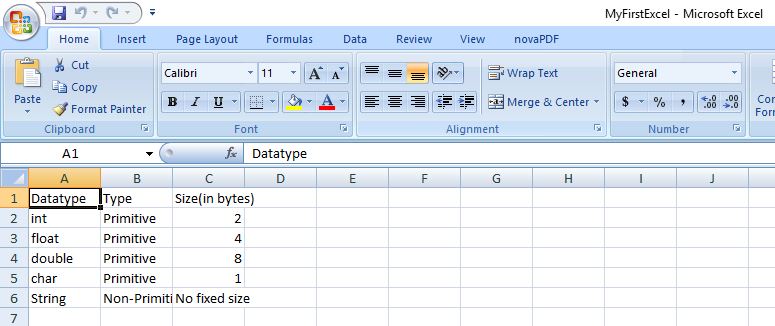
On executing the above code, you get below excel as an output.
4. Apache POI library – Reading an Excel file
The below code explains how to read an Excel file using Apache POI libraries. The function getCellTypeEnum is deprecated in version 3.15 and will be renamed to getCellType from version 4.0 onwards.
package com.mkyong;

import org.apache.poi.ss.usermodel.*;
import org.apache.poi.xssf.usermodel.XSSFWorkbook;

import java.io.File;
import java.io.FileInputStream;
import java.io.FileNotFoundException;
import java.io.IOException;
import java.util.Iterator;

public class ApachePOIExcelRead {

    private static final String FILE_NAME = "/tmp/MyFirstExcel.xlsx";

    public static void main(String[] args) {

        try {

            FileInputStream excelFile = new FileInputStream(new File(FILE_NAME));
            Workbook workbook = new XSSFWorkbook(excelFile);
            Sheet datatypeSheet = workbook.getSheetAt(0);
            Iterator<Row> iterator = datatypeSheet.iterator();

            while (iterator.hasNext()) {

                Row currentRow = iterator.next();
                Iterator<Cell> cellIterator = currentRow.iterator();

                while (cellIterator.hasNext()) {

                    Cell currentCell = cellIterator.next();
                    //getCellTypeEnum shown as deprecated for version 3.15
                    //getCellTypeEnum ill be renamed to getCellType starting from version 4.0
                    if (currentCell.getCellTypeEnum() == CellType.STRING) {
                        System.out.print(currentCell.getStringCellValue() + "--");
                    } else if (currentCell.getCellTypeEnum() == CellType.NUMERIC) {
                        System.out.print(currentCell.getNumericCellValue() + "--");
                    }

                }
                System.out.println();

            }
        } catch (FileNotFoundException e) {
            e.printStackTrace();
        } catch (IOException e) {
            e.printStackTrace();
        }

    }
}
On executing the above code, you get the below output.
Datatype--Type--Size(in bytes)--
int--Primitive--2.0--
float--Primitive--4.0--
double--Primitive--8.0--
char--Primitive--1.0--
String--Non-Primitive--No fixed size--
I am getting the below error while reading xls file in sap cpi
com.sap.it.rt.adapter.http.api.exception.HttpResponseException: An internal server error occured: org.apache.poi.poifs.filesystem.NotOLE2FileException: Invalid header signature; read 0x78206C6D74683C0A, expected 0xE11AB1A1E011CFD0
Hi there, I want to using this process for Rest Api, is it possible using MultipartFile ?
Good day, everyone! Thank you very much for this article! Helped very much!
How to embed or insert Excel sheet in Microsoft word document using java apache poi api.
How to wirte the output of a text file to a excel file
how to read from one excel afile and write that output to another excel file
Wow!! Sir my Great and Sincere regard to you, indeed for impacting knowledge online…..!
you have just save my life in adding excel to my java application! after tireless research, indeed nothing impossible
as you have done for me.
Gratefully Yours,
The type org.apache.poi.POIXMLDocument cannot be resolved. It is indirectly referenced from required .class files
+++++++++++++++++++ RESOLVED ++++++++++++++++
Add this library –
org.apache.poi
poi
3.17
Thanks
I downloaded the report form SQL into a CSV file that contains string fields a BLOB message and that has XML. I tried to write this to Excel but ht BLOB message got splitted into many lines, i could not set it into a single cell. is there possibility for this in java?
i am getting below error
The type org.apache.poi.POIXMLDocument cannot be resolved. It is indirectly referenced from required .class files
Please helped on my issues. Thanks in advance
what is the way to make the header column {“Datatype”, “Type”, “Size(in bytes)”} alone BOLD while writing to it
Hi i am looking for an example code about writing to excel from jtable. Can you help me.
package LeProjetExcel;
import java.io.FileInputStream;
import java.io.IOException;
import java.io.InputStream;
This code contains 2 class
one that reads and puts my data into an arrayList
secon that transforms my arraylist in jTable
main in secon class
The place where you indicate the root is in the main
only works with .xls extension because HSSF
package LeProjetExcel;
import java.io.FileInputStream;
import java.io.IOException;
import java.io.InputStream;
import java.sql.Connection;
import java.util.ArrayList;
import java.util.Iterator;
import org.apache.poi.hssf.usermodel.HSSFCell;
import org.apache.poi.hssf.usermodel.HSSFRow;
import org.apache.poi.hssf.usermodel.HSSFSheet;
import org.apache.poi.hssf.usermodel.HSSFWorkbook;
import org.apache.poi.poifs.filesystem.POIFSFileSystem;
import org.apache.poi.ss.usermodel.CellType;
public class ExcelReading2 {
ExcelReading2(){
}
public ArrayList ConvertionFichierExelEnArrayList(String racineDeFichierExcel) {
ArrayList TableauDeRetour = new ArrayList();
ArrayList values = new ArrayList();
Connection connection;
ArrayList nombreDeligneParColone = new ArrayList();
int nombrDeCarreBlanc=0;
try {
InputStream input = new FileInputStream(racineDeFichierExcel);
POIFSFileSystem fs = new POIFSFileSystem(input); //class permetant de lire fichier word,excel,powerpoint
HSSFWorkbook wb = new HSSFWorkbook(fs); ///class permeten de travailler avec des fichier excel
HSSFSheet sheet = wb.getSheetAt(0); ///ici on recupere la premiere feuille
Iterator rows = sheet.rowIterator(); ///on recupe les information ligne par ligne avec la methode rowIterator()
int nombreDeCase=0;///variable temporaire contenant le nombre de case de chaque tour pour metre dans tableau nombreDeligneParColone
while(rows.hasNext()) {//la boucle tourne tant quil y a des ligne
nombreDeCase=0;
//values.clear(); //sans doute pour quand il y a plusieur page
HSSFRow row = (HSSFRow) rows.next();///Attention il y a rows et row comme variable
Iterator cells = row.cellIterator();/// rows c la ligne
///row c la cellule ou case
while(cells.hasNext()) { //la boucle tourne tant quil y a des cellule ou case
HSSFCell cell = (HSSFCell) cells.next();
if(CellType.NUMERIC==cell.getCellType()) {//ATTENTION !!! les truc genre HSSFCell.CELL_TYPE_NUMERIC cela ne marche plus fo utiliser CellType.NUMERIC
values.add(Integer.toString((int)cell.getNumericCellValue()));
nombrDeCarreBlanc++;
}
if(CellType.STRING==cell.getCellType()) {//ATTENTION !!! les truc genre HSSFCell.CELL_TYPE_NUMERIC cela ne marche plus fo utiliser CellType.NUMERIC
values.add(cell.getStringCellValue());
nombrDeCarreBlanc++;
}
if(CellType.BOOLEAN==cell.getCellType()) {//ATTENTION !!! les truc genre HSSFCell.CELL_TYPE_NUMERIC cela ne marche plus fo utiliser CellType.NUMERIC
values.add(Boolean.toString((boolean)cell.getBooleanCellValue()));
}
if(CellType.BLANK==cell.getCellType()) {//ATTENTION !!! les truc genre HSSFCell.CELL_TYPE_NUMERIC cela ne marche plus fo utiliser CellType.NUMERIC
values.add(” “);
nombrDeCarreBlanc++;
}
if(CellType._NONE==cell.getCellType()) {//ATTENTION !!! les truc genre HSSFCell.CELL_TYPE_NUMERIC cela ne marche plus fo utiliser CellType.NUMERIC
values.add(” “);
nombrDeCarreBlanc++;
} if(CellType.FORMULA==cell.getCellType()) {//ATTENTION !!! les truc genre HSSFCell.CELL_TYPE_NUMERIC cela ne marche plus fo utiliser CellType.NUMERIC
values.add(cell.getStringCellValue());
nombrDeCarreBlanc++;
}//if
nombreDeCase++;
}///while(cells.hasNext()) boucle cellule
nombreDeligneParColone.add(nombreDeCase);
}//while(rows.hasNext()) boucle ligne
wb.close();
}catch(IOException e) {
e.printStackTrace();
}//try catch
TableauDeRetour.add(values);
TableauDeRetour.add(nombreDeligneParColone);
return TableauDeRetour;
}/// methode ConvertionFichierExelEnArrayList
public ArrayList DecoupageDeArrayList(ArrayList values,ArrayList nombreDeligneParColone) {
ArrayList TabDecoupe= new ArrayList();
int valeurCadre=0;//variable qui sert a donner la valeur de ctr2 a ctr1 sans changer sa valeur pendant le tour de boucle
int valeurLigneParColone=0;//variable qui sert a parcourir le tableau nombreDeligneParColone et avoir ses valeur.La boucle ne fitais pas avec
for(int ctr1=valeurCadre;ctr1<(values.size()-2);ctr1=valeurCadre) { //boucle qui continue tant qu'il y a des ligne //note pt revoir nombrDeCarreBlanc car fonctionnel mais non precise
ArrayList arrayListTemporaire = new ArrayList();
arrayListTemporaire.clear();
for(int ctr2=ctr1;ctr2<(nombreDeligneParColone.get(valeurLigneParColone)+ctr1);ctr2++) {/// ctr2 est initialiser a la valeur de ctr1 car values est unidimancionel sinon a 0 on va repeter les nombre
///on ajoute la valeur de ctr1 a nombreDeligneParColone.get(ctr1) car cela permette que le maximume a atteindre par la boucle soit dans lintervalle rechercher
arrayListTemporaire.add(values.get(ctr2));//ctr1 naugment po quand plusieur nombre dans sa fait get 1 get 1 get 1 get 1
valeurCadre++;//sert a avoir le bon minimum lors du parcour du tableau values
}///ctr2 //icite ctr2=19
TabDecoupe.add(arrayListTemporaire);
valeurLigneParColone++;
}///ctr1
return TabDecoupe;
}/// methode DecoupageDeArrayList
public int AvoirValeurPlusEleverTab(ArrayList nombreDeligneParColone) { //sert a remplissagePourTableur2 et a définir le nombre de titre dans la class Tableur
int valeurPlusElever=0;
for(int ctr=0;ctr<nombreDeligneParColone.size();ctr++) {
if(valeurPlusElever<nombreDeligneParColone.get(ctr)) {
valeurPlusElever=nombreDeligneParColone.get(ctr);
}//if
}//for
return valeurPlusElever;
}/// methode AvoirValeurPlusEleverTab
public ArrayList remplissagePourTableur2(ArrayList TabDecoupe,ArrayList nombreDeligneParColone) {
//note pt se creer un nouveau tableau et ajouter au fur et a mesure les string vide
/////*********patie1
///trouver le nombre le plus elever dans le tableau nombreDeligneParColone
int valeurPlusElever=AvoirValeurPlusEleverTab(nombreDeligneParColone);
/////*********patie2
///remplire plusieur tableau de string (celon la grandeur de TabDecoupe) pour que chaque tableau de string soit a la taille maximal donc une rectangulaire ou carré
ArrayList VraiTableauARRAY= new ArrayList();
for(int ctr1=0;ctr1<TabDecoupe.size();ctr1++) {
ArrayList VraiTableauSTRING = new ArrayList();
VraiTableauSTRING.clear();
for(int ctr2=0;ctr2<valeurPlusElever;ctr2++) {
VraiTableauSTRING.add(new String());
}
VraiTableauARRAY.add(VraiTableauSTRING);
}
/////*********patie3
///modifie les valeur celon leur emplacment pour avoir un tableau contenant les valeur original mais de forme rectangulaire au lieux de variable
for(int ctr1=0;ctr1<TabDecoupe.size();ctr1++) {
for(int ctr2=0;ctr2<TabDecoupe.get(ctr1).size();ctr2++) {
VraiTableauARRAY.get(ctr1).set(ctr2, TabDecoupe.get(ctr1).get(ctr2));
}
}
return VraiTableauARRAY;
}/// methode remplissagePourTableur2
public Object [][] ConvertionEnTableauObject(ArrayList VraiTableauARRAY,ArrayList nombreDeligneParColone) {
int valeurPlusElever=AvoirValeurPlusEleverTab(nombreDeligneParColone);
Object data[][]=new Object[VraiTableauARRAY.size()][valeurPlusElever];
for(int ctr1=0;ctr1<VraiTableauARRAY.size();ctr1++) {
for(int ctr2=0;ctr2<VraiTableauARRAY.get(ctr1).size();ctr2++) {
data[ctr1][ctr2]=VraiTableauARRAY.get(ctr1).get(ctr2);
}
}
return data;
}///ConvertionEnTableauObject
public ArrayList MethodeComplettePourTableur(String racine) {
ArrayList TabArrayAcTabValeurEtTabNombDeLigne = new ArrayList(); ///TabArrayAcTabValeurEtTabNombDeLigne c.est un tableau contenant le tableau contenant les valeur Excel en String (le tableau est sur 1 ligne donc il est traiter plus loin) et contenant aussi le tableau qui contient le nombre element de chacque tableau
TabArrayAcTabValeurEtTabNombDeLigne=ConvertionFichierExelEnArrayList(racine); ///convertion du fichier excel en arraylist sur 1 ligne
ArrayList TabDecoupe = new ArrayList (); ///tableau contenant plusieur tableau de string pour simuler un tableau multidimentionel
TabDecoupe=DecoupageDeArrayList(TabArrayAcTabValeurEtTabNombDeLigne.get(0), TabArrayAcTabValeurEtTabNombDeLigne.get(1)); ///découpe le tableau de string en array selon les ligne du fichier excel
///mais les tableau sont de taille différente donc non compatible avec la class Tableur
ArrayList TabRectangulaire = new ArrayList(); ///arrayDeFormeRectangulaire
TabRectangulaire=remplissagePourTableur2(TabDecoupe, TabArrayAcTabValeurEtTabNombDeLigne.get(1));//la class Tableur ne prend des tableau d’object rectangulaire donc cette methode transforme arraylist en arraylist ayant le meme nombre de case dans chaque tableau de string
Object data[][]=ConvertionEnTableauObject(TabRectangulaire,TabArrayAcTabValeurEtTabNombDeLigne.get(1));
ArrayList chose= new ArrayList();
chose.add(data);
int valeurPlusElever=0;
valeurPlusElever=AvoirValeurPlusEleverTab(TabArrayAcTabValeurEtTabNombDeLigne.get(1));
chose.add(valeurPlusElever);
return chose;
}// methode MethodeComplettePourTableur()
}///ExcelReading
/////************NNNNNNEXT CLASS
package LeProjetExcel;
import java.util.ArrayList;
import javax.swing.JFrame;
import javax.swing.JScrollPane;
import javax.swing.JTable;
public class Tableur extends JFrame {
Object[][] data;
String title[];
public Tableur(String title[],Object[][] data) {
this.setLocationRelativeTo(null);
this.setDefaultCloseOperation(JFrame.EXIT_ON_CLOSE);
this.setTitle(“Tableur Abel”);
this.setSize(300, 120);
this.title= title;
this.data=data;
JTable tableau = new JTable(data,title);
//Nous ajoutons notre tableau à notre contentPane dans un scroll
//Sinon les titres des colonnes ne s’afficheront pas !
this.getContentPane().add(new JScrollPane(tableau));
}//constructeur
public static String[] TitreInitialiation(int grandeur) {
ArrayList tableauDeLettre= new ArrayList();
tableauDeLettre.add(“A”);
tableauDeLettre.add(“B”);
tableauDeLettre.add(“C”);
tableauDeLettre.add(“D”);
tableauDeLettre.add(“E”);
tableauDeLettre.add(“F”);
tableauDeLettre.add(“G”);
tableauDeLettre.add(“H”);
tableauDeLettre.add(“I”);
tableauDeLettre.add(“J”);
tableauDeLettre.add(“K”);
tableauDeLettre.add(“L”);
tableauDeLettre.add(“M”);
tableauDeLettre.add(“N”);
tableauDeLettre.add(“O”);
tableauDeLettre.add(“P”);
tableauDeLettre.add(“Q”);
tableauDeLettre.add(“R”);
tableauDeLettre.add(“S”);
tableauDeLettre.add(“T”);
tableauDeLettre.add(“U”);
tableauDeLettre.add(“V”);
tableauDeLettre.add(“W”);
tableauDeLettre.add(“X”);
tableauDeLettre.add(“Y”);
tableauDeLettre.add(“Z”);
tableauDeLettre.add(“a”);
tableauDeLettre.add(“b”);
tableauDeLettre.add(“c”);
tableauDeLettre.add(“d”);
tableauDeLettre.add(“e”);
tableauDeLettre.add(“f”);
tableauDeLettre.add(“g”);
tableauDeLettre.add(“h”);
tableauDeLettre.add(“i”);
tableauDeLettre.add(“j”);
tableauDeLettre.add(“k”);
tableauDeLettre.add(“l”);
tableauDeLettre.add(“m”);
tableauDeLettre.add(“n”);
tableauDeLettre.add(“o”);
tableauDeLettre.add(“p”);
tableauDeLettre.add(“q”);
tableauDeLettre.add(“r”);
tableauDeLettre.add(“s”);
tableauDeLettre.add(“t”);
tableauDeLettre.add(“u”);
tableauDeLettre.add(“v”);
tableauDeLettre.add(“w”);
tableauDeLettre.add(“x”);
tableauDeLettre.add(“y”);
tableauDeLettre.add(“z”);
tableauDeLettre.add(“AA”);
tableauDeLettre.add(“AB”);
tableauDeLettre.add(“AC”);
tableauDeLettre.add(“AD”);
tableauDeLettre.add(“AE”);
String tableauTitle[]=new String[grandeur];
for(int ctr=0;ctr<grandeur;ctr++) {
tableauTitle[ctr]=tableauDeLettre.get(ctr);
}
return tableauTitle;
}///TitreInitialiation
public static void main(String[] args) {
ExcelReading babiboula = new ExcelReading();
ArrayList chose= new ArrayList();
chose=babiboula.MethodeComplettePourTableur(“C:\\Users\\JohnSmith\\Downloads\\labMath.xls”); ////ROOTS
String TestTitle[]=TitreInitialiation((int)chose.get(1));
Object[][] testData=(Object[][]) chose.get(0);
for (Object[] sousObject : testData) {
for (Object objects : sousObject) {
System.out.println(objects);
}
}
Tableur tableur = new Tableur(TestTitle,testData);
tableur.setVisible(true);
}///main
}//class Tableur
Writing to excel works fine. thank you so much.
Thanks you so much; the logical flow has worked.
You need to update your code, I have taken and it is not working, throwing errors. It wasted my time.
poi 4.x is not really working to read xlsx file and getting “java.lang.IllegalArgumentException: InputStream of class class org.apache.commons.compress.archivers.zip.ZipFile$1 is not implementing InputStreamStatistics”
at: workbook = new XSSFWorkbook(new InputStream(file));
Do we have any solution?
if .dot file convert html is it possible?
sorry, i found the answer
for (int i = 0; i < wb.getNumberOfSheets(); i++) {
Sheet datatypeSheet = workbook.getSheetAt(i);
}
how about the excel has multiple sheet?
Just FYI:
The type org.apache.poi.POIXMLDocument cannot be resolved. It is indirectly referenced from required .class files
i am also getting this problem
I m getting all the data line by line in output. I need it to be printed in row and column wise as it is in excel
how to read date into excel file
Hi Sir/Madam
xlsx(Excel) format file Read content issues that attaching file from Email and store into local drive, Please any help on this and that really appreciated.
———————————————————————————————————————————————————–
Below java code now we are using
———————————-
String contentType = message.getContentType();
String attachFiles = “”;
// String saveDirectory = (String) resources.get(SystemRqstAppConstants.WebConstants.CUSTOMERITEMVENDORPO_PATH);
String saveDirectory =”D:/ResumeFiles/”;
List errorsList= null;
String messageContent = “”;
logger.info(“:::::Timecards Auto Update before Attchments:::::”);
if (contentType.contains(“multipart”)) {
// content may contain attachments
String client=””;
if(subject.contains(“PFIZER”) || subject.contains(“Pfizer”) || subject.contains(“pfizer”))
client=”Pfizer”;
else if(subject.contains(“CSC”) || subject.contains(“Csc”) || subject.contains(“csc”))
client=”CSC”;
logger.info(“Timecards Auto Update client name: “+client);
Multipart multiPart = (Multipart) message.getContent();
int numberOfParts = multiPart.getCount();
for (int partCount = 0; partCount < numberOfParts; partCount++) {
MimeBodyPart part = (MimeBodyPart) multiPart.getBodyPart(partCount);
if (Part.ATTACHMENT.equalsIgnoreCase(part.getDisposition())) {
// this part is attachment
fileName = part.getFileName();
attachFiles += fileName + ", ";
saveDirectory = saveDirectory+client+"/";
File folder = new File(saveDirectory);
if(!folder.exists())
folder.mkdir();
String destFilePath = saveDirectory+fileName;
logger.info("Timecards Auto Update destFilePath: "+destFilePath);
FileOutputStream fileOutStream = new FileOutputStream(destFilePath);
byte abyte0[] = new byte[4096];
int length=0;
input = part.getInputStream();
DataInputStream in = new DataInputStream(input);
while ((in != null) && ((length = in.read(abyte0)) != -1)){
fileOutStream.write(abyte0, 0, length);
}
input.close();
in.close();
// my_xlsx_workbook.write(fileOutStream);
fileOutStream.flush();
fileOutStream.close();
Thanks in Advance
Rama
How can we handle non english strings like hindi text or thai text while reading excel sheets?
In the version of 3.9 of poi dependency you have to use “Cell.CELL_TYPE_STRING” or “Cell.CELL_TYPE_x” instead of “CellType.x” in which x may equal to BLANK, BOOLEAN, ERROR, FORMULA, NUMERIC OR STRING
For the ones who didn’t understand here is the example;
if (cell.getCellType() == Cell.CELL_TYPE_STRING) {
// your code
}
Thanks Buddy
What are the jars required?
This dependency is required for Apache POI.
org.apache.poi
poi
3.7
Could yo tell me how to import apache poi? I do not know exactly
You have a pom.xml in your project?
Add the code below:
<!-- https://mvnrepository.com/artifact/org.apache.poi/poi --><dependency>
<groupId>org.apache.poi</groupId>
<artifactId>poi</artifactId>
<version>3.17</version>
</dependency>
<!-- https://mvnrepository.com/artifact/org.apache.poi/poi-ooxml -->
<dependency>
<groupId>org.apache.poi</groupId>
<artifactId>poi-ooxml</artifactId>
<version>3.17</version>
</dependency>
When writing large Excel files there’s also SXSSFWorkbook. It’s a streaming version of XSSFWorkbook with a lower memory footprint.
Thanks for your SXSSFWorkbook suggestion.
SXSSFWorkbook stores in temporary file. Is there a solution to avoid this ? on server security is issue if we have temp files.