Here’s a guide to show you how to deploy JAX-WS web services on Tomcat servlet container. See following summary steps of a web service deployment.
- Create a web service (of course).
- Create a sun-jaxws.xml, defines web service implementation class.
- Create a standard web.xml, defines
WSServletContextListener,WSServletand structure of a web project. - Build tool to generate WAR file.
- Copy JAX-WS dependencies to “${Tomcat}/lib” folder.
- Copy WAR to “${Tomcat}/webapp” folder.
- Start It.
Directory structure of this example, so that you know where to put your files.
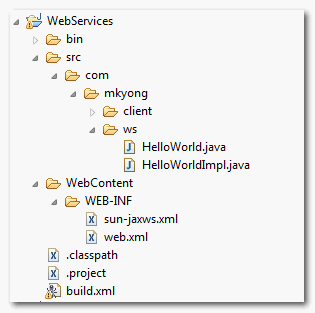
1. WebServices
A simple JAX-WS hello world example.
File : HelloWorld.java
package com.mkyong.ws;

import javax.jws.WebMethod;
import javax.jws.WebService;
import javax.jws.soap.SOAPBinding;
import javax.jws.soap.SOAPBinding.Style;

//Service Endpoint Interface
@WebService
@SOAPBinding(style = Style.RPC)
public interface HelloWorld{

	@WebMethod String getHelloWorldAsString();

}
File : HelloWorldImpl.java
package com.mkyong.ws;

import javax.jws.WebService;

//Service Implementation Bean

@WebService(endpointInterface = "com.mkyong.ws.HelloWorld")
public class HelloWorldImpl implements HelloWorld{

	@Override
	public String getHelloWorldAsString() {
		return "Hello World JAX-WS";
	}
}
Later, you will deploy this hello world web service on Tomcat.
2. sun-jaxws.xml
Create a web service deployment descriptor, which is also known as JAX-WS RI deployment descriptor – sun-jaxws.xml.
File : sun-jaxws.xml
<?xml version="1.0" encoding="UTF-8"?>
<endpoints
  xmlns="http://java.sun.com/xml/ns/jax-ws/ri/runtime"
  version="2.0">
  <endpoint
      name="HelloWorld"
      implementation="com.mkyong.ws.HelloWorldImpl"
      url-pattern="/hello"/>
</endpoints>
When user access /hello/ URL path, it will fire the declared web service, which is HelloWorldImpl.java.
For detail endpoint attributes , see this article.
3. web.xml
Create a standard web.xml deployment descriptor for the deployment. Defines WSServletContextListener as listener class, WSServlet as your hello servlet.
File : web.xml
<?xml version="1.0" encoding="UTF-8"?>
<!DOCTYPE web-app PUBLIC "-//Sun Microsystems,
Inc.//DTD Web Application 2.3//EN"
"http://java.sun.com/j2ee/dtds/web-app_2_3.dtd">

<web-app>
    <listener>
        <listener-class>
                com.sun.xml.ws.transport.http.servlet.WSServletContextListener
        </listener-class>
    </listener>
    <servlet>
        <servlet-name>hello</servlet-name>
        <servlet-class>
        	com.sun.xml.ws.transport.http.servlet.WSServlet
        </servlet-class>
        <load-on-startup>1</load-on-startup>
    </servlet>
    <servlet-mapping>
        <servlet-name>hello</servlet-name>
        <url-pattern>/hello</url-pattern>
    </servlet-mapping>
    <session-config>
        <session-timeout>120</session-timeout>
    </session-config>
</web-app>
4. WAR Content
Use Ant, Maven or JAR command to build a WAR file to include everything inside. The WAR content should look like this :
WEB-INF/classes/com/mkyong/ws/HelloWorld.class
WEB-INF/classes/com/mkyong/ws/HelloWorldImpl.class
WEB-INF/web.xml
WEB-INF/sun-jaxws.xml
For those who are interested, here’s the Ant file to build this project and generate the WAR file.
File : build.xml
<project name="HelloWorldWS" default="dist" basedir=".">
    <description>
        Web Services build file
    </description>
  <!-- set global properties for this build -->
  <property name="src" location="src"/>
  <property name="build" location="build"/>
  <property name="dist"  location="dist"/>
  <property name="webcontent"  location="WebContent"/>

  <target name="init">
        <!-- Create the time stamp -->
        <tstamp/>
        <!-- Create the build directory structure used by compile -->
        <mkdir dir="${build}"/>
  </target>

  <target name="compile" depends="init"
  	description="compile the source " >
        <!-- Compile the java code from ${src} into ${build} -->
        <javac srcdir="${src}" destdir="${build}"/>
  </target>

  <target name="war" depends="compile"
  	description="generate the distribution war" >

	<!-- Create the war distribution directory -->
  	<mkdir dir="${dist}/war"/>

  	<!-- Follow standard WAR structure -->
  	<copydir dest="${dist}/war/build/WEB-INF/" src="${webcontent}/WEB-INF/" />
  	<copydir dest="${dist}/war/build/WEB-INF/classes/" src="${build}" />

	<jar jarfile="${dist}/war/HelloWorld-${DSTAMP}.war" basedir="${dist}/war/build/"/>
  </target>

</project>
5. JAX-WS Dependencies
By default, Tomcat does not comes with any JAX-WS dependencies, So, you have to include it manually.
1. Go here http://jax-ws.java.net/.
2. Download JAX-WS RI distribution.
3. Unzip it and copy following JAX-WS dependencies to Tomcat library folder “{$TOMCAT}/lib“.
- jaxb-impl.jar
- jaxws-api.jar
- jaxws-rt.jar
- gmbal-api-only.jar
- management-api.jar
- stax-ex.jar
- streambuffer.jar
- policy.jar
6. Deployment
Copy the generated WAR file to {$TOMCAT}/webapps/ folder and start the Tomcat server.
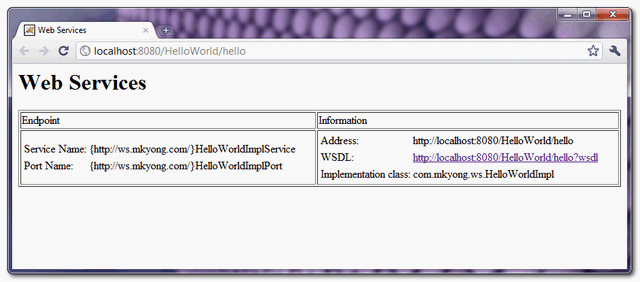
For testing, you can access this URL : http://localhost:8080/HelloWorld/hello, if you see following page, it means web services are deploy successfully.

You are simply superb
You show HOW TO DO IT but not HOW TO TEST…
Mkyong, not sure how to edit my last suggested comment, but for Step 5, the link redirects to
https://github.com/javaee/metro-jax-ws. This page has many links. The one needed is the “Download standalone distribution” link near the very bottom.
Thanks for the tutorial and all your hard work. The link in Step 5 now seems to redirect to
https://github.com/javaee/metro-jax-ws. While there is a JAX-WS RI inside this none of the expected jars can
be found. Perhaps you might confirm this and update the link.
Hi Mkyoung, thanks for your tutorial. I Did exactly what you say and worked perfectly 😉
Does this websevice works fine on Websphere server v8.0 Or do we need to change anything. Please advice
If I understood it correctly, sun-jaxws.xml and servlet config is required in case of deploying web service to tomcat server only.
Using eclipse and crating a new java project…the same using the command jar -cvf WebServices.war * it create only the xml file but not the classes………WHY????
i use latest jaxws-ri-2.x.jar. I found ha-api.jar and jaxb-core are also required.
Thanks Fremont! I was missing that!
and wsdl as follows…..
Hi young…wsdl document cant be parsed in client app….why wsdl document not well structured…following exception coming at client app
parsing WSDL…
[ERROR] Server returned HTTP response code: 502 for URL: http://localhost:8585/SampleWebService/hello?wsdl
Failed to read the WSDL document: http://localhost:8585/SampleWebService/hello?wsdl, because 1) could not find the document; /2) the document could not be read; 3) the root element of the document is not .
[ERROR] failed.noservice=Could not find wsdl:service in the provided WSDL(s):
Hi, thanks for your tutorial. Just as a side note, in your para 5. “JAX-WS Dependencies”, two jars are missing: jaxb-core.jar and ha-api.jar (with jaxws-ri-2.2.10.zip)
How do I see the actual output? I want to output something with my service
you will need to write a Web Service Client.. wsimport should help you get started with the end point interface generation. Alternatively you could you one of the several soap clients available such as SoapUI..
What if I have two Service implementation?
Thanks for a great tutorial but am still having
HTTP Status 404 – /HelloWorld-20101123/hello
type Status report
message /HelloWorld-20101123/hello
description The requested resource (/HelloWorld-20101123/hello) is not available
I copied the required jar files to /usr/share/tomcat7/lib. please is that the correct path to tomcat7 lib folder
Check your tomcat logs.. most likely there will be an exception trace there which could lead you to your answer..
Hi, I followed your tut but didn’t want to use eclipse but when I deployed under tomcat I got error 404 why ? My files structure here http://www33.zippyshare.com/v/70463488/file.html
when i try to deploy the war in JBoss/Tomcat it gives along list of exception—
org.apache.catalina.LifecycleException: Failed to start component [Stan
e[Catalina].StandardHost[localhost].StandardContext[/HelloWorld-2010112
at org.apache.catalina.util.LifecycleBase.start(LifecycleBase.j
at org.apache.catalina.core.ContainerBase.addChildInternal(Cont
.java:901)
at org.apache.catalina.core.ContainerBase.addChild(ContainerBas
7)
at org.apache.catalina.core.StandardHost.addChild(StandardHost.
at org.apache.catalina.startup.HostConfig.deployWAR(HostConfig.
)
at org.apache.catalina.startup.HostConfig$DeployWar.run(HostCon
1880)
at java.util.concurrent.Executors$RunnableAdapter.call(Executor
1)
at java.util.concurrent.FutureTask$Sync.innerRun(FutureTask.jav
at java.util.concurrent.FutureTask.run(FutureTask.java:166)………
Can anyone help me with this
After generate war by ran ant build.xml, the given url http://localhost:8080/HelloWorld/hello not working, so i did to changed the url http://localhost:8080/HelloWorld-20140512/hello It working fine, But WSDL could not open by using http://localhost:8080/HelloWorld-20140512/hello?wsdl. So how i can do ?
Is there anyway excluding adding web.xml entry? It’s urgly code.
Hi Mkyong, When I deploy above webservice in Jboss 4.2 it is working fine but when I deploy the same in Jboss 5.1 GA deployment fails and I get exception
java.lang.LinkageError: loader constraint violation in interface itable initialization: when resolving method “com.sun.xml.ws.util.xml.XMLStreamReaderFilter.getAttributeName(I)Ljavax/xml/namespace/QName;” the class loader (instance of org/jboss/classloader/spi/base/BaseClassLoader) of the current class, com/sun/xml/ws/util/xml/XMLStreamReaderFilter, and the class loader (instance of ) for interface javax/xml/stream/XMLStreamReader have different Class objects for the type javax/xml/namespace/QName used in the signature
I googled and come to know that this is due to some conflict in jar files but I am not able to identify which jar file
I am using tomcat/6.026 in windows.
A. I got the error “SEVERE: Error listenerStart” after I added the jars in STEP 5
SOLUTION: Add the following 2 additional jars (as Kaushal has mentioned)
1. ha-api.jar
2. jaxb-core.jar
B. From the download source code I took the HelloWorld-20101123.war and pasted it in the tomcat webapps directory while tomcat was running and automatically the application was deployed (hot deploy).
Then I typed in the following in the browser
http://localhost:8080/HelloWorld-20101123/hello
and it works
Thanks a lot to Mr. mykong who is doing a wonderful job in helping us with all the examples and to everyone in the post for helping each other.
I am using Tomcat 6.0.26.
In addition to what mkyong has mentioned
yeah!!! working…
If you run into issues, just copy the whole content of the lib folder from the extracted jaxws-ri to your Tomcat libs folder. Worked for me. Greets
Hello;
How can I publish a web service such folder:
http://localhost:8080/wstest/services/converter?wsdl
I tried various combinations but I could not managed
When I try to open the Web.xml in browser, I get the below error.
The XML page cannot be displayed
Cannot view XML input using style sheet. Please correct the error and then click the Refresh button, or try again later.
——————————————————————————–
Unspecified error Error processing resource ‘http://java.sun.com/j2ee/dtds/web-app_2_3.dtd’.
Hi thanks for this post, how can I create the wsdl file for this web service created ?
On a browser, type your web service address followed by ?wsdl, like stated on the 6th point (Deployment one).
Hi, thanks for this post. How can I create a wsdl file for this webservice created ? please help me, im new to WS
Thanks for the brilliant insights in java/jee by giving practical example. it would have been great of you have provided some use-cases where these will work.
And please recommend a book for Java Web Services (preferably SOAP)
Sorry I tried everything mentioned here but I am stuck at
SCHWERWIEGEND: WSSERVLET11: Runtime descriptor cannot be parsed: java
.lang.NoSuchMethodError: com.sun.xml.ws.assembler.TubelineAssemblyController: me
thod ()V not found
Please help me, I am running on Tomcat 7
you must read the older comments.
The answer was already posted.
Best regards.
Hi,
I added the jars you mentioned from jaxws-ri-2.2.8 but still no good :/
Any errors / stack trace. I am using this example and have now made it possible 3 external companies to connect to our web services(Well with added security measures). Please describe any errors you get or paste your stack trace..
Stack trace is:
SEVERE: WSSERVLET11: failed to parse runtime descriptor: java.lang.NoSuchMethodError: com.sun.xml.ws.assembler.TubelineAssemblyController: method ()V not found
java.lang.NoSuchMethodError: com.sun.xml.ws.assembler.TubelineAssemblyController: method ()V not found
at com.sun.xml.ws.assembler.TubelineAssemblerFactoryImpl$MetroTubelineAssembler.(TubelineAssemblerFactoryImpl.java:98)
at com.sun.xml.ws.assembler.TubelineAssemblerFactoryImpl.doCreate(TubelineAssemblerFactoryImpl.java:302)
at com.sun.xml.ws.api.pipe.TubelineAssemblerFactory.create(TubelineAssemblerFactory.java:111)
at com.sun.xml.ws.server.WSEndpointImpl.(WSEndpointImpl.java:187)
at com.sun.xml.ws.server.EndpointFactory.create(EndpointFactory.java:320)
at com.sun.xml.ws.server.EndpointFactory.create(EndpointFactory.java:315)
at com.sun.xml.ws.server.EndpointFactory.createEndpoint(EndpointFactory.java:158)
at com.sun.xml.ws.api.server.WSEndpoint.create(WSEndpoint.java:577)
at com.sun.xml.ws.api.server.WSEndpoint.create(WSEndpoint.java:560)
at com.sun.xml.ws.transport.http.DeploymentDescriptorParser.parseAdapters(DeploymentDescriptorParser.java:303)
at com.sun.xml.ws.transport.http.DeploymentDescriptorParser.parse(DeploymentDescriptorParser.java:179)
at com.sun.xml.ws.transport.http.servlet.WSServletContextListener.parseAdaptersAndCreateDelegate(WSServletContextListener.java:131)
at com.sun.xml.ws.transport.http.servlet.WSServletContainerInitializer.onStartup(WSServletContainerInitializer.java:65)
at org.apache.catalina.core.StandardContext.startInternal(StandardContext.java:5280)
at org.apache.catalina.util.LifecycleBase.start(LifecycleBase.java:150)
at org.apache.catalina.core.ContainerBase.addChildInternal(ContainerBase.java:901)
at org.apache.catalina.core.ContainerBase.addChild(ContainerBase.java:877)
at org.apache.catalina.core.StandardHost.addChild(StandardHost.java:633)
at org.apache.catalina.startup.HostConfig.deployDescriptor(HostConfig.java:657)
at org.apache.catalina.startup.HostConfig.deployApps(HostConfig.java:536)
at org.apache.catalina.startup.HostConfig.check(HostConfig.java:1462)
at sun.reflect.NativeMethodAccessorImpl.invoke0(Native Method)
at sun.reflect.NativeMethodAccessorImpl.invoke(NativeMethodAccessorImpl.java:57)
at sun.reflect.DelegatingMethodAccessorImpl.invoke(DelegatingMethodAccessorImpl.java:43)
at java.lang.reflect.Method.invoke(Method.java:601)
at org.apache.tomcat.util.modeler.BaseModelMBean.invoke(BaseModelMBean.java:301)
at com.sun.jmx.interceptor.DefaultMBeanServerInterceptor.invoke(DefaultMBeanServerInterceptor.java:819)
at com.sun.jmx.mbeanserver.JmxMBeanServer.invoke(JmxMBeanServer.java:792)
at org.apache.catalina.manager.ManagerServlet.check(ManagerServlet.java:1445)
at org.apache.catalina.manager.ManagerServlet.deploy(ManagerServlet.java:860)
at org.apache.catalina.manager.ManagerServlet.doGet(ManagerServlet.java:357)
at javax.servlet.http.HttpServlet.service(HttpServlet.java:621)
at javax.servlet.http.HttpServlet.service(HttpServlet.java:728)
at org.apache.catalina.core.ApplicationFilterChain.internalDoFilter(ApplicationFilterChain.java:305)
at org.apache.catalina.core.ApplicationFilterChain.doFilter(ApplicationFilterChain.java:210)
at org.apache.catalina.filters.SetCharacterEncodingFilter.doFilter(SetCharacterEncodingFilter.java:108)
at org.apache.catalina.core.ApplicationFilterChain.internalDoFilter(ApplicationFilterChain.java:243)
at org.apache.catalina.core.ApplicationFilterChain.doFilter(ApplicationFilterChain.java:210)
at org.apache.catalina.core.StandardWrapperValve.invoke(StandardWrapperValve.java:222)
at org.apache.catalina.core.StandardContextValve.invoke(StandardContextValve.java:123)
at org.apache.catalina.authenticator.AuthenticatorBase.invoke(AuthenticatorBase.java:581)
at org.apache.catalina.core.StandardHostValve.invoke(StandardHostValve.java:171)
at org.apache.catalina.valves.ErrorReportValve.invoke(ErrorReportValve.java:99)
at org.apache.catalina.valves.AccessLogValve.invoke(AccessLogValve.java:936)
at org.apache.catalina.core.StandardEngineValve.invoke(StandardEngineValve.java:118)
at org.apache.catalina.connector.CoyoteAdapter.service(CoyoteAdapter.java:407)
at org.apache.coyote.http11.AbstractHttp11Processor.process(AbstractHttp11Processor.java:1004)
at org.apache.coyote.AbstractProtocol$AbstractConnectionHandler.process(AbstractProtocol.java:589)
at org.apache.tomcat.util.net.JIoEndpoint$SocketProcessor.run(JIoEndpoint.java:312)
at java.util.concurrent.ThreadPoolExecutor.runWorker(ThreadPoolExecutor.java:1145)
at java.util.concurrent.ThreadPoolExecutor$Worker.run(ThreadPoolExecutor.java:615)
at java.lang.Thread.run(Thread.java:722)
Hi
Ok, this is classpath issues. Please try the following, assuming you running
tomcat 6 or 7 as a stand alone app server (outside an IDE) on windows.
1. Got to the Tomcat lib folder >> C:\TomcatHome\lib
find the jaxws-rt.jar (if not found, copy this jar and make sure it exists).
2. Got to c: \Tomcat \ webapps \ yourappname \ lib folder
find the jaxws-rt.jar, if found, please remove it, no need for it to be here, Tomcat will find the classes in the main lib folder.
Restart tomcat and it should work 🙂
As for running from an IDE, well, I cant help you there, but it should be fairly easy.
Just make sure the IDE class path has valid reference of all 10 jar as listed above.
Kod
Thanks for the answer. But I am using the Tomcat inside NetBeans.. And I already put the jar files under Tomcat’s lib folder, still no good.
Much appreciated,thank you.
Hi,
I think we have to add jaxb-core.jar and ha-api.jar as well to server lib or project lib.
I have downloaded jaxws-ri-2.2.8 and added following jars to my project lib folder
1. gmbal-api-only.jar
2. ha-api.jar
3. jaxb-core.jar
4. jaxb-impl.jar
5. jaxws-api.jar
6. jaxws-rt.jar
7. management-api.jar
8. policy.jar
9. stax-ex.jar
10. streambuffer.jar
Please check and update the post.
Regards,
kaushal
Thanks, kaushal. Very useful.
hi,
I have create new dynamic web project.(using eclipse-indigo & tomcat 6)
created all classes.web.xml,build.xml,sun-jaxws.xml as specfied above. Also copied below jars :
gmbal-api-only
ha-api
jaxb-impl
jaxws-api
jaxws-rt
management-api
policy
stax-ex
streambuffer
and restart the tomcat & i got following exception:
Jun 20, 2013 1:20:21 PM org.apache.catalina.core.AprLifecycleListener init
INFO: The APR based Apache Tomcat Native library which allows optimal performance in production environments was not found on the java.library.path: C:\Program Files\Java\jre6\bin;C:\WINDOWS\Sun\Java\bin;C:\WINDOWS\system32;C:\WINDOWS;C:/Program Files/Java/jre7/bin/client;C:/Program Files/Java/jre7/bin;C:/Program Files/Java/jre7/lib/i386;C:\WINDOWS\system32;C:\WINDOWS;C:\WINDOWS\System32\Wbem;C:\Program Files\ImageConverter Plus;C:\Program Files\ImageConverter Plus\Microsoft.VC90.CRT;C:\Program Files\ImageConverter Plus\Microsoft.VC90.MFC;C:\Program Files\Java\jdk1.6.0_20\bin;C:\Documents and Settings\All Users\Application Data\Titanium\mobilesdk\win32\1.7.3.v20111012114613;C:\apache-ant-1.8.2\bin;C:\WINDOWS\system32\WindowsPowerShell\v1.0;C:\Program Files\Microsoft SQL Server\100\Tools\Binn\VSShell\Common7\IDE\;C:\Program Files\Microsoft SQL Server\100\Tools\Binn\;C:\Program Files\Microsoft SQL Server\100\DTS\Binn\;C:\Program Files\TortoiseSVN\bin;C:\Program Files\K-Lite Codec Pack\QuickTime\QTSystem\;D:\GK\SkillSoft Courses\apache-ant-1.8.4-bin\apache-ant-1.8.4\bin;D:\GK\SkillSoft Courses\apache-ant-1.8.4-bin\apache-ant-1.8.4;C:\Program Files\Java\jdk1.6.0_20\bin;C:\Documents and Settings\pallavim;;.
Jun 20, 2013 1:20:21 PM org.apache.tomcat.util.digester.SetPropertiesRule begin
WARNING: [SetPropertiesRule]{Server/Service/Engine/Host/Context} Setting property ‘source’ to ‘org.eclipse.jst.jee.server:HelloWorld’ did not find a matching property.
Jun 20, 2013 1:20:21 PM org.apache.coyote.http11.Http11Protocol init
INFO: Initializing Coyote HTTP/1.1 on http-8080
Jun 20, 2013 1:20:21 PM org.apache.catalina.startup.Catalina load
INFO: Initialization processed in 449 ms
Jun 20, 2013 1:20:21 PM org.apache.catalina.core.StandardService start
INFO: Starting service Catalina
Jun 20, 2013 1:20:21 PM org.apache.catalina.core.StandardEngine start
INFO: Starting Servlet Engine: Apache Tomcat/6.0.26
Jun 20, 2013 1:20:21 PM org.apache.catalina.core.StandardContext listenerStart
SEVERE: Error configuring application listener of class com.sun.xml.ws.transport.http.servlet.WSServletContextListener
java.lang.ClassNotFoundException: com.sun.xml.ws.transport.http.servlet.WSServletContextListener
at org.apache.catalina.loader.WebappClassLoader.loadClass(WebappClassLoader.java:1516)
at org.apache.catalina.loader.WebappClassLoader.loadClass(WebappClassLoader.java:1361)
at org.apache.catalina.core.StandardContext.listenerStart(StandardContext.java:3915)
at org.apache.catalina.core.StandardContext.start(StandardContext.java:4467)
at org.apache.catalina.core.ContainerBase.start(ContainerBase.java:1045)
at org.apache.catalina.core.StandardHost.start(StandardHost.java:785)
at org.apache.catalina.core.ContainerBase.start(ContainerBase.java:1045)
at org.apache.catalina.core.StandardEngine.start(StandardEngine.java:443)
at org.apache.catalina.core.StandardService.start(StandardService.java:519)
at org.apache.catalina.core.StandardServer.start(StandardServer.java:710)
at org.apache.catalina.startup.Catalina.start(Catalina.java:581)
at sun.reflect.NativeMethodAccessorImpl.invoke0(Native Method)
at sun.reflect.NativeMethodAccessorImpl.invoke(Unknown Source)
at sun.reflect.DelegatingMethodAccessorImpl.invoke(Unknown Source)
at java.lang.reflect.Method.invoke(Unknown Source)
at org.apache.catalina.startup.Bootstrap.start(Bootstrap.java:289)
at org.apache.catalina.startup.Bootstrap.main(Bootstrap.java:414)
Jun 20, 2013 1:20:21 PM org.apache.catalina.core.StandardContext listenerStart
SEVERE: Skipped installing application listeners due to previous error(s)
Jun 20, 2013 1:20:21 PM org.apache.catalina.core.StandardContext start
SEVERE: Error listenerStart
Jun 20, 2013 1:20:21 PM org.apache.catalina.core.StandardContext start
SEVERE: Context [/HelloWorld] startup failed due to previous errors
On searched on net for this, solution was to add “jaxws-rt.jar”..bt its already included.
Plz help me..Im very new to web-services..
Thanks in advance
Regards,
Pallavi
Hi Pallavi,
did you copy the jar into the lib directory beneath /lib or somewhere else?
What about the WARNING about the source parameter?
>>> WARNING: [SetPropertiesRule]{Server/Service/Engine/Host/Context} Setting property ?source? to ?org.eclipse.jst.jee.server:HelloWorld? did not find a matching property.
Hi,
I have a problem, when I deployment the file HelloWorld.war the status aplication?s is false. In the log, the old message is “Failed to start component [StandardEngine[Catalina].StandardHost[localhost].StandardContext[/HelloWorld]]”
Can you help me?
I tried to run the above example (JAX-WS-Deploy-To-Tomcat-Example.zip), but when I tried it in the browser I got an 404 error. Can you please help me?
Hi,
Do it step by step:
Like you know 404 means that the deployment cannot be found.
404 should not be sent after deploying the application.
1. Make a new directory under “\webapps\” called HelloWorld.
2. Create a index.html page with just a text “Hello world” in it
and put it in the directory.
3. Start Tomcat
4. Go to your browser and type: http://localhost:8080/HelloWorld/
5. Now you should see your text.
6. Now deploy the zip file again (do not forget to copy the lib directories)
to the just created directory and it should work!
Hi Soap!
I was able to successfully execute steps 1-5. But unfortunately, when I included the *.war
file into the web app/HelloWorld/*.war and even tried extracting them on the HelloWorld folder
I still get the 404 Http Status. I made sure that the required *.jar files stated above are included and put in the appropriate folder. Can you show me the content of the web app/HelloWorld/ folder?
Your response is very much appreciated.
Thanks.
eight.bits
Brilliant article! Concise and correct (apart from slight hiccup regarding ha-api.jar). Got me up and running in 5 minutes flat, after spending a few confusing days trawling the net. Many, many thanks.
Hi there,
thanks for the tutorial and the example. I tried it but after downloading the JAX-WS dependency files and deploying the example on Tomcat, I keep getting the error:
27.05.2013 11:35:46 com.sun.xml.ws.transport.http.servlet.WSServletContextListen
er parseAdaptersAndCreateDelegate
SCHWERWIEGEND: WSSERVLET11: Runtime descriptor cannot be parsed: java
.lang.NoSuchMethodError: com.sun.xml.ws.assembler.TubelineAssemblyController: me
thod ()V not found
java.lang.NoSuchMethodError: com.sun.xml.ws.assembler.TubelineAssemblyController
: method ()V not found
at com.sun.xml.ws.assembler.TubelineAssemblerFactoryImpl$MetroTubelineAs
sembler.(TubelineAssemblerFactoryImpl.java:98)
Thanks in advance.
Issue solved! I just read the old comments 🙂
ha-api.jar needed. Thanks for the help.
Like you all said: great job done by Mkyong.
Keep it up!
Thank you .. you are doing great work..
Nice Example.. it would be nice if it have code description also..
Very nice tutorial
I have a question: do we need to run wsgen tool to create server side “artifacts” ? is it left out because we used RPC soap binding but is needed in case of default document binding ? I am a bit confused because i saw this tool mentioned in a couple of articles including this web site.
Hi, thanks for your guide.
However, I have to concur with Stefano, because you forgot
😉
Nice!
Note that ha-api.jar has to be included too in your calsspath. You should modify point 5 of this guide. Tested on tomcat 7.
Thanku very much!!! U saved my life!! God bless u asian man! Your god)
You should also add ha-api.jar to the list. The lastest version of JAX-WS required it to work.
This is only needed if you use GlassFIsh
Thanks Mkyong,
Nice tutorial. Your example is working well. But I have one issue. I place war file in webapps with my example, it is not automaically deployed. When i press start it shows the error “FAIL – Application at context path /foldername could not be started”. What is the issue.
Some can help me.
when i am running the client i am getting…
Exception in thread “main” javax.xml.ws.WebServiceException: Undefined port type: {http://service.web.test.com/}ServiceInterface
at com.sun.xml.internal.ws.client.WSServiceDelegate.getPort(WSServiceDelegate.java:300)
at com.sun.xml.internal.ws.client.WSServiceDelegate.getPort(WSServiceDelegate.java:306)
at javax.xml.ws.Service.getPort(Service.java:161)
at com.test.client.ServiceClient.main(ServiceClient.java:22)
where ..client progrom is like this
import java.net.URL;
import javax.xml.namespace.QName;
import javax.xml.ws.Service;
import com.test.web.service.ServiceInterface;
public class ServiceClient {
public static void main(String[] args) throws Exception {
URL url = new URL(“http://localhost:8080/ServiceTest/hello?wsdl”);
//1st argument service URI, refer to wsdl document above
//2nd argument is service name, refer to wsdl document above
QName qname = new QName(“http://service.web.test.com/”, “ServiceImplService”);
Service service = Service.create(url, qname);
ServiceInterface hello = service.getPort(com.test.web.service.ServiceInterface.class);
System.out.println(hello.message(“Murali”));
}
}
Hi Mr.Mkyong,
Thanks a lot for this Useful tutorial. It was really simple at the same time very much Explainatory.
I tried to run the above example (JAX-WS-Deploy-To-Tomcat-Example.zip), but when I tried it in the browser I got an 404 error. Can you please help me?
Finally got things up and running. Main problem for me was build.xml. For some reason, the was not firing. I grouped it in with and it worked.
Also, I believe I had to remove the date stamp from HelloWorld-20121215.war (to HelloWorld.war) when I moved it to tomcat/webapps
for the above sample code – it is asking for ha-api.jar also. Thanks.
Sir, I found your tutorial very useful. I followed all your instructions. But I am not able to understand step number 4. I am totally new to web services in java. I have installed and set Tomcat server. I am not able to generate war files. I have downloaded Apache Ant . please guide me. I am using Eclipse IDE. I have followed all your other steps.
Hi Karthik,
If you are using eclipse IDE, ant tool comes up by default along with eclipse. You need to create build.xml and right click on build.xml in eclipse and select Run as ant build. This will generate XXXX.war file. You need to deploy this war to tomcat/webapps. Please let me know if you need further clarification…
I am getting the following error.
INFO: WSSERVLET12: JAX-WS context listener initializing
Feb 18, 2013 5:29:06 PM com.sun.xml.ws.transport.http.DeploymentDescriptorParser getImplementorClass
SEVERE: com.test.WebTests
java.lang.ClassNotFoundException: com.test.WebTests
at org.apache.catalina.loader.WebappClassLoader.loadClass(WebappClassLoader.java:1711)
at org.apache.catalina.loader.WebappClassLoader.loadClass(WebappClassLoader.java:1556)
at java.lang.ClassLoader.loadClassInternal(ClassLoader.java:320)
at java.lang.Class.forName0(Native Method)
at java.lang.Class.forName(Class.java:247)
at com.sun.xml.ws.transport.http.DeploymentDescriptorParser.getImplementorClass(DeploymentDescriptorParser.java:553)
at com.sun.xml.ws.transport.http.DeploymentDescriptorParser.parseAdapters(DeploymentDescriptorParser.java:228)
at com.sun.xml.ws.transport.http.DeploymentDescriptorParser.parse(DeploymentDescriptorParser.java:152)
at com.sun.xml.ws.transport.http.servlet.WSServletContextListener.parseAdaptersAndCreateDelegate(WSServletContextListener.java:131)
at com.sun.xml.ws.transport.http.servlet.WSServletContextListener.contextInitialized(WSServletContextListener.java:152)
at org.apache.catalina.core.StandardContext.listenerStart(StandardContext.java:4779)
at org.apache.catalina.core.StandardContext.startInternal(StandardContext.java:5273)
at org.apache.catalina.util.LifecycleBase.start(LifecycleBase.java:150)
at org.apache.catalina.core.ContainerBase$StartChild.call(ContainerBase.java:1566)
at org.apache.catalina.core.ContainerBase$StartChild.call(ContainerBase.java:1556)
at java.util.concurrent.FutureTask$Sync.innerRun(FutureTask.java:303)
at java.util.concurrent.FutureTask.run(FutureTask.java:138)
at java.util.concurrent.ThreadPoolExecutor$Worker.runTask(ThreadPoolExecutor.java:886)
at java.util.concurrent.ThreadPoolExecutor$Worker.run(ThreadPoolExecutor.java:908)
at java.lang.Thread.run(Thread.java:619)
Feb 18, 2013 5:29:06 PM com.sun.xml.ws.transport.http.servlet.WSServletContextListener parseAdaptersAndCreateDelegate
SEVERE: WSSERVLET11: failed to parse runtime descriptor: com.sun.xml.ws.util.exception.LocatableWebServiceException: class not found in runtime descriptor: com.test.WebTests
at line 3 of jndi:/localhost/webserviceTest/WEB-INF/sun-jaxws.xml
com.sun.xml.ws.util.exception.LocatableWebServiceException: class not found in runtime descriptor: com.test.WebTests
at line 3 of jndi:/localhost/webserviceTest/WEB-INF/sun-jaxws.xml
at com.sun.xml.ws.transport.http.DeploymentDescriptorParser.getImplementorClass(DeploymentDescriptorParser.java:556)
at com.sun.xml.ws.transport.http.DeploymentDescriptorParser.parseAdapters(DeploymentDescriptorParser.java:228)
at com.sun.xml.ws.transport.http.DeploymentDescriptorParser.parse(DeploymentDescriptorParser.java:152)
at com.sun.xml.ws.transport.http.servlet.WSServletContextListener.parseAdaptersAndCreateDelegate(WSServletContextListener.java:131)
at com.sun.xml.ws.transport.http.servlet.WSServletContextListener.contextInitialized(WSServletContextListener.java:152)
at org.apache.catalina.core.StandardContext.listenerStart(StandardContext.java:4779)
at org.apache.catalina.core.StandardContext.startInternal(StandardContext.java:5273)
at org.apache.catalina.util.LifecycleBase.start(LifecycleBase.java:150)
at org.apache.catalina.core.ContainerBase$StartChild.call(ContainerBase.java:1566)
at org.apache.catalina.core.ContainerBase$StartChild.call(ContainerBase.java:1556)
at java.util.concurrent.FutureTask$Sync.innerRun(FutureTask.java:303)
at java.util.concurrent.FutureTask.run(FutureTask.java:138)
at java.util.concurrent.ThreadPoolExecutor$Worker.runTask(ThreadPoolExecutor.java:886)
at java.util.concurrent.ThreadPoolExecutor$Worker.run(ThreadPoolExecutor.java:908)
at java.lang.Thread.run(Thread.java:619)
Caused by: java.lang.ClassNotFoundException: com.test.WebTests
at org.apache.catalina.loader.WebappClassLoader.loadClass(WebappClassLoader.java:1711)
at org.apache.catalina.loader.WebappClassLoader.loadClass(WebappClassLoader.java:1556)
at java.lang.ClassLoader.loadClassInternal(ClassLoader.java:320)
at java.lang.Class.forName0(Native Method)
at java.lang.Class.forName(Class.java:247)
at com.sun.xml.ws.transport.http.DeploymentDescriptorParser.getImplementorClass(DeploymentDescriptorParser.java:553)
… 14 more
Feb 18, 2013 5:29:06 PM org.apache.catalina.core.StandardContext startInternal
SEVERE: Error listenerStart
Feb 18, 2013 5:29:07 PM org.apache.catalina.core.StandardContext startInternal
SEVERE: Context [/webserviceTest] startup failed due to previous errors
Feb 18, 2013 5:29:07 PM com.sun.xml.ws.transport.http.servlet.WSServletContextListener contextDestroyed
INFO: WSSERVLET13: JAX-WS context listener destroyed
Feb 18, 2013 5:29:07 PM org.apache.catalina.startup.HostConfig deployWAR
INFO: Deploying web application archive D:\Murali\MEAP\apache-tomcat-7.0.27\webapps\webSrvTest.war
Feb 18, 2013 5:29:07 PM org.apache.catalina.core.StandardContext startInternal
SEVERE: Error listenerStart
Feb 18, 2013 5:29:07 PM org.apache.catalina.core.StandardContext startInternal
SEVERE: Context [/webSrvTest] startup failed due to previous errors
Feb 18, 2013 5:29:07 PM org.apache.coyote.AbstractProtocol start
INFO: Starting ProtocolHandler [“http-apr-8080”]
Feb 18, 2013 5:29:07 PM org.apache.coyote.AbstractProtocol start
INFO: Starting ProtocolHandler [“ajp-apr-8009”]
Feb 18, 2013 5:29:07 PM org.apache.catalina.startup.Catalina start
Issue was solved..class files not able to creat
Hi Mkyong,
as u mentioned JDK 6 is delivering the jars. Does it mean that all jars for JAX WS are shipped with the JDK. What are the dependencies between JDK6 and Tomcat6/7 and also JAX-WS. I am only aware that JDK 6 is containing JAXB 2.1.x It a little bit confusing. Do i need still sun-jaxws.xml if i would use JAX WS 2.2.7 as endpoint interface aren’t matter in this version? What is your recomendation? Wouldn’t it better to put the jars in the WEB-INF/lib folder?
Sincerely Ünhan
Hello ppl. How Can I get the content of a WS wich contain just the Hello world message (String) via URL? I’m trying to do http://localhost:8080/holamundoWS/services/HolaMundoImpl but inside HolaMundoImpl i have a function and I want to call that function (called getSaludoLycka) via the URL. I’ve been tried to http://localhost:8080/holamundoWS/services/HolaMundoImpl/getSaludoLycka but the Axis server said to me that No service is available at this URL. Please Need some help!
Such simple and great sample!!
i have tried the deployment of .war on both SunJavaSystem Webserver 7 and Oracle Weblogic 12c webserver – both deployments work fine with no additional tuneup needed.
Thank you Mr. Mkyong
Dear Mkyong team,
Many thanks to your team for your effort to helping the people in the IT world.
Attached example for the web service is very simple to understand the web service concept.
Hi,
Great tutorial. But what if I want to have two sun-jaxws.xml files? One for a live production environment and one for development. In my application I have a webservice were I only receive some requests. But I created an simulator where, a web service client sends some requests. That client send the requests to a simulator. That simulator I want to buil only if a development environment not on the live environment.
In the WSServletContextListener the path to the sun-jaxws.xml is hardcoded and I don’t want two endpoints.
Is JAXWS, smart enough to create dynamically the endpoints?
Thanks,
Dean
Hi,
Thanks for the wonderful example.
I had to include “ha-api.jar” also in the tomcat lib folder for this application to work, otherwise it was throwing the exception “java.lang.NoClassDefFoundError: org/glassfish/ha/store/api/BackingStoreException”. Is this happening only for me or everyone faced same issue?
If you are running tomcat inside eclipse then open server configuration window by double clicking, and then open “open launch configuration” and add all jar files necessary for JAX-WS under “classpath” or “source” option and it will work.
Thanks.
Many Many thanks Mkyong
really very useful Site
above app works fine.
i want to know how it configure under maven:jetty server project ?
what is the usage of below line.?
How to use with ajax ? i have difficulties to define a correct soap message to the service
And how to call it with ajax ?
SEVERE: WSSERVLET11: failed to parse runtime descriptor: javax.xml.ws.WebServiceException: Runtime descriptor “/WEB-INF/sun-jaxws.xml” is mising
I copied the war file in tomcat webapps folder, its deployed but when i try to access the url it says 404–
description The requested resource () is not available.
war file name: JaxWsProject.war
url: http://localhost:8080/JaxWsProject/add
i tried to resolve but no effort.. Kindly help..
I also copied all the dependency jar from jaxws-ri2.2 to tomcat6 lib folder..
I am using eclipse.. I did recheck all my code with yours, its matching..
All your help greatly appreciated
Something wrong in the tutorial..
I keep getting
SEVERE: WSSERVLET11: failed to parse runtime descriptor: java.lang.NoClassDefFoundError: org/glassfish/ha/store/api/BackingStoreException
Hi,
Thanks for the tutorial. What is the use of wsgen and wsimport. You didn’t use wsgen in the above tutorial. Could you please explain what is the exact need of that keyword?
Thanks
I get a strange error after deploying the war :
SEVERE: WSSERVLET11: failed to parse runtime descriptor: java.lang.NoClassDefFoundError: org/glassfish/ha/store/api/BackingStoreException
java.lang.NoClassDefFoundError: org/glassfish/ha/store/api/BackingStoreException
at com.sun.xml.ws.transport.http.servlet.ServletAdapter.(ServletAdapter.java:95)
at com.sun.xml.ws.transport.http.servlet.ServletAdapterList.createHttpAdapter(ServletAdapterList.java:77)
at com.sun.xml.ws.transport.http.servlet.ServletAdapterList.createHttpAdapter(ServletAdapterList.java:53)
….
Caused by: java.lang.ClassNotFoundException: org.glassfish.ha.store.api.BackingStoreException
at java.net.URLClassLoader$1.run(URLClassLoader.java:366)
at java.net.URLClassLoader$1.run(URLClassLoader.java:355)
….
Perhaps I’m missing some dependency?
SOLVED.
Actually it was a matter of Tomcat not loading the JAX-WS RI jars.
I downloaded the JAX-WS RI archive and unzipped into ${CATALINA_HOME}/shared/lib
Since I’m using Eclipse WTP to control the Tomcat installation, I didn’t notice that there are configuration files mantained under some sort of “meta-project” in the eclipse workspace. So I edited the file catalina.properties in the meta-project directory and added the reference to the JAX-WS RI jars to the “common.loader” variable.
So, now the corresponding configuration line read as:
common.loader=${catalina.base}/lib,${catalina.base}/lib/*.jar,${catalina.home}/lib,${catalina.home}/lib/*.jar,${catalina.base}/shared/lib/*.jar
The working project with the sample web service is now correctly deployed as an eclipse’s dynamic web project with the “Add/Remove modules” feature of the web tools platform.
Thank you very much for the tip. You saved my day :))))
I’ve stuck for almost a day with this damn error……..Thanks again…
Hello guys, the list of missing a jar jar above this post that will solve the lack of class not found glassfish. The jar should be added is the hr-api.jar. This jar is the link of the jaw-rs – http://jax-ws.java.net/2.2.6-2/ just download and add the jars from the list of this most excellent tutorial ha-api.jar.
Sincerely, Jesus.
Thanks Jesus. Your answer is correct except for the missing jar file is ha-api.jar.
Thanks Jesus!, after placing hr-api.jar jar. It is working fine.
Thanks, this solves the problem.
Found other links, which made simple solution more complex.
I included also ha-api.jar and it was fine for me.
Thanks.This is excellent tutorial.
Hi
I am confused as to how you began this project in Eclipse. Is this project meant to be a “Dynamic Web Project” ? I have tried many different wizards i.e. Dynamic Web Project, Web Service, Java Project but yet I am not able to get the same directory structure as your example. Any help will be appreciated here.
Thanks
This should be dynamic web project, if some folders don’t exists , just create it 🙂
Hi MKYong
Thank you very much for this tutorial. It works like a charm.
Hi,
Thanks very much for this tutorial this was very helpful in implementing the webservice.
However when we build a war file it creates in the following format.
HelloWorld-${DSTAMP}.war
so in that case in order to access the webpage this would be the url
http://localhost:8080/${warFileName}/hello
eg:
http://localhost:8080/HelloWorld-20120510/hello
Here the war file that is created after running the build is having its name as
HelloWorld-20120510.
This is how it extracts the war file in the webapps folder.
please correct me if any thing is wrong .
Thanks
Vishwanath
I appreciate your tutorial.
It will be more useful if you show this in a maven project as your most of the tutorials. So, that we will not face the dependency related issues.
I do not agree. If he had made this a maven project, some of us would have had to stop here and learn about maven before we could read this good tutorial.
Thanks for nice tutorial with perfect example !!!
I have a question:
Intially, I have developed a web service using JDK1.5.
Now, I would like to upgrade it to jdk1.6. Will there be any change the wsdl generated?
Please let me know as soon as possible.
Great tutorial, this was extremely helpful!
Thank you for this clear and well laid out tutorial. It took me days to get a webservice up a running and all that was missing was the jar files at the end of the tutorial in tomcat/lib. Didn’t see that explain on any other site.
Thanks for your help, keep up the good work!
Thank you for this great tutorial!
If someone tries to start the tomcat and gets an error like “BackingStoreException… class not found…”, download the ha-api.jar and copy it in the {$tomcat}/lib order and try it again.
Really thanks for this clear, simple, and useful tutorial and example, it saved me a lot of time and took me to the point
Hi,
thank you for this really good tutorial.
I have a problem in the final step. I putted the war-File in the webapps-folder and started tomcat. The war-File is now unpacked in the webapps-folder, but I can’t open the URL in browser (HTTP Status 404). There were no errors during the start of tomcat.
Hope someone can help me. Thanks!
Please access tomcat admin page, to view the list of deployed app and its url.
the same problem. I open admin page:
/HelloWorld-20101123 false
and I cannot start service.
url for your example should be like this:
http://localhost:8080/HelloWorld-20101123/hello
and also i include all jars from jax-ws to the tomcat lib.
After that example begin working.
hello
plaese help me
i want implement ecommerce with metro web services
I dont know what i do?
Hi,
thank you for the excellent tutorial!
Perhaps only a supplement, I had to copy the ha-api.jar to Tomcat library folder.
Geo
Hi!
I am trying to run this example uisng java6 and Tomcat6 but when I compile in linux I get this error:
root@squezze:~/wshex# javac src/com/mkyong/ws/HelloWorldImpl.java
src/com/mkyong/ws/HelloWorldImpl.java:8: cannot find symbol
symbol: class HelloWorld
public class HelloWorldImpl implements HelloWorld{
^
src/com/mkyong/ws/HelloWorldImpl.java:10: method does not override or implement a method from a supertype
@Override
^
2 errors
Anybody has a cluee ?
May be packaging error at your environment. Attached is an Eclipse project with ant build tool, try build with ant tool.
Hi Team,
I’m getting following error when i tried to run the client , could you help me ?
Exception in thread “main” javax.xml.ws.WebServiceException: Failed to access the WSDL at: http://localhost:8666/HelloWorld/hello?wsdl. It failed with:
Connection refused: connect.
at com.sun.xml.internal.ws.wsdl.parser.RuntimeWSDLParser.tryWithMex(RuntimeWSDLParser.java:151)
at com.sun.xml.internal.ws.wsdl.parser.RuntimeWSDLParser.parse(RuntimeWSDLParser.java:133)
at com.sun.xml.internal.ws.client.WSServiceDelegate.parseWSDL(WSServiceDelegate.java:254)
at com.sun.xml.internal.ws.client.WSServiceDelegate.(WSServiceDelegate.java:217)
at com.sun.xml.internal.ws.client.WSServiceDelegate.(WSServiceDelegate.java:165)
at com.sun.xml.internal.ws.spi.ProviderImpl.createServiceDelegate(ProviderImpl.java:93)
at javax.xml.ws.Service.(Service.java:92)
at javax.xml.ws.Service.create(Service.java:722)
at com.mkyong.client.HelloWorldClient.main(HelloWorldClient.java:23)
Caused by: java.net.ConnectException: Connection refused: connect
at java.net.PlainSocketImpl.socketConnect(Native Method)
Thanks a lot for the tutorial!
However when I tried this on Eclipse I need to add more one jar file from JAX-WS RI distribution, that is ha-api.jar. 😀
Hi your blog is very useful,but when i place war file in webapps,it is not automaically deployed.when i press start it shows the error “FAIL – Application at context path /HelloWorld could not be started”.what is the issue
Thanks for reply..
One more problem I am facing while creating war..
It is not able find the JAR file refference when i run ‘ant war’ command.
Getting Error:
package javax.jws does not exist
import javax.jws.WebMethod;
How can I give refference while creating war?
Also I have stored all jars in folder called ‘lib’ and I have adde following comd in build file
But still it is not able to get that jars..
Please help me on the same…
-Mahendra
Short and sweet explanation….
My problem is I am not able to find the above given dependency jars, pls can you help me.
-Mahendra
Refer to JAX-WS hello world, https://mkyong.com/webservices/jax-ws/jax-ws-hello-world-example/
Actually, the web service dependency jars are bundle with the JDK1.6 , or you can try Metro
Thanks for reply..
One more problem I am facing while creating war..
It is not able find the JAR file refference when i run ‘ant war’ command.
Getting Error:
package javax.jws does not exist
import javax.jws.WebMethod;
How can I give refference while creating war?
Also I have stored all jars in folder called ‘lib’ and I have adde following comd in build file
But still it is not able to get that jars..
Please help me on the same…
-Mahendra
if I don’t prefer to Metro, how can I work with only JDK1.6? that is, Which jars copy to tomcat?
Read this article – JAX-WS hello world , it contains all the required jax-ws dependency libraries.
I was able to complete this tutorial, Deploy JAX-WS web services on Tomcat, successfully and I wanted to say thank you. But I had one question. When I clicked on the WSDL link I do NOT see the names of the params within the but only the following and I needed to know how to get the names of each param instead of arg1 – arg14 that was depicted in the WSDL? Here is what came out in the WSDL:
–
And within the :
–
Any help/direction would be greatly appreciated. Thank you.
I finally found the problem and my issue is now resolved. Thanks anyway.
Glad to know you solved it. Mind to share how to did it?
Can’t see your WSDL detail?
Short but everything. Excelent!!
Hi,
I like your site …
Nice and clear explanation…..
Keep it up.
Thanks for your kind feedback.
you specifies @SOAPBinding(style = Style.RPC)
i need to know what are styles are applicable and i need an example for Rest style webservice example , and what are the main difference between soap based webservice and REST based web service and how to perform authentication in soap style and rest style
thanks, I’ll try if there is trouble I will be asking his opinion.
Hi,
did you try to use JAX-WS with digital sinature? I mean solution described in Metro guide: http://jax-ws.java.net/guide/Configuring_Keystores_and_Truststores.html and it doesn’t work for me.