Container Authentication with JAX-WS – (Tomcat version)

In this article, we show you how to implement container authentication with JAX-WS, under Tomcat 6.0. In this way, the authentication is declarative rather than programmatic like this – application authentication in JAX-WS. And Tomcat implement the container authentication via security realm.
At the end of this article, the deployed web service will authenticate user based on the authentication data stored in Tomcat’s conf/tomcat-users.xml file.
1. WebService
Create a simple JAX-WS, RPC style.
File : UserProfile.java
package com.mkyong.ws;

import javax.jws.WebMethod;
import javax.jws.WebService;
import javax.jws.soap.SOAPBinding;
import javax.jws.soap.SOAPBinding.Style;

//Service Endpoint Interface
@WebService
@SOAPBinding(style = Style.RPC)
public interface UserProfile{

	@WebMethod
	String getUserName();

}
File : UserProfileImpl.java
package com.mkyong.ws;

import javax.jws.WebService;

//Service Implementation Bean
@WebService(endpointInterface = "com.mkyong.ws.UserProfile")
public class UserProfileImpl implements UserProfile{

	@Override
	public String getUserName() {

		return "getUserName() : returned value";

	}

}
2. web.xml
Configure a security role “operator”, make url “/user” required basic http authentication. See below web.xml file, self-explanatory.
File : web.xml
<?xml version="1.0" encoding="UTF-8"?>
<!DOCTYPE web-app PUBLIC "-//Sun Microsystems,
Inc.//DTD Web Application 2.3//EN"
"http://java.sun.com/dtd/web-app_2_3.dtd">

<web-app>
    //...
    <security-role>
     	<description>Normal operator user</description>
     	<role-name>operator</role-name>
   	</security-role>

	<security-constraint>
      	<web-resource-collection>
        	<web-resource-name>Operator Roles Security</web-resource-name>
        	<url-pattern>/user</url-pattern>
      	</web-resource-collection>

      	<auth-constraint>
        	<role-name>operator</role-name>
      	</auth-constraint>
      	<user-data-constraint>
          	<transport-guarantee>NONE</transport-guarantee>
      	</user-data-constraint>
   	</security-constraint>

	<login-config>
      	<auth-method>BASIC</auth-method>
   	</login-config>

    <servlet-mapping>
        <servlet-name>user</servlet-name>
        <url-pattern>/user</url-pattern>
    </servlet-mapping>
    //...
</web-app>
In production, it’s recommended to set the transport guarantee to “CONFIDENTIAL“, so that any access to resources via normal http request, such as http://localhost:8080/ws/user, Tomcat will redirect the request to https request https://localhost:8443/ws/user. Of course, the redirect https can be configure in The Tomcat’s
conf/server.xml.
<user-data-constraint>
    <transport-guarantee>CONFIDENTIAL</transport-guarantee>
</user-data-constraint>
See this article – Make Tomcat to support SSL or https connection
3. Tomcat Users
Add new role, username and password in $Tomcat/conf/tomcat-users.xml file. In this case, add new user “mkyong”,”123456″ and attached it to a role named “operator”.
File : $Tomcat/conf/tomcat-users.xml
<?xml version='1.0' encoding='utf-8'?>
<tomcat-users>
  <role rolename="tomcat"/>
  <role rolename="operator"/>
  <user username="tomcat" password="tomcat" roles="tomcat"/>
  <user username="mkyong" password="123456" roles="operator"/>
  <user name="admin" password="admin" roles="admin,manager" />
</tomcat-users>
4. Tomcat Realm
Configure security realm in $Tomcat/conf/server.xml file. In this case, uses default UserDatabaseRealm to read the authentication information in $Tomcat/conf/tomcat-users.xml.
File : $Tomcat/conf/server.xml
  <GlobalNamingResources>

    <Resource name="UserDatabase" auth="Container"
              type="org.apache.catalina.UserDatabase"
              description="User database that can be updated and saved"
              factory="org.apache.catalina.users.MemoryUserDatabaseFactory"
              pathname="conf/tomcat-users.xml" />
  </GlobalNamingResources>

  <Realm className="org.apache.catalina.realm.UserDatabaseRealm"
             resourceName="UserDatabase"/>
5. Deploy JAX-WS web service on Tomcat
See this detail guide on how to deploy JAX-WS web services on Tomcat.
6. Testing
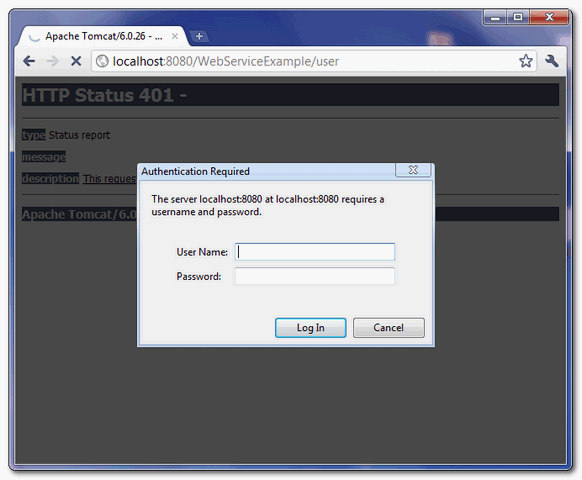
Now, any access to your deployed web service is required username and password authentication, see figure :
URL : http://localhost:8080/WebServiceExample/user
7. WebService Client
To access the deployed web service, bind a correct username and password like this :
    UserProfile port = service.getPort(UserProfile.class);
    BindingProvider bp = (BindingProvider) port;
    bp.getRequestContext().put(BindingProvider.USERNAME_PROPERTY, "mkyong");
    bp.getRequestContext().put(BindingProvider.PASSWORD_PROPERTY, "123456");
File : WsClient.java
package com.mkyong.client;

import java.net.URL;
import javax.xml.namespace.QName;
import javax.xml.ws.BindingProvider;
import javax.xml.ws.Service;

import com.mkyong.ws.UserProfile;

public class WsClient{

        //can't parse wsdl "http://localhost:8080/WebServiceExample/user.wsdl" directly
	//save it as local file, and parse it
	private static final String WS_URL = "file:c://user.wsdl";

	public static void main(String[] args) throws Exception {

	URL url = new URL(WS_URL);
        QName qname = new QName("http://ws.mkyong.com/", "UserProfileImplService");

        Service service = Service.create(url, qname);
        UserProfile port = service.getPort(UserProfile.class);

        //add username and password for container authentication
        BindingProvider bp = (BindingProvider) port;
        bp.getRequestContext().put(BindingProvider.USERNAME_PROPERTY, "mkyong");
        bp.getRequestContext().put(BindingProvider.PASSWORD_PROPERTY, "123456");

        System.out.println(port.getUserName());

    }

}
output
getUserName() : returned value
For those clients provided an invalid username or password, Tomcat will return following exception :
Exception in thread "main" com.sun.xml.internal.ws.client.ClientTransportException:
	request requires HTTP authentication: Unauthorized
Done.
Download Source Code
Reference
About Author

Can you explaine about “file:c://user.wsdl”?
Thanks for your tutorials!! I have learnt a lot about web service security from your site. Recently I read a lot web service security using OAuth. But couldn’t find any examples which can guide step by step through the process. Would you like to share your knowledge on this?
You’re a rat…
confirmed by WHO(
World Health Organization)
Our Grand rat lord. Mykong.
i did exactely what is in the tutorial but my service does not accept my user name and password , can you help me plz ?
HI , i just fix it , i should modify tomcat-users.xml from the location ~/MyWorkspace/Servers/Tomcat v6.0 not in the installation file in my machine , that’s for help to others tnx
hello mkyong….I create a web service using tomcat and axis2 in windows using eclipse
and when I update the web.xml as u mentioned above….even the tomcat-user.xml from program file.
I didnt made any change in service.xml
but when I run the service it does not accept my user name and password..directly from authentication required window…
Is is possible to access from there…or need to make a client….?
HI Jaskirat i have the same trouble , my service does not accept my user name and password , did you fix this? can youn help me plz ?
HI , i just fix it , i should modify tomcat-users.xml from the location ~/MyWorkspace/Servers/Tomcat v6.0 not in the installation file in my machine , that’s for help to others tnx
Hi,
I am not sure why in my case following code is not working.
 // BindingProvider bp = (BindingProvider) pm;
      // bp.getRequestContext().put(BindingProvider.USERNAME_PROPERTY, "vijay");
      // bp.getRequestContext().put(BindingProvider.PASSWORD_PROPERTY, "vijay123");
So I googled a bit and added these lines
Authenticator.setDefault(new Authenticator() {

		    @Override
		    protected PasswordAuthentication getPasswordAuthentication() {
		        return new PasswordAuthentication("vijay", "vijay123".toCharArray());
		    }
		});
Any reason ? Is I am missing something here why original code was giving HTTP ERROR 401 to me.I know its related to authentication.But why ?
Is there are any side effects of using Authenticator ?
public static void main(String[] args) throws Exception{
		// TODO Auto-generated method stub

		/*********** WORKING *****/
		Authenticator.setDefault(new Authenticator() {

		    @Override
		    protected PasswordAuthentication getPasswordAuthentication() {
		        return new PasswordAuthentication("vijay", "vijay123".toCharArray());
		    }
		});

		PortfolioManagerService pmService = new PortfolioManagerService();
		IPortfolioManager pm = pmService.getPortfolioManagerPort();

		/*********** NOT WORKING *****/
		 //add username and password for container authentication
       // BindingProvider bp = (BindingProvider) pm;
      // bp.getRequestContext().put(BindingProvider.USERNAME_PROPERTY, "vijay");
      // bp.getRequestContext().put(BindingProvider.PASSWORD_PROPERTY, "vijay123");

		  Portfolio portfolio=  pm.getPortfolioInfo("5YPlan");
	        System.out.println(portfolio.getPortfolioName()+"-"+ portfolio.getInitialValue());

	       List<Trade> tradeList = portfolio.getTradeList();
	       for(Trade t :tradeList)
	       {
	    	   System.out.println(t.getTradeName());
	       }
	}
Kind Regards,
Vijayendra Bhati
Hi MKyong
I think I have been succesfully been able to deploy your example to tomcat. But when I try to run WsClient.java as a java application it says that it cannot access that it cannot access http://localhost:8080/WebServicesExample/user?wsdl and I understand why that is because I do have a user.wsdl file defined on my hard-drive.
Even when I try to access the WSDL file from http://localhost:8080/WebServicesExample/user it gives me a 404 Not Found type of error message. So am I expected to create my own WSDL file for this or get the WSDL file from somewhere else ? Was that how this example was intended to be or am I missing a trick somewhere ?
Any clarification here would greatly help me.
Thanks
I can see which you are putting a a lot of efforts into your blog. Preserve posting the good perform.Some really helpful information in there. Bookmarked. Wonderful to see your website. Thanks!
Just a thought:
Is there anyway to persuade tomcat to give out the wsdl, without requiring a userid/password?
Yes, I know its a far shot, since the authentication is bound to the service that must be protected. But maybe someone comes up with a solution anyway.
KR
Henrik
By default, and you didn’t configure Tomcat authentication like what mention in above article, users can get wsdl directly.
Am I the only one who thinks that getting the wsdl from a local file is pretty awful?
I if you deploy your client in a jar, you will need to put the wsdl somewhere in your filesystem, and if the wsdl changes, you are up the creek without a paddle.
But it seems that with jax-ws/Basic authentication this is the only option.
Anyone with a solution to this will get my personal commendation with oak leaves, eagles and diamonds!
Kind regards
Henrik
Hi, I were implementing your tutorial and it worked fine with one WS, however, when I wanted to assign to a user more than one WS I got troubles…I mean, for example, I have 4 WS and I want to grant permissions over 2 specified WS to 2 different users, when the user access to one of its suppossed assigned WS it works fine, but after the user can access the other WS. I don´t know if there is a concrete way to organize de web.xml. Thx for your attention. Hope your answer. =D
How implemented authentification with DB+JAX-WS?
hi mykyong,
this tutorial was amazing thank you.