RESTEasy, JBoss project, implementation of the JAX-RS specification. In this tutorial, we show you how to use RESTEasy framework to create a simple REST style web application.
Technologies and Tools used in this article:
- RESTEasy 2.2.1.GA
- JDK 1.6
- Maven 3.0.3
- Eclipse 3.6
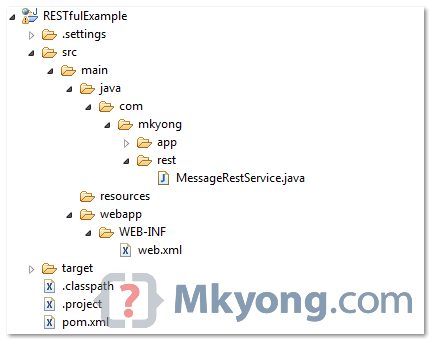
1. Directory Structure
Review final directory structure of this tutorial. Just a standard web project structure.
2. Standard Web Project
Create a standard Maven web project structure.
mvn archetype:generate -DgroupId=com.mkyong.common -DartifactId=RESTfulExample
	-DarchetypeArtifactId=maven-archetype-webapp -DinteractiveMode=false
Convert to Eclipse web project.
mvn eclipse:eclipse -Dwtpversion=2.0
3. Project Dependencies
Declares JBoss public Maven repository and “resteasy-jaxrs” in your Maven pom.xml file. That’s all you need to use RESTEasy.
File : pom.xml
<project ...">

	<repositories>
	   <repository>
		  <id>JBoss repository</id>
		  <url>https://repository.jboss.org/nexus/content/groups/public-jboss/</url>
	   </repository>
	</repositories>

	<dependencies>

		<dependency>
			<groupId>org.jboss.resteasy</groupId>
			<artifactId>resteasy-jaxrs</artifactId>
			<version>2.2.1.GA</version>
		</dependency>

	</dependencies>
</project>
4. REST Service
A simple REST service. See demo at the end of the article, it should be self-explanatory.
package com.mkyong.rest;

import javax.ws.rs.GET;
import javax.ws.rs.Path;
import javax.ws.rs.PathParam;
import javax.ws.rs.core.Response;

@Path("/message")
public class MessageRestService {

	@GET
	@Path("/{param}")
	public Response printMessage(@PathParam("param") String msg) {

		String result = "Restful example : " + msg;

		return Response.status(200).entity(result).build();

	}

}
5. web.xml
Now, configure listener and servlet to support RESTEasy. Read this JBoss documentation for detail explanation.
File : web.xml
<web-app id="WebApp_ID" version="2.4"
	xmlns="http://java.sun.com/xml/ns/j2ee"
	xmlns:xsi="http://www.w3.org/2001/XMLSchema-instance"
	xsi:schemaLocation="http://java.sun.com/xml/ns/j2ee
	http://java.sun.com/xml/ns/j2ee/web-app_2_4.xsd">
	<display-name>Restful Web Application</display-name>

	<!-- Auto scan REST service -->
	<context-param>
		<param-name>resteasy.scan</param-name>
		<param-value>true</param-value>
	</context-param>

	<!-- this need same with resteasy servlet url-pattern -->
	<context-param>
		<param-name>resteasy.servlet.mapping.prefix</param-name>
		<param-value>/rest</param-value>
	</context-param>

	<listener>
		<listener-class>
			org.jboss.resteasy.plugins.server.servlet.ResteasyBootstrap
		</listener-class>
	</listener>

	<servlet>
		<servlet-name>resteasy-servlet</servlet-name>
		<servlet-class>
			org.jboss.resteasy.plugins.server.servlet.HttpServletDispatcher
		</servlet-class>
	</servlet>

	<servlet-mapping>
		<servlet-name>resteasy-servlet</servlet-name>
		<url-pattern>/rest/*</url-pattern>
	</servlet-mapping>

</web-app>
You need to set the “resteasy.servlet.mapping.prefix” if your servlet-mapping for the resteasy servlet has a url-pattern other than “/*“.
In above example, the resteasy servlet url-pattern is “/rest/*“, so you have to set the “resteasy.servlet.mapping.prefix” to “/rest” as well, otherwise, you will hit resource not found error message.
Remember to set “resteasy.scan” to true, so that RESTEasy will find and register your REST service automatically.
6. Demo
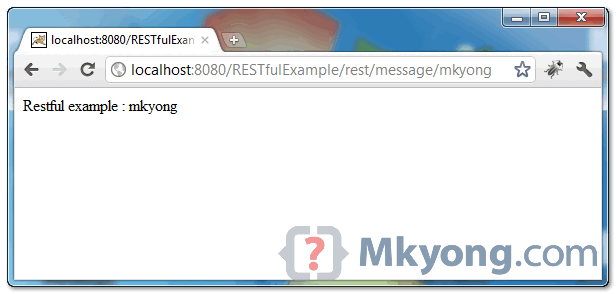
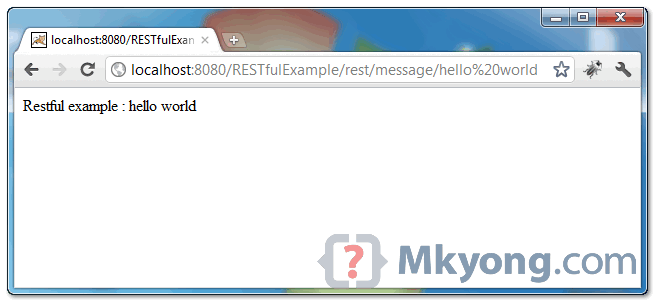
In this example, web request from “projectURL/rest/message/” will match to “MessageRestService“, and “projectURL/rest/message/{any values}” will match to @PathParam parameter.
Test 1 : http://localhost:8080/RESTfulExample/rest/message/mkyong
Test 2 : http://localhost:8080/RESTfulExample/rest/message/hello%20world
Alternative REST Service Registration
In above example, you are register REST service via “ResteasyBootstrap” listener. Here i show you another way.
Create a class and extends javax.ws.rs.core.Application, and add your REST service manually.
package com.mkyong.app;

import java.util.HashSet;
import java.util.Set;
import javax.ws.rs.core.Application;
import com.mkyong.rest.MessageRestService;

public class MessageApplication extends Application {
	private Set<Object> singletons = new HashSet<Object>();

	public MessageApplication() {
		singletons.add(new MessageRestService());
	}

	@Override
	public Set<Object> getSingletons() {
		return singletons;
	}
}
File : web.xml , no more listener, configure your application class like below :
<web-app id="WebApp_ID" version="2.4"
	xmlns="http://java.sun.com/xml/ns/j2ee"
        xmlns:xsi="http://www.w3.org/2001/XMLSchema-instance"
	xsi:schemaLocation="http://java.sun.com/xml/ns/j2ee
	http://java.sun.com/xml/ns/j2ee/web-app_2_4.xsd">
	<display-name>Restful Web Application</display-name>

	<context-param>
		<param-name>resteasy.servlet.mapping.prefix</param-name>
		<param-value>/rest</param-value>
	</context-param>

	<servlet>
		<servlet-name>resteasy-servlet</servlet-name>
		<servlet-class>
			org.jboss.resteasy.plugins.server.servlet.HttpServletDispatcher
                </servlet-class>
		<init-param>
			<param-name>javax.ws.rs.Application</param-name>
			<param-value>com.mkyong.app.MessageApplication</param-value>
		</init-param>
	</servlet>

	<servlet-mapping>
		<servlet-name>resteasy-servlet</servlet-name>
		<url-pattern>/rest/*</url-pattern>
	</servlet-mapping>

</web-app>
Done.

The second link in ‘What’s REST?’ is broken. The correct link is: https://www.ibm.com/developerworks/library/ws-restful/index.html
Thanks for this site. I have learnt a lot from here, both from mkyong and the other readers.
I am still new to programming web services and would like to know why mvn generates FOUR projects, namely rest, ejb, rest-web & model..
Please advise which artifacts goes into each of these projects as everywhere I find examples on rest web services, I find everything in a single project and I am sure there has to be some reason for mvn to generate four separate projects…
however, I am too less knowledge to figure it out.. and online searches gives me unrelated answers, as though this has not been asked before..
please help
how do you given this url?? can you please explain….?
http://localhost:8080/RESTfulExample/rest/message/hello%20world
Thanks for the nice tutorial. Can you please publish a tutorial on the following?
RESTEasy + Spring Security 4.x + OAuth2
It will really be helpful if you can publish it as I did not find any blog/tutorial on this combination on Web.
Thanks mykong, I use your site all the time. You are great.
Hi all. I have created rest service but i am facing cross origin problem when i am trying to accessing through ajax call please help me to fix this
Hi..
I am trying to run this example using using Tomcat and Eclipse, but when server gets started Error 404 occurs.
Also when hit correct URL, then also 404 occurs..
No jar error in console…
Please help asap..
Its urgent………
What does it mean when you get a “404 not found” when you run the first demo “http://localhost:8080/RESTfulExample/rest/message/mkyong” ?
I am also facing the same issue..
Any idea how to solve it
It means,,,resource is not available for the particular URL on the server, which u r requesting.
great post. On TomEE if you make this war it works. If you copy the war and rename it re.war and deploy that as well. Only one of the sites produced works.
Why can’t two sites with restful services work?
How many ways we can bootstrap my Jax-RS runtime using Resteasy implementation.
Does not work for me in Wildfly 8.2.0.Final. The only thing I had to do was to add
an “activator” class, to not use a web.xml and no Maven dependencies were needed.
That’s all to get JaxRs running in Wildfly 8.2.0:
@ApplicationPath(“/rest”)
public class JaxRsActivator extends Application
{
}
For people using JBoss Wildfly 8.2.0.Final & Maven POM, due to the automatic deployment for RestEasy in JBoss Wildfly, the scope of RestEasy dependency in Maven POM needs to be set “Provided” to avoid module conflicts.
org.jboss.resteasy
resteasy-jaxrs
3.0.10.Final
provided
More info., please refer to this question: http://stackoverflow.com/questions/15603662/asynchronousdispatcher-error
Hope it helps!
Hi MKyong,
Thank you for this awesome tutorial.
I have a question. How can we redirect to a page when we hit this service urls (I am trying to develop an application which has services & a monitoring page for the services)
For example lets say my URL is http://localhost:8080/TestApp/rest/monitor
When i hit this URL i wanted the application to navigate to sample-monitor.jsp
I tried the above approach using so, but i was not getting the page that i requested
Service class:
@Path(“/”)
public class TestAppService{
@GET
@Path(“/monitor”)
public void getPage(){
try {
HttpServletRequest req = ResteasyProviderFactory.getContextData(HttpServletRequest.class);
HttpServletResponse res = ResteasyProviderFactory.getContextData(HttpServletResponse.class);
req.getRequestDispatcher(“/sample-monitor.jsp”).forward(req, res);
} catch (ServletException e) {
// TODO Auto-generated catch block
e.printStackTrace();
} catch (IOException e) {
// TODO Auto-generated catch block
e.printStackTrace();
}
}
}
When i hit the url i get this error
org.jboss.resteasy.spi.NotFoundException: Could not find resource for relative : /sample-monitor.jsp of full path: http://localhost:8080/TestApp/sample-monitor.jsp
but my Application contains the jsp file at the root.
I am using the following jar resteasy-jaxrs-2.2.1.GA.jar in my application.
Found the issue.
I had the following in my web.xml
resteasy.servlet.mapping.prefix
/
which intercepted all the request as a rest call.
i modified it as below, which makes rest call when url is prefixed with rest/* and ignores other requests (example request for any pages)
resteasy.servlet.mapping.prefix
/rest/*
which fixed my problem.
Hope this will be helpful for someone 🙂
Thank you so much. I have spent days trying to properly configure JBoss for Rest Services. I had the same problem with ResteasyBootstrap as Dilip, but alternative method worked well with a little tweaking. I had to manually install some jar libraries, change compiler version in pom, do mvn install on pom.xml, then run on JBoss 7.1. Thanks again.
Worked well 🙂 On to tinkering with it.
Do you have steps for deploying rest service in weblogic 10.3 server. i have below code and need to deploy the same in weblogic server
package com.RS;
import javax.ws.rs.GET;
import javax.ws.rs.Produces;
import javax.ws.rs.Path;
@Path(“/TestHello”)
public class TestJAXRS_Hello {
@GET
@Produces(“text/html”)
public String getString(){
return “TEST JAX-RS”;
}
}
Appreciate your help
I am using Restful web service in eclipse. Few days ago it is running
smoothly. But today, something goes wrong. Web services are running
properly but when I modified something on web service program it does
not reflect after invoking the web service. I have noticed earlier that
whenever I changed small code in my program the server starts
automatically and it reflects on the fly.
Now my web service starts but seems like it runs from cache. Whatever I
modified in the program it does not show in output. I have restart (stop
& start) the server and even restart the eclipse but nothing
changes. It gives always previous results. for example
@Path(“/todo”)
public class TodoResource {
// This method is called if XMLis request
@GET
//@Path(“/text”)
@Produces({ MediaType.APPLICATION_XML, MediaType.APPLICATION_JSON })
public Todo getXML() {
Todo todo = new Todo();
todo.setSummary(“testing web service”);
todo.setDescription(“This is my first todo using restful”);
return todo;
}
when I run this web service, it gives output as
testing web service
This is my first todo using restful
When I modified somthing like (just segement of code 4444 is added)
todo.setSummary(“testing web service 4444”);
it does not display 4444, instead it show older output
testing web service
This is my first todo using restful
Its really strange and I do not know what goes wrong.
Any helps or suggestions are appreciated.
Eclipse Version: Indigo Service Release 2
Thanks in advance
Shrestha
Hey folks,
you need the following jars:
A few of the above jars are not included in the .classpath file.
Regards,
Anadi Kumar
mail – [email protected]
Hello mkyong,
This is a nice and simple explanation. I appreciate it.
I have one question regarding the implementation. Is it possible to remove project name in the URL ? (RESTfulExample in your case) to make the URL simple by any means of configuration.
Thanks
Pavan
Yes, rename your project to ROOT, and done.
Hey
This is very nice tutorial ,But i need simple token base oAuth in my web service.I had rest easy web services running on tomcat.Can anyone suggest me how can i implement that.
Note – Suppose that oAuth in jboss as7 and web services on tomcat.
Thanks in advance.
Valuable info. Fortunate me I discovered your site by accident,
and I’m shocked why this coincidence didn’t happened in advance!
I bookmarked it.
Awesome! Its truly amazing post, I have got
much clear idea regarding from this post.
Great tutorial, but could use some info on packaging and running.
mvn package
and then to run it and test it quickly from the command line, I added the jetty plugin to the pom
RESTfulExample
org.mortbay.jetty
maven-jetty-plugin
then
mvn jetty:run-war
Thanks!
looks like the jetty plugin xml did not render…
I’ll try again:
RESTfulExample
org.mortbay.jetty
maven-jetty-plugin
Still didn’t render. I did use the “to post source code in comment tags, but the xml did not render. Sorry.
Thanks for this. It worked fine for me.
In case anyone wants to build the war using gradle rather than maven create the following build.gradle file and add this to it:
apply plugin: ‘java’
apply plugin: ‘war’
repositories {
mavenCentral()
}
dependencies {
providedCompile ‘javax.servlet:servlet-api:2.5’
compile ‘javax:javaee-web-api:6.0’
runtime ‘javax.servlet:jstl:1.1.2’
}
Then the command ‘gradle build’ will create the war file in the directory build/libs
Is it possible to have multiple prefixes
like /rest /core
Hi,
Do you have a tutorial to setup RESTEasy on Tomcat and not on JBoss AS?
Thanks,
Ravi
Well, got it working by simple dropping the war into tomcat’s webapps dir. I thought we had to do something extra for configuring and using resteasy when not using with jboss AS.
Hi,
I have deployed the application in Tomcat6.0 , while running the application
i am getting below error
ERROR:”HTTP Status 500 – Wrapper cannot find servlet class org.jboss.resteasy.plugins.server.servlet.HttpServletDispatcher
or a class it depends on”
please suggest me which plug in i need to add to resolve this.
Hi Ravi,
I have copied the above application in Tomact 6.0 , i have added the jars also.
After deploying while running the application i am getting below error.Please share
what are the extra configurations we need to do at Tomcat End.
Same; I didn’t know RESTEasy won’t run on Tomcat. I’m wondering how to configure Tomcat…
Does it work in cross-origin request (CORS)? I couldn’t make it work…
My partner and I absolutely love your blog and find a lot of your post’s to be exactly I’m looking for. Would you offer guest writers to write content for you? I wouldn’t mind composing a post or elaborating on a few of the subjects you write about here. Again, awesome blog!
Great Tutorial. Your tutorials are always the best. Example code is working & easy to understand. Excellent templates for learning the features of JAX-RS.
The above example with Alternative REST Service Registration is working for me but it doesn’t work if I register the service via “ResteasyBootstrap” listener.
I get this error in later case
—————————–
HTTP Status 404 – Could not find resource for relative : /message/mkyong of full path: http://localhost:8089/RESTfulExample/rest/message/mkyong
type Status report
message Could not find resource for relative : /message/mkyong of full path: http://localhost:8089/RESTfulExample/rest/message/mkyong
description The requested resource (Could not find resource for relative : /message/mkyong of full path: http://localhost:8089/RESTfulExample/rest/message/mkyong) is not available.
Apache Tomcat/6.0.29
————————
I’m getting the same error at the moment
I am getting the same error.
I have this issue running under RESIN, does anyone fixed the issue?
Thanks,
I have the same problem if I try to run the project in IntelliJ. Do you have an idea why not work for me?
This issue is explained and resolved here
http://www.javaroots.com/2013/05/creating-rest-services-with-rest-easy.html
You may get error like this : Could not find resource for relative : /application/test of full path: http://localhost:8080/onlinehttpclient/rest/application/test
You have to define resteasy.resource context param with the full path of Rest class.
Hi,
Will it works on tomcat server.
Hi there,
I built my first RESTful web service with Eclipse Juno and JBoss 7, using your tutorial.
Many thanks, you saved me a lot of bootstrapping time.
Much appreciated 🙂
Thanks a lot for your examples. They are a tremendous help.
Hey mkyong,
Thanks for putting this together. I’ve been having problems getting it working. I keep getting a java.lang.ClassNotFoundException: org.jboss.resteasy.plugins.server.servlet.ResteasyBootstrap exception when I start my server. I can confirm my pom.xml has the dependency in place.
Please help!
Thanks again.
Also, when I try your source code and hit the demo URL, I get this message back:
[8/30/2012 9:48:41 PM] System.Deployment.Application.InvalidDeploymentException (ManifestParse)
Very lost, thanks for any help.
Ever resolve your manifest problem?
Thanks,
jd
Hi Henry,
this problem can be solve in two ways —
1) If you have installed both the Maven Eclipse Plugin and the Maven WTP Plugin this is automatic. If you don’t have these installed, go ahead and install them and then once Eclipse restarts right-click on the project and do a Maven > Update project…. This will internally change the project configuration so the Maven dependencies are copied to the /WEB-INF/lib folder on your deployment target.
2) If you don’t want to use any of these plug-ins, then you have to go to the Project properties > Deployment Assembly configuration and add your dependencies manually, but again, this is done automatically by these plug-ins.
Hi,
Do you know to do this HelloWorld on JBoss SwitchYard, using RESTeasy?
I need to put a SOAP Service (already made one, that is working) with a REST service on a SwitchYard project, I’m using JBoss Developer Studio
https://www.jboss.org/switchyard
http://www.jboss.org/resteasy
I’m asking your help because, in my case, your tutorial/guide doesn’t work, I don’t have any compile errors/warning, but I can’t use service on browser, I think it is because SwitchYard uses different ports (on server) and definitions (on Maven).
Regards,
Paulo
A trivial question (sorry), how do I run this app? mvn tomcat:run ? Thanks.
Read this How to run mkyong tutorial
Thanks. Works well.
Thanks for posting article. It was useful. 🙂
Hi, great article!
I’ve been able to run a REST service with the configuration you provided in a GWT application
web.xml
, however when deploying to JBoss AS7 it fails with:
Exception sending context initialized event to listener instance of class org.jboss.resteasy.plugins.server.servlet.ResteasyBootstrap: java.lang.NoClassDefFoundError: javax/servlet/ServletContext
For it to work I need to change web.xml as follows
but is really annoying having to change the web.xml file from development to deployment back and forth. Have you had this problem? Do you have any suggestion how to overcome this?
Thanks!
Hi cirovladimir:
I am facing the same problem you had with JBOSS AS7. May I know what exactly the changes you did on the web.xml ?
Regards,
Fan