When i received a new mail from yahoo mail box, my yahoo messenger will voice out a typical “de” voice and display a simple dialog box as “Yahoo! Mail 1 new message(s)”
I just want my yahoo messenger to voice up a “You’ve got mail” voice whenever any new mail received. Here i show how i set it up.
1) Download a “You’ve got mail” voice
please visit following site, it’s contains different type of “You’ve got mail” voice.
http://www.ilovewavs.com/Events/GotMail/GotMail.htm
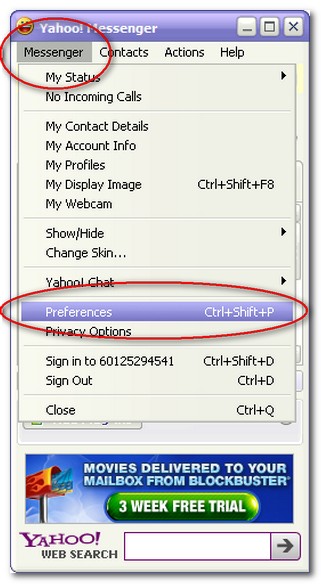
2) Open Yahoo Messenger , click Messenger –> Preferences
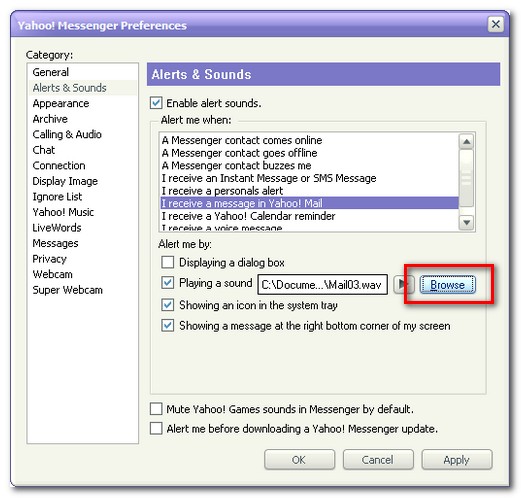
3) Under “Category” – Click Alerts & Sounds
4) Check Enable alert sounds, Under Alert me when :, choose I received a message in Yahoo! Mail
5) Check Playing a sound, click browse to select a “You’ve got mail’ .wav voice file
6) Apply , Done
Now, wherever i received a new mail from yahoo, my yahoo messenger will voice out a “You’ve got mail” voice. I like this sound effect 🙂

ok… but how do i stop this? I don’t want to hear it.
My messenger doesn’t look like the picture shown above
I truly love your blog.. Pleasant colors & theme.
Did you develop this web site yourself? Please reply back as I’m planning to create my own personal website and would love to find out where you got this from or exactly what the theme is called. Thank you!
can i find java microsoft
What you means ? java Microsoft?