JUnit 4 and TestNG are both very popular unit test framework in Java. Both frameworks look very similar in functionality. Which one is better? Which unit test framework should I use in Java project?
Here I did a feature comparison between JUnit 4 and TestNG.
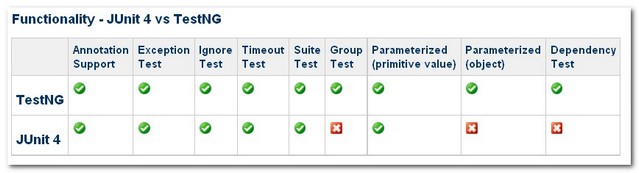
1. Annotation Support
The annotation supports are implemented in both JUnit 4 and TestNG look similar.
| Feature | JUnit 4 | TestNG |
| test annotation | @Test | @Test |
| run before all tests in this suite have run | — | @BeforeSuite |
| run after all tests in this suite have run | — | @AfterSuite |
| run before the test | — | @BeforeTest |
| run after the test | — | @AfterTest |
| run before the first test method that belongs to any of these groups is invoked | — | @BeforeGroups |
| run after the last test method that belongs to any of these groups is invoked | — | @AfterGroups |
| run before the first test method in the current class is invoked | @BeforeClass | @BeforeClass |
| run after all the test methods in the current class have been run | @AfterClass | @AfterClass |
| run before each test method | @Before | @BeforeMethod |
| run after each test method | @After | @AfterMethod |
| ignore test | @ignore | @Test(enbale=false) |
| expected exception | @Test(expected = ArithmeticException.class) | @Test(expectedExceptions = ArithmeticException.class) |
| timeout | @Test(timeout = 1000) | @Test(timeout = 1000) |
The main annotation differences between JUnit4 and TestNG are
1. In JUnit 4, we have to declare “@BeforeClass” and “@AfterClass” method as static method. TestNG is more flexible in method declaration, it does not have this constraints.
2. 3 additional setUp/tearDown level: suite and group (@Before/AfterSuite, @Before/AfterTest, @Before/AfterGroup). See more detail here.
JUnit 4
    @BeforeClass
    public static void oneTimeSetUp() {
        // one-time initialization code
    	System.out.println("@BeforeClass - oneTimeSetUp");
    }
TestNG
    @BeforeClass
    public void oneTimeSetUp() {
        // one-time initialization code
    	System.out.println("@BeforeClass - oneTimeSetUp");
}
In JUnit 4, the annotation naming convention is a bit confusing, e.g “Before”, “After” and “Expected”, we do not really understand what is “Before” and “After” do, and what we “Expected” from test method? TestiNG is easier to understand, it uses “BeforeMethod”, “AfterMethod” and “ExpectedException” instead.
2. Exception Test
The “exception testing” means what exception throws from the unit test, this feature is implemented in both JUnit 4 and TestNG.
JUnit 4
      @Test(expected = ArithmeticException.class)
	public void divisionWithException() {
	  int i = 1/0;
	}
TestNG
      @Test(expectedExceptions = ArithmeticException.class)
	public void divisionWithException() {
	  int i = 1/0;
	}
3. Ignore Test
The “Ignored” means whether it should ignore the unit test, this feature is implemented in both JUnit 4 and TestNG .
JUnit 4
        @Ignore("Not Ready to Run")
	@Test
	public void divisionWithException() {
	  System.out.println("Method is not ready yet");
	}
TestNG
	@Test(enabled=false)
	public void divisionWithException() {
	  System.out.println("Method is not ready yet");
	}
4. Time Test
The “Time Test” means if an unit test takes longer than the specified number of milliseconds to run, the test will terminated and mark as fails, this feature is implemented in both JUnit 4 and TestNG .
JUnit 4
        @Test(timeout = 1000)
	public void infinity() {
		while (true);
	}
TestNG
	@Test(timeOut = 1000)
	public void infinity() {
		while (true);
	}
5. Suite Test
The “Suite Test” means bundle a few unit test and run it together. This feature is implemented in both JUnit 4 and TestNG. However both are using very different method to implement it.
JUnit 4
The “@RunWith” and “@Suite” are use to run the suite test. The below class means both unit test “JunitTest1” and “JunitTest2” run together after JunitTest5 executed. All the declaration is define inside the class.
@RunWith(Suite.class)
@Suite.SuiteClasses({
        JunitTest1.class,
        JunitTest2.class
})
public class JunitTest5 {
}
TestNG
XML file is use to run the suite test. The below XML file means both unit test “TestNGTest1” and “TestNGTest2” will run it together.
<!DOCTYPE suite SYSTEM "http://beust.com/testng/testng-1.0.dtd" >
<suite name="My test suite">
  <test name="testing">
    <classes>
       <class name="com.fsecure.demo.testng.TestNGTest1" />
       <class name="com.fsecure.demo.testng.TestNGTest2" />
    </classes>
  </test>
</suite>
TestNG can do more than bundle class testing, it can bundle method testing as well. With TestNG unique “Grouping” concept, every method is tie to a group, it can categorize tests according to features. For example,
Here is a class with four methods, three groups (method1, method2 and method3)
        @Test(groups="method1")
	public void testingMethod1() {
	  System.out.println("Method - testingMethod1()");
	}

	@Test(groups="method2")
	public void testingMethod2() {
		System.out.println("Method - testingMethod2()");
	}

	@Test(groups="method1")
	public void testingMethod1_1() {
		System.out.println("Method - testingMethod1_1()");
	}

	@Test(groups="method4")
	public void testingMethod4() {
		System.out.println("Method - testingMethod4()");
	}
With the following XML file, we can execute the unit test with group “method1” only.
<!DOCTYPE suite SYSTEM "http://beust.com/testng/testng-1.0.dtd" >
<suite name="My test suite">
  <test name="testing">
  	<groups>
      <run>
        <include name="method1"/>
      </run>
    </groups>
    <classes>
       <class name="com.fsecure.demo.testng.TestNGTest5_2_0" />
    </classes>
  </test>
</suite>
With “Grouping” test concept, the integration test possibility is unlimited. For example, we can only test the “DatabaseFuntion” group from all of the unit test classes.
6. Parameterized Test
The “Parameterized Test” means vary parameter value for unit test. This feature is implemented in both JUnit 4 and TestNG. However both are using very different method to implement it.
JUnit 4
The “@RunWith” and “@Parameter” is use to provide parameter value for unit test, @Parameters have to return List[], and the parameter will pass into class constructor as argument.
@RunWith(value = Parameterized.class)
public class JunitTest6 {

	 private int number;

	 public JunitTest6(int number) {
	    this.number = number;
	 }

	 @Parameters
	 public static Collection<Object[]> data() {
	   Object[][] data = new Object[][] { { 1 }, { 2 }, { 3 }, { 4 } };
	   return Arrays.asList(data);
	 }

	 @Test
	 public void pushTest() {
	   System.out.println("Parameterized Number is : " + number);
	 }
}
It has many limitations here; we have to follow the “JUnit” way to declare the parameter, and the parameter has to pass into constructor in order to initialize the class member as parameter value for testing. The return type of parameter class is “List []”, data has been limited to String or a primitive value for testing.
TestNG
XML file or “@DataProvider” is use to provide vary parameter for testing.
XML file for parameterized test.
Only “@Parameters” declares in method which needs parameter for testing, the parametric data will provide in TestNG’s XML configuration files. By doing this, we can reuse a single test case with different data sets and even get different results. In addition, even end user, QA or QE can provide their own data in XML file for testing.
Unit Test
      public class TestNGTest6_1_0 {

	   @Test
	   @Parameters(value="number")
	   public void parameterIntTest(int number) {
	      System.out.println("Parameterized Number is : " + number);
	   }

      }
XML File
<!DOCTYPE suite SYSTEM "http://beust.com/testng/testng-1.0.dtd" >
<suite name="My test suite">
  <test name="testing">

    <parameter name="number" value="2"/>

    <classes>
       <class name="com.fsecure.demo.testng.TestNGTest6_0" />
    </classes>
  </test>
</suite>
@DataProvider for parameterized test.
While pulling data values into an XML file can be quite handy, tests occasionally require complex types, which can’t be represented as a String or a primitive value. TestNG handles this scenario with its @DataProvider annotation, which facilitates the mapping of complex parameter types to a test method.
@DataProvider for Vector, String or Integer as parameter
        @Test(dataProvider = "Data-Provider-Function")
	public void parameterIntTest(Class clzz, String[] number) {
	   System.out.println("Parameterized Number is : " + number[0]);
	   System.out.println("Parameterized Number is : " + number[1]);
	}

	//This function will provide the patameter data
	@DataProvider(name = "Data-Provider-Function")
	public Object[][] parameterIntTestProvider() {
		return new Object[][]{
				   {Vector.class, new String[] {"java.util.AbstractList",
"java.util.AbstractCollection"}},
				   {String.class, new String[] {"1", "2"}},
				   {Integer.class, new String[] {"1", "2"}}
				  };
	}
@DataProvider for object as parameter
P.S “TestNGTest6_3_0” is an simple object with just get set method for demo.
        @Test(dataProvider = "Data-Provider-Function")
	public void parameterIntTest(TestNGTest6_3_0 clzz) {
	   System.out.println("Parameterized Number is : " + clzz.getMsg());
	   System.out.println("Parameterized Number is : " + clzz.getNumber());
	}

	//This function will provide the patameter data
	@DataProvider(name = "Data-Provider-Function")
	public Object[][] parameterIntTestProvider() {

		TestNGTest6_3_0 obj = new TestNGTest6_3_0();
		obj.setMsg("Hello");
		obj.setNumber(123);

		return new Object[][]{
				   {obj}
		};
	}
TestNG’s parameterized test is very user friendly and flexible (either in XML file or inside the class). It can support many complex data type as parameter value and the possibility is unlimited. As example above, we even can pass in our own object (TestNGTest6_3_0) for parameterized test
7. Dependency Test
The “Parameterized Test” means methods are test base on dependency, which will execute before a desired method. If the dependent method fails, then all subsequent tests will be skipped, not marked as failed.
JUnit 4
JUnit framework is focus on test isolation; it did not support this feature at the moment.
TestNG
It use “dependOnMethods “ to implement the dependency testing as following
        @Test
	public void method1() {
	   System.out.println("This is method 1");
	}

	@Test(dependsOnMethods={"method1"})
	public void method2() {
		System.out.println("This is method 2");
	}
The “method2()” will execute only if “method1()” is run successfully, else “method2()” will skip the test.
Conclusion
After go thought all the features comparison, i suggest to use TestNG as core unit test framework for Java project, because TestNG is more advance in parameterize testing, dependency testing and suite testing (Grouping concept). TestNG is meant for high-level testing and complex integration test. Its flexibility is especially useful with large test suites. In addition, TestNG also cover the entire core JUnit4 functionality. It’s just no reason for me to use JUnit anymore.
References
TestNG
————
http://en.wikipedia.org/wiki/TestNG
http://www.ibm.com/developerworks/java/library/j-testng/
http://testng.org/doc/index.html
http://beust.com/weblog/
JUnit
———–
http://en.wikipedia.org/wiki/JUnit
http://www.ibm.com/developerworks/java/library/j-junit4.html
http://junit.sourceforge.net/doc/faq/faq.htm
http://www.devx.com/Java/Article/31983/0/page/3
http://ourcraft.wordpress.com/2008/08/27/writing-a-parameterized-junit-test/
TestNG VS JUnit
——————
http://docs.codehaus.org/display/XPR/Migration+to+JUnit4+or+TestNG
http://www.ibm.com/developerworks/java/library/j-cq08296/index.html
http://www.cavdar.net/2008/07/21/junit-4-in-60-seconds/

Below are a few features of JUnit that more or less cope with the shortfalls mentioned for Junit,
1, Categories:
provide similar “grouping” feature as that of TestNG
https://github.com/junit-team/junit/wiki/Categories
2, As i read from this article, JUnit seems to support Parameterized-tests with objects,
http://java-open-source.com/stream/13f3326236e/simple-junit4-and-parameterized-test-example
and JUnit has another killer feature, Theories:
https://github.com/junit-team/junit/wiki/Theories
by taking advantage of this feature, you could specify a range of values for the input parameters of your unit test methods, and JUnit would then automatically combine them all together randomly to verify you tests.
3,Assumptions of Junit, could help save the credit back a little for itself for missing the “Dependency test” feature,
https://github.com/junit-team/junit/wiki/Assumptions-with-assume
you actually missed the junit killer feature : Rules !
i would use test ng and agree your conclusion when testng would provide a similar concept. especially when you work on many projects and want to share test glue/base code Rulse are awsome. they allow to delegate logic instead of inheritence.
Junit Rule chains saved my life with automated tests. TestNG Listeners, while super handy, just don’t cut it.
Today I’m struggling with the fact that I can’t seem to skip a TestNG test if something takes a long time to load — “assume” comes in handy in those cases.
Yep would agree. I was on the way to switch to TestNG, when JUnit introduced Rules. It’s basically a Strategy pattern for Before/After code.
I would also normally use ExpectedException:
@Rule public ExpectedException exception = ExpectedException.none(); @Test public void divisionWithException() { // Your TestNG and JUnit sample would not detect that the exception was actually thrown in the 'prepare/setup' code int s = 1/0; // verify exception.expect(ArithmeticException.class); // execute, this is the exception we expect int i = s/0; }In the table in line “@Test(enbale=false)” (third raw from the end, last column) here is a small misprint, i guess:
enABle –>> should be changed with –>> anABle.
Overall – thank you very much for all your educational efforts!!!
Great explanation, Thanks much. You made my life easy.
Thank you for such a detailed comparison of JUnit and TestNG!
But the final suggestion is evil!
These TestNG features are EVIL, especially dependencies between tests and XML! Do not use it ever! And do not recommend it for anybody ever.
Hey, Andrei! Could you please tell me more why do you prefer JUnit? Or maybe you have an article about it?
Hi!
I am writing this article. I hope it will be ready soon, then I will share it.
Thank you for asking 🙂
nice article , properly explained with egs, thnx!!!
I observed that while testing my application from testNG caused StackOverFlowError whereas same thing worked from JUnit (just replaced the @Test annotation of testng by that of junit).
Is there something which testNG does more than junit which causes more stack space?
From reading the comments, I suggest this article be rewritten or you could just post an updated version. A lot of changes have occurred within JUnit and I’m sure TestNG by now.
This is Awesome! Thank you!
I have to say that the lack of @RunWith annotation is TestNG is a killer. In fact, right this minute it means I have a boat load of work to do for our TestNG tests because subclassing is a one-shot idiom in Java. If I had access to multiple-inheritance, then all would be fine, but I don’t. Now I have to create some awkward inheritance trees that are invasive and unnatural, all because I cannot use a simple concept like @RunWith to incorporate a cross-cutting concern. For reference, our spring integration tests use JUnit and consequently the test inheritance hierarchy is much more natural and flexible as Spring integration is merely used with @RunWith. If TestNG could add this concept then it truly would be a JUnit killer IMHO. If you care about your long term test health over many years, then I would advise against TestNG until it allows for more flexible specification of extra arbitrary behaviour that doesn’t result in painful inheritance hierarchy and subsequent maintenance thereof.
Good and Simple article ! Could you also please provide a comparison on the reporting abilities and formats between junit4 and testng ?
Very useful. Short and sweet!
It kinda extracts the complexity of rich features into a bunch of xml settings, and I don’t like it very much that way.
Hi friends,
Am running a tests in suite consider IRCTC website
eg:suite1.class contains 3class files
1.login.class-contains info for logging in
2.Search schedule-contains info for searching schedules
3.Booking tickets-if both test are pass it should execute third class file, else it should fail and skip the other test cases
My query is how to use dependency in TestNG for each and every class file???thanks in advance for ur valuable response….)waiting for ur answers…)
Very useful article! One thing worth mentioning though, Junit as well supports what is called in the article “Grouping concept” by using @Category, @IncludeCategory and @ExcludeCategory annotations (an example can be found here: https://github.com/junit-team/junit/wiki/Categories)
TestNG supports parallel execution which I would say is one of the coolest feature.
where parallel can be either of – classes/tests/methods
apparently junit 4.7+ can do this now: http://stackoverflow.com/a/9498315/32453
This article will assist the internet visitors for
building up new website or even a weblog from start to
end.
Simple and straight forward explanation.Thanks for sharing it.
Thank you so much for the awesome explanation !!
Great comparison…. thanks for extending your knowledge
Grouping is now available in JUnit 4.8+
It’s described here: http://maven.apache.org/surefire/maven-surefire-plugin/examples/junit.html under ‘Using JUnit Categories’
It is very much helpful.
Great explanation..thank you..
Can we run junit class withn testNG configuration
Hi Guys i am facing weired problem.
1.Have one Junit class which is running fine.
2.Have configured the testng class as well.
3.Copied junitlibrary as well.
But still testNG is not showing me the result
Can any one please help me with that.
Any help will be appreciated
It has been a while that I use the tutorials on your website.
Just want you to know that I love it!
Greate, straight, and simple explanation of everything…
It is very good and easily undastandable
thank Q
Wonderful article. And the fact that Cedric himself added this article in official testNG docs shows how thoroughly written it was!
Although I was always pro testNG for overall automation (and I am not just talking about unit testing here), this article only helped in confirming my decision
very helpful content
TestNG is supposed to make things easier but it adds a bunch of XML… in my experience, XML never makes things simpler. Looks to me like all TestNG does is take the complexity and put it somewhere else, giving the illusion of simpler code.
You don’t need to use XML. XML is just an option. I am using it almost exactly as you would use JUnit(by in-lining your tests right in the code). The XML is preferable to some(maybe ridiculously large dev companies), but not necessary. After working with JUnit for some time(and enjoying it), I agree with my architect’s decision to use TestNG.
So, why you agreed?
You claim that you don’t use XML, you use TestNG almost exactly as JUnit – so why you agree to migrate to TestNG?
I “claim” accurately. Either English is not your first language(nothing wrong with that), or you have baseless doubt that one can use TestNG without XML. I have used both frameworks professionally. I like JUnit because there’s more support/userbase. I agree with the switch to TestNG because it’s entirely painless, slightly more extensible, and relatively easy to switch back if we run into a nasty surprise. So why not try something which promises(and seems to be) slightly more feature rich? I can’t spend more time trolling this thread. I run a hackspace and a competitive hacker team in my spare time. This will be my last post here. I just wanted to correct a misconception and move on.
Totally agree. Although TestNG has a few extra features that seem very nice at first, it adds some complexity in XML configurations, which is very annoying to maintain. When I think about having to configure my tests using XML files, I realize that all those nice features aren’t really necessary for any project I’ve ever worked with. Also, JUnit has officially releases @Rule, which will cover other problems of the framework compared to TestNG, like parallel testing.
Really its very usefull info…thanks dude..