In JUnit, you can pass the parameters into the unit test method via the following methods :
- Constructor
- Fields injection via
@Parameter
P.S Tested with JUnit 4.12
1. MatchUtils – Test with multiple parameters
A simple add operation.
MathUtils.java
package com.mkyong.examples;

public class MathUtils {

    public static int add(int a, int b) {
        return a + b;
    }

}
1.2 MatchUtils – Parameterized via Constructor
The parameters are passed into the test method via constructor.
ParameterizedTest.java
package com.mkyong;

import com.mkyong.examples.MathUtils;
import org.junit.Test;
import org.junit.runner.RunWith;
import org.junit.runners.Parameterized;
import org.junit.runners.Parameterized.Parameters;

import java.util.Arrays;
import java.util.Collection;

import static org.hamcrest.CoreMatchers.is;
import static org.junit.Assert.assertThat;

@RunWith(value = Parameterized.class)
public class ParameterizedTest {

    private int numberA;
    private int numberB;
    private int expected;

    // Inject via constructor
    // for {8, 2, 10}, numberA = 8, numberB = 2, expected = 10
    public ParameterizedTest(int numberA, int numberB, int expected) {
        this.numberA = numberA;
        this.numberB = numberB;
        this.expected = expected;
    }

	// name attribute is optional, provide an unique name for test
	// multiple parameters, uses Collection<Object[]>
    @Parameters(name = "{index}: testAdd({0}+{1}) = {2}")
    public static Collection<Object[]> data() {
        return Arrays.asList(new Object[][]{
                {1, 1, 2},
                {2, 2, 4},
                {8, 2, 10},
                {4, 5, 9},
                {5, 5, 10}
        });
    }

    @Test
    public void test_addTwoNumbes() {
        assertThat(MathUtils.add(numberA, numberB), is(expected));
    }

}
1.3 MatchUtils – Parameterized via Field Injection
The parameters are passed into the test method via field injection.
ParameterizedTest.java
package com.mkyong;

import com.mkyong.examples.MathUtils;
import org.junit.Test;
import org.junit.runner.RunWith;
import org.junit.runners.Parameterized;
import org.junit.runners.Parameterized.Parameters;
import org.junit.runners.Parameterized.Parameter;

import java.util.Arrays;
import java.util.Collection;

import static org.hamcrest.CoreMatchers.is;
import static org.junit.Assert.assertThat;

@RunWith(value = Parameterized.class)
public class ParameterizedTest {

    //default value = 0
    @Parameter(value = 0)
    public int numberA;

    @Parameter(value = 1)
    public int numberB;

    @Parameter(value = 2)
    public int expected;

    @Parameters(name = "{index}: testAdd({0}+{1}) = {2}")
    public static Collection<Object[]> data() {
        return Arrays.asList(new Object[][]{
                {1, 1, 2},
                {2, 2, 4},
                {8, 2, 10},
                {4, 5, 9},
                {5, 5, 10}
        });
    }

    @Test
    public void test_addTwoNumbes() {
        assertThat(MathUtils.add(numberA, numberB), is(expected));
    }

}
Note
For
For
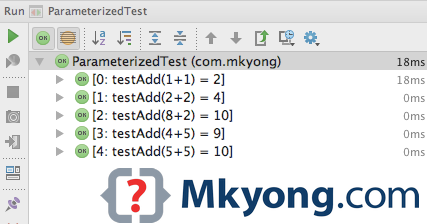
@Parameters, the “name” attribute is optional, it helps you to identify individual test cases by providing a unique name.
What is {0}, {1} and {2}?
If the parameter is “{ 3, 4, 7 }”, then {0} = 3, {1} = 4, {2} = 7.
Output
2. DomainUtils – Test with single parameter
Another simple class, validate a domain name.
DomainUtils.java
package com.mkyong.examples;

import java.util.regex.Pattern;

public class DomainUtils {

    private static final String DOMAIN_NAME_PATTERN = "^((?!-)[A-Za-z0-9-]{1,63}(?<!-)\\.)+[A-Za-z]{2,6}$";
    private static Pattern pDomainName = Pattern.compile(DOMAIN_NAME_PATTERN);

    public static boolean isValid(String domainName) {
        return pDomainName.matcher(domainName).find();
    }

}
2.1 DomainUtils Parameterized Test
The parameters are passed into the test method via field injection.
ParameterizedTest.java
package com.mkyong;

import com.mkyong.examples.DomainUtils;
import org.junit.Test;
import org.junit.runner.RunWith;
import org.junit.runners.Parameterized;
import org.junit.runners.Parameterized.Parameter;
import org.junit.runners.Parameterized.Parameters;

import static org.hamcrest.CoreMatchers.is;
import static org.junit.Assert.assertThat;

@RunWith(value = Parameterized.class)
public class Parameterized2Test {

    //default value = 0
    @Parameter
    public String domainName;

	//Single parameter, use Object[]
    @Parameters(name = "{index}: testDomain - {0}")
    public static Object[] data() {
        return new Object[]{
                "google.com",
                "mkyong.com",
                "twitter.com"
        };
    }

    @Test
    public void test_valid_domain() {
        assertThat(DomainUtils.isValid(domainName), is(true));
    }

}
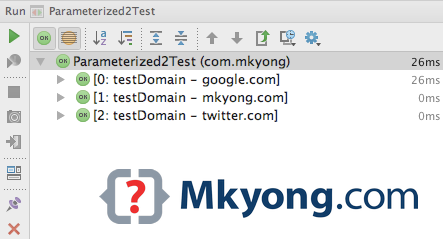
Output
Note
TestNG is more flexible in the way of passing the parameters into unit tests, read this TestNG parameter test.
TestNG is more flexible in the way of passing the parameters into unit tests, read this TestNG parameter test.

please change the title heading from MatchUtils to MathUtils
not nice
Sad to heard that, May I know which area should be improve?
there is a simpler way. check zohhak.googlecode.com it lets you write:
@TestWith({ “2, true”, “6, false”, “19, true” }) public void testPrimeNumberValidator(int number, boolean isPrime) { assertThat(… }Thanks, hope JUnit can implements some similar in future release.
Nice post. BTW, it seems that is supporting any data time:
@Parameters public static List<Object[]> data() { return Arrays.asList(new Object[][] { { DesiredCapabilities.chrome() }, { DesiredCapabilities.internetExplorer() } }); }thanks very much.. this really helped me!
Hi ,
I want to know that how we can implement different assertion for each parameter in same test case.
As the collection of object is passed to constructor of Class. for every test run i want to have different assertion but that is not possible in current example.
Thanks in advance.
Better split out the test case.
Hi,
Could you please help me out regarding below issue:
First Test case failure is carried to other consecutive tests when I used Parameterized tests. How can I skip this error:
Below is the snippet of the code:
package com.ncr.travel.airline.tests.myCopy; import static org.junit.Assert.*; import java.util.Arrays; import java.util.List; import org.junit.AfterClass; import org.junit.Assert; import org.junit.BeforeClass; import org.junit.Rule; import org.junit.Test; import org.junit.rules.ErrorCollector; import org.junit.runner.RunWith; import org.junit.runners.Parameterized; import org.junit.runners.Parameterized.Parameters; @RunWith(Parameterized.class) public class ServerBuilderTest { @Parameters public static List<Object[]> data() { Object[][] lc = new Object[3][1]; lc[0][0]=0; lc[1][0]=1; lc[2][0]=0; return Arrays.asList(lc); } private int fInput; private int fExpected; public ServerBuilderTest(int input) { super(); fInput= input; } @Rule public static ErrorCollector errCollect = new ErrorCollector(); @BeforeClass public static void setUp() throws Exception { System.out.println("test"); } @AfterClass public static void tearDown() throws Exception { System.out.println("After Test"); } @Test public void test() { try{ Assert.assertEquals(0, fInput); } catch (Throwable t) { System.out.println(t); errCollect.addError(t); } } }Just remove the try and catch construct in test method
issue found in the above code is :
1) junit4 doesn’t have (Not worked for me)
2) private int fExpected;
an unnecessary variable
3) Exception handling in the test case is not appreciated …
good to use like below
@Test(expected = XXXXXXException.class) public void XXXXX() { --------------------------------------- -------------------------------- }Hello Ramesh,
I think the issue is that you have ‘static’ declared in your @Rule.
create error collector instance without the ‘static’ keyword and it should work fine in Junit 4.
Hi ,
Am new to Junit Testing and getting Initialization error while running Test class . pls help in resolving it , Thanks in advance
code :
package com.source;
import java.util.Arrays;
import java.util.Collection;
import static org.junit.Assert.*;
import org.junit.After;
import org.junit.AfterClass;
import org.junit.Before;
import org.junit.BeforeClass;
import org.junit.Test;
import org.junit.runner.RunWith;
import org.junit.runners.Parameterized;
import org.junit.runners.Parameterized.Parameters;
@RunWith(Parameterized.class)
public class ParameterizedAddclassTest {
public int a[];
public int expected;
ParameterizedAddclassTest(int inputparameters[],int expected)
{
this.a=inputparameters;
this.expected=expected;
}
@Parameterized.Parameters
public static Collection parameterPassing()
{
return Arrays.asList(new Object[][]{ {new int[]{5,2,3},10} ,
{new int[] {5,10,15},30}
});
}
@Test
public void TestaddClass()
{
Addclass add =new Addclass();
int actual=add.addClass(a);
System.out.println(actual);
assertEquals(actual,expected);
}
}
error :
java.lang.AssertionError: expected: but was:
at org.junit.Assert.fail(Assert.java:58)
at org.junit.Assert.failNotEquals(Assert.java:259)
at org.junit.Assert.assertEquals(Assert.java:80)
at org.junit.Assert.assertEquals(Assert.java:88)
at org.junit.runners.Parameterized$TestClassRunnerForParameters.getOnlyConstructor(Parameterized.java:100)
at org.junit.runners.Parameterized$TestClassRunnerForParameters.(Parameterized.java:80)
at org.junit.runners.Parameterized$RunAllParameterMethods.(Parameterized.java:115)
at org.junit.runners.Parameterized.(Parameterized.java:140)
at sun.reflect.NativeConstructorAccessorImpl.newInstance0(Native Method)
at sun.reflect.NativeConstructorAccessorImpl.newInstance(NativeConstructorAccessorImpl.java:39)
at sun.reflect.DelegatingConstructorAccessorImpl.newInstance(DelegatingConstructorAccessorImpl.java:27)
at java.lang.reflect.Constructor.newInstance(Constructor.java:513)
at org.junit.internal.requests.ClassRequest.getRunner(ClassRequest.java:27)
at org.eclipse.jdt.internal.junit4.runner.JUnit4TestReference.(JUnit4TestReference.java:29)
at org.eclipse.jdt.internal.junit4.runner.JUnit4TestClassReference.(JUnit4TestClassReference.java:25)
at org.eclipse.jdt.internal.junit4.runner.JUnit4TestLoader.createTest(JUnit4TestLoader.java:40)
at org.eclipse.jdt.internal.junit4.runner.JUnit4TestLoader.loadTests(JUnit4TestLoader.java:30)
at org.eclipse.jdt.internal.junit.runner.RemoteTestRunner.runTests(RemoteTestRunner.java:452)
at org.eclipse.jdt.internal.junit.runner.RemoteTestRunner.runTests(RemoteTestRunner.java:683)
at org.eclipse.jdt.internal.junit.runner.RemoteTestRunner.run(RemoteTestRunner.java:390)
at org.eclipse.jdt.internal.junit.runner.RemoteTestRunner.main(RemoteTestRunner.java:197)
I am trying to subclass a Junit class to be used a ‘harness’ for parameterizing tests. I Want to subsclass a class that looks like
@RunWith(Parameterized.class)
public class A {
@Parameters
public Collection data() {
return overrideableMethod();
}
}
Subclass
public class B extends A {
@Override
public Object[] overrideableMethod() {
// change list of parmeters
}
@Test a() {
}
}
However, this seems not to be possible due to Java treating the @Parameters annotation.
My main objective is to simplify subclasses so that they don’t have to use the @Parameters and @RunWith annotations, and automatically get benefit of some standard parameters built into the base class
Any tips / ideas?
How do you make it jdk 1.5 (or above) compliance? I’m getting: The expression of type List needs unchecked conversion to conform to Collection
I’m using jdk1.6, has no warning at the above code.
May be you can explicit convert the List to collection by using the following code, data() {) Arrays.asList(data);
@Parameters
public static Collection
Object[][] data = new Object[][] { { 1 }, { 2 }, { 3 }, { 4 } };
return (Collection
}
Did you use tTestNG before? Personally i more prefer to use TestNG as my unit test framework.
https://mkyong.com/unittest/junit-4-vs-testng-comparison/