In SWT, button widget consists of five buttons style.
1) Normal Button – SWT.PUSH
2) Arrow Button – SWT.ARROW
3) Toggle Button – SWT.TOGGLE
4) Check Box button – SWT.CHECK
5) Radio Button – SWT.RADIO
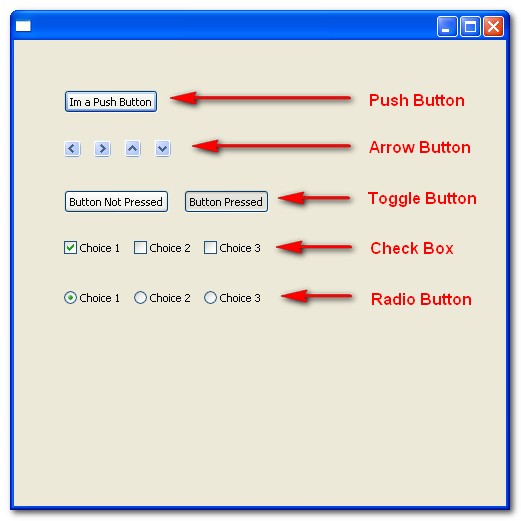
Here i demonstrate how to create those buttons in SWT
import org.eclipse.swt.SWT;
import org.eclipse.swt.widgets.Button;
import org.eclipse.swt.widgets.Display;
import org.eclipse.swt.widgets.Shell;

public class SWTButton {

public static void main (String [] args) {
	Display display = new Display ();
	Shell shell = new Shell(display);

	//push button
	Button pushButton = new Button(shell, SWT.PUSH);
	pushButton.setLocation(50, 50);
	pushButton.setText("Im a Push Button");
	pushButton.pack();

	//arrow button
	Button arrowLeftButton = new Button(shell, SWT.ARROW | SWT.LEFT);
	arrowLeftButton.setLocation(50, 100);
	arrowLeftButton.setText("LEFT");
	arrowLeftButton.pack();

	Button arrowRightButton = new Button(shell, SWT.ARROW | SWT.RIGHT);
	arrowRightButton.setLocation(80, 100);
	arrowRightButton.setText("RIGHT");
	arrowRightButton.pack();

	Button arrowUpButton = new Button(shell, SWT.ARROW | SWT.UP);
	arrowUpButton.setLocation(110, 100);
	arrowUpButton.setText("UP");
	arrowUpButton.pack();

	Button arrowDownButton = new Button(shell, SWT.ARROW | SWT.DOWN);
	arrowDownButton.setLocation(140, 100);
	arrowDownButton.setText("DOWN");
	arrowDownButton.pack();

	//toggle
	Button toggleNotPressedButton = new Button(shell, SWT.TOGGLE);
	toggleNotPressedButton.setSelection(false);
	toggleNotPressedButton.setLocation(50, 150);
	toggleNotPressedButton.setText("Button Not Pressed");
	toggleNotPressedButton.pack();

	Button togglePressedButton = new Button(shell, SWT.TOGGLE);
	togglePressedButton.setSelection(true);
	togglePressedButton.setLocation(170, 150);
	togglePressedButton.setText("Button Pressed");
	togglePressedButton.pack();

	//check box
	Button[] checkBoxs = new Button[3];
	checkBoxs[0] = new Button(shell, SWT.CHECK);
	checkBoxs[0].setSelection(true);
	checkBoxs[0].setText("Choice 1");
	checkBoxs[0].setLocation(50,200);
	checkBoxs[0].pack();

	checkBoxs[1] = new Button(shell, SWT.CHECK);
	checkBoxs[1].setText("Choice 2");
	checkBoxs[1].setLocation(120,200);
	checkBoxs[1].pack();

	checkBoxs[2] = new Button(shell, SWT.CHECK);
	checkBoxs[2].setText("Choice 3");
	checkBoxs[2].setLocation(190,200);
	checkBoxs[2].pack();

	//radio
	Button[] radioButtons = new Button[3];
	radioButtons[0] = new Button(shell, SWT.RADIO);
	radioButtons[0].setSelection(true);
	radioButtons[0].setText("Choice 1");
	radioButtons[0].setLocation(50,250);
	radioButtons[0].pack();

	radioButtons[1] = new Button(shell, SWT.RADIO);
	radioButtons[1].setText("Choice 2");
	radioButtons[1].setLocation(120,250);
	radioButtons[1].pack();

	radioButtons[2] = new Button(shell, SWT.RADIO);
	radioButtons[2].setText("Choice 3");
	radioButtons[2].setLocation(190,250);
	radioButtons[2].pack();


	shell.setSize(500,500);
	shell.open ();
	while (!shell.isDisposed ()) {
		if (!display.readAndDispatch ()) display.sleep ();
	}
	display.dispose ();
}
}
