Spring Resource bundle with ResourceBundleMessageSource example

In Spring, you can use ResourceBundleMessageSource to resolve text messages from properties file, base on the selected locales. See following example :
1. Directory Structure
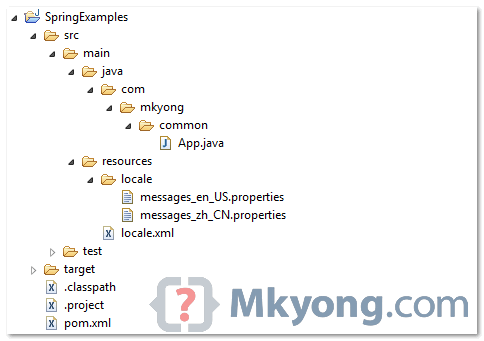
Review directory structure of this example.
2. Properties file
Create two properties files, one for English characters (messages_en_US.properties), other one for Chinese characters (messages_zh_CN.properties). Put it into the project class path (see figure above).
File : messages_en_US.properties
customer.name=Yong Mook Kim, age : {0}, URL : {1}
File : messages_zh_CN.properties
customer.name=\ufeff\u6768\u6728\u91d1, age : {0}, URL : {1}
The ‘\ufeff\u6768\u6728\u91d1‘ is Unicode characters in Chinese.
To display the Chinese characters correctly, you have to use “native2ascii” tool to convert the Chinese characters into Unicode characters.
3. Bean configuration file
Include the properties file into the bean configuration file. Both “messages_en_US.properties” and “messages_zh_CN.properties” are consider one file in Spring, you just need to include the file name once, and Spring will find the correct locale automatically.
<?xml version="1.0" encoding="UTF-8"?>
<beans xmlns="http://www.springframework.org/schema/beans"
	xmlns:xsi="http://www.w3.org/2001/XMLSchema-instance"
	xsi:schemaLocation="http://www.springframework.org/schema/beans
	http://www.springframework.org/schema/beans/spring-beans-2.5.xsd">

	<bean id="messageSource"
		class="org.springframework.context.support.ResourceBundleMessageSource">
		<property name="basename">
			<value>locale\customer\messages</value>
		</property>
	</bean>

</beans>
P.S Assume both files are located at “resources\locale\customer\” folder.
4. Run it
package com.mkyong.common;

import java.util.Locale;
import org.springframework.context.ApplicationContext;
import org.springframework.context.support.ClassPathXmlApplicationContext;

public class App {
	public static void main(String[] args) {

		ApplicationContext context
			= new ClassPathXmlApplicationContext("locale.xml");

		String name = context.getMessage("customer.name",
				new Object[] { 28,"https://mkyong.com" }, Locale.US);

		System.out.println("Customer name (English) : " + name);

		String namechinese = context.getMessage("customer.name",
				new Object[] {28, "https://mkyong.com" },
                                        Locale.SIMPLIFIED_CHINESE);

		System.out.println("Customer name (Chinese) : " + namechinese);

	}
}
Output
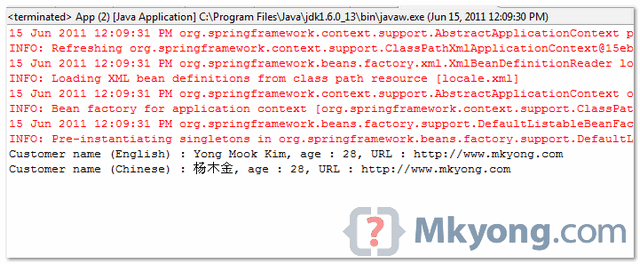
Make sure your Eclipse is able to display Chinese output.
Explanation
1. In context.getMessage(), the second argument is message parameters, you have to pass it as object array. You can just pass a null if no parameter values available.
context.getMessage("customer.name",null, Locale.US);
2. The Locale.US will retrieve the messages from ‘messages_en_US.properties‘, while Locale.SIMPLIFIED_CHINESE will retrieve the messages from ‘messages_zh_CN.properties‘.
Read this article to know how to access the MessageSource inside a bean.
Download Source Code
About Author

You forgot “customer” package under “locale” man, in the directory structure. just a heads up. and thanks for these great tutorials. keep up the good work
Thanks dude.. 🙂
You are here got u…
Hi sir, please help me.
I have prepared validation processes by writing rest api. And I prepared a resource-bundle operation for each validation operation. However, when I send a query in the postman, some UTF-8 characters that I added in the resource-bundle are not read. It looks like this. The letters I use here are from the Azerbaijani language.The text I want to show here is “no such Employee id found”. Even when I look at the resource-bundl, Intellij itself gives such a warning on utf-8-e characters. What can I do to make UTF-8 letters appear normally? I configured MessageSource bean and I want to print this properties file of message-key. How to solve this problem?
ID_NOT_FOUND = Belə id-də İşçi tapılmadı.
Unsupported characters for the charset ‘ISO-8859-1
{ "code": 404, "message": "\"Bel? id-d? i?�i tap?lmad?." }instead of property files like messages.properties, i want to load the translations from a web service. Can we achieve that?
Thanks a lot. you saved my day.
Hi, I’m trying to configure a maven webapp using Spring 3 and ResourceBundleMessageSource in an Ubuntu 32 bits OS. I’m having the following error:
javax.servlet.ServletException: javax.servlet.jsp.JspTagException: No message found under code ‘welcome’ for locale ‘en_US’.
I understand the error message, but double checked the war file and the properties files are in the expected folder (resources) and it contains the “missing” tag. After running out of ideas I found this post and to my concern I see I have everything in place. I thought I may have anything missing so I downloaded your source and built… and it’s not working.
I started to think that I may have something wrong with my dev environment so I tried your app in a windows environment and it is working. Have you ever experienced this kind of problem in an Ubuntu OS? One thing I tried is to switch from open-jdk (default for ubuntu) to jdk1.6.0_32 but no luck.
I can send sources if needed, but right now I’m mainly trying with your app (that I know works in Windows)
Any help would be appreciated. Thanks for your time, excellent posts and a great source of info by the way
Any result after deployed my example on Ubuntu? Btw, what is your app / web server?
It worked properly when I changed the backslashes to slashes in the locale files path (changed from classpath:locale\customer\messages to classpath:locale/customer/messages). I’m using Tomcat 7. I also downloaded and deployed this example:
https://mkyong.com/spring-mvc/spring-mvc-internationalization-example/
And it works in Ubuntu out of the box. Note that in this last example you put the messages files in the root of the classpath, so there were no slash issues.
I also managed to make my own code work.
Thanks Mkyong!
Gastón
Never mind, writing this made me go through all the config again – Problem was that in windows you configure your paths with backslashes (\) while in Ubuntu you need to use slashes (/). I have your example working now, so I’ll go through my code
Thanks!
Hello i have got question what i must doing if my properties file isnt locale in war file ??
When i have got resouce bundle file (.properties) store on hard drive ??
How can I use the messages defined in the resource bundle in a JSP file? What tag should I use? fmt:message or spring:message? How to pass the arguments?
Hi
I m using below code for resolving text messages, but in out put i m not getting all the index values.Please let me where i m doing wrong.
package ResolvindTextMessages;

import java.util.Locale;
import org.springframework.context.ApplicationContext;
import org.springframework.context.support.ClassPathXmlApplicationContext;

/**
 *
 * @author Jasvinder
 */
public class MainClass {
    public static void main(String[] args) {
         ApplicationContext ac = new ClassPathXmlApplicationContext("ResolvindtextMessages/newXMLDocument.xml");
         Locale locale = Locale.US;
         String tesst1 = ac.getMessage("course",new Object[]{24},locale);
         System.out.println("SEE THIS"+"    "+tesst1 );

    }
}
package ResolvindTextMessages; import java.util.Locale; import org.springframework.context.MessageSourceResolvable; import org.springframework.context.NoSuchMessageException; import org.springframework.context.support.ResourceBundleMessageSource.*; public interface MessageSource { String getMessage(MessageSourceResolvable resolvable,Locale locale) throws NoSuchMessageException; String getMessage(String code,Object[] args,Locale locale) throws NoSuchMessageException; String getMessage(String code,Object[] args,String defaultMessage,Locale locale) throws NoSuchMessageException; }And contents in my trainingtext_en_US.properties
is as below:
course=class
student={0}
Cant see your xml file, and dun know where you put the resource file. My advice is download the attached example, change line by line slowly to test your code.
But eclipse helios can’t display the Chinese customer name, it displays like ???