This quick guide example uses Maven to generate a simple Java project structure, and demonstrates how to retrieve Spring bean and prints a “hello world” string.
Technologies used in this article :
- Spring 2.5.6
- Maven 3.0.3
- Eclipse 3.6
- JDK 1.6.0.13
For Spring 3, refer to this Maven + Spring 3 hello world example.
1. Generate project structure with Maven
In command prompt, issue following Maven command :
mvn archetype:generate -DgroupId=com.mkyong.common -DartifactId=SpringExamples
	-DarchetypeArtifactId=maven-archetype-quickstart -DinteractiveMode=false
Maven will generate all the Java’s standard folders structure for you (besides resources folder, which you need to create it manually)
2. Convert to Eclipse project
Type “mvn eclipse:eclipse” to convert the newly generated Maven style project to Eclipse’s style project.
mvn eclipse:eclipse
Later, import the converted project into Eclipse IDE.
Create a resources “/src/main/resources” folder, the Spring’s bean xml configuration file will put here later. Maven will treat all files under this “resources” folder as resources files, and copy it to output classes automatically.
3. Add Spring dependency
Add Spring dependency in Maven’s pom.xml file.
File : pom.xml
<project xmlns="http://maven.apache.org/POM/4.0.0"
	xmlns:xsi="http://www.w3.org/2001/XMLSchema-instance"
	xsi:schemaLocation="http://maven.apache.org/POM/4.0.0
	http://maven.apache.org/maven-v4_0_0.xsd">
	<modelVersion>4.0.0</modelVersion>
	<groupId>com.mkyong.common</groupId>
	<artifactId>SpringExamples</artifactId>
	<packaging>jar</packaging>
	<version>1.0-SNAPSHOT</version>
	<name>SpringExamples</name>
	<url>http://maven.apache.org</url>
	<dependencies>

		<!-- Spring framework -->
		<dependency>
			<groupId>org.springframework</groupId>
			<artifactId>spring</artifactId>
			<version>2.5.6</version>
		</dependency>

	</dependencies>
</project>
Issue “mvn eclipse:eclipse” again, Maven will download the Spring dependency libraries automatically and put it into your Maven’s local repository. At the same time, Maven will add the downloaded libraries into Eclipse “.classpath” for dependency purpose.
4. Spring bean (Java class)
Create a normal Java class (HelloWorld.java) at “src/main/java/com/mkyong/common/HelloWorld.java”. Spring’s bean is just a normal Java class, and declare in Spring bean configuration file later.
package com.mkyong.common;

/**
 * Spring bean
 *
 */
public class HelloWorld {
	private String name;

	public void setName(String name) {
		this.name = name;
	}

	public void printHello() {
		System.out.println("Hello ! " + name);
	}
}
5. Spring bean configuration file
Create an xml file (Spring-Module.xml) at “src/main/resources/Spring-Module.xml“. This is the Spring’s bean configuration file, which declares all the available Spring beans.
File : Spring-Module.xml
<beans xmlns="http://www.springframework.org/schema/beans"
	xmlns:xsi="http://www.w3.org/2001/XMLSchema-instance"
	xsi:schemaLocation="http://www.springframework.org/schema/beans
	http://www.springframework.org/schema/beans/spring-beans-2.5.xsd">

	<bean id="helloBean" class="com.mkyong.common.HelloWorld">
		<property name="name" value="Mkyong" />
	</bean>

</beans>
6. Review project structure
Review it and make sure the folder structure as follows
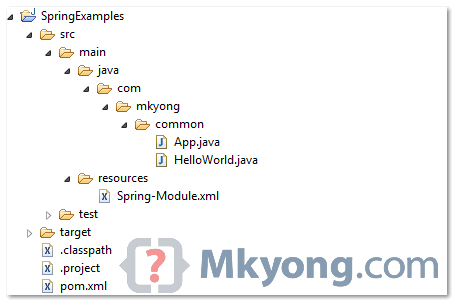
7. Run It
Run App.java, it will load the Spring bean configuration file (Spring-Module.xml) and retrieve the Spring bean via getBean() method.
File : App.java
package com.mkyong.common;

import org.springframework.context.ApplicationContext;
import org.springframework.context.support.ClassPathXmlApplicationContext;

public class App {
	public static void main(String[] args) {
		ApplicationContext context = new ClassPathXmlApplicationContext(
				"Spring-Module.xml");

		HelloWorld obj = (HelloWorld) context.getBean("helloBean");
		obj.printHello();
	}
}
8. Output
Hello ! Mkyong

Its seems to be a pretty old post, but can you update this to the new version of spring because there is not jar packaging available with the latest releases.
Thanku so much..
Thanks you very much!
how can i convert to IntelliJ styles ?
I have try it but there is some problem with mvn idea:module that get ERROR Failed to execute goal org.apache.maven.plugins:maven-idea-plugin:2.2.1:module on project …….. : Execution default-cli of goal org.apache.maven.plugins:maven-idea-plugin:2.2.1:module failed. : NullPointerException
thank your mkyong…
ffs….no…..maven!!!!!!
Hi mkyong, Thanks for this article. I did everything like you described here expect I used the Spring latest version. But I am getting error like’ClassPathXmlApplicationContext and ApplicationContext are not available’. What I understood is Spring dependency jar “spring 4.2.0” not available.But I checked the class path, jar is available there.
Can anybody please look into this!!! help me……..
Exception in thread “main” org.springframework.beans.factory.BeanCreationException: Error creating bean with name ‘helloBean’ defined in class path resource [bean.xml]: Instantiation of bean failed; nested exception is org.springframework.beans.BeanInstantiationException: Could not instantiate bean class [com.mkyong.common.HelloWorld]: No default constructor found; nested exception is java.lang.NoSuchMethodException: com.mkyong.common.HelloWorld.()
at org.springframework.beans.factory.support.AbstractAutowireCapableBeanFactory.instantiateBean(AbstractAutowireCapableBeanFactory.java:883)
at org.springframework.beans.factory.support.AbstractAutowireCapableBeanFactory.createBeanInstance(AbstractAutowireCapableBeanFactory.java:839)
at org.springframework.beans.factory.support.AbstractAutowireCapableBeanFactory.doCreateBean(AbstractAutowireCapableBeanFactory.java:440)
at org.springframework.beans.factory.support.AbstractAutowireCapableBeanFactory$1.run(AbstractAutowireCapableBeanFactory.java:409)
at java.security.AccessController.doPrivileged(Native Method)
at org.springframework.beans.factory.support.AbstractAutowireCapableBeanFactory.createBean(AbstractAutowireCapableBeanFactory.java:380)
at org.springframework.beans.factory.support.AbstractBeanFactory$1.getObject(AbstractBeanFactory.java:264)
at org.springframework.beans.factory.support.DefaultSingletonBeanRegistry.getSingleton(DefaultSingletonBeanRegistry.java:222)
at org.springframework.beans.factory.support.AbstractBeanFactory.doGetBean(AbstractBeanFactory.java:261)
at org.springframework.beans.factory.support.AbstractBeanFactory.getBean(AbstractBeanFactory.java:185)
at org.springframework.beans.factory.support.AbstractBeanFactory.getBean(AbstractBeanFactory.java:164)
at org.springframework.beans.factory.support.DefaultListableBeanFactory.preInstantiateSingletons(DefaultListableBeanFactory.java:429)
at org.springframework.context.support.AbstractApplicationContext.finishBeanFactoryInitialization(AbstractApplicationContext.java:728)
at org.springframework.context.support.AbstractApplicationContext.refresh(AbstractApplicationContext.java:380)
at org.springframework.context.support.ClassPathXmlApplicationContext.(ClassPathXmlApplicationContext.java:139)
at org.springframework.context.support.ClassPathXmlApplicationContext.(ClassPathXmlApplicationContext.java:83)
at com.mkyong.common.App.main(App.java:14)
Caused by: org.springframework.beans.BeanInstantiationException: Could not instantiate bean class [com.mkyong.common.HelloWorld]: No default constructor found; nested exception is java.lang.NoSuchMethodException: com.mkyong.common.HelloWorld.()
at org.springframework.beans.factory.support.SimpleInstantiationStrategy.instantiate(SimpleInstantiationStrategy.java:58)
at org.springframework.beans.factory.support.AbstractAutowireCapableBeanFactory.instantiateBean(AbstractAutowireCapableBeanFactory.java:877)
… 16 more
Caused by: java.lang.NoSuchMethodException: com.mkyong.common.HelloWorld.()
at java.lang.Class.getConstructor0(Class.java:2892)
at java.lang.Class.getDeclaredConstructor(Class.java:2058)
at org.springframework.beans.factory.support.SimpleInstantiationStrategy.instantiate(SimpleInstantiationStrategy.java:54)
… 17 more
i got same error. Did you solve problem ?
Please Specify Bean Path correctly or class path correctly in spring-module.xml file
can you please paste the code here!
nice one post and see also this
http://www.javaproficiency.com/2015/03/spring-tutorial.html
Hi i´m trying to compile the App.java
but when i run I get the error
Could not find or load main class com.mkyong.common.App
already have im my POM the dependencies for commons annotations so
what can be the problem?
There´s no error in the project.
Thanks.
Just right click on your project then run as and click on maven install after doing this try to run your App.java , It’ll compile and run easily.
i am getting error in first step itself. when i write the command i get the following lines in the end.
Please help me.
Choose a number or apply filter (format: [groupId:]artifactId, case sensitive co
ntains): 387: -DarchetypeArtifactId=maven-archetype-quickstart -DinteractiveMo
de=false
Choose archetype:
Your filter doesn’t match any archetype (hint: enter to return to initial lis
t)
Great work perfectly.. 😀 thanks..
Please help me I am new to Maven I cant understand the configurations of using Sping.
I am getting Error:
Could not find or load main class com.mkyong.common.App
Please Help Me. I am new to maven
The program is running fine I need to create this program using Eclipse editor. I already install this springtoolssuit
Thanks, Mkyong. You’re awesome
Thank you from Morocco,good job
Thank you for this tutorial. I thought I could start learning Spring doing this example, but for me it does not work. I followed the instructions carefully, but the resulting eclipse project has some error(s). When I run it I get the error
Could not find or load main class com.mkyong.common.App
The file App.java now has no errors. In the beginning it had, but after I added the file spring-2.5.6.jar the errors disappeared. I don’t find any file with errors in the whole project SpringExamples.
What could be the problem? Any help will be greatly appreciated. And by the way, the code provided for download has the same error.
This is caused by the missing of commons-logging-xxx.jar
If you want more information please refer this link :
https://mkyong.com/java/javalangnoclassdeffounderror-orgapachecommonslogginglogfactory/
Also getting
ClassPathXmlApplicationContext cannot be resolved to a type
Add spring-context jar to rectify this…
it is excellent web site for java developer
Superb. very nice!!
Hi MKYong,
Most of your tutorials not working for those who are trying in 2013,Please suggest wt to do?.Many people simply wasting the time,
They are working fine. You might have configuraiton issues with jars , build etc which developer must own responsibality.
You cannot expect MyKong to spoon feed you with setup , execution …..
also note that the version of framework keeps changing , you must look into those also.
make sure maven is working fine
I just try this example today and it worked, try harder…
I will be interested and enthusiastic about what you’re covering the following.
Nice Post, thanks mkyong. Got one question though. How does spring know the configuration file is under main/resources? in my local environment, I receives the following exception:
==============================
INFO: Loading XML bean definitions from class path resource [Spring-Moduleg.xml]
Exception in thread “main” org.springframework.beans.factory.BeanDefinitionStoreException: IOException parsing XML document from class path resource [Spring-Moduleg.xml]; nested exception is java.io.FileNotFoundException: class path resource [Spring-Moduleg.xml] cannot be opened because it does not exist
=====================================
can you advice please? Thank you.
please ignore my question. after add the following line in .classpath file, it works like charm.
thank you
Hi Jack, I think as a good habit, one should avoid changing .classpath file manually. For your exception you only needed to run mvn eclipse:eclipse once and refresh your project in eclipse.
hi mkyong..
am new to java and am so addicted to java.
I uv learned upto making applets and connecting with oracle,sql databases..
now I want to knw ant way is spring,hibernate and so..
pls say any idea to understand easily..
my mail id is : [email protected]
I am facing problem with App.java
=================================
Exception in thread “main” java.lang.Error: Unresolved compilation problems:
ApplicationContext cannot be resolved to a type
ClassPathXmlApplicationContext cannot be resolved to a type
at com.mkyong.common.App.main(App.java:8)
add the concerned jars to the build path of the project. It will work
U really rockkk…. lovee uuu…!!@
Thanks mkyong, your example is very much appreciated!
Just a suggestion, this example could have been done entirely without involving Eclipse by just mentioning that, to execute the app, you can just use maven at the command line:
mvn exec:java -Dexec.mainClass=”com.mkyong.common.App”
I know many people use Eclipse, but it is often instructive to design an example with as few extraneous dependencies as possible.
Thanks again, really do appreciate the time and effort you put into this :).
Cheers,
Andrew
Yes,I agree. Thanks! I was confused how to run
Hi i would like to know the materials for spring and hibernate with maven
Hi
just a question
how can Maven know where the spring and junit jar (or source) are ?
which repository is maven looking for to download them from ?
then will it download jars or source ?
I don’t have junit, yes manually I can that….. BUT…..no with maven
Thanks
Dear Yong,
I have gone through most of the code snippets in your website. The IOC concept is a very useful one. But i have seen most of the samples contains only the hard coded values of the Objects in the xml file. Then how to assign the values dynamically into the dependencies and then inject them into the Components?
Can you provide me the sample which performs the same?
Thanks in Advance
DineshT
when spring container creates the object? on call of getBean() ..what happens in case of singilton /prototype?
Really nice …Done a good job !!!
Nice Example.
Nice example.Thanks Mr.Yong!!!
thanks for the example.
nice example
I am using Tomcat 7, Apache maven 3 and eclipse Helios
hi,
i downloaded the source code and build it in maven as described by you but eclipse is not able to detect the spring dependencies tough they are present in the classpath i am getting compile time error in App.java
-ClassPathXmlApplicationContext cannot be resolved to a type
-ApplicationContext cannot be resolved to a type
pls help
restart the eclipse. It worked for me.
Hi !!
I am facing same problem here,restarting the eclipse not working for the same error.
Exception in thread “main” java.lang.Error: Unresolved compilation problems:
ApplicationContext cannot be resolved to a type
ClassPathXmlApplicationContext cannot be resolved to a type
at com.mkyong.common.App.main(App.java:8)
MkYong, Kindly reply to this problem.. I am also facing the same problem.
Hi
I am also facing the same problem please reply for this
restarting eclipse worked 4 me…
How to control back button after logout in struts.
Thanks a lot….really helpful…
nice example…:D
Thank you for posting this article.It is very nice and helpful
when i run mvn eclipse:eclipse in cmd .. i see this where shld be the problem ..
3.HTML –
Eclipse cannot find this two classes .
NOTE: the previous steps are done successfully .
I also had this but solved it by going at least in Eclipse Indigo. Right Click on the Project and do Configure->Convert to Maven project then as if by magic it seemed to load the spring dependencies and bingo the two warnings went away. Admitedly I was experimenting with a fully loaded Maven repository but I suspect it will still work just might take a while do download the depenencies.
I also added the following to the pom file just below dependencies.
  <build>
  <plugins>
    <plugin>
      <artifactId>maven-assembly-plugin</artifactId>
      <configuration>
        <descriptorRefs>
          <descriptorRef>jar-with-dependencies</descriptorRef>
        </descriptorRefs>
        <archive>
          <manifest>
            <mainClass>com.mkyong.core.App</mainClass>
          </manifest>
        </archive>
      </configuration>
      <executions>
        <execution>
          <phase>package</phase>
          <goals>
            <goal>single</goal>
          </goals>
        </execution>
      </executions>
    </plugin>
  </plugins>
  </build>
Then you can go javar -jar Spring3-Example-1.0-SNAPSHOT-jar-with-dependencies.jar
and then you will have you can run your spring app.
Ohh and sorry to compile it I just used maven the command line version and went
mvn -Dskiptests clean package then the jar file is in the target directory.
Apart from the couple of missing bits of how to make a good jar and howto run it,
it is a sweet little tutorial. The output for me looked like this…
31-Oct-2012 23:05:20 org.springframework.context.support.AbstractApplicationContext prepa
reRefresh
INFO: Refreshing org.springframework.context.support.ClassPathXmlApplicationContext@19c26
f5: startup date [Wed Oct 31 23:05:20 GMT 2012]; root of context hierarchy
31-Oct-2012 23:05:20 org.springframework.beans.factory.xml.XmlBeanDefinitionReader loadBe
anDefinitions
INFO: Loading XML bean definitions from class path resource [SpringBeans.xml]
31-Oct-2012 23:05:22 org.springframework.beans.factory.support.DefaultListableBeanFactory
preInstantiateSingletons
INFO: Pre-instantiating singletons in org.springframework.beans.factory.support.DefaultLi
stableBeanFactory@d251a3: defining beans [helloBean]; root of factory hierarchy
Spring 3 : Hello ! Mkyong
Appreciated you efforts , but to get more clarity and understanding please post the tutorials developing in Eclipse IDE .
Don’t get you, this post is developed in Eclipse environment.
Mkyong @ Best , I regret for confusion ., what i mean is it would be easy if you can post the step by step screen print of the development in eclipse ide .so that every individual can easily follow . What i felt is there are few developer havinf less experience could not follow this tutorial .Though its really excellent and one of the best in Internet ,like the executing the mvn . Appreciate your thoughts on this mvn eclipse:eclipse creates confusion whether it needs to execute in command prompt and which path .Again Many thanks – Muskandaza ,SIU – Carbondale
i see… sorry for the confusion, and thanks for your suggestion, i will improve it continuously.
MKyong @ Best , Really appreciated for prompt response. I could say one thing your tutorials are really helpful to many people across the globe ,who are enjoying in learning the latest technologies in java . Keep doing good work .Best wishes – Muskandaza,SIU-Carbondale
Very Very good !!
Well done boy !!
Nice and clear ! Find another one at
http://www.java-tutorial.ch/spring/maven-and-spring
Hi mkyong,
I’m getting an error, when i enter the command ‘mvn archetype:generate’ in command prompt.
Please help me.
C:\>mvn archetype:generate
[INFO] Scanning for projects…
[INFO] Searching repository for plugin with prefix: ‘archetype’.
[INFO] org.apache.maven.plugins: checking for updates from central
[WARNING] repository metadata for: ‘org.apache.maven.plugins’ could not be retrieved from repository: central due to an error:
[INFO] Repository ‘central’ will be blacklisted
[INFO] ————————————————————————
[ERROR] BUILD ERROR
[INFO] ————————————————————————
[INFO] The plugin ‘org.apache.maven.plugins:maven-archetype-plugin’ does not exist or no valid version could be found
[INFO] ————————————————————————
[INFO] For more information, run Maven with the -e switch
[INFO] ————————————————————————
[INFO] Total time: 21 seconds
[INFO] Finished at: Tue Apr 19 17:09:47 IST 2011
[INFO] Final Memory: 1M/4M
[INFO] ————————————————————————
‘cmd’ is not recognized as an internal or external command,
operable program or batch file.
C:\>
“Repository ‘central’ will be blacklisted” ? you may behind firewall, try configure Maven to use proxy access.
I don’t understand why you chose vaadin archetype???
15: remote -> vaadin-archetype-sample (This archetype generates a Vaadin application as a Maven project.
The application contains a custom GWT widgetset that is compiled
by the GWT compiler and integrated into the project as part of the
build process. The application is based on the Vaadin Color Picker
Demo application available at http://vaadin.com.)
At my end, “15: internal -> maven-archetype-quickstart ()” , what’s your Maven version?
Hi Yong.
I have maven installed on my machine but when i execute “archetype:generate”
command it gives the following error. 🙁
E:\TestWorkspace>maven archetype:generate
__ __
| \/ |__ _Apache__ ___
| |\/| / _` \ V / -_) ‘ \ ~ intelligent projects ~
|_| |_\__,_|\_/\___|_||_| v. 1.0.2
BUILD FAILED
Goal “archetype:generate” does not exist in this project.
Total time: 1 seconds
Finished at: Mon Dec 13 14:16:53 GMT+05:30 2010
Please Help……
What’s your maven version?
It’s v1.0.2.
Do i need to update it? or need to install some plug-in over Maven?
yes, your version is too old, please get at least v 2.0
http://maven.apache.org/
I think you missed one line of explanation.
1) go to \\
here is your pom.xml.
then run following command from here (otherwise will give you error: POM not found).
Type “mvn eclipse:eclipse” to convert the newly generated project to Eclipse’s style project..
Thanks.
Thanks for your extra inputs, really appreciated it.
I am facing problem with App.java
=================================
Exception in thread “main” java.lang.Error: Unresolved compilation problems:
ApplicationContext cannot be resolved to a type
ClassPathXmlApplicationContext cannot be resolved to a type
at com.mkyong.common.App.main(App.java:8)
Note :- it should automatically download all the dependencies.
Let me know where i have to change in code ?
Thanks a lot Mykong for the nice article !!
Very nice , simple and to the point.
Great Work MK young!!!!!!!!!!!!!!!!