In this tutorial, we will extend last Maven + Spring hello world example by adding JDBC support, to use Spring + JDBC to insert a record into a customer table.
1. Customer table
In this example, we are using MySQL database.
CREATE TABLE `customer` (
  `CUST_ID` int(10) unsigned NOT NULL AUTO_INCREMENT,
  `NAME` varchar(100) NOT NULL,
  `AGE` int(10) unsigned NOT NULL,
  PRIMARY KEY (`CUST_ID`)
) ENGINE=InnoDB AUTO_INCREMENT=2 DEFAULT CHARSET=utf8;
2. Project Dependency
Add Spring and MySQL dependencies in Maven pom.xml file.
File : pom.xml
<project xmlns="http://maven.apache.org/POM/4.0.0"
  xmlns:xsi="http://www.w3.org/2001/XMLSchema-instance"
  xsi:schemaLocation="http://maven.apache.org/POM/4.0.0
  http://maven.apache.org/maven-v4_0_0.xsd">
  <modelVersion>4.0.0</modelVersion>
  <groupId>com.mkyong.common</groupId>
  <artifactId>SpringExample</artifactId>
  <packaging>jar</packaging>
  <version>1.0-SNAPSHOT</version>
  <name>SpringExample</name>
  <url>http://maven.apache.org</url>

  <dependencies>

        <!-- Spring framework -->
	<dependency>
		<groupId>org.springframework</groupId>
		<artifactId>spring</artifactId>
		<version>2.5.6</version>
	</dependency>

        <!-- MySQL database driver -->
	<dependency>
		<groupId>mysql</groupId>
		<artifactId>mysql-connector-java</artifactId>
		<version>5.1.9</version>
	</dependency>

  </dependencies>
</project>
3. Customer model
Add a customer model to store customer’s data.
package com.mkyong.customer.model;

import java.sql.Timestamp;

public class Customer
{
	int custId;
	String name;
	int age;
	//getter and setter methods

}
4. Data Access Object (DAO) pattern
Customer Dao interface.
package com.mkyong.customer.dao;

import com.mkyong.customer.model.Customer;

public interface CustomerDAO
{
	public void insert(Customer customer);
	public Customer findByCustomerId(int custId);
}
Customer Dao implementation, use JDBC to issue a simple insert and select statement.
package com.mkyong.customer.dao.impl;

import java.sql.Connection;
import java.sql.PreparedStatement;
import java.sql.ResultSet;
import java.sql.SQLException;
import javax.sql.DataSource;
import com.mkyong.customer.dao.CustomerDAO;
import com.mkyong.customer.model.Customer;

public class JdbcCustomerDAO implements CustomerDAO
{
	private DataSource dataSource;

	public void setDataSource(DataSource dataSource) {
		this.dataSource = dataSource;
	}

	public void insert(Customer customer){

		String sql = "INSERT INTO CUSTOMER " +
				"(CUST_ID, NAME, AGE) VALUES (?, ?, ?)";
		Connection conn = null;

		try {
			conn = dataSource.getConnection();
			PreparedStatement ps = conn.prepareStatement(sql);
			ps.setInt(1, customer.getCustId());
			ps.setString(2, customer.getName());
			ps.setInt(3, customer.getAge());
			ps.executeUpdate();
			ps.close();

		} catch (SQLException e) {
			throw new RuntimeException(e);

		} finally {
			if (conn != null) {
				try {
					conn.close();
				} catch (SQLException e) {}
			}
		}
	}

	public Customer findByCustomerId(int custId){

		String sql = "SELECT * FROM CUSTOMER WHERE CUST_ID = ?";

		Connection conn = null;

		try {
			conn = dataSource.getConnection();
			PreparedStatement ps = conn.prepareStatement(sql);
			ps.setInt(1, custId);
			Customer customer = null;
			ResultSet rs = ps.executeQuery();
			if (rs.next()) {
				customer = new Customer(
					rs.getInt("CUST_ID"),
					rs.getString("NAME"),
					rs.getInt("Age")
				);
			}
			rs.close();
			ps.close();
			return customer;
		} catch (SQLException e) {
			throw new RuntimeException(e);
		} finally {
			if (conn != null) {
				try {
				conn.close();
				} catch (SQLException e) {}
			}
		}
	}
}
5. Spring bean configuration
Create the Spring bean configuration file for customerDAO and datasource.
File : Spring-Customer.xml
<beans xmlns="http://www.springframework.org/schema/beans"
	xmlns:xsi="http://www.w3.org/2001/XMLSchema-instance"
	xsi:schemaLocation="http://www.springframework.org/schema/beans
	http://www.springframework.org/schema/beans/spring-beans-2.5.xsd">

	<bean id="customerDAO" class="com.mkyong.customer.dao.impl.JdbcCustomerDAO">
		<property name="dataSource" ref="dataSource" />
	</bean>

</beans>
File : Spring-Datasource.xml
<beans xmlns="http://www.springframework.org/schema/beans"
	xmlns:xsi="http://www.w3.org/2001/XMLSchema-instance"
	xsi:schemaLocation="http://www.springframework.org/schema/beans
	http://www.springframework.org/schema/beans/spring-beans-2.5.xsd">

	<bean id="dataSource"
		class="org.springframework.jdbc.datasource.DriverManagerDataSource">

		<property name="driverClassName" value="com.mysql.jdbc.Driver" />
		<property name="url" value="jdbc:mysql://localhost:3306/mkyongjava" />
		<property name="username" value="root" />
		<property name="password" value="password" />
	</bean>

</beans>
File : Spring-Module.xml
<beans xmlns="http://www.springframework.org/schema/beans"
	xmlns:xsi="http://www.w3.org/2001/XMLSchema-instance"
	xsi:schemaLocation="http://www.springframework.org/schema/beans
	http://www.springframework.org/schema/beans/spring-beans-2.5.xsd">

	<import resource="database/Spring-Datasource.xml" />
	<import resource="customer/Spring-Customer.xml" />

</beans>
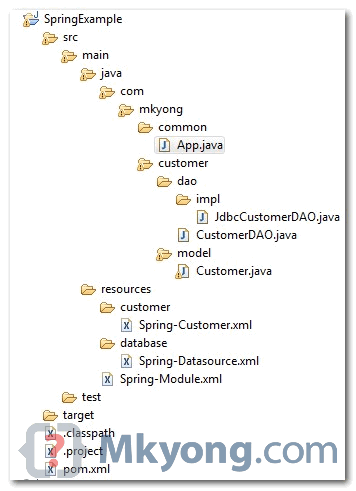
6. Review project structure
Full directory structure of this example.
7. Run it
package com.mkyong.common;

import org.springframework.context.ApplicationContext;
import org.springframework.context.support.ClassPathXmlApplicationContext;
import com.mkyong.customer.dao.CustomerDAO;
import com.mkyong.customer.model.Customer;

public class App
{
    public static void main( String[] args )
    {
    	ApplicationContext context =
    		new ClassPathXmlApplicationContext("Spring-Module.xml");

        CustomerDAO customerDAO = (CustomerDAO) context.getBean("customerDAO");
        Customer customer = new Customer(1, "mkyong",28);
        customerDAO.insert(customer);

        Customer customer1 = customerDAO.findByCustomerId(1);
        System.out.println(customer1);

    }
}
output
Customer [age=28, custId=1, name=mkyong]
Download Source Code
Download it– SpringJDBCExample.zip (10 KB)

found some errors in these class, i modified them then run well.
1. App.java
instead :
Customer customer = new Customer(1, “mkyong”,28);
i change it to :
Customer customer = new Customer();
customer.setName(“beceng”);
customer.setAge(31);
2. JdbcCustomerDao.java
insert method ->
i modified insert query to :
String sql = “INSERT INTO CUSTOMER ” +
“(NAME, AGE) VALUES (?, ?)”;
and
//ps.setInt(1, customer.getCustId());
ps.setString(1, customer.getName());
ps.setInt(2, customer.getAge());
the reason is, cust_id in database is constraint / serial / auto increment, so (i guess) dont need to set that id.
well, thats my experience.
thanks mkyong 🙂
1. Yaa complete project very good to practice for new bies like me ….constructor is missing in “Customer class” please add people who are very new with java they face problem.
public Customer(int cust_id,String name,int age) {
this.cust_id=cust_id;
this.name = name;
this.age = age;
}
2. second thing is you need to create a database by yourself (this example assumed that already database existed) upon that they created “CUSTOMER” table. this is the place where you need to add you database name “Spring-Datasource.xml”>>”jdbc:mysql://localhost:3306/mkyongjava” in place of “mkyongjava”.
I hope this will help some one facing this problem
Hi folks!
Is there any way to do the same, but instead of configuring datasource inside the application use an external datasource? For example, I’d like not to use Spring-Datasource.xml, instead get datasources from external datasource accessed through JNDI, for example, and have these datasources participate in the transaction.
Why? Suppose I have many modules that use the same datasource configuration, let’s say more than 20 modules, and change these configurations for any different deployment would be tedious. In this case would be better to have a datasource configured in the container and have all the modules sharing the same configuration.
Is that possible? I can not find an example of this.
Thanks
Hi!
I found this post (http://www.journaldev.com/2597/spring-datasource-jndi-with-tomcat-example) with a possible solution. I’ll try it.
I am getting this error when I run this code
Caused by: org.springframework.beans.NotWritablePropertyException: Invalid property ‘dataSource’ of bean class [com.tutorialspoint.FundDaoImpl]: Bean property ‘dataSource’ is not writable or has an invalid setter method. Does the parameter type of the setter match the return type of the getter?
Did anyone have this issue ?
WARNING: Exception encountered during context initialization – cancelling refresh attempt: org.springframework.beans.factory.BeanCreationException: Error creating bean with name ‘customer’ defined in class path resource [beans.xml]: Error setting property values; nested exception is org.springframework.beans.NotWritablePropertyException: Invalid property ‘driverClassName’ of bean class [shoppingMall.Customer]: Bean property ‘driverClassName’ is not writable or has an invalid setter method. Does the parameter type of the setter match the return type of the getter?
Exception in thread “main” org.springframework.beans.factory.BeanCreationException: Error creating bean with name ‘customer’ defined in class path resource [beans.xml]: Error setting property values; nested exception is org.springframework.beans.NotWritablePropertyException: Invalid property ‘driverClassName’ of bean class [shoppingMall.Customer]: Bean property ‘driverClassName’ is not writable or has an invalid setter method. Does the parameter type of the setter match the return type of the getter?
at org.springframework.beans.factory.support.AbstractAutowireCapableBeanFactory.applyPropertyValues(AbstractAutowireCapableBeanFactory.java:1726)
at org.springframework.beans.factory.support.AbstractAutowireCapableBeanFactory.populateBean(AbstractAutowireCapableBeanFactory.java:1434)
at org.springframework.beans.factory.support.AbstractAutowireCapableBeanFactory.doCreateBean(AbstractAutowireCapableBeanFactory.java:601)
at org.springframework.beans.factory.support.AbstractAutowireCapableBeanFactory.createBean(AbstractAutowireCapableBeanFactory.java:524)
at org.springframework.beans.factory.support.AbstractBeanFactory.lambda$doGetBean$0(AbstractBeanFactory.java:335)
at org.springframework.beans.factory.support.DefaultSingletonBeanRegistry.getSingleton(DefaultSingletonBeanRegistry.java:234)
at org.springframework.beans.factory.support.AbstractBeanFactory.doGetBean(AbstractBeanFactory.java:333)
at org.springframework.beans.factory.support.AbstractBeanFactory.getBean(AbstractBeanFactory.java:208)
at org.springframework.beans.factory.support.DefaultListableBeanFactory.preInstantiateSingletons(DefaultListableBeanFactory.java:944)
at org.springframework.context.support.AbstractApplicationContext.finishBeanFactoryInitialization(AbstractApplicationContext.java:918)
at org.springframework.context.support.AbstractApplicationContext.refresh(AbstractApplicationContext.java:583)
at org.springframework.context.support.ClassPathXmlApplicationContext.<init>(ClassPathXmlApplicationContext.java:144)
at org.springframework.context.support.ClassPathXmlApplicationContext.<init>(ClassPathXmlApplicationContext.java:85)
at shoppingMall.Main.main(Main.java:8)
I dont know now to rectify this error
I want some validation. Every time you get the connection using
con = dataSource.getConnection()
this means you are not establishing connection every time (not for the first time) you are just taking the connection from connection pool. Am I right?
I am getting below error when I run the code. Can anyone help?
Exception in thread “main” java.lang.RuntimeException: com.mysql.jdbc.exceptions.jdbc4.CommunicationsException: Communications link failure
The last packet sent successfully to the server was 0 milliseconds ago. The driver has not received any packets from the server.
at co.mkyong.customermodelimpl.CustomerModelImpl.insert(CustomerModelImpl.java:41)
at co.mkyong.ModelApps.CustomerDAOApp.main(CustomerDAOApp.java:15)
Caused by: com.mysql.jdbc.exceptions.jdbc4.CommunicationsException: Communications link failure
The last packet sent successfully to the server was 0 milliseconds ago. The driver has not received any packets from the server.
at sun.reflect.NativeConstructorAccessorImpl.newInstance0(Native Method)
org.springframework.jdbc.datasource.DriverManagerDataSource.getConnectionFromDriverManager(DriverManagerDataSource.java:153)
at org.springframework.jdbc.datasource.DriverManagerDataSource.getConnectionFromDriver(DriverManagerDataSource.java:144)
at org.springframework.jdbc.datasource.AbstractDriverBasedDataSource.getConnectionFromDriver(AbstractDriverBasedDataSource.java:155)
at org.springframework.jdbc.datasource.AbstractDriverBasedDataSource.getConnection(AbstractDriverBasedDataSource.java:120)
at co.mkyong.customermodelimpl.CustomerModelImpl.insert(CustomerModelImpl.java:32)
… 1 more
Caused by: com.mysql.jdbc.exceptions.jdbc4.CommunicationsException: Communications link failure
The last packet sent successfully to the server was 0 milliseconds ago. The driver has not received any packets from the server.
at sun.reflect.NativeConstructorAccessorImpl.newInstance0(Native Method)
at sun.reflect.NativeConstructorAccessorImpl.newInstance(Unknown Source)
at sun.reflect.DelegatingConstructorAccessorImpl.newInstance(Unknown Source)
at java.lang.reflect.Constructor.newInstance(Unknown Source)
at com.mysql.jdbc.Util.handleNewInstance(Util.java:406)
at com.mysql.jdbc.SQLError.createCommunicationsException(SQLError.java:1074)
at com.mysql.jdbc.MysqlIO.(MysqlIO.java:343)
at com.mysql.jdbc.ConnectionImpl.createNewIO(ConnectionImpl.java:2132)
… 17 more
Caused by: java.net.ConnectException: Connection refused: connect
at java.net.DualStackPlainSocketImpl.connect0(Native Method)
I have a little question, where I must create table? In main class or DAO?
thing is you need to create a database by yourself (this example assumed that already database existed) upon that they created “CUSTOMER” table. this is the place where you need to add you database name “Spring-Datasource.xml”>>”jdbc:mysql://localhost:3306/mkyongjava” in place of “mkyongjava”.
can you plz help i am getting error what after imported this project
i am getting error when i imported to my eclipse
What’s “ps” ?
Great tutorial! I generally return an int of whatever executeUpdate returns on an insert statement.
hello,
i want to write a code in spring where when username and password is checked from database (PostgreSQL) then only if correct then next page is opened else “incorrect username/password” message is shown.
thank you
I followed your code but when I try to run the main App, it keeps saying “selection doesn’t contain a main type”. Do you know why is that? Thank you!
I spent 9am-11pm trying to find out why this didn’t work. Answer: my driver was 5.1.9 (article written in 2010) as soon as I upgraded to 5.1.36 it worked.
Tks mkyong
A clear cut coding for basic learners like me.I faced a problem with SQL connection.MySQL was not started first.Is there any plugin that i need to add in pom.xml to start MYSQL.
Note.To build the code i started MySql manually
This was driving me crazy! I did everything ok except for: part. Thank you so much, very useful post!
Hello Jagruti,
First you need to understand spring IOC(Dependency Injection), because in this project “dataSource” bean is created in “Spring-Datasource” and this is getting refereed DAOImplementation class, thats why its giving null pointer exception. For this you need to write a code to first connection to DB (like simple JDBC). Hope this will be helpful. For any concerns please let me know.
regards
Excellent tutorial, many thanks from central Europe 😉
isn’t it incorrect to create the object of class Customer as
Customer customer = new Customer(1, “mkyong”,28); ????
creating object with new keyword breaks the inversion of control feature of spring and make it tightly bound…..plzz reply soon
When I run this app, I get the following error:
MacBook-Air:SpringJDBCExample raj$ java -jar target/SpringExample-1.0-SNAPSHOT.jar
no main manifest attribute, in target/SpringExample-1.0-SNAPSHOT.jar
Any help will be appreciated.
Thanks,
Raj
add main class info in pom.xml
To pom.xml
org.springframework
spring-jdbc
3.0.3.RELEASE
Thank you so much
constructor is also required
public Customer(int custId, String name, int age) {
this.age = age;
this.custId = custId;
this.name = name;}
Can be used…
Good morning everyone.
I have made ??available on my GitHub repository a project (http://www.dontesta.it/blog/blog-2/repository-update-standalone-jdbc-template-spring-application/) of an application, which uses a standalone Spring JDBC Template and annotations.
Bye,
Antonio.
The link says 404 : Not found
I get the following Exception, although i verify that the username/password to my database are correct (by using tool gui) .
Exception in thread “main” java.lang.RuntimeException: java.sql.SQLException: Access denied for user ‘root’@’localhost’ (using password: YES)
Could you help me to fix it?
Thank you
Run your IDE as Administrator
How i run this program
Just run the main.
Nice once, code is perfect
thnx a lot..it helped me
Hi
I am using this tutorial to learn spring jdbc, I am not using maven.
Can you please refer to the uploaded proj and let me know why it is giving null pointer wile setting the connection.
conn = dataSource.getConnection();
I am new to spring
Please let me know where i can put my code.
your reply is appreciated, dont know which door to knock for help.
Thanks