This example will use Maven to create a simple Java project structure, and demonstrate how to use Hibernate in Spring framework to do the data manipulation works(insert, select, update and delete) in MySQL database.
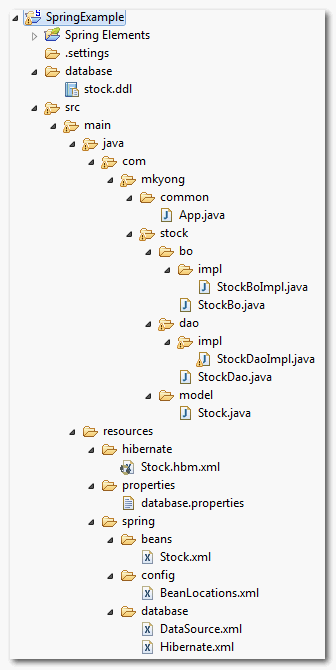
Final project structure
Your final project file structure should look exactly like following, if you get lost in the folder structure creation, please review this folder structure here.
1. Table creation
Create a ‘stock’ table in MySQL database. SQL statement as follow :
CREATE TABLE  `mkyong`.`stock` (
  `STOCK_ID` int(10) unsigned NOT NULL AUTO_INCREMENT,
  `STOCK_CODE` varchar(10) NOT NULL,
  `STOCK_NAME` varchar(20) NOT NULL,
  PRIMARY KEY (`STOCK_ID`) USING BTREE,
  UNIQUE KEY `UNI_STOCK_NAME` (`STOCK_NAME`),
  UNIQUE KEY `UNI_STOCK_ID` (`STOCK_CODE`) USING BTREE
) ENGINE=InnoDB AUTO_INCREMENT=11 DEFAULT CHARSET=utf8;
2. Project File Structure
Create a quick project file structure with Maven command ‘mvn archetype:generate‘, see example here. Convert it to Eclipse project (mvn eclipse:eclipse) and import it into Eclipse IDE.
E:\workspace>mvn archetype:generate
[INFO] Scanning for projects...
...
Choose a number:
(1/2/3....) 15: : 15
...
Define value for groupId: : com.mkyong.common
Define value for artifactId: : HibernateExample
Define value for version:  1.0-SNAPSHOT: :
Define value for package:  com.mkyong.common: : com.mkyong.common
[INFO] OldArchetype created in dir: E:\workspace\HibernateExample
[INFO] ------------------------------------------------------------------------
[INFO] BUILD SUCCESSFUL
[INFO] ------------------------------------------------------------------------
3. Pom.xml file configuration
Add the Spring, Hibernate , MySQL and their dependency in the Maven’s pom.xml file.
<project xmlns="http://maven.apache.org/POM/4.0.0"
  xmlns:xsi="http://www.w3.org/2001/XMLSchema-instance"
  xsi:schemaLocation="http://maven.apache.org/POM/4.0.0
  http://maven.apache.org/maven-v4_0_0.xsd">
  <modelVersion>4.0.0</modelVersion>
  <groupId>com.mkyong.common</groupId>
  <artifactId>SpringExample</artifactId>
  <packaging>jar</packaging>
  <version>1.0-SNAPSHOT</version>
  <name>SpringExample</name>
  <url>http://maven.apache.org</url>

  <dependencies>

        <!-- JUnit testing framework -->
        <dependency>
                <groupId>junit</groupId>
                <artifactId>junit</artifactId>
                <version>3.8.1</version>
                <scope>test</scope>
        </dependency>

        <!-- Spring framework -->
        <dependency>
	        <groupId>org.springframework</groupId>
	        <artifactId>spring</artifactId>
	        <version>2.5.6</version>
        </dependency>

        <!-- Spring AOP dependency -->
        <dependency>
    	        <groupId>cglib</groupId>
		<artifactId>cglib</artifactId>
		<version>2.2</version>
	</dependency>

        <!-- MySQL database driver -->
	<dependency>
		<groupId>mysql</groupId>
		<artifactId>mysql-connector-java</artifactId>
		<version>5.1.9</version>
	</dependency>

	<!-- Hibernate framework -->
	<dependency>
		<groupId>hibernate</groupId>
		<artifactId>hibernate3</artifactId>
		<version>3.2.3.GA</version>
	</dependency>


	<!-- Hibernate library dependecy start -->
	<dependency>
		<groupId>dom4j</groupId>
		<artifactId>dom4j</artifactId>
		<version>1.6.1</version>
	</dependency>

	<dependency>
		<groupId>commons-logging</groupId>
		<artifactId>commons-logging</artifactId>
		<version>1.1.1</version>
	</dependency>

	<dependency>
		<groupId>commons-collections</groupId>
		<artifactId>commons-collections</artifactId>
		<version>3.2.1</version>
	</dependency>

	<dependency>
		<groupId>antlr</groupId>
		<artifactId>antlr</artifactId>
		<version>2.7.7</version>
	</dependency>
	<!-- Hibernate library dependecy end -->

  </dependencies>
</project>
4. Model & BO & DAO
The Model, Business Object (BO) and Data Access Object (DAO) pattern is useful to identify the layer clearly to avoid mess up the project structure.
Stock Model
A Stock model class to store the stock data later.
package com.mkyong.stock.model;

import java.io.Serializable;

public class Stock implements Serializable {

	private static final long serialVersionUID = 1L;

	private Long stockId;
	private String stockCode;
	private String stockName;

	//getter and setter methods...
}
Stock Business Object (BO))
Stock business object (BO) interface and implementation, it’s used to store the project’s business function, the real database operations (CRUD) works should not involved in this class, instead it has a DAO (StockDao) class to do it.
package com.mkyong.stock.bo;

import com.mkyong.stock.model.Stock;

public interface StockBo {

	void save(Stock stock);
	void update(Stock stock);
	void delete(Stock stock);
	Stock findByStockCode(String stockCode);
}
package com.mkyong.stock.bo.impl;

import com.mkyong.stock.bo.StockBo;
import com.mkyong.stock.dao.StockDao;
import com.mkyong.stock.model.Stock;

public class StockBoImpl implements StockBo{

	StockDao stockDao;

	public void setStockDao(StockDao stockDao) {
		this.stockDao = stockDao;
	}

	public void save(Stock stock){
		stockDao.save(stock);
	}

	public void update(Stock stock){
		stockDao.update(stock);
	}

	public void delete(Stock stock){
		stockDao.delete(stock);
	}

	public Stock findByStockCode(String stockCode){
		return stockDao.findByStockCode(stockCode);
	}
}
Stock Data Access Object
A Stock DAO interface and implementation, the dao implementation class extends the Spring’s “HibernateDaoSupport” to make Hibernate support in Spring framework. Now, you can execute the Hibernate function via getHibernateTemplate().
package com.mkyong.stock.dao;

import com.mkyong.stock.model.Stock;

public interface StockDao {

	void save(Stock stock);
	void update(Stock stock);
	void delete(Stock stock);
	Stock findByStockCode(String stockCode);

}
package com.mkyong.stock.dao.impl;

import java.util.List;

import org.springframework.orm.hibernate3.support.HibernateDaoSupport;

import com.mkyong.stock.dao.StockDao;
import com.mkyong.stock.model.Stock;

public class StockDaoImpl extends HibernateDaoSupport implements StockDao{

	public void save(Stock stock){
		getHibernateTemplate().save(stock);
	}

	public void update(Stock stock){
		getHibernateTemplate().update(stock);
	}

	public void delete(Stock stock){
		getHibernateTemplate().delete(stock);
	}

	public Stock findByStockCode(String stockCode){
		List list = getHibernateTemplate().find(
                      "from Stock where stockCode=?",stockCode
                );
		return (Stock)list.get(0);
	}

}
5. Resource Configuration
Create a ‘resources‘ folder under ‘project_name/main/java/‘, Maven will treat all files under this folder as resources file. It will used to store the Spring, Hibernate and others configuration file.
Hibernate Configuration
Create a Hibernate mapping file (Stock.hbm.xml) for Stock table, put it under “resources/hibernate/” folder.
<?xml version="1.0"?>
<!DOCTYPE hibernate-mapping PUBLIC "-//Hibernate/Hibernate Mapping DTD 3.0//EN"
"http://hibernate.sourceforge.net/hibernate-mapping-3.0.dtd">

<hibernate-mapping>
    <class name="com.mkyong.stock.model.Stock" table="stock" catalog="mkyong">
        <id name="stockId" type="java.lang.Long">
            <column name="STOCK_ID" />
            <generator class="identity" />
        </id>
        <property name="stockCode" type="string">
            <column name="STOCK_CODE" length="10" not-null="true" unique="true" />
        </property>
        <property name="stockName" type="string">
            <column name="STOCK_NAME" length="20" not-null="true" unique="true" />
        </property>
    </class>
</hibernate-mapping>
Spring Configuration
Database related….
Create a properties file (database.properties) for the database details, put it into the “resources/properties” folder. It’s good practice disparate the database details and Spring bean configuration into different files.
database.properties
jdbc.driverClassName=com.mysql.jdbc.Driver
jdbc.url=jdbc:mysql://localhost:3306/mkyong
jdbc.username=root
jdbc.password=password
Create a “dataSource” bean configuration file (DataSource.xml) for your database, and import the properties from database.properties, put it into the “resources/database” folder.
DataSource.xml
<beans xmlns="http://www.springframework.org/schema/beans"
xmlns:xsi="http://www.w3.org/2001/XMLSchema-instance"
xsi:schemaLocation="http://www.springframework.org/schema/beans
http://www.springframework.org/schema/beans/spring-beans-2.5.xsd">

<bean
class="org.springframework.beans.factory.config.PropertyPlaceholderConfigurer">
	<property name="location">
		<value>properties/database.properties</value>
	</property>
</bean>

<bean id="dataSource"
         class="org.springframework.jdbc.datasource.DriverManagerDataSource">
	<property name="driverClassName" value="${jdbc.driverClassName}" />
	<property name="url" value="${jdbc.url}" />
	<property name="username" value="${jdbc.username}" />
	<property name="password" value="${jdbc.password}" />
</bean>

</beans>
Hibernate related….
Create a session factory bean configuration file (Hibernate.xml), put it into the “resources/database” folder. This LocalSessionFactoryBean class will set up a shared Hibernate SessionFactory in a Spring application context.
Hibernate.xml
<?xml version="1.0" encoding="UTF-8"?>
<beans xmlns="http://www.springframework.org/schema/beans"
xmlns:xsi="http://www.w3.org/2001/XMLSchema-instance"
xsi:schemaLocation="http://www.springframework.org/schema/beans
http://www.springframework.org/schema/beans/spring-beans-2.5.xsd">

<!-- Hibernate session factory -->
<bean id="sessionFactory"
     class="org.springframework.orm.hibernate3.LocalSessionFactoryBean">

    <property name="dataSource">
      <ref bean="dataSource"/>
    </property>

    <property name="hibernateProperties">
       <props>
         <prop key="hibernate.dialect">org.hibernate.dialect.MySQLDialect</prop>
         <prop key="hibernate.show_sql">true</prop>
       </props>
     </property>

     <property name="mappingResources">
	<list>
           <value>/hibernate/Stock.hbm.xml</value>
	</list>
      </property>

    </bean>
</beans>
Spring beans related….
Create a bean configuration file (Stock.xml) for BO and DAO classes, put it into the “resources/spring” folder. Dependency inject the dao (stockDao) bean into the bo (stockBo) bean; sessionFactory bean into the stockDao.
Stock.xml
<beans xmlns="http://www.springframework.org/schema/beans"
xmlns:xsi="http://www.w3.org/2001/XMLSchema-instance"
xsi:schemaLocation="http://www.springframework.org/schema/beans
http://www.springframework.org/schema/beans/spring-beans-2.5.xsd">

    <!-- Stock business object -->
   <bean id="stockBo" class="com.mkyong.stock.bo.impl.StockBoImpl" >
   		<property name="stockDao" ref="stockDao" />
   </bean>

   <!-- Stock Data Access Object -->
   <bean id="stockDao" class="com.mkyong.stock.dao.impl.StockDaoImpl" >
   		<property name="sessionFactory" ref="sessionFactory"></property>
   </bean>

</beans>
Import all the Spring’s beans configuration files into a single file (BeanLocations.xml), put it into the “resources/config” folder.
BeanLocations.xml
<beans xmlns="http://www.springframework.org/schema/beans"
xmlns:xsi="http://www.w3.org/2001/XMLSchema-instance"
xsi:schemaLocation="http://www.springframework.org/schema/beans
http://www.springframework.org/schema/beans/spring-beans-2.5.xsd">

	<!-- Database Configuration -->
	<import resource="../database/DataSource.xml"/>
	<import resource="../database/Hibernate.xml"/>

	<!-- Beans Declaration -->
	<import resource="../beans/Stock.xml"/>

</beans>
6. Run it
You have all the files and configurations , run it.
package com.mkyong.common;

import org.springframework.context.ApplicationContext;
import org.springframework.context.support.ClassPathXmlApplicationContext;

import com.mkyong.stock.bo.StockBo;
import com.mkyong.stock.model.Stock;

public class App
{
    public static void main( String[] args )
    {
    	ApplicationContext appContext =
    	  new ClassPathXmlApplicationContext("spring/config/BeanLocations.xml");

    	StockBo stockBo = (StockBo)appContext.getBean("stockBo");

    	/** insert **/
    	Stock stock = new Stock();
    	stock.setStockCode("7668");
    	stock.setStockName("HAIO");
    	stockBo.save(stock);

    	/** select **/
    	Stock stock2 = stockBo.findByStockCode("7668");
    	System.out.println(stock2);

    	/** update **/
    	stock2.setStockName("HAIO-1");
    	stockBo.update(stock2);

    	/** delete **/
    	stockBo.delete(stock2);

    	System.out.println("Done");
    }
}
output
Hibernate: insert into mkyong.stock (STOCK_CODE, STOCK_NAME) values (?, ?)
Hibernate: select stock0_.STOCK_ID as STOCK1_0_,
stock0_.STOCK_CODE as STOCK2_0_, stock0_.STOCK_NAME as STOCK3_0_
from mkyong.stock stock0_ where stock0_.STOCK_CODE=?
Stock [stockCode=7668, stockId=11, stockName=HAIO]
Hibernate: update mkyong.stock set STOCK_CODE=?, STOCK_NAME=? where STOCK_ID=?
Hibernate: delete from mkyong.stock where STOCK_ID=?
Done

HibernateDaoSupport is not present in Hibernate dependency you provide it throws an error needed javax-transaction jar
could you please suggest any changes in the pom.xml
After searching I replaced hibernate dependency with spring-orm and I have still problems
Caused by: java.lang.ClassNotFoundException: org.hibernate.cfg.Configuration
change dependency to
org.hibernate
hibernate
3.2.3.ga
then clean and re install the project if ur using eclipse or netbeans
it may help ..
in your project directory every xml file in different folder not in resource]
[ERROR] Failed to execute goal on project SpringExample: Could not resolve dependencies for project com.mkyong.common:SpringExample:jar:1.0: Failure to find org.hibernate:hibernate:jar:3.2.3.ga in http://repo.maven.apache.org/maven2 was cached in the local repository, resolution will not be reattempted until the update interval of central has elapsed or updates are forced -> [Help 1]
Same error.
how to select all rows from the database?
if I do StockDaoImpl stockDao;
and Inject the StockDaoImpl. Then what will go wrong?
I am facing 1 issue where I am taking reference variable of Impl class type like StockDaoImpl and its giveing me No conversion mechanism provide for converting ‘Proxt$68 imlementing XXXX, YYY, XXXProxy….’ to ‘Proxt$68 imlementing XXXX, YYY, XXXProxy….’
Please let me know what goes wrong?
tks :V
Can’t we use a single xml file for the bean instead of 4 as in the above example>
Doesn’t work. Even if I copy paste. WTF?
Hi
how can i implement two controller means one maincontroller and restcontroller in spring mvc maven
Exception in thread “main” org.springframework.dao.InvalidDataAccessResourceUsageException: Cannot open connection; SQL [???]; nested exception is org.hibernate.exception.SQLGrammarException: Cannot open connection
HI, I used these file structure and almost everything as the same for my project. The only difference I have in my project is I use Spring Boot. When I run the project, it gives me following error.
*********************************************************************************************************************************************
Parameter 0 of constructor in org.springframework.boot.autoconfigure.orm.jpa.HibernateJpaAutoConfiguration required a bean of type ‘javax.sql.DataSource’ that could not be found.
– Bean method ‘dataSource’ not loaded because @ConditionalOnProperty (spring.datasource.jndi-name) did not find property ‘jndi-name’
– Bean method ‘dataSource’ not loaded because @ConditionalOnBean (types: org.springframework.boot.jta.XADataSourceWrapper; SearchStrategy: all) did not find any beans
*********************************************************************************************************************************************
My question is, what am I missing. Doesn’t spring boot support the file structure and the configuration shown here? How can I fix the issue?
Hi, Mr. Yong,
Thanks for this tutorial.
I’m using Hibernate for SAP HANA database. I’m able to persistent data using preparedStatements but I’m getting problem with using hibernate. Please tell me what changes are required in this example so that I can integrate sap hana and hibernate.
Hi Nice one, i follow the step and run the program,however lots of maven issue were there after all sort it out, it succedd.
Please add same example with annotation based injection instead of xml based.
CLEAR PRESENTATION:
public class App
{
public static void main( String[] args )
{
ApplicationContext appContext = new ClassPathXmlApplicationContext(“springconfig/BeanLocations.xml”);
StockBo stockBo = (StockBo)appContext.getBean(“stockBo”);
/** insert **/
Stock stock = new Stock(7,”73″,”Yunus”);
stockBo.save(stock);
System.out.println(“INSERT: “+stock);
/** select **/
Stock stock2 = stockBo.findByStockCode(“73”);
System.out.println(“READ: “+stock2);
/** update **/
stock2.setStockName(“HAIO”);
stockBo.update(stock2);
System.out.println(“UPDATE: “+stock2);
/** delete **/
stockBo.delete(stock2);
Mr. Yong,
I need a inner join. What should I do with my HQL? should i create a new model class with the HQL or put the HQL in one of the classes i want to join? What is the proper way to do it?
I’m stuck in this, because i want to work with it correctly. I need to retrive some information from different tables
Hii… I want to use named query instead of normal HQL in the above example. Can you please throw some light on that….
Hi…i am getting error when trying add dependency of MySql. iam using MySql 5.1.73
error:Missing artifact mysql:mysql-connector-java:jar:5.1.7
please help me
Great tutorial to start with Spring and hibernate together 🙂
Nice tutorial! There’s a great RAD tool out called Jigy Generator that automatically spits you out a fully configured spring project which can already connect to your database, authenticate users, handle file uploads, etc. It even creates dao’s, domain objects and validators in your project by reverse engineering your database. This way you don’t have to get mired in the low level details of spring and hibernate… It Just Works! You can download the project at http://www.getjigy.com
Thanks you so much, really helpful, I have to update pom.xml and it run perfect.
So old and not working
Thanks a lot mkyong. This article is very helpful. I used these steps and tried to build my project and it worked like a charm. Also my project looked more organized.
Good tutorial, with some minnor mistakes, but a great resource of knowledge.
This tutorial isn’t worth to try. If you follow the instructions he gives, your app won’t run. Wrong directories, wrong files path. Thank you for wasting my time following your howto.
i am getting this error..can u plz help me
Error: Could not find or load main class com.login.common.App
problem with your package …
Good Job Man 🙂
Failed to execute goal org.codehaus.mojo:exec-maven-plugin:1.2.1:exec (default-cli) on project SpringExample: Command execution failed. Process exited with an error: 1 (Exit value: 1) -> [Help 1]
Pls help me in fixing this pblm. Thanks
Hi, Mkyong,HibernateDaoSupport is not recommend,because this unnecessarily ties code to spring classes which means I have to use older version of Hibernate.So, there is no HibernateDaoSupport in package org.springframework.orm.hibernate4.
hi Mkyong, this example is very helpful for me. thanks so much
hi Mkyong ,your tutorial on spring+hibernate with “CRUD” operation is good but if we want to work with bulk operations using hibernate like we were used to do in hibernate using hibernate methods and classess ,How can we perform in spring+hibernate scenerio ? please explain.