In this tutorial, we will show you how to use BCryptPasswordEncoder to hash a password and perform a login authentication in Spring Security.
In the old days, normally, we used MD5 Md5PasswordEncoder or SHA ShaPasswordEncoder hashing algorithm to encode a password… you are still allowed to use whatever encoder you like, but Spring recommends to use BCrypt BCryptPasswordEncoder, a stronger hashing algorithm with randomly generated salt.
Technologies used :
- Spring 3.2.8.RELEASE
- Spring Security 3.2.3.RELEASE
- Spring JDBC 3.2.3.RELEASE
- MySQL Server 5.6
1. Review PasswordEncoder
The familiar old authentication PasswordEncoder interface is deprecated…
package org.springframework.security.authentication.encoding;

//Implementation : Md5PasswordEncoder and ShaPasswordEncoder
@Deprecated
public interface PasswordEncoder {
Instead, you should use this new crypto PasswordEncoder interface.
package org.springframework.security.crypto.password;

//Implementation : BCryptPasswordEncoder
public interface PasswordEncoder {
2. Generate a BCrypt Password
First, hash a password and put it into a database, for login authentication later. This example uses BCryptPasswordEncoder to hash a password “123456”.
package com.mkyong.web.controller;

import org.springframework.security.crypto.bcrypt.BCryptPasswordEncoder;

public class PasswordEncoderGenerator {

  public static void main(String[] args) {

	int i = 0;
	while (i < 10) {
		String password = "123456";
		BCryptPasswordEncoder passwordEncoder = new BCryptPasswordEncoder();
		String hashedPassword = passwordEncoder.encode(password);

		System.out.println(hashedPassword);
		i++;
	}

  }
}
In BCrypt hashing algorithm, each time, a different hash value of length 60 is generated.
$2a$10$EblZqNptyYvcLm/VwDCVAuBjzZOI7khzdyGPBr08PpIi0na624b8.
$2a$10$trT3.R/Nfey62eczbKEnueTcIbJXW.u1ffAo/XfyLpofwNDbEB86O
$2a$10$teJrCEnsxNT49ZpXU7n22O27aCGbVYYe/RG6/XxdWPJbOLZubLIi2
$2a$10$BHG59UT6p7bgT6U2fQ/9wOyTIdejh4Rk1vWilvl4b6ysNPdhnViUS
$2a$10$W9oRWeFmOT0bByL5fmAceucetmEYFg2yzq3e50mcu.CO7rUDb/poG
$2a$10$HApapHvDStTEwjjneMCvxuqUKVyycXZRfXMwjU0rRmaWMsjWQp/Zu
$2a$10$GYCkBzp2NlpGS/qjp5f6NOWHeF56ENAlHNuSssSJpE1MMYJevHBWO
$2a$10$gwbTCaIR/qE1uYhvEY6GG.bNDQcZuYQX9tkVwaK/aD7ZLPptC.7QC
$2a$10$5uKS72xK2ArGDgb2CwjYnOzQcOmB7CPxK6fz2MGcDBM9vJ4rUql36
$2a$10$6TajU85/gVrGUm5fv5Z8beVF37rlENohyLk3BEpZJFi6Av9JNkw9O
It’s normal to get a different value each time you hash a value with BCrypt, because salt is generated randomly. In this tutorial, we get the first output and inserts it into the database.
3. Database
Create tables and insert a user “mkyong” for testing.
CREATE  TABLE users (
  username VARCHAR(45) NOT NULL ,
  password VARCHAR(60) NOT NULL ,
  enabled TINYINT NOT NULL DEFAULT 1 ,
  PRIMARY KEY (username));

CREATE TABLE user_roles (
  user_role_id int(11) NOT NULL AUTO_INCREMENT,
  username varchar(45) NOT NULL,
  role varchar(45) NOT NULL,
  PRIMARY KEY (user_role_id),
  UNIQUE KEY uni_username_role (role,username),
  KEY fk_username_idx (username),
  CONSTRAINT fk_username FOREIGN KEY (username) REFERENCES users (username));

INSERT INTO users(username,password,enabled)
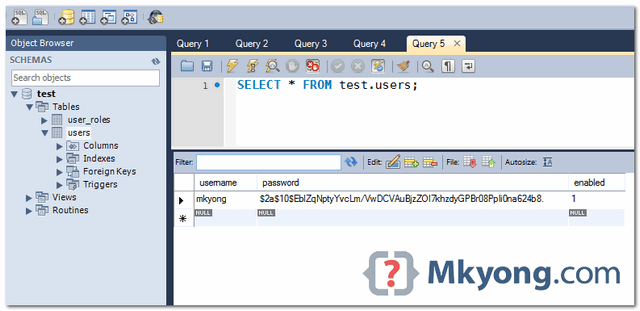
VALUES ('mkyong','$2a$10$EblZqNptyYvcLm/VwDCVAuBjzZOI7khzdyGPBr08PpIi0na624b8.', true);

INSERT INTO user_roles (username, role)
VALUES ('mkyong', 'ROLE_USER');
INSERT INTO user_roles (username, role)
VALUES ('mkyong', 'ROLE_ADMIN');
4. Enable Password Encoder
A few ways to enable the password encoder in XML configuration.
4.1 Using the default BCryptPasswordEncoder.
  <authentication-manager>
	<authentication-provider>
	    <password-encoder hash="bcrypt" />
	</authentication-provider>
  </authentication-manager>
4.2 Pass a “strength” parameter to the BCryptPasswordEncoder.
  <authentication-manager>
	<authentication-provider>
	    <password-encoder ref="encoder" />
	</authentication-provider>
  </authentication-manager>

  <beans:bean id="encoder"
	class="org.springframework.security.crypto.bcrypt.BCryptPasswordEncoder">
	<beans:constructor-arg name="strength" value="11" />
  </beans:bean>
4.3 Pass an encoder to DaoAuthenticationProvider.
  <bean id="authProvider"
	class="org.springframework.security.authentication.dao.DaoAuthenticationProvider">
	<property name="userDetailsService" ref="customUserService" />
	<property name="passwordEncoder" ref="encoder" />
  </bean>

  <bean id="encoder"
	class="org.springframework.security.crypto.bcrypt.BCryptPasswordEncoder"/>
4.4 Annotation example.
@Configuration
@EnableWebSecurity
public class SecurityConfig extends WebSecurityConfigurerAdapter {

	@Autowired
	DataSource dataSource;

	@Autowired
	public void configAuthentication(AuthenticationManagerBuilder auth)
		throws Exception {

		auth.jdbcAuthentication().dataSource(dataSource)
			.passwordEncoder(passwordEncoder())
			.usersByUsernameQuery("sql...")
			.authoritiesByUsernameQuery("sql...");
	}

	@Bean
	public PasswordEncoder passwordEncoder(){
		PasswordEncoder encoder = new BCryptPasswordEncoder();
		return encoder;
	}
5. Project Demo
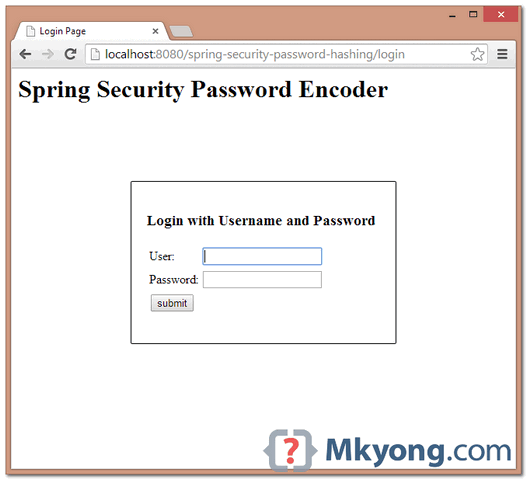
Access a password protected page : localhost:8080/spring-security-password-hashing/admin, a login page is displayed. Enter a password “123456”, Spring Security will hash the password and compare it with the hashed password from database.
User and password in Database.

It works like a charm but I have one question. While encrypting the password, I used rounds as 10 and 4 separately but while matching the password no rounds are required. But both the generated passwords match with 123456. Then why rounds are required. I used this tool for password matching – https://www.devglan.com/online-tools/bcrypt-hash-generator
how can I run this project?
the files above are separated or we should use them?
mkyong You have been saving my inexpert ass since years ago…but this is the first time i thank you, your java tutorials always help to find the right answer.
For anyone wondering where the salt value is or how this works, the top answer here explains it well:
https://stackoverflow.com/questions/6832445/how-can-bcrypt-have-built-in-salts
Hi Thanks. How does the decode works here?
If I have to disallow a user from setting a password, which they had used in the last 5 instances, would I be able to do that?
Yes, you will just need to save the last five passwords, then when the user sets a new one compare it against all of the old ones using BCryptPasswordEncoder.matches() passing in the newly hashed password and each saved hashed password.
What is the purpose of these method? an what “sql. . .” means?
.usersByUsernameQuery(“sql…”)
.authoritiesByUsernameQuery(“sql…”);
If I wanted to store the password between two columns (as in a hash and salt column), how would you recommend doing that?
Hi, y try to look for decode md5 and i cant found it, i have a bean whit a password in md5 but i have to decode and i can Y_Y, can any help me?
MD5 cannot be decoded. It is a one-way encoding (hash code)
Is it possible to call a user defined hash function, that is defined in the oracle database?
I generated 10 different encrypted password for 123456 and each of them worked for me. How is it possible?
What if a user wants to retrieve his original password. i mean if he forgets his password, he will request for his original(non-encrypted) password, but there is no way we can decrypt it. so does that mean, we sud not use bcrypt in that situation and go or for some other algorithm, if so then which algorithm is best suitable in this situation.
I think the best choice is to allow user to set a new password through a mailed link. I think storing decryptable passwords this way is not secure nor ethic.
Hello mkyong,
nice tutorial so far! I have a simple question: When I want to exchange the bcrypt encoder against a sha256+salt encoder, what do I have to do?
I replaced the bcrypt bean implementation against this implementation:
@Bean
public ShaPasswordEncoder passwordEncoder(){
ShaPasswordEncoder encoder = new ShaPasswordEncoder(256);
return encoder;
}
Now, how can I add salt to that?
Greets
Dimash
i love you mkyong
Well, but the password is POSTed in non-encripted form, isn’t it? (Just as it is by default.) So what are the advantages of your approach?
To post the password in encrypted form, make your web server to use HTTPS.
The advantages
1. Your password will not be compromise if the database is hacked. because there is no way (very hard) to revert back to the original password.
2. No one know the user’s password, even the database administrator.
When importing into eclipse have following error, doesnot compile in maven, any suggestions to fix error,ERROR is:”An internal error occurred during: “Importing Maven projects”. Unsupported IClasspathEntry kind=4″?
I usually delete
1) .project
2) .classpath
3) .settings
and then I will import the in eclipse as maven project. This usually solve this problem you facing now.
if each time a different hash value is generated for the same password. then how can one password can be compared to one of its generated hash value?
Each time, it will hash to same value for same password. Study hash algorithm from http://en.wikipedia.org/wiki/Hash_function
With BCrypt encoder, you don’t need to worry about the random generated SALT value, the generated hash value you see above will NOT be use to compare directly with the database hash value, BCrypt algorithm still need to do extra “things” to make sure it match.
I’m not really sure how exactly BCrypt algorithm works, if you are interest, do study below Spring Security classes , get the source code and read the complicated algorithm 🙂
1. BCryptPasswordEncoder.java
2. BCrypt.java
Here’s the wiki link
1. http://en.wikipedia.org/wiki/Bcrypt
I’m not really sure how this algorithm is implemented this is logical:
salt is generated randomly, and at the end it’s concatenated to main
hash. It’s simple and it works.
BCryptPasswordEncoder encoder = new BCryptPasswordEncoder();
encoder.matches(password, user.getPassword());
password – from form(JSP)
user.getPassword() – from database
The SHA algorithm should not be considered secure. Xiaoyun Wang, Yiqun Lisa Yin, and Hongbo Yu did the cryptanalysis and Bruce Schneier explained it in his “Schneier on Security”-Blog (http://bit.ly/14L0ImQ).
So please: If security is really a concern and you are not absolutely positively sure that SHA-1 fulfills you security needs, use SHA-256 instead.
Bottom line: if you do not need to create thousands of hashes a second, you should always use SHA-256, despite the fact that it is slower than SHA-1.
Thanks, article is updated to use Bcrypt.
Hi mkyong, I’m a big fan of you and your tutorials. Believe it or not, I landed with this page searching for http://bit.ly/13U3d7D 🙂
Ok, this application works like a charm, but my question is :
Is there any way to add a salt to our password this way, the hard-coding-credentials-in-xml way? I’m just going to hard code few username and passwords in the xml. I don’t want to get into setting up a DB datasource for this purpose.
Article is updated, yes you can do that.
hi
   <authentication-manager>
      <authentication-provider>
	<password-encoder hash="sha" />
	   <user-service>
	      <user name="mkyong" password="7c4a8d09ca3762af61e59520943dc26494f8941b"
		    authorities="ROLE_USER" />
	   </user-service>
	</authentication-provider>
   </authentication-manager>
in spring how to use custom password decoding .in my applicationcontext-security.xml file i used
<authentication-manager alias="authenticationManager">
        <authentication-provider user-service-ref="customUserDetailsService">
        </authentication-provider>
   </authentication-manager>
and customUserDetailsService is a bean id with class that implements UserDetailsService there in loadUserByUsername method i use coustom password endoder.but while running the project in neatbeans i got the error
Exception while loading the app : java.lang.IllegalStateException: ContainerBase.addChild: start: org.apache.catalina.LifecycleException: org.springframework.beans.factory.BeanCreationException: Error creating bean with name ‘org.springframework.security.authentication.ProviderManager#0’: Cannot create inner bean ‘(inner bean)’ of type [org.springframework.security.config.authentication.AuthenticationManagerFactoryBean] while setting bean property ‘parent’; nested exception is org.springframework.beans.factory.BeanCreationException: Error creating bean with name ‘(inner bean)’: FactoryBean threw exception on object creation; nested exception is org.springframework.beans.factory.BeanCreationException: Error creating bean with name ‘org.springframework.security.authenticationManager’: Cannot resolve reference to bean ‘org.springframework.security.authentication.dao.DaoAuthenticationProvider#0’ while setting bean property ‘providers’ with key [0]; nested exception is org.springframework.beans.factory.BeanCreationException: Error creating bean with name ‘org.springframework.security.authentication.dao.DaoAuthenticationProvider#0’: Initialization of bean failed; nested exception is org.springframework.beans.ConversionNotSupportedException:
please help me what i need to extend
you should not have 2 authentication managers.
Hello,
I have not tried it yet but,does the decryption happen internally while checking for authentication?
Thanks
AFAIK, there is no decryption. u save the password in the DB encrypted, and when the user enters his pswd, Spring encrypts it and compares to what u have in the DB.
HTH
Ohad