By default, if no login form is specified, Spring Security will create a default login form automatically. Please refer to this – Spring Security hello world example.
In this tutorial, we will show you how to create a custom login form for Spring Security (XML example).
Technologies used :
- Spring 3.2.8.RELEASE
- Spring Security 3.2.3.RELEASE
- Eclipse 4.2
- JDK 1.6
- Maven 3
In this example, previous Spring Security hello world example will be reused, enhance it to support a custom login form.
1. Project Demo
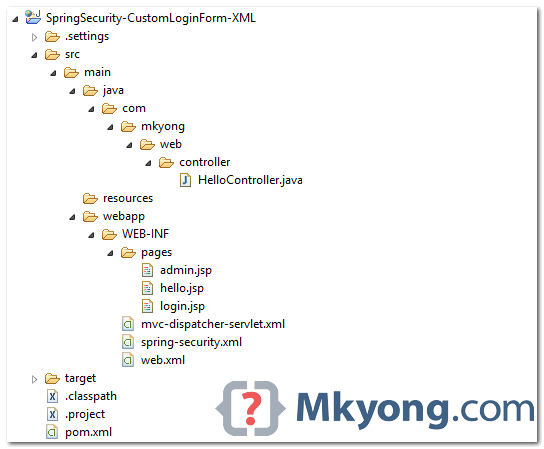
2. Directory Structure
Review the final directory structure of this tutorial.
3. Spring Security Configuration
Defined your custom login form in Spring XML file. See explanation below :
- login-page=”/login” – The page to display the custom login form
- authentication-failure-url=”/login?error” – If authentication failed, forward to page
/login?error - logout-success-url=”/login?logout” – If logout successful, forward to view
/logout - username-parameter=”username” – The name of the request which contains the “username”. In HTML, this is the name of the input text.
- <csrf/> – Enable the Cross Site Request Forgery (CSRF) protection, refer to this link. In XML, by default, CSRF protection is disabled.
Normally, we don’t involve in the authentication like login or logout processing, let Spring handle it, we just handle the successful or failed page to display.
<beans:beans xmlns="http://www.springframework.org/schema/security"
	xmlns:beans="http://www.springframework.org/schema/beans"
	xmlns:xsi="http://www.w3.org/2001/XMLSchema-instance"
	xsi:schemaLocation="http://www.springframework.org/schema/beans
	http://www.springframework.org/schema/beans/spring-beans-3.0.xsd
	http://www.springframework.org/schema/security
	http://www.springframework.org/schema/security/spring-security-3.2.xsd">

	<http auto-config="true">
		<intercept-url pattern="/admin**" access="ROLE_USER" />
		<form-login
		    login-page="/login"
		    default-target-url="/welcome"
			authentication-failure-url="/login?error"
			username-parameter="username"
			password-parameter="password" />
		<logout logout-success-url="/login?logout" />
		<!-- enable csrf protection -->
		<csrf/>
	</http>

	<authentication-manager>
		<authentication-provider>
		  <user-service>
			<user name="mkyong" password="123456" authorities="ROLE_USER" />
		  </user-service>
		</authentication-provider>
	</authentication-manager>

</beans:beans>
In above congratulation, the /admin and sub-folders of it are all password protected.
If CSRF is enabled, you have to include a
_csrf.token in the page you want to login or logout. Refer to below login.jsp and admin.jsp (logout form). Otherwise, both login and logout function will be failed.
A pretty bad idea, you should always hash the password with SHA algorithm, this tutorial show you how – Spring Security password hashing example.
4. Custom Login Form
A custom login form to match above (step 3) Spring Security congratulation. It should be self-explanatory.
<%@ taglib prefix="c" uri="http://java.sun.com/jsp/jstl/core"%>
<html>
<head>
<title>Login Page</title>
<style>
.error {
	padding: 15px;
	margin-bottom: 20px;
	border: 1px solid transparent;
	border-radius: 4px;
	color: #a94442;
	background-color: #f2dede;
	border-color: #ebccd1;
}

.msg {
	padding: 15px;
	margin-bottom: 20px;
	border: 1px solid transparent;
	border-radius: 4px;
	color: #31708f;
	background-color: #d9edf7;
	border-color: #bce8f1;
}

#login-box {
	width: 300px;
	padding: 20px;
	margin: 100px auto;
	background: #fff;
	-webkit-border-radius: 2px;
	-moz-border-radius: 2px;
	border: 1px solid #000;
}
</style>
</head>
<body onload='document.loginForm.username.focus();'>

	<h1>Spring Security Custom Login Form (XML)</h1>

	<div id="login-box">

		<h2>Login with Username and Password</h2>

		<c:if test="${not empty error}">
			<div class="error">${error}</div>
		</c:if>
		<c:if test="${not empty msg}">
			<div class="msg">${msg}</div>
		</c:if>

		<form name='loginForm'
		  action="<c:url value='j_spring_security_check' />" method='POST'>

		  <table>
			<tr>
				<td>User:</td>
				<td><input type='text' name='username' value=''></td>
			</tr>
			<tr>
				<td>Password:</td>
				<td><input type='password' name='password' /></td>
			</tr>
			<tr>
				<td colspan='2'><input name="submit" type="submit"
					value="submit" /></td>
			</tr>
		  </table>

		  <input type="hidden" name="${_csrf.parameterName}"
			value="${_csrf.token}" />

		</form>
	</div>

</body>
</html>
And the other two JSP pages, btw admin.jsp is password protected by Spring Security.
<%@page session="false"%>
<html>
<body>
	<h1>Title : ${title}</h1>
	<h1>Message : ${message}</h1>
</body>
</html>
<%@taglib prefix="c" uri="http://java.sun.com/jsp/jstl/core"%>
<%@page session="true"%>
<html>
<body>
	<h1>Title : ${title}</h1>
	<h1>Message : ${message}</h1>

	<c:url value="/j_spring_security_logout" var="logoutUrl" />

	<!-- csrt for log out-->
	<form action="${logoutUrl}" method="post" id="logoutForm">
	  <input type="hidden"
		name="${_csrf.parameterName}"
		value="${_csrf.token}" />
	</form>

	<script>
		function formSubmit() {
			document.getElementById("logoutForm").submit();
		}
	</script>

	<c:if test="${pageContext.request.userPrincipal.name != null}">
		<h2>
			Welcome : ${pageContext.request.userPrincipal.name} | <a
				href="javascript:formSubmit()"> Logout</a>
		</h2>
	</c:if>

</body>
</html>
5. Spring MVC Controller
A simple controller.
package com.mkyong.web.controller;

import org.springframework.stereotype.Controller;
import org.springframework.web.bind.annotation.RequestMapping;
import org.springframework.web.bind.annotation.RequestMethod;
import org.springframework.web.bind.annotation.RequestParam;
import org.springframework.web.servlet.ModelAndView;

@Controller
public class HelloController {

	@RequestMapping(value = { "/", "/welcome**" }, method = RequestMethod.GET)
	public ModelAndView welcomePage() {

		ModelAndView model = new ModelAndView();
		model.addObject("title", "Spring Security Custom Login Form");
		model.addObject("message", "This is welcome page!");
		model.setViewName("hello");
		return model;

	}

	@RequestMapping(value = "/admin**", method = RequestMethod.GET)
	public ModelAndView adminPage() {

		ModelAndView model = new ModelAndView();
		model.addObject("title", "Spring Security Custom Login Form");
		model.addObject("message", "This is protected page!");
		model.setViewName("admin");

		return model;

	}

	//Spring Security see this :
	@RequestMapping(value = "/login", method = RequestMethod.GET)
	public ModelAndView login(
		@RequestParam(value = "error", required = false) String error,
		@RequestParam(value = "logout", required = false) String logout) {

		ModelAndView model = new ModelAndView();
		if (error != null) {
			model.addObject("error", "Invalid username and password!");
		}

		if (logout != null) {
			model.addObject("msg", "You've been logged out successfully.");
		}
		model.setViewName("login");

		return model;

	}

}
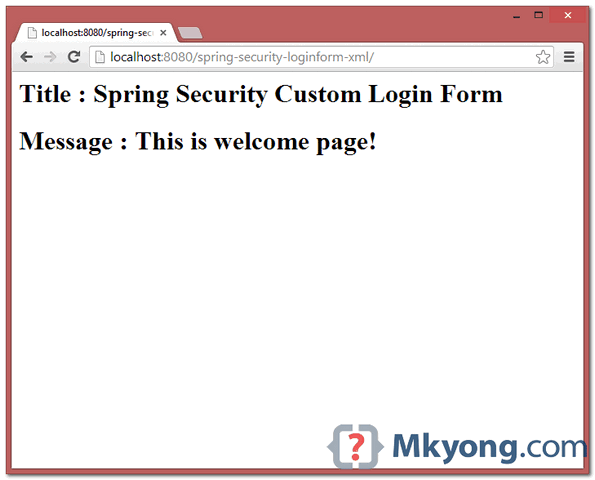
6. Demo
6.1. Welcome Page – http://localhost:8080/spring-security-loginform-xml/
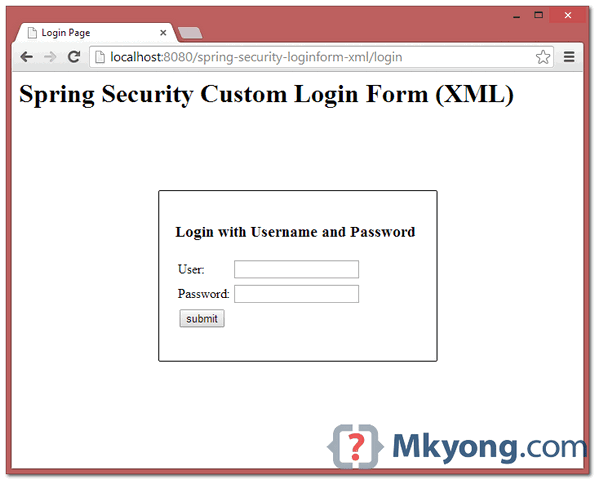
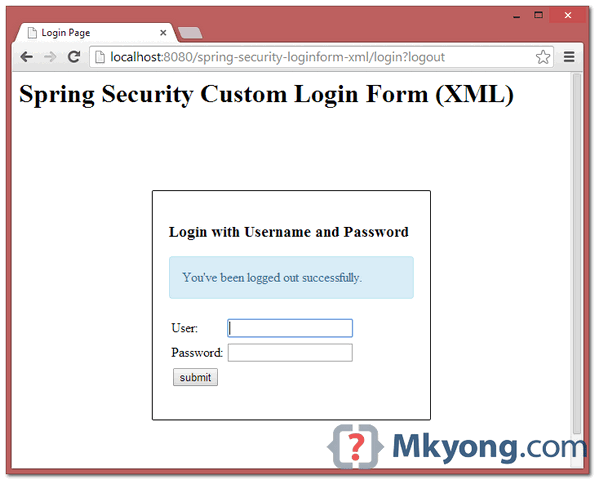
6.2 Try to access /admin page, Spring Security will intercept the request and redirect to /login, and your custom login form is displayed.
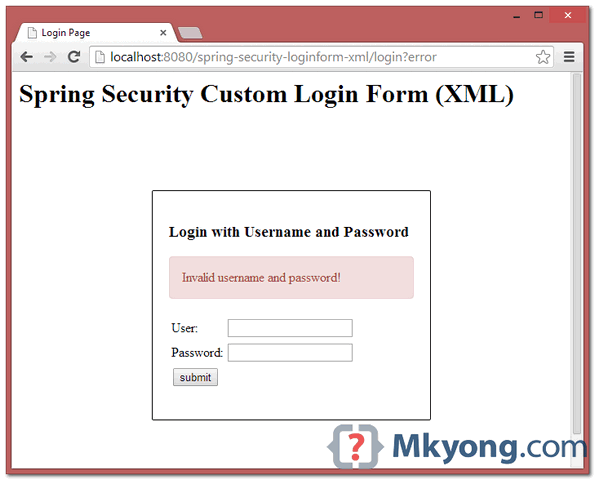
6.3. If username and password is incorrect, error messages will be displayed, and Spring will redirect to this URL /login?error.
6.4. If username and password are correct, Spring will redirect to the original requested URL and display the page.
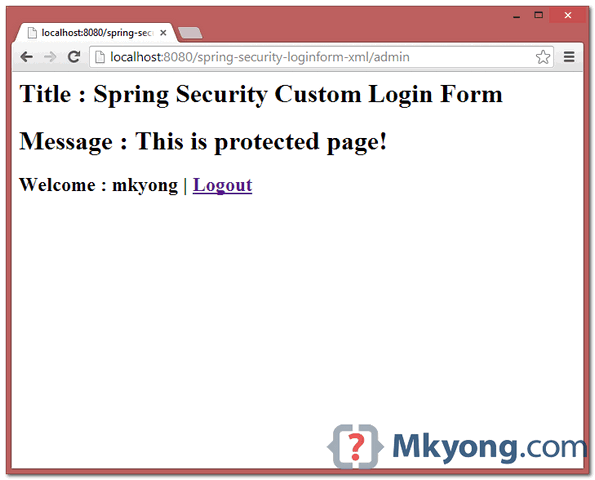
6.5. Try to log out, it will redirect to /login?logout page.

can you share password less authentication using Spring MVC and Spring Security
Where is the documentation for the XML descriptors?
Hi, How r u getting the user context in the above example ?
No program run here. Are you fooling people?
this is a very bullshit site…not even a single program run here…
If you dont know spring dont criticism him
Hi.. I have done a social app what type of security I can give for that
worth putting the mvc-dispatch-servlet.xml and web.xml in there or even a link from the previous section. just reference the hello world example is not enough, most beginner would still struggle
hi i have tried your example i am getting no handler for j_spring_security_check…
hi
vishnupriya
how to create login page in spring mvc where 10 username or password is hardcoded using map interface
please solve this problem
no need j_spring_security_check interceptor internally provided by spring security. make sure about your username and password input field has the same parameter as defined in SecurityConfig class .
Mkyong thank you for the tutorial, I gave you +20 rep. in stackoverflow, now your reputation moves up to 1011 😉
what is a *?. for example admin**, what does it mean?
Please note that like this it doesn’t work, because you need also processing url in the spring-security.xml, like the following:
with this you will get correct feedback information about login attempt
Hi Mknyong,
I wanna call you “sensei”
Thanks
Hello Sir, I use spring security custom login form.My application is giving 404 error on login process when i run it on server side, but same application is working properly or login successful on localhost. Please suggest me something that will help me.
Thanks
it appears that is not supported in spring security 3.1. how do I enable csrf in that version?
In the login method of the controller, the user is redirected again to the login page even if there is no error —> loop !
How can it go back to the admin page ?
Solved . I haven’t used the wright username-parameter
Hi.. The project s awesome but whenever i’m adding filter tags to my web.xml it is giving me resource unavailable error after that. can anyone tell me why it is happening??
I Am getting now this error:
java.lang.ClassNotFoundException: org.springframework.web.context.ContextLoaderListener
Hi, Can I use Spring MVC Form Tags (eg, ) with Spring Security functionality together? I noticed everyone uses standard html form tags. If it’s possible, what would be the parts to care about? Thanks a lot in advance!!
If I want to implement this into an existing project. Let’s say without the welcome page redirect, and the page goes straight to the login, and then to the index. jsp page for my project how would I go about that?
I’ve tried setting it up according to the instructions here, and on another site, but I keep getting a 404 error anytime I make any sort of change to the web.xml
Hi
This post is awesome. I uploaded ur project by choosing Import-> Existing Maven Project . What shld I choose if i do it by my own. ie whether to choose File-> New ( A Maven Project or a Spring Project or Simple Spring Maven or Simple Spring Web Maven
Hi ,
My project name is Formhandling .i tried to use spring security .i am facing below error:
WARNING: No mapping found for HTTP request with URI [/FormHandling/kik] in DispatcherServlet with name ‘FormHandling’
Jan 19, 2015 11:17:07 PM org.springframework.web.servlet.DispatcherServlet noHandlerFound
WARNING: No mapping found for HTTP request with URI [/FormHandling/] in DispatcherServlet with name ‘FormHandling’
plzz hlp
mkyong that is a good post , however could you please elaborate on something i.e.your hello controller has only get methods, where is the HTTP post beeing done? One thing i do not understand is why this constelation is working at all, if the HTTP POST where the username and the password are supposed to be recieveid is not beeing processed from this code, or is there any magic behind this? I would really appreciate any feedback regarding this question. The reason i am asking this question is because i would like to use your example but work on my custome login controller, for example what would your login controller look like if you had not just user name and password but additional parameters such as certificate , or what if you were about to authenticate SRP (Secure Remote Password protocol) application
i am getting two errors to run the program.
1.java.lang.NoSuchMethodError: org.springframework.web.context.support.XmlWebApplicationContext.getEnvironment()Lorg/springframework/core/env/ConfigurableEnvironment;
2.java.lang.IllegalStateException: LifecycleProcessor not initialized – call ‘refresh’ before invoking lifecycle methods via the context: Root WebApplicationContext: startup date [Sat Sep 27 17:45:41 IST 2014]; root of context hierarchy
Hi Mkyong : am rookie to springFw i got required output as i coded as in above example of yours; But a Big ” ” ” ” Disappointing ” factor is that after i logout and i click on browser ” Back button ” then it shows previous admin page, why is this happing same problem is occurs and not solved when i write Basic JSP AND SERVLET web app, any suggestions mky. thank for this tutorial…
Hello “Mr. Mkyong” all is good. but could you please provide the .xml files so that the freshers are also can understand. if it’s possible then please provide.
in STS, when press login button…
WARN : org.springframework.web.servlet.PageNotFound – No mapping found for HTTP request with URI [/lead/] in DispatcherServlet with name ‘appServlet’
Following are the problems I faced. Hope this would be helpful for other.
1. class loader issue.
Solution: include spring jar in the lib folder of your war
2. EL expressions not evaluated
Solution: use following tag for
Sir,
Can you please show me how save and retrieve an image from sql in spring.
Nice tutorial.
It’s work for me but I don’t load a static resource.
I’ve copied header.png in srcmainwebapprisorse.
in hello.jsp I put
<img src='’ alt=”” id=”logo”/>
but i received this error:
Failed to load resource: the server responded with a status of 404 (Not Found)
How to load static resource? I read from web, ma I don’t understand the solution.
You can help me?
*sorry for a little my english
Roberto
Nice tutorial
But I am getting problem,
I am getting login page twice and then it gets logged in
Why?
How can we do to Junit test for this
1-login-page=”/login” – The login form will be “/login”
2-default-target-url=”/welcome” – If authentication success, forward to “/welcome”
3-authentication-failure-url=”/loginfailed” – If authentication failed, forward to “/loginfailed”
4-logout-success-url=”/logout” – If logout , forward to “/logout”
Good Post but I am weak in Java
Here find login form in PHP
http://www.discussdesk.com/download-login-form-in-PHP-and-mysql.htm
for what?
One strange behavior that I noticed is, once you are at url http://localhost:8080/SpringMVC/login
and provide the incorrect url then url should be changed to http://localhost:8080/SpringMVC/loginfailed but it is not! It is at /login only. What can be the reason?
Are you sure you have the @RequestMapping annotation in the loginError method?
hi i did your project.When i access welcome page its re directing to login page bur am getting following 404 error
WARNING: No mapping found for HTTP request with URI [/Spring-Security-Form-Login-Example/login] in DispatcherServlet with name ‘mvc-dispatcher’.Please tell what is the problem.
Get latest source code, problem solved.
Sir, Could you please explain.. what was the cause of the above mentioned issue ?
I’m sorry but even with the lastest source code it won’t work for me…
Could please explain where is the problem from ?
thx
hi
mkyong
how to create login page in spring mvc where 10 username or password is hardcoded using map interface
please solve this problem
Can u plz exaplain how to spring security without using mvc?
hey man can you make example login logout or register with DaoFile,class object ,controller in one package.
Nice Article. Easy to understand. Thanks 🙂
I agree that its nice article.
I’m getting the error
Can not find the tag library descriptor for “http://java.sun.com/jsp/jstl/core”
please help me………
you have to include jstl.jar in your build path.
copy jstl.jar in your lib folder
Hey there! I know this is somewhat off topic
but I was wondering which blog platform are you using for
this website? I’m getting tired of WordPress because I’ve had
issues with hackers and I’m looking at alternatives for another platform. I would be fantastic if you could point me in the direction of a good platform.
Hi,
I’m getting the following error while running such type of example.
org.xml.sax.SAXParseException: schema_reference.4: Failed to read schema document ‘http://www.springframework.org/schema/security/spring-security-3.0.3.xsd’, because 1) could not find the document; 2) the document could not be read; 3) the root element of the document is not .
at org.apache.xerces.util.ErrorHandlerWrapper.createSAXParseException(Unknown Source)
at org.apache.xerces.util.ErrorHandlerWrapper.warning(Unknown Source)
at org.apache.xerces.impl.XMLErrorReporter.reportError(Unknown Source)
at org.apache.xerces.impl.XMLErrorReporter.reportError(Unknown Source)
at org.apache.xerces.impl.xs.traversers.XSDHandler.reportSchemaWarning(Unknown Source)
at org.apache.xerces.impl.xs.traversers.XSDHandler.getSchemaDocument(Unknown Source)
at org.apache.xerces.impl.xs.traversers.XSDHandler.parseSchema(Unknown Source)
at org.apache.xerces.impl.xs.XMLSchemaLoader.loadSchema(Unknown Source)
at org.apache.xerces.impl.xs.XMLSchemaValidator.findSchemaGrammar(Unknown Source)
at org.apache.xerces.impl.xs.XMLSchemaValidator.handleStartElement(Unknown Source)
at org.apache.xerces.impl.xs.XMLSchemaValidator.startElement(Unknown Source)
at org.apache.xerces.impl.XMLNSDocumentScannerImpl.scanStartElement(Unknown Source)
at org.apache.xerces.impl.XMLDocumentFragmentScannerImpl$FragmentContentDispatcher.dispatch(Unknown Source)
at org.apache.xerces.impl.XMLDocumentFragmentScannerImpl.scanDocument(Unknown Source)
at org.apache.xerces.parsers.XML11Configuration.parse(Unknown Source)
at org.apache.xerces.parsers.XML11Configuration.parse(Unknown Source)
at org.apache.xerces.parsers.XMLParser.parse(Unknown Source)
at org.apache.xerces.parsers.DOMParser.parse(Unknown Source)
at org.apache.xerces.jaxp.DocumentBuilderImpl.parse(Unknown Source)
at org.springframework.beans.factory.xml.DefaultDocumentLoader.loadDocument(DefaultDocumentLoader.java:75)
at org.springframework.beans.factory.xml.XmlBeanDefinitionReader.doLoadBeanDefinitions(XmlBeanDefinitionReader.java:388)
at org.springframework.beans.factory.xml.XmlBeanDefinitionReader.loadBeanDefinitions(XmlBeanDefinitionReader.java:334)
at org.springframework.beans.factory.xml.XmlBeanDefinitionReader.loadBeanDefinitions(XmlBeanDefinitionReader.java:302)
at org.springframework.beans.factory.support.AbstractBeanDefinitionReader.loadBeanDefinitions(AbstractBeanDefinitionReader.java:143)
at org.springframework.beans.factory.support.AbstractBeanDefinitionReader.loadBeanDefinitions(AbstractBeanDefinitionReader.java:178)
at org.springframework.beans.factory.support.AbstractBeanDefinitionReader.loadBeanDefinitions(AbstractBeanDefinitionReader.java:149)
at org.springframework.web.context.support.XmlWebApplicationContext.loadBeanDefinitions(XmlWebApplicationContext.java:124)
at org.springframework.web.context.support.XmlWebApplicationContext.loadBeanDefinitions(XmlWebApplicationContext.java:93)
at org.springframework.context.support.AbstractRefreshableApplicationContext.refreshBeanFactory(AbstractRefreshableApplicationContext.java:130)
at org.springframework.context.support.AbstractApplicationContext.obtainFreshBeanFactory(AbstractApplicationContext.java:458)
at org.springframework.context.support.AbstractApplicationContext.refresh(AbstractApplicationContext.java:388)
at org.springframework.web.context.ContextLoader.createWebApplicationContext(ContextLoader.java:261)
at org.springframework.web.context.ContextLoader.initWebApplicationContext(ContextLoader.java:192)
at org.springframework.web.context.ContextLoaderListener.contextInitialized(ContextLoaderListener.java:47)
at org.apache.catalina.core.StandardContext.listenerStart(StandardContext.java:3856)
at org.apache.catalina.core.StandardContext.start(StandardContext.java:4361)
at org.apache.catalina.core.ContainerBase.addChildInternal(ContainerBase.java:790)
at org.apache.catalina.core.ContainerBase.addChild(ContainerBase.java:770)
at org.apache.catalina.core.StandardHost.addChild(StandardHost.java:553)
at sun.reflect.NativeMethodAccessorImpl.invoke0(Native Method)
at sun.reflect.NativeMethodAccessorImpl.invoke(Unknown Source)
at sun.reflect.DelegatingMethodAccessorImpl.invoke(Unknown Source)
at java.lang.reflect.Method.invoke(Unknown Source)
at org.apache.tomcat.util.modeler.BaseModelMBean.invoke(BaseModelMBean.java:296)
at org.jboss.mx.server.RawDynamicInvoker.invoke(RawDynamicInvoker.java:164)
at org.jboss.mx.server.MBeanServerImpl.invoke(MBeanServerImpl.java:659)
at org.apache.catalina.core.StandardContext.init(StandardContext.java:5312)
at sun.reflect.NativeMethodAccessorImpl.invoke0(Native Method)
at sun.reflect.NativeMethodAccessorImpl.invoke(Unknown Source)
at sun.reflect.DelegatingMethodAccessorImpl.invoke(Unknown Source)
at java.lang.reflect.Method.invoke(Unknown Source)
at org.apache.tomcat.util.modeler.BaseModelMBean.invoke(BaseModelMBean.java:296)
at org.jboss.mx.server.RawDynamicInvoker.invoke(RawDynamicInvoker.java:164)
at org.jboss.mx.server.MBeanServerImpl.invoke(MBeanServerImpl.java:659)
at org.jboss.web.tomcat.service.TomcatDeployer.performDeployInternal(TomcatDeployer.java:301)
at org.jboss.web.tomcat.service.TomcatDeployer.performDeploy(TomcatDeployer.java:104)
at org.jboss.web.AbstractWebDeployer.start(AbstractWebDeployer.java:375)
at org.jboss.web.WebModule.startModule(WebModule.java:83)
at org.jboss.web.WebModule.startService(WebModule.java:61)
at org.jboss.system.ServiceMBeanSupport.jbossInternalStart(ServiceMBeanSupport.java:289)
at org.jboss.system.ServiceMBeanSupport.jbossInternalLifecycle(ServiceMBeanSupport.java:245)
at sun.reflect.GeneratedMethodAccessor3.invoke(Unknown Source)
at sun.reflect.DelegatingMethodAccessorImpl.invoke(Unknown Source)
at java.lang.reflect.Method.invoke(Unknown Source)
at org.jboss.mx.interceptor.ReflectedDispatcher.invoke(ReflectedDispatcher.java:155)
at org.jboss.mx.server.Invocation.dispatch(Invocation.java:94)
at org.jboss.mx.server.Invocation.invoke(Invocation.java:86)
at org.jboss.mx.server.AbstractMBeanInvoker.invoke(AbstractMBeanInvoker.java:264)
at org.jboss.mx.server.MBeanServerImpl.invoke(MBeanServerImpl.java:659)
at org.jboss.system.ServiceController$ServiceProxy.invoke(ServiceController.java:978)
at $Proxy0.start(Unknown Source)
at org.jboss.system.ServiceController.start(ServiceController.java:417)
at sun.reflect.GeneratedMethodAccessor9.invoke(Unknown Source)
at sun.reflect.DelegatingMethodAccessorImpl.invoke(Unknown Source)
at java.lang.reflect.Method.invoke(Unknown Source)
at org.jboss.mx.interceptor.ReflectedDispatcher.invoke(ReflectedDispatcher.java:155)
at org.jboss.mx.server.Invocation.dispatch(Invocation.java:94)
at org.jboss.mx.server.Invocation.invoke(Invocation.java:86)
at org.jboss.mx.server.AbstractMBeanInvoker.invoke(AbstractMBeanInvoker.java:264)
at org.jboss.mx.server.MBeanServerImpl.invoke(MBeanServerImpl.java:659)
at org.jboss.mx.util.MBeanProxyExt.invoke(MBeanProxyExt.java:210)
at $Proxy44.start(Unknown Source)
at org.jboss.web.AbstractWebContainer.start(AbstractWebContainer.java:466)
at sun.reflect.NativeMethodAccessorImpl.invoke0(Native Method)
at sun.reflect.NativeMethodAccessorImpl.invoke(Unknown Source)
at sun.reflect.DelegatingMethodAccessorImpl.invoke(Unknown Source)
at java.lang.reflect.Method.invoke(Unknown Source)
at org.jboss.mx.interceptor.ReflectedDispatcher.invoke(ReflectedDispatcher.java:155)
at org.jboss.mx.server.Invocation.dispatch(Invocation.java:94)
at org.jboss.mx.interceptor.AbstractInterceptor.invoke(AbstractInterceptor.java:133)
at org.jboss.mx.server.Invocation.invoke(Invocation.java:88)
at org.jboss.mx.interceptor.ModelMBeanOperationInterceptor.invoke(ModelMBeanOperationInterceptor.java:142)
at org.jboss.mx.interceptor.DynamicInterceptor.invoke(DynamicInterceptor.java:97)
at org.jboss.system.InterceptorServiceMBeanSupport.invokeNext(InterceptorServiceMBeanSupport.java:238)
at org.jboss.wsf.container.jboss42.DeployerInterceptor.start(DeployerInterceptor.java:87)
at org.jboss.deployment.SubDeployerInterceptorSupport$XMBeanInterceptor.start(SubDeployerInterceptorSupport.java:188)
at org.jboss.deployment.SubDeployerInterceptor.invoke(SubDeployerInterceptor.java:95)
at org.jboss.mx.server.Invocation.invoke(Invocation.java:88)
at org.jboss.mx.server.AbstractMBeanInvoker.invoke(AbstractMBeanInvoker.java:264)
at org.jboss.mx.server.MBeanServerImpl.invoke(MBeanServerImpl.java:659)
at org.jboss.mx.util.MBeanProxyExt.invoke(MBeanProxyExt.java:210)
at $Proxy45.start(Unknown Source)
at org.jboss.deployment.MainDeployer.start(MainDeployer.java:1025)
at org.jboss.deployment.MainDeployer.deploy(MainDeployer.java:819)
at org.jboss.deployment.MainDeployer.deploy(MainDeployer.java:782)
at sun.reflect.GeneratedMethodAccessor21.invoke(Unknown Source)
at sun.reflect.DelegatingMethodAccessorImpl.invoke(Unknown Source)
at java.lang.reflect.Method.invoke(Unknown Source)
at org.jboss.mx.interceptor.ReflectedDispatcher.invoke(ReflectedDispatcher.java:155)
at org.jboss.mx.server.Invocation.dispatch(Invocation.java:94)
at org.jboss.mx.interceptor.AbstractInterceptor.invoke(AbstractInterceptor.java:133)
at org.jboss.mx.server.Invocation.invoke(Invocation.java:88)
at org.jboss.mx.interceptor.ModelMBeanOperationInterceptor.invoke(ModelMBeanOperationInterceptor.java:142)
at org.jboss.mx.server.Invocation.invoke(Invocation.java:88)
at org.jboss.mx.server.AbstractMBeanInvoker.invoke(AbstractMBeanInvoker.java:264)
at org.jboss.mx.server.MBeanServerImpl.invoke(MBeanServerImpl.java:659)
at org.jboss.mx.util.MBeanProxyExt.invoke(MBeanProxyExt.java:210)
at $Proxy9.deploy(Unknown Source)
at org.jboss.deployment.scanner.URLDeploymentScanner.deploy(URLDeploymentScanner.java:421)
at org.jboss.deployment.scanner.URLDeploymentScanner.scan(URLDeploymentScanner.java:634)
at org.jboss.deployment.scanner.AbstractDeploymentScanner$ScannerThread.doScan(AbstractDeploymentScanner.java:263)
at org.jboss.deployment.scanner.AbstractDeploymentScanner.startService(AbstractDeploymentScanner.java:336)
at org.jboss.system.ServiceMBeanSupport.jbossInternalStart(ServiceMBeanSupport.java:289)
at org.jboss.system.ServiceMBeanSupport.jbossInternalLifecycle(ServiceMBeanSupport.java:245)
at sun.reflect.GeneratedMethodAccessor3.invoke(Unknown Source)
at sun.reflect.DelegatingMethodAccessorImpl.invoke(Unknown Source)
at java.lang.reflect.Method.invoke(Unknown Source)
at org.jboss.mx.interceptor.ReflectedDispatcher.invoke(ReflectedDispatcher.java:155)
at org.jboss.mx.server.Invocation.dispatch(Invocation.java:94)
at org.jboss.mx.server.Invocation.invoke(Invocation.java:86)
at org.jboss.mx.server.AbstractMBeanInvoker.invoke(AbstractMBeanInvoker.java:264)
at org.jboss.mx.server.MBeanServerImpl.invoke(MBeanServerImpl.java:659)
at org.jboss.system.ServiceController$ServiceProxy.invoke(ServiceController.java:978)
at $Proxy0.start(Unknown Source)
at org.jboss.system.ServiceController.start(ServiceController.java:417)
at sun.reflect.GeneratedMethodAccessor9.invoke(Unknown Source)
at sun.reflect.DelegatingMethodAccessorImpl.invoke(Unknown Source)
at java.lang.reflect.Method.invoke(Unknown Source)
at org.jboss.mx.interceptor.ReflectedDispatcher.invoke(ReflectedDispatcher.java:155)
at org.jboss.mx.server.Invocation.dispatch(Invocation.java:94)
at org.jboss.mx.server.Invocation.invoke(Invocation.java:86)
at org.jboss.mx.server.AbstractMBeanInvoker.invoke(AbstractMBeanInvoker.java:264)
at org.jboss.mx.server.MBeanServerImpl.invoke(MBeanServerImpl.java:659)
at org.jboss.mx.util.MBeanProxyExt.invoke(MBeanProxyExt.java:210)
at $Proxy4.start(Unknown Source)
at org.jboss.deployment.SARDeployer.start(SARDeployer.java:304)
at org.jboss.deployment.MainDeployer.start(MainDeployer.java:1025)
at org.jboss.deployment.MainDeployer.deploy(MainDeployer.java:819)
at org.jboss.deployment.MainDeployer.deploy(MainDeployer.java:782)
at org.jboss.deployment.MainDeployer.deploy(MainDeployer.java:766)
at sun.reflect.NativeMethodAccessorImpl.invoke0(Native Method)
at sun.reflect.NativeMethodAccessorImpl.invoke(Unknown Source)
at sun.reflect.DelegatingMethodAccessorImpl.invoke(Unknown Source)
at java.lang.reflect.Method.invoke(Unknown Source)
at org.jboss.mx.interceptor.ReflectedDispatcher.invoke(ReflectedDispatcher.java:155)
at org.jboss.mx.server.Invocation.dispatch(Invocation.java:94)
at org.jboss.mx.interceptor.AbstractInterceptor.invoke(AbstractInterceptor.java:133)
at org.jboss.mx.server.Invocation.invoke(Invocation.java:88)
at org.jboss.mx.interceptor.ModelMBeanOperationInterceptor.invoke(ModelMBeanOperationInterceptor.java:142)
at org.jboss.mx.server.Invocation.invoke(Invocation.java:88)
at org.jboss.mx.server.AbstractMBeanInvoker.invoke(AbstractMBeanInvoker.java:264)
at org.jboss.mx.server.MBeanServerImpl.invoke(MBeanServerImpl.java:659)
at org.jboss.mx.util.MBeanProxyExt.invoke(MBeanProxyExt.java:210)
at $Proxy5.deploy(Unknown Source)
at org.jboss.system.server.ServerImpl.doStart(ServerImpl.java:482)
at org.jboss.system.server.ServerImpl.start(ServerImpl.java:362)
at org.jboss.Main.boot(Main.java:200)
at org.jboss.Main$1.run(Main.java:508)
at java.lang.Thread.run(Unknown Source)
16:28:00,841 ERROR [ContextLoader] Context initialization failed
org.springframework.beans.factory.xml.XmlBeanDefinitionStoreException: Line 9 in XML document from ServletContext resource [/WEB-INF/spring-security.xml] is invalid; nested exception is org.xml.sax.SAXParseException: cvc-complex-type.2.4.c: The matching wildcard is strict, but no declaration can be found for element ‘http’.
at org.springframework.beans.factory.xml.XmlBeanDefinitionReader.doLoadBeanDefinitions(XmlBeanDefinitionReader.java:396)
at org.springframework.beans.factory.xml.XmlBeanDefinitionReader.loadBeanDefinitions(XmlBeanDefinitionReader.java:334)
at org.springframework.beans.factory.xml.XmlBeanDefinitionReader.loadBeanDefinitions(XmlBeanDefinitionReader.java:302)
at org.springframework.beans.factory.support.AbstractBeanDefinitionReader.loadBeanDefinitions(AbstractBeanDefinitionReader.java:143)
at org.springframework.beans.factory.support.AbstractBeanDefinitionReader.loadBeanDefinitions(AbstractBeanDefinitionReader.java:178)
at org.springframework.beans.factory.support.AbstractBeanDefinitionReader.loadBeanDefinitions(AbstractBeanDefinitionReader.java:149)
at org.springframework.web.context.support.XmlWebApplicationContext.loadBeanDefinitions(XmlWebApplicationContext.java:124)
at org.springframework.web.context.support.XmlWebApplicationContext.loadBeanDefinitions(XmlWebApplicationContext.java:93)
at org.springframework.context.support.AbstractRefreshableApplicationContext.refreshBeanFactory(AbstractRefreshableApplicationContext.java:130)
at org.springframework.context.support.AbstractApplicationContext.obtainFreshBeanFactory(AbstractApplicationContext.java:458)
at org.springframework.context.support.AbstractApplicationContext.refresh(AbstractApplicationContext.java:388)
at org.springframework.web.context.ContextLoader.createWebApplicationContext(ContextLoader.java:261)
at org.springframework.web.context.ContextLoader.initWebApplicationContext(ContextLoader.java:192)
at org.springframework.web.context.ContextLoaderListener.contextInitialized(ContextLoaderListener.java:47)
at org.apache.catalina.core.StandardContext.listenerStart(StandardContext.java:3856)
at org.apache.catalina.core.StandardContext.start(StandardContext.java:4361)
at org.apache.catalina.core.ContainerBase.addChildInternal(ContainerBase.java:790)
at org.apache.catalina.core.ContainerBase.addChild(ContainerBase.java:770)
at org.apache.catalina.core.StandardHost.addChild(StandardHost.java:553)
at sun.reflect.NativeMethodAccessorImpl.invoke0(Native Method)
at sun.reflect.NativeMethodAccessorImpl.invoke(Unknown Source)
at sun.reflect.DelegatingMethodAccessorImpl.invoke(Unknown Source)
at java.lang.reflect.Method.invoke(Unknown Source)
at org.apache.tomcat.util.modeler.BaseModelMBean.invoke(BaseModelMBean.java:296)
at org.jboss.mx.server.RawDynamicInvoker.invoke(RawDynamicInvoker.java:164)
at org.jboss.mx.server.MBeanServerImpl.invoke(MBeanServerImpl.java:659)
at org.apache.catalina.core.StandardContext.init(StandardContext.java:5312)
at sun.reflect.NativeMethodAccessorImpl.invoke0(Native Method)
at sun.reflect.NativeMethodAccessorImpl.invoke(Unknown Source)
at sun.reflect.DelegatingMethodAccessorImpl.invoke(Unknown Source)
at java.lang.reflect.Method.invoke(Unknown Source)
at org.apache.tomcat.util.modeler.BaseModelMBean.invoke(BaseModelMBean.java:296)
at org.jboss.mx.server.RawDynamicInvoker.invoke(RawDynamicInvoker.java:164)
at org.jboss.mx.server.MBeanServerImpl.invoke(MBeanServerImpl.java:659)
at org.jboss.web.tomcat.service.TomcatDeployer.performDeployInternal(TomcatDeployer.java:301)
at org.jboss.web.tomcat.service.TomcatDeployer.performDeploy(TomcatDeployer.java:104)
at org.jboss.web.AbstractWebDeployer.start(AbstractWebDeployer.java:375)
at org.jboss.web.WebModule.startModule(WebModule.java:83)
at org.jboss.web.WebModule.startService(WebModule.java:61)
at org.jboss.system.ServiceMBeanSupport.jbossInternalStart(ServiceMBeanSupport.java:289)
at org.jboss.system.ServiceMBeanSupport.jbossInternalLifecycle(ServiceMBeanSupport.java:245)
at sun.reflect.GeneratedMethodAccessor3.invoke(Unknown Source)
at sun.reflect.DelegatingMethodAccessorImpl.invoke(Unknown Source)
at java.lang.reflect.Method.invoke(Unknown Source)
at org.jboss.mx.interceptor.ReflectedDispatcher.invoke(ReflectedDispatcher.java:155)
at org.jboss.mx.server.Invocation.dispatch(Invocation.java:94)
at org.jboss.mx.server.Invocation.invoke(Invocation.java:86)
at org.jboss.mx.server.AbstractMBeanInvoker.invoke(AbstractMBeanInvoker.java:264)
at org.jboss.mx.server.MBeanServerImpl.invoke(MBeanServerImpl.java:659)
at org.jboss.system.ServiceController$ServiceProxy.invoke(ServiceController.java:978)
at $Proxy0.start(Unknown Source)
at org.jboss.system.ServiceController.start(ServiceController.java:417)
at sun.reflect.GeneratedMethodAccessor9.invoke(Unknown Source)
at sun.reflect.DelegatingMethodAccessorImpl.invoke(Unknown Source)
at java.lang.reflect.Method.invoke(Unknown Source)
at org.jboss.mx.interceptor.ReflectedDispatcher.invoke(ReflectedDispatcher.java:155)
at org.jboss.mx.server.Invocation.dispatch(Invocation.java:94)
at org.jboss.mx.server.Invocation.invoke(Invocation.java:86)
at org.jboss.mx.server.AbstractMBeanInvoker.invoke(AbstractMBeanInvoker.java:264)
at org.jboss.mx.server.MBeanServerImpl.invoke(MBeanServerImpl.java:659)
at org.jboss.mx.util.MBeanProxyExt.invoke(MBeanProxyExt.java:210)
at $Proxy44.start(Unknown Source)
at org.jboss.web.AbstractWebContainer.start(AbstractWebContainer.java:466)
at sun.reflect.NativeMethodAccessorImpl.invoke0(Native Method)
at sun.reflect.NativeMethodAccessorImpl.invoke(Unknown Source)
at sun.reflect.DelegatingMethodAccessorImpl.invoke(Unknown Source)
at java.lang.reflect.Method.invoke(Unknown Source)
at org.jboss.mx.interceptor.ReflectedDispatcher.invoke(ReflectedDispatcher.java:155)
at org.jboss.mx.server.Invocation.dispatch(Invocation.java:94)
at org.jboss.mx.interceptor.AbstractInterceptor.invoke(AbstractInterceptor.java:133)
at org.jboss.mx.server.Invocation.invoke(Invocation.java:88)
at org.jboss.mx.interceptor.ModelMBeanOperationInterceptor.invoke(ModelMBeanOperationInterceptor.java:142)
at org.jboss.mx.interceptor.DynamicInterceptor.invoke(DynamicInterceptor.java:97)
at org.jboss.system.InterceptorServiceMBeanSupport.invokeNext(InterceptorServiceMBeanSupport.java:238)
at org.jboss.wsf.container.jboss42.DeployerInterceptor.start(DeployerInterceptor.java:87)
at org.jboss.deployment.SubDeployerInterceptorSupport$XMBeanInterceptor.start(SubDeployerInterceptorSupport.java:188)
at org.jboss.deployment.SubDeployerInterceptor.invoke(SubDeployerInterceptor.java:95)
at org.jboss.mx.server.Invocation.invoke(Invocation.java:88)
at org.jboss.mx.server.AbstractMBeanInvoker.invoke(AbstractMBeanInvoker.java:264)
at org.jboss.mx.server.MBeanServerImpl.invoke(MBeanServerImpl.java:659)
at org.jboss.mx.util.MBeanProxyExt.invoke(MBeanProxyExt.java:210)
at $Proxy45.start(Unknown Source)
at org.jboss.deployment.MainDeployer.start(MainDeployer.java:1025)
at org.jboss.deployment.MainDeployer.deploy(MainDeployer.java:819)
at org.jboss.deployment.MainDeployer.deploy(MainDeployer.java:782)
at sun.reflect.GeneratedMethodAccessor21.invoke(Unknown Source)
at sun.reflect.DelegatingMethodAccessorImpl.invoke(Unknown Source)
at java.lang.reflect.Method.invoke(Unknown Source)
at org.jboss.mx.interceptor.ReflectedDispatcher.invoke(ReflectedDispatcher.java:155)
at org.jboss.mx.server.Invocation.dispatch(Invocation.java:94)
at org.jboss.mx.interceptor.AbstractInterceptor.invoke(AbstractInterceptor.java:133)
at org.jboss.mx.server.Invocation.invoke(Invocation.java:88)
at org.jboss.mx.interceptor.ModelMBeanOperationInterceptor.invoke(ModelMBeanOperationInterceptor.java:142)
at org.jboss.mx.server.Invocation.invoke(Invocation.java:88)
at org.jboss.mx.server.AbstractMBeanInvoker.invoke(AbstractMBeanInvoker.java:264)
at org.jboss.mx.server.MBeanServerImpl.invoke(MBeanServerImpl.java:659)
at org.jboss.mx.util.MBeanProxyExt.invoke(MBeanProxyExt.java:210)
at $Proxy9.deploy(Unknown Source)
at org.jboss.deployment.scanner.URLDeploymentScanner.deploy(URLDeploymentScanner.java:421)
at org.jboss.deployment.scanner.URLDeploymentScanner.scan(URLDeploymentScanner.java:634)
at org.jboss.deployment.scanner.AbstractDeploymentScanner$ScannerThread.doScan(AbstractDeploymentScanner.java:263)
at org.jboss.deployment.scanner.AbstractDeploymentScanner.startService(AbstractDeploymentScanner.java:336)
at org.jboss.system.ServiceMBeanSupport.jbossInternalStart(ServiceMBeanSupport.java:289)
at org.jboss.system.ServiceMBeanSupport.jbossInternalLifecycle(ServiceMBeanSupport.java:245)
at sun.reflect.GeneratedMethodAccessor3.invoke(Unknown Source)
at sun.reflect.DelegatingMethodAccessorImpl.invoke(Unknown Source)
at java.lang.reflect.Method.invoke(Unknown Source)
at org.jboss.mx.interceptor.ReflectedDispatcher.invoke(ReflectedDispatcher.java:155)
at org.jboss.mx.server.Invocation.dispatch(Invocation.java:94)
at org.jboss.mx.server.Invocation.invoke(Invocation.java:86)
at org.jboss.mx.server.AbstractMBeanInvoker.invoke(AbstractMBeanInvoker.java:264)
at org.jboss.mx.server.MBeanServerImpl.invoke(MBeanServerImpl.java:659)
at org.jboss.system.ServiceController$ServiceProxy.invoke(ServiceController.java:978)
at $Proxy0.start(Unknown Source)
at org.jboss.system.ServiceController.start(ServiceController.java:417)
at sun.reflect.GeneratedMethodAccessor9.invoke(Unknown Source)
at sun.reflect.DelegatingMethodAccessorImpl.invoke(Unknown Source)
at java.lang.reflect.Method.invoke(Unknown Source)
at org.jboss.mx.interceptor.ReflectedDispatcher.invoke(ReflectedDispatcher.java:155)
at org.jboss.mx.server.Invocation.dispatch(Invocation.java:94)
at org.jboss.mx.server.Invocation.invoke(Invocation.java:86)
at org.jboss.mx.server.AbstractMBeanInvoker.invoke(AbstractMBeanInvoker.java:264)
at org.jboss.mx.server.MBeanServerImpl.invoke(MBeanServerImpl.java:659)
at org.jboss.mx.util.MBeanProxyExt.invoke(MBeanProxyExt.java:210)
at $Proxy4.start(Unknown Source)
at org.jboss.deployment.SARDeployer.start(SARDeployer.java:304)
at org.jboss.deployment.MainDeployer.start(MainDeployer.java:1025)
at org.jboss.deployment.MainDeployer.deploy(MainDeployer.java:819)
at org.jboss.deployment.MainDeployer.deploy(MainDeployer.java:782)
at org.jboss.deployment.MainDeployer.deploy(MainDeployer.java:766)
at sun.reflect.NativeMethodAccessorImpl.invoke0(Native Method)
at sun.reflect.NativeMethodAccessorImpl.invoke(Unknown Source)
at sun.reflect.DelegatingMethodAccessorImpl.invoke(Unknown Source)
at java.lang.reflect.Method.invoke(Unknown Source)
at org.jboss.mx.interceptor.ReflectedDispatcher.invoke(ReflectedDispatcher.java:155)
at org.jboss.mx.server.Invocation.dispatch(Invocation.java:94)
at org.jboss.mx.interceptor.AbstractInterceptor.invoke(AbstractInterceptor.java:133)
at org.jboss.mx.server.Invocation.invoke(Invocation.java:88)
at org.jboss.mx.interceptor.ModelMBeanOperationInterceptor.invoke(ModelMBeanOperationInterceptor.java:142)
at org.jboss.mx.server.Invocation.invoke(Invocation.java:88)
at org.jboss.mx.server.AbstractMBeanInvoker.invoke(AbstractMBeanInvoker.java:264)
at org.jboss.mx.server.MBeanServerImpl.invoke(MBeanServerImpl.java:659)
at org.jboss.mx.util.MBeanProxyExt.invoke(MBeanProxyExt.java:210)
at $Proxy5.deploy(Unknown Source)
at org.jboss.system.server.ServerImpl.doStart(ServerImpl.java:482)
at org.jboss.system.server.ServerImpl.start(ServerImpl.java:362)
at org.jboss.Main.boot(Main.java:200)
at org.jboss.Main$1.run(Main.java:508)
at java.lang.Thread.run(Unknown Source)
Hi Neelam, its the problem of your xml file.
Check it once again, and make sure that you are correctly specifying the header part.
Hope it helps you.
Hi, i think, this problem ocurred when you are trying different jar into application. like if u are using spring.jar and you are using spring schema with 3.0.5 etc.
Oh my goodness! Awesome article dude! Thanks, However
I am having problems with your RSS. I don’t understand why I can’t join it.
Is there anyone else having the same RSS issues?
Anyone who knows the answer can you kindly respond? Thanks!
!
With havin so much content and articles do you ever run into
any problems of plagorism or copyright violation? My
website has a lot of unique content I’ve either created myself or outsourced but it seems a lot of it is popping it up all over the web without my agreement. Do you know any solutions to help stop content from being ripped off? I’d really appreciate it.
Remarkable things here. I am very happy to see your article.
Thank you so much and I’m taking a look forward to contact you. Will you kindly drop me a e-mail?
The specific aspect for the coupon code for
fleshlight is just one step beyond the shopping cart application page, unfortunately
by means of this particular technique your not able
to make an effort to apply multiple codes on the same screen.
Our recommendation is to use the code aided by
the highest discount very first ascertain if it applies to your order.
Some of the promotion code service for Fleshlight is just above the evaluation purchase button in the image below.
After you click review order you can be capable of seeing if the coupon
has applied properly. The user are not able to stack multiple.
The specific coupon laws and regulations community for Fleshlight could be a action past the purchasing basket site, sadly because of this
strategy you actually can not be sure that you utilize several codes located on the same screen.
Each of our hint will getting make an effort to use the laws and regulations along with the finest cheap
start to understand if that uses to your prescribe. The code laws region of expertise regarding fleshlight
coupon code is actually more than the review order
switch during the picture further down. Once you push overview order one can determine
if the specific coupon offers justified already.
Hi Mknyong,
This tutorial is awesome. Even I am using the similar architecture for my login form.
Can you suggest me how I can use ajax login form with spring
Hello,
I have a error when i want to log
url to log
http://localhost:8080/welcome/spring_security_login
url finish
http://localhost:8080/j_spring_security_check
HTTP ERROR 500
Problem accessing /j_spring_security_check. Reason:
(class: org/springframework/security/authentication/AbstractAuthenticationToken, method: implies signature: (Ljavax/security/auth/Subject;)Z) Illegal use of nonvirtual function call
Caused by:
java.lang.VerifyError: (class: org/springframework/security/authentication/AbstractAuthenticationToken, method: implies signature: (Ljavax/security/auth/Subject;)Z) Illegal use of nonvirtual function call
at org.springframework.security.web.authentication.UsernamePasswordAuthenticationFilter.attemptAuthentication(UsernamePasswordAuthenticationFilter.java:85)
at org.springframework.security.web.authentication.AbstractAuthenticationProcessingFilter.doFilter(AbstractAuthenticationProcessingFilter.java:199)
at org.springframework.security.web.FilterChainProxy$VirtualFilterChain.doFilter(FilterChainProxy.java:380)
at org.springframework.security.web.authentication.logout.LogoutFilter.doFilter(LogoutFilter.java:105)
at org.springframework.security.web.FilterChainProxy$VirtualFilterChain.doFilter(FilterChainProxy.java:380)
at org.springframework.security.web.context.SecurityContextPersistenceFilter.doFilter(SecurityContextPersistenceFilter.java:79)
at org.springframework.security.web.FilterChainProxy$VirtualFilterChain.doFilter(FilterChainProxy.java:380)
at org.springframework.security.web.FilterChainProxy.doFilter(FilterChainProxy.java:169)
at org.springframework.web.filter.DelegatingFilterProxy.invokeDelegate(DelegatingFilterProxy.java:237)
at org.springframework.web.filter.DelegatingFilterProxy.doFilter(DelegatingFilterProxy.java:167)
at org.eclipse.jetty.servlet.ServletHandler$CachedChain.doFilter(ServletHandler.java:1307)
at org.eclipse.jetty.servlet.ServletHandler.doHandle(ServletHandler.java:453)
at org.eclipse.jetty.server.handler.ScopedHandler.handle(ScopedHandler.java:137)
at org.eclipse.jetty.security.SecurityHandler.handle(SecurityHandler.java:559)
at org.eclipse.jetty.server.session.SessionHandler.doHandle(SessionHandler.java:231)
at org.eclipse.jetty.server.handler.ContextHandler.doHandle(ContextHandler.java:1072)
at org.eclipse.jetty.servlet.ServletHandler.doScope(ServletHandler.java:382)
at org.eclipse.jetty.server.session.SessionHandler.doScope(SessionHandler.java:193)
at org.eclipse.jetty.server.handler.ContextHandler.doScope(ContextHandler.java:1006)
at org.eclipse.jetty.server.handler.ScopedHandler.handle(ScopedHandler.java:135)
at org.eclipse.jetty.server.handler.ContextHandlerCollection.handle(ContextHandlerCollection.java:255)
at org.eclipse.jetty.server.handler.HandlerCollection.handle(HandlerCollection.java:154)
at org.eclipse.jetty.server.handler.HandlerWrapper.handle(HandlerWrapper.java:116)
at org.eclipse.jetty.server.Server.handle(Server.java:365)
at org.eclipse.jetty.server.AbstractHttpConnection.handleRequest(AbstractHttpConnection.java:485)
at org.eclipse.jetty.server.AbstractHttpConnection.content(AbstractHttpConnection.java:937)
at org.eclipse.jetty.server.AbstractHttpConnection$RequestHandler.content(AbstractHttpConnection.java:998)
at org.eclipse.jetty.http.HttpParser.parseNext(HttpParser.java:856)
at org.eclipse.jetty.http.HttpParser.parseAvailable(HttpParser.java:240)
at org.eclipse.jetty.server.AsyncHttpConnection.handle(AsyncHttpConnection.java:82)
at org.eclipse.jetty.io.nio.SelectChannelEndPoint.handle(SelectChannelEndPoint.java:627)
at org.eclipse.jetty.io.nio.SelectChannelEndPoint$1.run(SelectChannelEndPoint.java:51)
at org.eclipse.jetty.util.thread.QueuedThreadPool.runJob(QueuedThreadPool.java:608)
at org.eclipse.jetty.util.thread.QueuedThreadPool$3.run(QueuedThreadPool.java:543)
at java.lang.Thread.run(Thread.java:722)
your website simply superb easy to understand but we need explanation for these concepts can you please provide
Hello,
I liked your post, congrat’s !!!
I’m brazilian
Hi mkyong
Thank you Very much. Based on your tutorial, i created the same one with details steps
in my blog. Here is the url
http://emrpms.blogspot.in/2013/01/spring-security-form-login-example.html
Hi mkyong
I want to have 2 different login pages, one for admin , and one for users.
How should I change your project?
thanks
Hi mkyong
I want to have 2 differrent login pages, one for admin , and one for users.
How should I change your project?
thanks
Very good post. I definitely appreciate this website. Thanks!
Hey there! Quick question that’s totally off topic. Do you know how to make your site mobile friendly? My web site looks weird when browsing from my iphone 4. I’m trying
to find a template or plugin that might be able to resolve this
issue. If you have any recommendations, please share.
Many thanks!
I have tried your example and STS indicates below error:
Multiple annotations found at this line:
– spring-security-web classes are not available. You need these to use
– Configuration problem: spring-security-web classes are not available. You need these to
use Offending resource: file [C:/security/Spring3MVC/src/main/webapp/WEB-
INF/spring-security.xml]
Hi , example is very nice and works really well. But I am facing one issue .
13:51:21,927 WARN [org.springframework.web.servlet.PageNotFound] (http-localhost-127.0.0.1-8080-1) No mapping found for HTTP request with URI [/lms/themes/style/mainStyle.css] in DispatcherServlet with name ‘springmvc’
as result css is not loading.
Please help me to resolve the issue
Ans:—
Use absolute references to resources. Don’t forget to include the application name in that. There are tags that can help you
Ex:-
Hi Mkyong
I have a doubt. How to support the custom login error messages for different languages ? I have tried overriding the error messages in different messages.properties and it is not working.
Thanks
Bala
Hi ,
Im beginner to spring security framework. its very good tutorial. I want to handle the concurrent session control management. In my session control im using
this is working fine. but once user logout the application then again its not allowing the user to login and its showing the error message=> Maximum sessions of 1 for this principal exceeded .
Its very very urgent
When running the project, the error occurs: HTTP Status 404 – /TesteLogin3/
need it urgently…
HELP ME PLEASE?
I know I am late to the party, but have the same problem. No matter what I do, the server returns blank pages. curl confirmed that these are actually 404s with no body. I run the project without any changes under tomcat7 maven plugin.
Can somebody help please?
I am doing my project in Java using Spring. I am using spring security in my project.
My problem is that , depending upon the role that is ROLE_USER or ROLE_ADMIN i want to redirect them to different pages.
It means that if Admin is logged in then he should redirect to one page and if normal user is logged in then to different page, but the login page is same for both user.
Now i am using below code into spring-servlet.xml file . So please suggest me some solution on that.
<security:http auto-config="true">
        <security:intercept-url pattern="/user/*" access="ROLE_USER" />

        <security:form-login login-page="/login" default-target-url="/user/welcome"
            authentication-failure-url="/login"

        <security:logout logout-success-url="/logout" />
        </security:http>
how should i write code for ROLE_ADMIN.
there can be two possible reasons for this.
1. try Spring MVC Dispatcher Servlet load on start up as 2.
2.use listener as “org.springframework.web.context.request.RequestContextListener”
I got error at j_spring_security_check..Can you give me explanation about that? and where I can configure that?
Hi,
I wanted to secure my REST Easy web service.Can i do it with this spring security example.
hi,
in a web application we insert password using md5 + some password encoding logic .
now the problem is for login in we are using spring authentication,
<authentication-manager alias="authenticationManager">
        <authentication-provider ref="userDetailsService">
        </authentication-provider>
    </authentication-manager>
<jdbc-user-service authorities-by-username-query="" data-source-ref="dataSource" id="userDetailsService" users-by-username-query="select u.xxx_ID as username,u.xxxPASSWORD as password,u.xxx_STATUS as enabled from xxxxx u where u.xxxx_ID=?"/>
how to create the same encoding technique and pass the password to the same so that the authentication can be done with the encoded password
i gone through Adding a Password Encoder
but its through error when i create custom class
please help
In database you have to store only password hashes.
And you need two tables – users and authorities (follow this link
http://static.springsource.org/spring-security/site/docs/3.1.x/referencespringsecurity-single.html#appendix-schema )
Look here too:
http://static.springsource.org/spring-security/site/docs/3.1.x/reference/springsecurity-single.html#ns-auth-providers
For instance, I just created two above mentioned tables (users and authorities), inserted data (including already encrypted passwords using org.springframework.security.crypto.password.StandardPasswordEncoder), configured data source bean, and in the security config file I have the following lines:
=====================================================================
====================================================================
where “adminDataSource” is a datasource bean defined in another config file.
And all works fine.
Sorry, used tag, so peace of my xml code is missing. Here it is:
I got thsi working, but my question is, I am using RichFaces. So say after login, teh user is clicking on a link, how do i force it to check for the authentication? The ‘/welcome’is only for spring right? If they click on a link later and the Faces-Config.xml has the file mapped somwehre else /pages/user/homepage.xhtml, how does that get authenticated? If the user doesn’t have access, it should go back to teh login page.
Thanks for this helpful tutorial.
Solved my problem !!
Nice article. I have it running OK.
I’m trying to modify it to use spring validation annotations, BeanPropertyBindingResult and form:errors in place of the ‘error’ attribute and ‘SPRING_SECURITY_LAST_EXCEPTION’.
This almost seems to work, but if I submit say an invalid password (not an empty one), the BindingResult comes back with null username and password, so form:errors displays: ‘default message [may not be empty]’.
@RequestMapping(value="/loginfailed", method = RequestMethod.GET) public String loginerror(@Valid Login login, BindingResult result, Map<String, Login> model) {
//		ModelMap model passed in originally
//		model.addAttribute("error", "true");
                model.put("login", login);
		return "login";
	}
My error just just be about the password being invalid, not that both values ‘may not be empty’.
How can I get the correct ‘login’ object and ‘result’ errors into the View?
Hi, I’ve tried and it works…It’s a fantastic tutorial!!!!
Now, I would like to do an upgrade, adding a postgres database (with or without hibernate), where I would store all the authentication credential and first and last name…so, when the login is gonna success, I could see the page “Welcome mr….”
Thanks
HI I am trying to use your example my app contains spring 2.5 spring security 2.0.7
But every time i click on login i got this error The requested resource (/springhibernate/user/j_spring_security_check) is not available.
App configuration is like this
login.jsp
<form name='f' action="<c:url value='j_spring_security_check' />"
        method='POST'>

        <table>
            <tr>
                <td>User:</td>
                <td><input type='text' name='j_username' value=''>
                </td>
            </tr>
            <tr>
                <td>Password:</td>
                <td><input type='password' name='j_password' />
                </td>
            </tr>
            <tr>
                <td colspan='2'><input name="submit" type="submit"
                    value="submit" />
                </td>
            </tr>
            <tr>
                <td colspan='2'><input name="reset" type="reset" />
                </td>
            </tr>
        </table>

    </form>
</body>
</html>
Login controller
@Controller public class LoginController {

 @RequestMapping("/user/login.do")
    public ModelAndView handleLoginForm(HttpServletRequest request) {
        String errParam = request.getParameter("error");
        ModelAndView mv = new ModelAndView("login");
        if(errParam != null) {
            mv.addObject("error", "Benutzer oder Kennwort unzulässig");
        }
        return mv;
    }
}
spring secuirty xml
    <http auto-config="true">
        <intercept-url pattern="/login"
            access="ROLE_USER" />
        <intercept-url pattern="/j_spring_security_check"
            access="ROLE_USER" />
        <form-login login-page="/login"
            login-processing-url="/j_spring_security_check" default-target-url="/userPage.do"
            authentication-failure-url="/login?error=1" />
        <logout logout-success-url="/login"
            logout-url="/logout" />
    <!--    <intercept-url pattern="/user/userPage.do" access="ROLE_USER" />
        <form-login login-page="/user/login.do" default-target-url="/user/userPage.do"
            authentication-failure-url="/loginfailed" />
        <logout logout-success-url="/logout" />  -->
    </http>


   <authentication-provider>
                <user-service id="userDetailsService">
                        <user name="admin" password="admin" authorities="ROLE_USER, ROLE_ADMIN" />
                        <user name="username" password="password" authorities="ROLE_USER" />
                        <user name="test" password="test" authorities="ROLE_USER" />
                </user-service>
   </authentication-provider>

</beans:beans>
spring xml
 <?xml version="1.0" encoding="UTF-8"?>
<!DOCTYPE beans PUBLIC "-//SPRING//DTD BEAN//EN" "http://www.springframework.org/dtd/spring-beans.dtd">
<beans>


    <bean id="userFormValidator" class="com.validator.UserFormValidator"/>

    <bean id="userProxy"
        class="org.springframework.aop.framework.ProxyFactoryBean">
        <property name="target" ref="userManager" />
        <property name="interceptorNames">
            <list>
                <value>transactionInterceptor</value>
            </list>
        </property>
   </bean>

    <bean id="genderManager" class="com.service.impl.GenderManagerImpl">
    </bean>

    <bean id="userProxyBean" class="org.springframework.aop.framework.ProxyFactoryBean">
        <property name="proxyInterfaces">
          <value>com.service.UserManager</value>
        </property>
        <property name="target">
          <ref bean="userManager" />
        </property>
        <property name="interceptorNames">
          <list>
            <value>loggerAdviser</value>
          </list>
        </property>
    </bean>

    <bean id="genderProxyBean" class="org.springframework.aop.framework.ProxyFactoryBean">
        <property name="proxyInterfaces">
          <value>com.service.GenderManager</value>
        </property>
        <property name="target">
          <ref bean="genderManager" />
        </property>
        <property name="interceptorNames">
          <list>
            <value>loggerAdviser</value>
          </list>
        </property>
    </bean>

    <bean id="loggerAdviser"  class="org.springframework.aop.support.RegexpMethodPointcutAdvisor">
      <property name="advice">
         <ref bean="loggingInterceptor"/>
      </property>
      <property name="patterns">
         <value>.*</value>
      </property>
    </bean>

    <bean id="loggingInterceptor"  class="com.log.LoggingInterceptor"/>

    <bean id="userDetailController" class="com.web.UserDetailController">
      <property name="userManager"><ref bean="userProxyBean"/></property>
    </bean>

    <bean id="loginController" class="com.web.LoginController">

    </bean>

    <bean id="userController" class="com.web.UserController">
      <property name="sessionForm"><value>true</value></property>
      <property name="commandName"><value>userBean</value></property>
      <property name="commandClass"><value>com.beans.UserBean</value></property>
      <property name="validator"><ref bean="userFormValidator"/></property>
      <property name="formView"><value>userForm</value></property>
      <property name="successView"><value>userDetail.do</value></property>
      <property name="userManager"><ref bean="userProxyBean"/></property>
      <property name="genderManager"><ref bean="genderProxyBean"/></property>
    </bean>

    <bean id="urlMapping" class="org.springframework.web.servlet.handler.SimpleUrlHandlerMapping">
      <property name="urlMap">
         <map>
            <entry key="/user/userPage.do"><ref bean="userController"/></entry>
            <entry key="/user/userDetail.do"><ref bean="userDetailController"/></entry>
            <entry key="/user/login.do"><ref bean="loginController"/></entry>
         </map>
      </property>
    </bean>

    <bean id="viewResolver" class="org.springframework.web.servlet.view.InternalResourceViewResolver">
        <property name="viewClass"><value>org.springframework.web.servlet.view.JstlView</value></property>
        <property name="prefix"><value>/WEB-INF/jsp/</value></property>
        <property name="suffix"><value>.jsp</value></property>
    </bean>

</beans>
web.xml
    <servlet>
        <servlet-name>context</servlet-name>
        <servlet-class>
            org.springframework.web.context.ContextLoaderServlet
        </servlet-class>
        <load-on-startup>1</load-on-startup>
    </servlet>
    <!-- Spring context loading ends-->
    <servlet>
        <servlet-name>user</servlet-name>
        <servlet-class>org.springframework.web.servlet.DispatcherServlet</servlet-class>
        <load-on-startup>1</load-on-startup>
    </servlet>
    <servlet-mapping>
        <servlet-name>user</servlet-name>
        <url-pattern>*.do</url-pattern>
    </servlet-mapping>

    <servlet>
       <servlet-name>dwr-invoker</servlet-name>
       <servlet-class>uk.ltd.getahead.dwr.DWRServlet</servlet-class>
       <load-on-startup>2</load-on-startup>
    </servlet>

    <servlet-mapping>
        <servlet-name>dwr-invoker</servlet-name>
        <url-pattern>/dwr/*</url-pattern>
    </servlet-mapping>

    <taglib>
        <taglib-uri>/spring</taglib-uri>
        <taglib-location>/WEB-INF/spring.tld</taglib-location>
    </taglib>

    <!-- Spring Security -->
    <filter>
        <filter-name>springSecurityFilterChain</filter-name>
        <filter-class>org.springframework.web.filter.DelegatingFilterProxy</filter-class>
    </filter>

    <filter-mapping>
        <filter-name>springSecurityFilterChain</filter-name>
        <url-pattern>/*</url-pattern>
    </filter-mapping>

   </web-app>
Can you check what is i am missing in this configuration
Too long, sorry, i have no time to check it line by line.
Solution :
Download the attached example, compare with yours and spot the different 🙂
Friend Virendra,
Me too faced the same problem. And solved by this code.
Just add this in spring-security.xml.
<http auto-config="true">
        <intercept-url pattern="/admin*" access="ROLE_USER" />
        <intercept-url pattern="/j_spring_security_check" access="IS_AUTHENTICATED_ANONYMOUSLY"/>
        <form-login login-page="/admin/login" default-target-url="/admin"
                    authentication-failure-url="/admin/loginfailed" login-processing-url="/j_spring_security_check" />
        <logout logout-success-url="/admin/logout" />
    </http>
This code worked for me. I use Spring 3.1.1, tomcat 7.0.22.
It works if you make these changes
1) in POM.xml change the Spring.Version to 3.1.3 or lower, 3.2 is not released for some of the security components
2) change the spring-security.xml file and remove the versions for spring-securityXXX
3) Run the pom.xml file using mvn install to download all the dependencies
thanks, this works fine for me with spring 4.1.6 and spring-security 4.0.1
I found
java.lang.NullPointerException
at java.util.Hashtable.get(Hashtable.java:334)
at org.apache.tomcat.util.http.Parameters.getParameterValues(Parameters.java:195)
at org.apache.tomcat.util.http.Parameters.getParameter(Parameters.java:240)
at org.apache.catalina.connector.Request.getParameter(Request.java:1088)
at org.apache.catalina.connector.RequestFacade.getParameter(RequestFacade.java:355)
at javax.servlet.ServletRequestWrapper.getParameter(ServletRequestWrapper.java:158)
at org.springframework.security.web.authentication.AbstractAuthenticationTargetUrlRequestHandler.determineTargetUrl(AbstractAuthenticationTargetUrlRequestHandler.java:86)
at org.springframework.security.web.authentication.AbstractAuthenticationTargetUrlRequestHandler.handle(AbstractAuthenticationTargetUrlRequestHandler.java:67)
at org.springframework.security.web.authentication.logout.SimpleUrlLogoutSuccessHandler.onLogoutSuccess(SimpleUrlLogoutSuccessHandler.java:28)
at org.springframework.security.web.authentication.logout.LogoutFilter.doFilter(LogoutFilter.java:100)
at org.springframework.security.web.FilterChainProxy$VirtualFilterChain.doFilter(FilterChainProxy.java:381)
at org.springframework.security.web.context.SecurityContextPersistenceFilter.doFilter(SecurityContextPersistenceFilter.java:79)
at org.springframework.security.web.FilterChainProxy$VirtualFilterChain.doFilter(FilterChainProxy.java:381)
at org.springframework.security.web.FilterChainProxy.doFilter(FilterChainProxy.java:168)
at org.springframework.web.filter.DelegatingFilterProxy.invokeDelegate(DelegatingFilterProxy.java:237)
at org.springframework.web.filter.DelegatingFilterProxy.doFilter(DelegatingFilterProxy.java:167)
at org.apache.catalina.core.ApplicationFilterChain.internalDoFilter(ApplicationFilterChain.java:235)
at org.apache.catalina.core.ApplicationFilterChain.doFilter(ApplicationFilterChain.java:206)
at org.apache.catalina.core.StandardWrapperValve.invoke(StandardWrapperValve.java:233)
at org.apache.catalina.core.StandardContextValve.invoke(StandardContextValve.java:191)
at org.apache.catalina.core.StandardHostValve.invoke(StandardHostValve.java:127)
at org.apache.catalina.valves.ErrorReportValve.invoke(ErrorReportValve.java:102)
at org.apache.catalina.core.StandardEngineValve.invoke(StandardEngineValve.java:109)
at org.apache.catalina.connector.CoyoteAdapter.service(CoyoteAdapter.java:298)
at org.apache.coyote.http11.Http11Processor.process(Http11Processor.java:859)
at org.apache.coyote.http11.Http11Protocol$Http11ConnectionHandler.process(Http11Protocol.java:588)
at org.apache.tomcat.util.net.JIoEndpoint$Worker.run(JIoEndpoint.java:489)
at java.lang.Thread.run(Thread.java:662)
when I click logout link
I got the same. Did you find out the cause ?
Regards
V