
In this tutorial, we will show you how to use the log4j framework to do the logging in a Spring MVC web application.
Technologies and tools used :
- Log4j 1.2.17
- Spring 4.1.6.RELEASE
- Maven 3
- Tomcat 6
- Eclipse Kepler 4.3
Note
By default, Spring (spring-core) is using the JCL (commons-logging) for logging, and the JCL has a runtime discovery algorithm to find out for other logging frameworks in well known places on the project classpath.
By default, Spring (spring-core) is using the JCL (commons-logging) for logging, and the JCL has a runtime discovery algorithm to find out for other logging frameworks in well known places on the project classpath.
To integrate log4j, all you need to do is :
- Puts the
log4j.jarin the project classpath. - Create a
log4j.propertiesorlog4j.xmlfile in the project root classpath (if you follow the Maven standard directory structure, this should be theresourcesfolder).
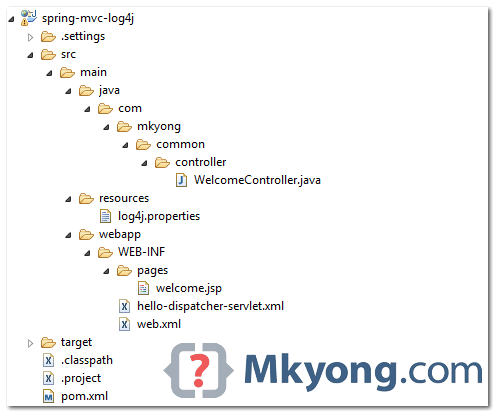
1. Project Directory
Review the final project structure.
2. Project Dependencies
Declares the following dependencies :
pom.xml
	<properties>
		<spring.version>4.1.6.RELEASE</spring.version>
		<log4j.version>1.2.17</log4j.version>
	</properties>

	<dependencies>

		<!-- Spring -->
		<dependency>
			<groupId>org.springframework</groupId>
			<artifactId>spring-webmvc</artifactId>
			<version>${spring.version}</version>
		</dependency>

		<!-- Log4j -->
		<dependency>
			<groupId>log4j</groupId>
			<artifactId>log4j</artifactId>
			<version>${log4j.version}</version>
		</dependency>

	</dependencies>
3. log4j.properties
Create a log4j.properties file, and put it in the resources. folder, refer to the above project directory structure.
log4j.properties
# Root logger option
log4j.rootLogger=DEBUG, stdout, file

# Redirect log messages to console
log4j.appender.stdout=org.apache.log4j.ConsoleAppender
log4j.appender.stdout.Target=System.out
log4j.appender.stdout.layout=org.apache.log4j.PatternLayout
log4j.appender.stdout.layout.ConversionPattern=%d{yyyy-MM-dd HH:mm:ss} %-5p %c{1}:%L - %m%n

# Redirect log messages to a log file
log4j.appender.file=org.apache.log4j.RollingFileAppender
#outputs to Tomcat home
log4j.appender.file.File=${catalina.home}/logs/myapp.log
log4j.appender.file.MaxFileSize=5MB
log4j.appender.file.MaxBackupIndex=10
log4j.appender.file.layout=org.apache.log4j.PatternLayout
log4j.appender.file.layout.ConversionPattern=%d{yyyy-MM-dd HH:mm:ss} %-5p %c{1}:%L - %m%n
4. Spring MVC Controller + Message Logging
A simple controller to return a welcome page. Furthermore, it shows you how to use log4j to do the logging.
WelcomeController.java
package com.mkyong.common.controller;

import org.apache.log4j.Logger;
import org.springframework.stereotype.Controller;
import org.springframework.web.bind.annotation.RequestMapping;
import org.springframework.web.bind.annotation.RequestMethod;
import org.springframework.web.servlet.ModelAndView;

@Controller
public class WelcomeController {

	private static final Logger logger = Logger.getLogger(WelcomeController.class);

	@RequestMapping(value = "/", method = RequestMethod.GET)
	public ModelAndView getWelcome() {

		//logs debug message
		if(logger.isDebugEnabled()){
			logger.debug("getWelcome is executed!");
		}

		//logs exception
		logger.error("This is Error message", new Exception("Testing"));

		ModelAndView model = new ModelAndView("welcome");
		model.addObject("msg", "Hello Spring MVC + Log4j");
		return model;

	}

}
5. Demo
5.1 Download the source code, and run the web app with the embedded Jetty container.
$ mvn jetty:run
Access URL : http://localhost:8080/spring-mvc-log4j/
5.2 All logging messages will be displayed in the console.
log4j.properties
# Redirect log messages to console
log4j.appender.stdout=org.apache.log4j.ConsoleAppender
log4j.appender.stdout.Target=System.out
log4j.appender.stdout.layout=org.apache.log4j.PatternLayout
log4j.appender.stdout.layout.ConversionPattern=%d{yyyy-MM-dd HH:mm:ss} %-5p %c{1}:%L - %m%n
Jetty console
2015-06-19 14:10:35 DEBUG WelcomeController:19 - getWelcome is executed!
2015-06-19 14:10:35 ERROR WelcomeController:23 - This is Error message
java.lang.Exception: Testing
        at com.mkyong.common.controller.WelcomeController.getWelcome(WelcomeController.java:23)
        at sun.reflect.NativeMethodAccessorImpl.invoke0(Native Method)
        at sun.reflect.NativeMethodAccessorImpl.invoke(NativeMethodAccessorImpl.java:57)
        at sun.reflect.DelegatingMethodAccessorImpl.invoke(DelegatingMethodAccessorImpl.java:43)
        at java.lang.reflect.Method.invoke(Method.java:606)
Download Source Code
Download it – spring-mvc-log4j.zip (5 KB)

Thank you so much
Hi guys, i have an issue with the logging management, it seems that wildfly or let’s say jboss AS ignores the loggers in the app.
Is there any configuration required to make this work.
Question: I actually arrived here while looking for the next logical step; how to easily search the log output from log4j! The most common way to do this seems to be rely on a huge bloated “slove-all-your-problems” log server like greylog, ELK or splunk. But what I want is simply a viewer that shows the log in realtime embedded in my spring application. That way if something goes wrong, instead of SSH into my instance doing a lot of grep I can just point my browser to the “log controller” and see what is going on. Any hints how I could do this?
use papertrail SaaS log management or similar if you don’t wanna use ELK/Greylog. I don’t advise building your own.
With out using maven . Log file was not created
Hi Folks,
I didn’t find any difference between log4j with Spring and log4j with any other java application? We do configure log4j.properties and get the Logger object in the same way. Or Am I missing something? 🙂
ya, it’s pretty much the same. And Spring is using JCL , it’s able to detect the log4j automatically.
I think that’s important to note about the double foward slash (//) because with a simple one it doesnt work in the file configuration in log4j.properties.
Hi, I got the clear picture about log 4j usage in spring MVC application. but i have a doubt.. like struts application doesnt i need to configure this xml file in configuration file….
We also need to include following –
log4jConfigLocation
/WEB-INF/resource/log4j.properties
org.springframework.web.util.Log4jConfigListener
in your “web.xml”. Then, it will work fine with your properties file.
My property files is under main/resources and works fine without explicitly mentioning the location.
This is optional.
oh here i got the answer thanks dude
@Krunal Jain why dont you be a little clear next time. COMPLETE YOUR ANSWER!!!!!
log4jConfigLocation
classpath:/main/webapp/resources/log4j.properties
Will you be capable of manual us in your web marketer or the person that takes care of your blog post, I have to determine if it will be easy to certainly be a invitee poster.
This is not any different from configuring log4j in any java program. Can it be configured as a bean in application context and inject the parameters/properties?
hi,
great article, as always.
Shouldn’t there be
Cheers,
pejot
Hi!
When I implement this solution it give me a Grave warning when I stop Tomcat:
“A Local Thread has been created”
I guess it comes from the initialisation’s method of the logger:
private static final Logger logger = Logger.getLogger(WelcomeController.class);
Thanks!
Nice Explanation but you should also explain the process of adding dependencies for the beginners like me.
Anyways It worked for me.. Cheers 😉
this is not working for me..
getting the following error.
log4j:WARN No appenders could be found for logger (…).
log4j:WARN Please initialize the log4j system properly.
Make sure your log4j.properties file is in the correct folder. Normally, we put this into the project resources folder. Maven or Gradle build tool will copy it to WEB-INF/classes automatically.
keep the log4j.properties directly under WEB-INF/classes folder(inside the war), then it should work.
This is exactly what I’ve been looking for!
Thanks!