This tutorial shows you how to create a Spring Web MVC application with the Thymeleaf template.
Technologies and tools used:
- Java 11
- Spring 5.2.22.RELEASE
- Thymeleaf 3.0.15.RELEASE
- Embedded Jetty Server 9.4.45.v20220203
- Servlet API 4.0.4
- Bootstrap 5.2.0 (webjars)
- IntelliJ IDEA
- Maven 3.8.6
- Spring Test 5.2.22.RELEASE
- Hamcrest 2.2
- JUnit 5.9
Table of contents:
- 1. Spring Web MVC Basic
- 2. Directory Structure
- 3. Project Dependencies
- 4. Project Dependencies – Tree Format
- 5. Spring Controller
- 6. Spring Configuration
- 7. Spring DispatcherServlet
- 8. View (Thymeleaf)
- 9. Spring MVC and Unit Tests
- 10. Demo
- 11. Download Source Code
- 10. References
Note
This tutorial is NOT a Spring Boot application, just pure Spring Web MVC!
1. Spring Web MVC Basic
In Spring Web MVC, it consists of 3 standards MVC (Model, Views, Controller) components :
Models– Contains data.Views– Display data using view technologies like Thymeleaf, FreeMarker, Groovy Markup, Script views (Mustache, React, etc.), or the classic JSP and JSTL.Controllers– Accepts inputs, modify them, and pass to model or view.
Spring Web MVC’s core component is DispatcherServlet, which acts as the front-controller pattern. Every web request has to go through this DispatcherServlet, and the DispatcherServlet will dispatch the web request to the registered handlers or components.
The following figures demonstrate how the Spring MVC web application handles a web request.
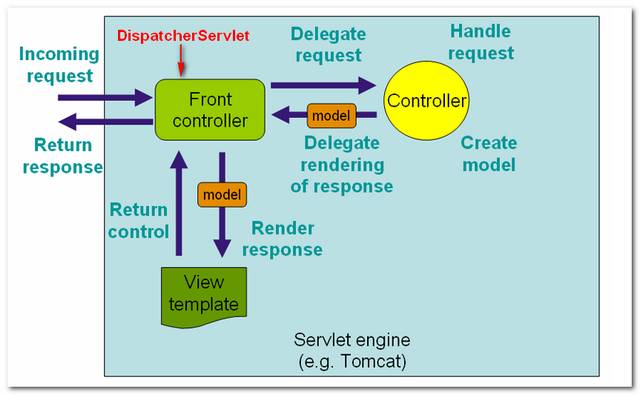
Figure 1.1: Image is copied from Spring MVC reference with slightly modified.
Note
Please refer to the official Spring Web MVC doc.
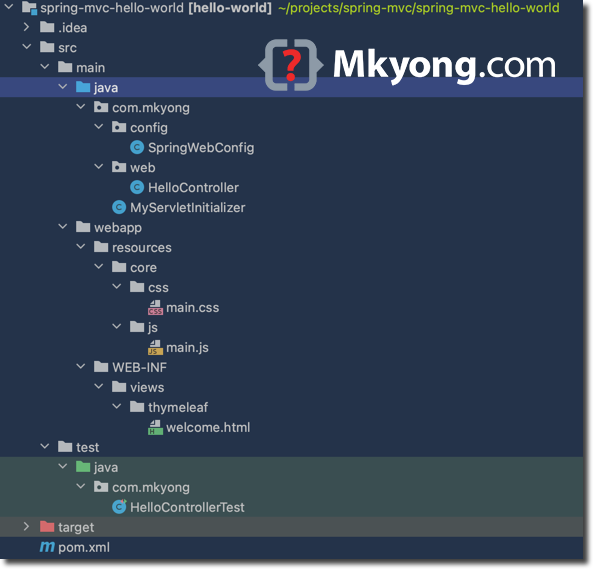
2. Directory Structure
Below is the standard Maven directory structure for this project.
3. Project Dependencies
Below is the core dependency for this project; The spring-webmvc dependency is a must, but other dependencies depend on your project requirement.
spring-webmvc– For Spring core related web components.thymeleaf-spring5– For Thymeleaf view template and Spring 5 integration.org.webjars.bootstrap– For WebJars to manage client-side web libraries, for example bootstrap.jakarta.servlet-api– We need servlet-api to compile the web application, set toprovidedscope; usually, the embedded server will provide this.maven-compiler-plugin– Compile project.jetty-maven-plugin– Run this project in the embedded Jetty server, likemvn jetty:run.
<project xmlns="http://maven.apache.org/POM/4.0.0"
    xmlns:xsi="http://www.w3.org/2001/XMLSchema-instance"
         xsi:schemaLocation="http://maven.apache.org/POM/4.0.0
         http://maven.apache.org/maven-v4_0_0.xsd">
    <modelVersion>4.0.0</modelVersion>
    <groupId>com.mkyong</groupId>
    <artifactId>spring-mvc-hello-world</artifactId>
    <packaging>war</packaging>
    <version>1.0-SNAPSHOT</version>
    <name>spring web mvc</name>

    <properties>
        <project.build.sourceEncoding>UTF-8</project.build.sourceEncoding>
        <jdk.version>11</jdk.version>
        <spring.version>5.2.22.RELEASE</spring.version>
        <servletapi.version>4.0.4</servletapi.version>
        <thymeleaf.spring.version>3.0.15.RELEASE</thymeleaf.spring.version>
        <webjars.version>5.2.0</webjars.version>
        <hamcrest.version>2.2</hamcrest.version>
        <junit.version>5.9.0</junit.version>
    </properties>

    <dependencies>

        <dependency>
            <groupId>org.springframework</groupId>
            <artifactId>spring-webmvc</artifactId>
            <version>${spring.version}</version>
        </dependency>

        <dependency>
            <groupId>org.thymeleaf</groupId>
            <artifactId>thymeleaf-spring5</artifactId>
            <version>${thymeleaf.spring.version}</version>
        </dependency>

        <dependency>
            <groupId>org.webjars</groupId>
            <artifactId>bootstrap</artifactId>
            <version>${webjars.version}</version>
        </dependency>

        <dependency>
            <groupId>jakarta.servlet</groupId>
            <artifactId>jakarta.servlet-api</artifactId>
            <version>${servletapi.version}</version>
            <scope>provided</scope>
        </dependency>

        <dependency>
            <groupId>org.springframework</groupId>
            <artifactId>spring-test</artifactId>
            <version>${spring.version}</version>
            <scope>test</scope>
        </dependency>

        <dependency>
            <groupId>org.junit.jupiter</groupId>
            <artifactId>junit-jupiter-engine</artifactId>
            <version>${junit.version}</version>
            <scope>test</scope>
        </dependency>

        <dependency>
            <groupId>org.hamcrest</groupId>
            <artifactId>hamcrest-core</artifactId>
            <version>${hamcrest.version}</version>
            <scope>test</scope>
        </dependency>

        <!-- compile only, deployed container will provide this -->
        <!--
        <dependency>
            <groupId>javax.servlet</groupId>
            <artifactId>javax.servlet-api</artifactId>
            <version>${servletapi.version}</version>
            <scope>provided</scope>
        </dependency>
        -->
    </dependencies>

    <build>

        <plugins>
            <plugin>
                <groupId>org.apache.maven.plugins</groupId>
                <artifactId>maven-compiler-plugin</artifactId>
                <version>3.10.1</version>
                <configuration>
                    <source>${jdk.version}</source>
                    <target>${jdk.version}</target>
                </configuration>
            </plugin>

            <plugin>
                <groupId>org.eclipse.jetty</groupId>
                <artifactId>jetty-maven-plugin</artifactId>
                <version>9.4.45.v20220203</version>
                <configuration>
                    <scanIntervalSeconds>10</scanIntervalSeconds>
                    <webApp>
                        <contextPath>/spring</contextPath>
                    </webApp>
                </configuration>
            </plugin>

        </plugins>
    </build>

</project>
4. Project Dependencies – Tree Format
Review again the project dependencies in a tree structure.
mvn dependency:tree

[INFO] Scanning for projects...
[INFO]
[INFO] -----------------< com.mkyong:spring-mvc-hello-world >------------------
[INFO] Building spring web mvc 1.0-SNAPSHOT
[INFO] --------------------------------[ war ]---------------------------------
[INFO]
[INFO] --- maven-dependency-plugin:2.8:tree (default-cli) @ spring-mvc-hello-world ---
[INFO] com.mkyong:spring-mvc-hello-world:war:1.0-SNAPSHOT
[INFO] +- org.springframework:spring-webmvc:jar:5.2.22.RELEASE:compile
[INFO] |  +- org.springframework:spring-aop:jar:5.2.22.RELEASE:compile
[INFO] |  +- org.springframework:spring-beans:jar:5.2.22.RELEASE:compile
[INFO] |  +- org.springframework:spring-context:jar:5.2.22.RELEASE:compile
[INFO] |  +- org.springframework:spring-core:jar:5.2.22.RELEASE:compile
[INFO] |  |  \- org.springframework:spring-jcl:jar:5.2.22.RELEASE:compile
[INFO] |  +- org.springframework:spring-expression:jar:5.2.22.RELEASE:compile
[INFO] |  \- org.springframework:spring-web:jar:5.2.22.RELEASE:compile
[INFO] +- org.thymeleaf:thymeleaf-spring5:jar:3.0.15.RELEASE:compile
[INFO] |  +- org.thymeleaf:thymeleaf:jar:3.0.15.RELEASE:compile
[INFO] |  |  +- org.attoparser:attoparser:jar:2.0.5.RELEASE:compile
[INFO] |  |  \- org.unbescape:unbescape:jar:1.1.6.RELEASE:compile
[INFO] |  \- org.slf4j:slf4j-api:jar:1.7.25:compile
[INFO] +- org.webjars:bootstrap:jar:5.2.0:compile
[INFO] +- jakarta.servlet:jakarta.servlet-api:jar:4.0.4:provided
[INFO] +- org.springframework:spring-test:jar:5.2.22.RELEASE:test
[INFO] +- org.junit.jupiter:junit-jupiter-engine:jar:5.9.0:test
[INFO] |  +- org.junit.platform:junit-platform-engine:jar:1.9.0:test
[INFO] |  |  +- org.opentest4j:opentest4j:jar:1.2.0:test
[INFO] |  |  \- org.junit.platform:junit-platform-commons:jar:1.9.0:test
[INFO] |  +- org.junit.jupiter:junit-jupiter-api:jar:5.9.0:test
[INFO] |  \- org.apiguardian:apiguardian-api:jar:1.1.2:test
[INFO] \- org.hamcrest:hamcrest-core:jar:2.2:test
[INFO]    \- org.hamcrest:hamcrest:jar:2.2:test
[INFO] ------------------------------------------------------------------------
[INFO] BUILD SUCCESS
[INFO] ------------------------------------------------------------------------
[INFO] Total time:  0.877 s
[INFO] Finished at: 2022-09-23T20:17:05+08:00
[INFO] ------------------------------------------------------------------------
5. Spring Controller
Below is a Spring Web MVC controller to handle web requests for / and /hello/{name} and display messages.
package com.mkyong.web;

import org.springframework.stereotype.Controller;
import org.springframework.ui.Model;
import org.springframework.ui.ModelMap;
import org.springframework.web.bind.annotation.GetMapping;
import org.springframework.web.bind.annotation.PathVariable;
import org.springframework.web.bind.annotation.RequestMapping;
import org.springframework.web.bind.annotation.RequestMethod;

@Controller
public class HelloController {

  @RequestMapping(value = "/", method = RequestMethod.GET)
  public String welcome(ModelMap model) {

      model.addAttribute("message", "Spring MVC Hello World");

      // view name, map to welcome.html later
      return "welcome";
  }

  @GetMapping("/hello/{name:.+}")
  public String hello(Model model, @PathVariable("name") String name) {

      model.addAttribute("message", name);

      // view name, map to welcome.html later
      return "welcome";
  }

}
6. Spring Configuration
For the Spring configuration, implement the WebMvcConfigurer and override the required methods, or declare the extra beans here, for example, the Spring + Thymeleaf view resolver, etc.
Note
For a more detailed explanation, please refer to the official Thymeleaf + Spring integration documents.
package com.mkyong.config;

import org.springframework.beans.factory.annotation.Autowired;
import org.springframework.context.ApplicationContext;
import org.springframework.context.annotation.Bean;
import org.springframework.context.annotation.ComponentScan;
import org.springframework.context.annotation.Configuration;
import org.springframework.web.servlet.config.annotation.EnableWebMvc;
import org.springframework.web.servlet.config.annotation.ResourceHandlerRegistry;
import org.springframework.web.servlet.config.annotation.WebMvcConfigurer;
import org.thymeleaf.spring5.SpringTemplateEngine;
import org.thymeleaf.spring5.templateresolver.SpringResourceTemplateResolver;
import org.thymeleaf.spring5.view.ThymeleafViewResolver;
import org.thymeleaf.templatemode.TemplateMode;

@EnableWebMvc
@Configuration
@ComponentScan({"com.mkyong.web"})
public class SpringWebConfig implements WebMvcConfigurer {

  // Spring + Thymeleaf need this
  @Autowired
  private ApplicationContext applicationContext;

  @Override
  public void addResourceHandlers(final ResourceHandlerRegistry registry) {
      registry.addResourceHandler("/css/**").addResourceLocations("/resources/core/css/");
      registry.addResourceHandler("/js/**").addResourceLocations("/resources/core/js/");
      registry.addResourceHandler("/webjars/**").addResourceLocations("/webjars/");
  }

  // Spring + Thymeleaf
  @Bean
  public SpringResourceTemplateResolver templateResolver() {
      SpringResourceTemplateResolver templateResolver = new SpringResourceTemplateResolver();
      templateResolver.setApplicationContext(this.applicationContext);
      templateResolver.setPrefix("/WEB-INF/views/thymeleaf/");
      templateResolver.setSuffix(".html");
      templateResolver.setTemplateMode(TemplateMode.HTML);
      templateResolver.setCacheable(true);
      return templateResolver;
  }

  // Spring + Thymeleaf
  @Bean
  public SpringTemplateEngine templateEngine() {
      SpringTemplateEngine templateEngine = new SpringTemplateEngine();
      templateEngine.setTemplateResolver(templateResolver());
      templateEngine.setEnableSpringELCompiler(true);
      return templateEngine;
  }

  // Spring + Thymeleaf
  // Configure Thymeleaf View Resolver
  @Bean
  public ThymeleafViewResolver viewResolver() {
      ThymeleafViewResolver viewResolver = new ThymeleafViewResolver();
      viewResolver.setTemplateEngine(templateEngine());
      return viewResolver;
  }

}
7. Spring DispatcherServlet
We can extend AbstractAnnotationConfigDispatcherServletInitializer to register the DispatcherServlet so that the Servlet container knows where to find the above Spring configuration SpringWebConfig to load and start the Spring Web MVC application.
P.S This MyServletInitializer will be auto-detected by the Servlet container (e.g., Jetty or Tomcat).
package com.mkyong;

import com.mkyong.config.SpringWebConfig;
import org.springframework.web.servlet.support.AbstractAnnotationConfigDispatcherServletInitializer;

public class MyServletInitializer
      extends AbstractAnnotationConfigDispatcherServletInitializer {

  // services and data sources
  @Override
  protected Class<?>[] getRootConfigClasses() {
      return new Class[0];
  }

  // controller, view resolver, handler mapping
  @Override
  protected Class<?>[] getServletConfigClasses() {
      return new Class[]{SpringWebConfig.class};
  }

  @Override
  protected String[] getServletMappings() {
      return new String[]{"/"};
  }
}
8. View (Thymeleaf)
A simple Thylemeaf template to display a hello world message also shows how to integrate webjars’ Bootstrap and custom CSS and JS files.
<!DOCTYPE HTML>
<html lang="en" xmlns:th="http://www.thymeleaf.org">
<head>
  <meta charset="utf-8">
  <meta name="viewport" content="width=device-width, initial-scale=1, shrink-to-fit=no">

  <title>Spring Web MVC Thymeleaf Hello World Example</title>

  <!-- Boostrap core css -->
  <link rel="stylesheet" th:href="@{/webjars/bootstrap/5.2.0/css/bootstrap.min.css}"/>

  <!-- custom style -->
  <link rel="stylesheet" th:href="@{/css/main.css}"/>

</head>

<body>

<nav class="navbar navbar-expand-md navbar-dark bg-dark fixed-top">
  <a class="navbar-brand" href="#">Mkyong.com</a>
</nav>

<main role="main" class="container">

  <div class="starter-template">
      <h1>Spring Web MVC Thymeleaf Example</h1>
      <h2>
          <span th:text="'Hello, ' + ${message}"></span>
      </h2>
  </div>

</main>
<!-- /.container -->

<!-- Boostrap core js -->
<script type="text/javascript" th:src="@{webjars/bootstrap/5.2.0/js/bootstrap.min.js}"></script>
</body>
</html>
9. Spring MVC and Unit Tests
Spring MVC 5 and JUnit 5 examples.
package com.mkyong;

import com.mkyong.config.SpringWebConfig;
import org.junit.jupiter.api.BeforeEach;
import org.junit.jupiter.api.Test;
import org.junit.jupiter.api.extension.ExtendWith;
import org.springframework.beans.factory.annotation.Autowired;
import org.springframework.test.context.ContextConfiguration;
import org.springframework.test.context.junit.jupiter.SpringExtension;
import org.springframework.test.context.web.WebAppConfiguration;
import org.springframework.test.web.servlet.MockMvc;
import org.springframework.test.web.servlet.MvcResult;
import org.springframework.test.web.servlet.setup.MockMvcBuilders;
import org.springframework.web.context.WebApplicationContext;
import org.springframework.web.servlet.ModelAndView;

import static org.junit.jupiter.api.Assertions.assertEquals;
import static org.springframework.test.web.servlet.request.MockMvcRequestBuilders.get;
import static org.springframework.test.web.servlet.result.MockMvcResultMatchers.status;

@ExtendWith(SpringExtension.class)
@WebAppConfiguration
@ContextConfiguration(classes = {SpringWebConfig.class})
public class HelloControllerTest {

    @Autowired
    private WebApplicationContext wac;

    private MockMvc mockMvc;

    @BeforeEach
    void setup() {
        this.mockMvc = MockMvcBuilders.webAppContextSetup(this.wac).build();
    }

    @Test
    public void testDefaultPage() throws Exception {

        MvcResult result = this.mockMvc.perform(get("/"))
                /*.andDo(print())*/
                .andExpect(status().isOk())
                .andReturn();

        ModelAndView modelAndView = result.getModelAndView();
        assertEquals("welcome", modelAndView.getViewName());
        assertEquals("Spring MVC Hello World", modelAndView.getModel().get("message"));

    }

    @Test
    public void testHelloPage() throws Exception {

        MvcResult result = this.mockMvc.perform(get("/hello/mkyong"))
                .andExpect(status().isOk())
                .andReturn();

        ModelAndView modelAndView = result.getModelAndView();
        assertEquals("welcome", modelAndView.getViewName());
        assertEquals("mkyong", modelAndView.getModel().get("message"));

    }

}
10. Demo
Go terminal, project folder, and run mvn jetty:run.
  mvn jetty:run

...
[INFO] Started ServerConnector@5b3755f4{HTTP/1.1, (http/1.1)}{0.0.0.0:8080}
[INFO] Started @3134ms
[INFO] Started Jetty Server
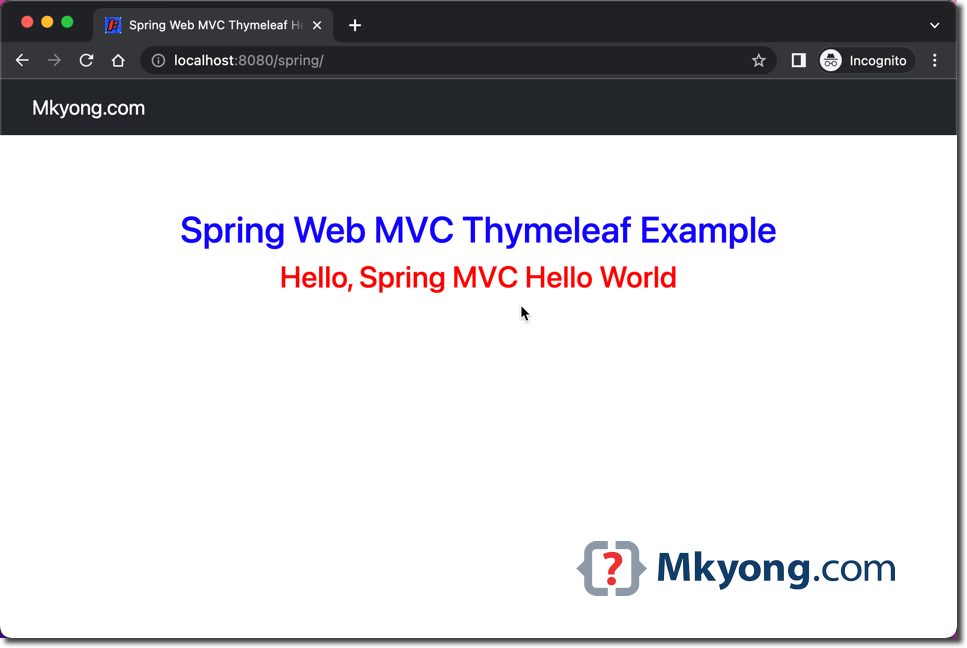
The Spring Web MVC application is default deployed to the Jetty container at port 8080.
http://localhost:8080/spring
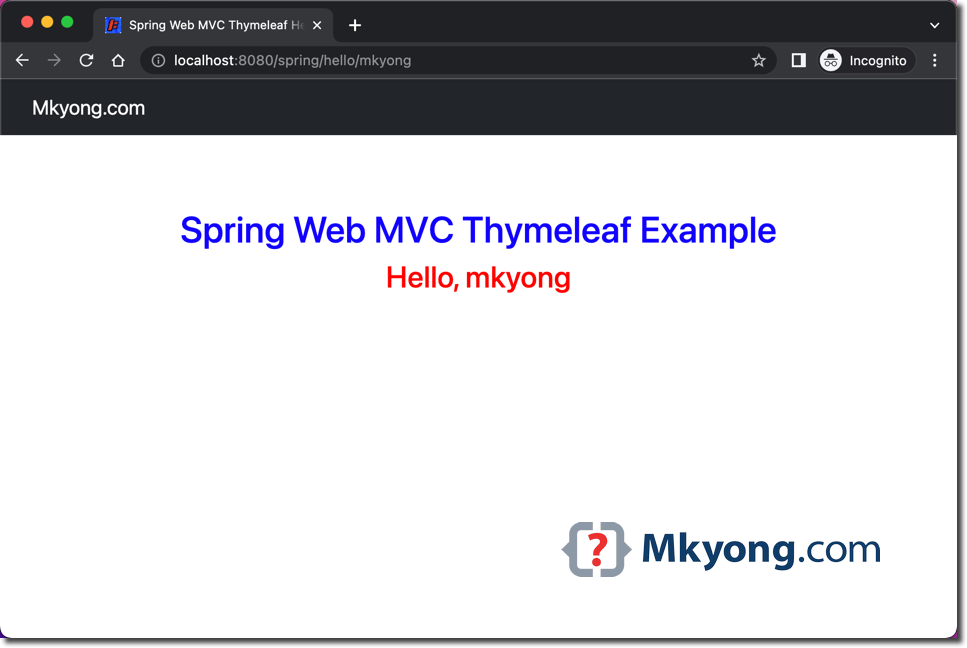
http://localhost:8080/spring/hello/mkyong
11. Download Source Code
$ git clone https://github.com/mkyong/spring-mvc/
$ cd spring-mvc-hello-world
$ mvn clean jetty:run
visit http://localhost:8080/spring
visit http://localhost:8080/spring/hello/mkyong

No comments yet. Be the first to leave a comment!