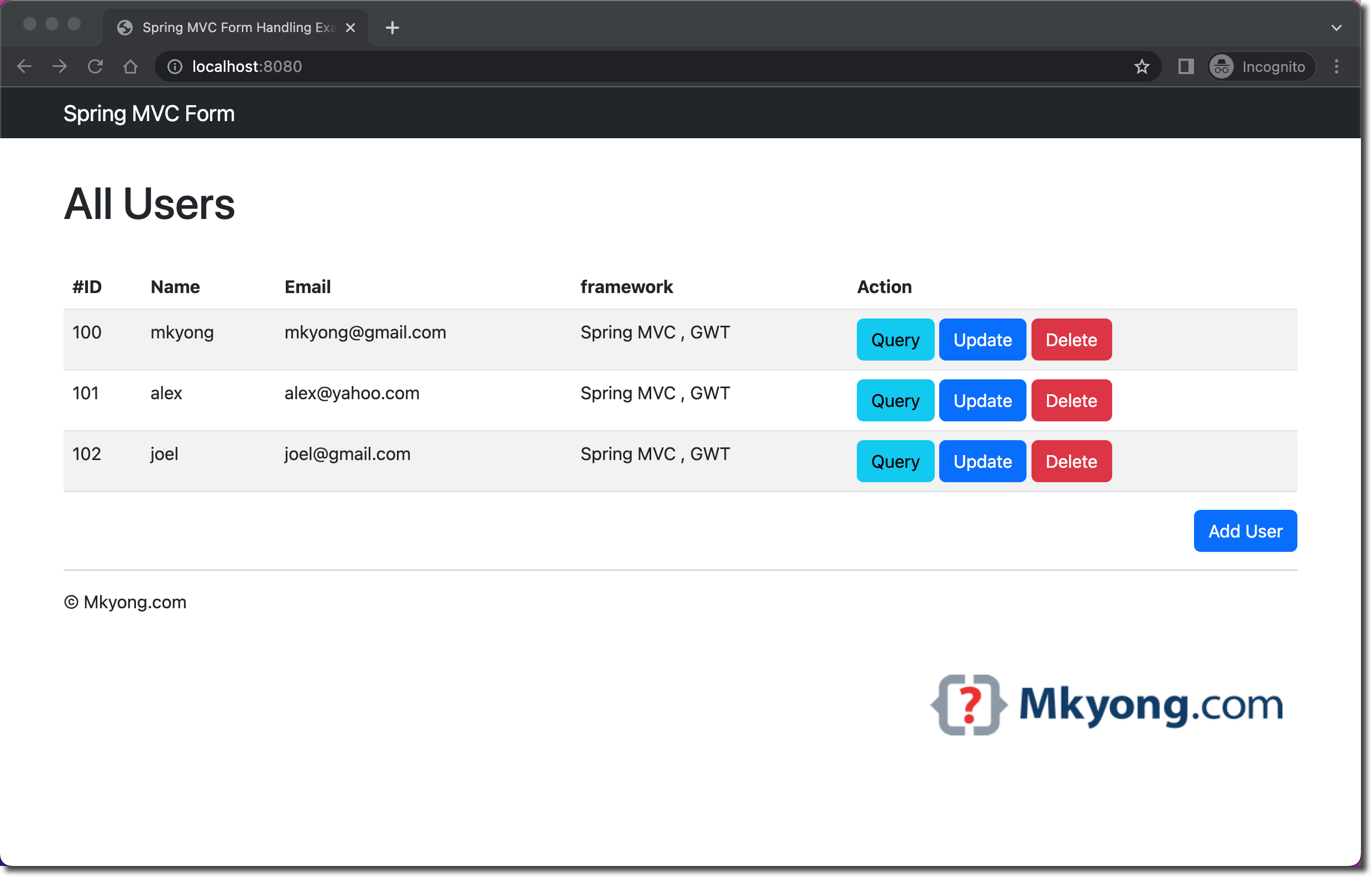
This tutorial shows you how to do form handling in Spring Web MVC application.
Technologies and tools used:
- Java 11
- Spring 5.2.22.RELEASE
- JSP
- JSTL 1.2
- Embedded Jetty Server 9.4.45.v20220203
- Servlet API 4.0.4
- Bootstrap 5.2.0 (webjars)
- Hibernate Validator 6.2.5.Final
- HSQLDB 2.7.0
- IntelliJ IDEA
- Maven 3.8.6
- Spring Test 5.2.22.RELEASE
- Hamcrest 2.2
- JUnit 5.9
Table of contents:
- 1. What you’ll build
- 2. Directory Structure
- 3. Project Dependencies
- 4. Project Dependencies – Tree Format
- 5. Spring Controller
- 6. Spring Form Validator
- 7. Spring Services and Responsitories
- 8. Spring Configuration
- 9. Spring DispatcherServlet
- 10. Database SQL Scripts
- 11. JSP Views
- 12. Demo
- 13. Download Source Code
- 14. References
Note
This tutorial is NOT a Spring Boot application, just pure Spring Web MVC!
1. What you’ll build
In this tutorial, we will show you a Spring MVC form handling project to do the following stuff :
- Form value binding – JSP and Model.
- Form validation and display error message.
- Form POST/REDIRECT/GET pattern to avoid duplicate submission, and add messages to the flash attribute.
- CRUD operations, add, get, update and delete with an HTML form.
This ia a simple user management project, you can list, add, update and delete users, via JSP. You’ll also see how to perform the form validation and display the error message conditionally. This project is styling with Bootstrap 5, and data are stored in the HSQL embedded database.
The URI structure:
| URI | Method | Action |
|---|---|---|
| /users | Get | Listing, displlay all users |
| /users | Post | Save or update user |
| /users/{id} | Get | Display user {id} detail |
| /users/add | Get | Display add user form |
| /users/{id}/update | Get | Display update user form for user {id} |
| /users/{id}/delete | Post | Delete user {id} |
Note
In the old days, before Spring 3.0, we use SimpleFormController to do the form handling. As Spring 3.0, this class is deprecated in favor of Spring annotated @Controller.
2. Directory Structure
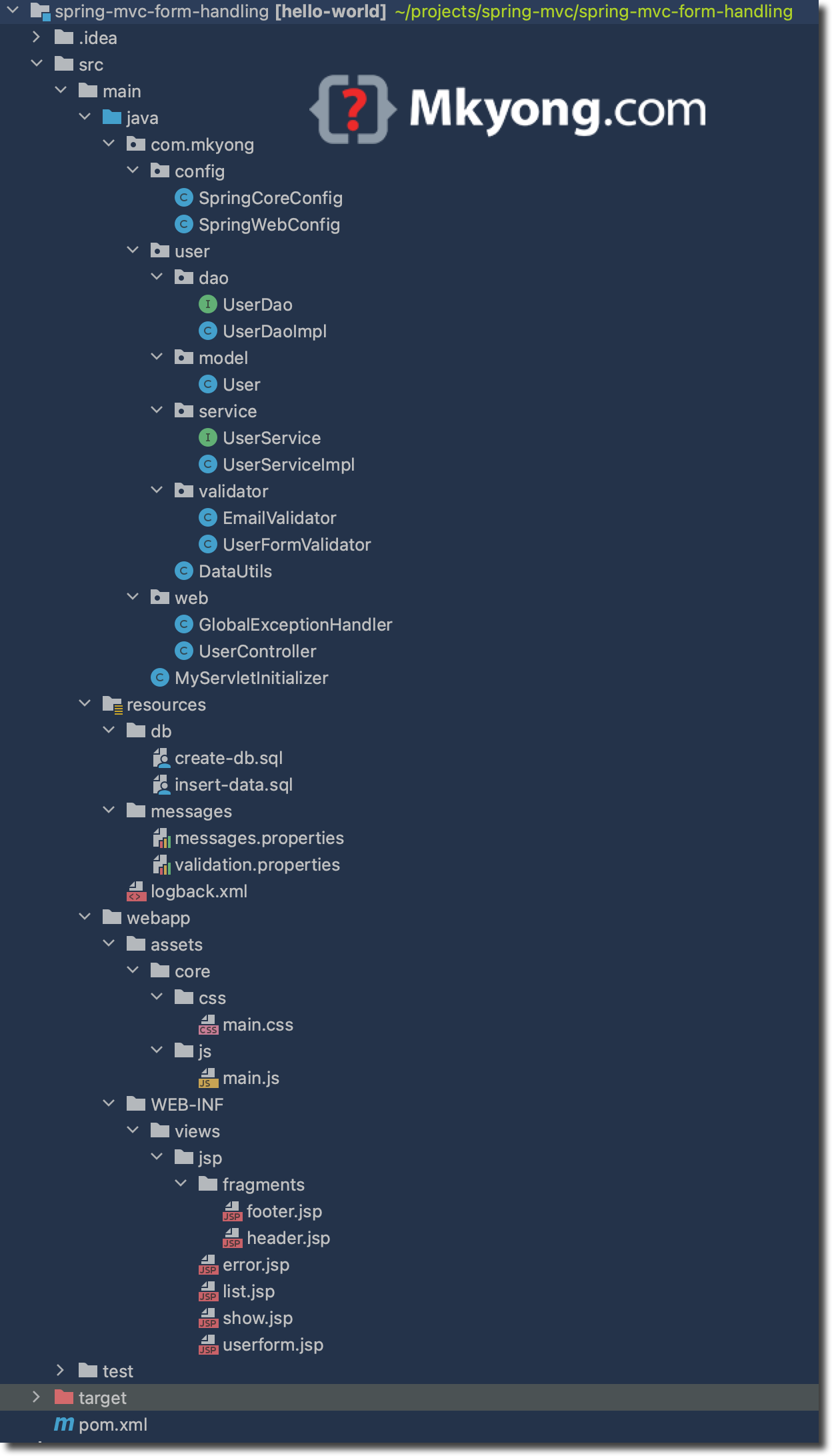
Below is the standard Maven directory structure for this project.
3. Project Dependencies
Below is the core dependency for this project; The spring-webmvc dependency is a must, but other dependencies depend on your project requirement.
spring-webmvc– For Spring core related web components.jstl– For Jakarta Standard Tag Library (JSTL; formerly JavaServer Pages Standard Tag Library).org.webjars.bootstrap– For WebJars to manage client-side web libraries, for example bootstrap.javax.servlet-api– We needservlet-apito compile the web application, set tocompileOnlyscope; usually, the embedded server will provide this.jetty-maven-plugin– Run this project with the embedded servlet containers like Tomcat 9 or Jetty 9.4.hibernate-validator– Form validator, for JSR 303.spring-jdbc– JDBC to interact with the database.HSQLDB– Stores the users’ data into this embedded database.
<project xmlns="http://maven.apache.org/POM/4.0.0"
          xmlns:xsi="http://www.w3.org/2001/XMLSchema-instance"
          xsi:schemaLocation="http://maven.apache.org/POM/4.0.0
          http://maven.apache.org/maven-v4_0_0.xsd">
    <modelVersion>4.0.0</modelVersion>
    <groupId>com.mkyong</groupId>
    <artifactId>spring-mvc-form-handling</artifactId>
    <packaging>war</packaging>
    <version>1.0-SNAPSHOT</version>
    <name>spring web mvc form handling</name>

    <properties>
        <project.build.sourceEncoding>UTF-8</project.build.sourceEncoding>
        <jdk.version>11</jdk.version>
        <spring.version>5.2.22.RELEASE</spring.version>
        <jetty.version>9.4.45.v20220203</jetty.version>
        <servletapi.version>4.0.1</servletapi.version>
        <webjars.version>5.2.0</webjars.version>
        <junit5.version>5.9.0</junit5.version>
        <hamcrest.version>2.2</hamcrest.version>
        <surefire.version>3.0.0-M7</surefire.version>
        <hsqldb.version>2.7.0</hsqldb.version>
        <logback.version>1.3.1</logback.version>
        <jstl.version>1.2</jstl.version>
        <hibernate.validator.version>6.2.5.Final</hibernate.validator.version>
    </properties>

    <dependencies>

        <!-- Spring Web -->
        <dependency>
            <groupId>org.springframework</groupId>
            <artifactId>spring-webmvc</artifactId>
            <version>${spring.version}</version>
        </dependency>

        <!-- Spring JDBC -->
        <dependency>
            <groupId>org.springframework</groupId>
            <artifactId>spring-jdbc</artifactId>
            <version>${spring.version}</version>
        </dependency>

        <dependency>
            <groupId>org.hsqldb</groupId>
            <artifactId>hsqldb</artifactId>
            <version>${hsqldb.version}</version>
        </dependency>

        <!-- since spring 5, no need log bridge -->
        <!--
        <dependency>
            <groupId>org.slf4j</groupId>
            <artifactId>jcl-over-slf4j</artifactId>
            <version>${jcl.slf4j.version}</version>
        </dependency>
         -->

        <dependency>
            <groupId>ch.qos.logback</groupId>
            <artifactId>logback-classic</artifactId>
            <version>${logback.version}</version>
        </dependency>

        <dependency>
            <groupId>javax.servlet</groupId>
            <artifactId>jstl</artifactId>
            <version>${jstl.version}</version>
        </dependency>

        <!-- jsr 303 -->
        <dependency>
            <groupId>org.hibernate.validator</groupId>
            <artifactId>hibernate-validator</artifactId>
            <version>${hibernate.validator.version}</version>
        </dependency>

        <dependency>
            <groupId>org.springframework</groupId>
            <artifactId>spring-test</artifactId>
            <version>${spring.version}</version>
            <scope>test</scope>
        </dependency>

        <dependency>
            <groupId>org.junit.jupiter</groupId>
            <artifactId>junit-jupiter-engine</artifactId>
            <version>${junit5.version}</version>
            <scope>test</scope>
        </dependency>

        <dependency>
            <groupId>org.hamcrest</groupId>
            <artifactId>hamcrest-core</artifactId>
            <version>${hamcrest.version}</version>
            <scope>test</scope>
        </dependency>

        <dependency>
            <groupId>org.webjars</groupId>
            <artifactId>bootstrap</artifactId>
            <version>${webjars.version}</version>
        </dependency>

        <!-- compile only, deployed container will provide this -->
        <dependency>
            <groupId>javax.servlet</groupId>
            <artifactId>javax.servlet-api</artifactId>
            <version>${servletapi.version}</version>
            <scope>provided</scope>
        </dependency>

    </dependencies>

    <build>

        <plugins>
            <plugin>
                <groupId>org.apache.maven.plugins</groupId>
                <artifactId>maven-compiler-plugin</artifactId>
                <version>3.10.1</version>
                <configuration>
                    <source>${jdk.version}</source>
                    <target>${jdk.version}</target>
                </configuration>
            </plugin>

            <plugin>
                <groupId>org.eclipse.jetty</groupId>
                <artifactId>jetty-maven-plugin</artifactId>
                <version>${jetty.version}</version>
                <configuration>
                    <scanIntervalSeconds>10</scanIntervalSeconds>
                    <webApp>
                        <contextPath>/</contextPath>
                    </webApp>
                </configuration>
            </plugin>

            <!-- junit 5 -->
            <plugin>
                <groupId>org.apache.maven.plugins</groupId>
                <artifactId>maven-surefire-plugin</artifactId>
                <version>${surefire.version}</version>
            </plugin>

        </plugins>
    </build>

</project>
4. Project Dependencies – Tree Format
Review again the project dependencies in a tree structure.
mvn dependency:tree

[INFO] Scanning for projects...
[INFO]
[INFO] ----------------< com.mkyong:spring-mvc-form-handling >-----------------
[INFO] Building spring web mvc form handling 1.0-SNAPSHOT
[INFO] --------------------------------[ war ]---------------------------------
[INFO]
[INFO] --- maven-dependency-plugin:2.8:tree (default-cli) @ spring-mvc-form-handling ---
[INFO] com.mkyong:spring-mvc-form-handling:war:1.0-SNAPSHOT
[INFO] +- org.springframework:spring-webmvc:jar:5.2.22.RELEASE:compile
[INFO] |  +- org.springframework:spring-aop:jar:5.2.22.RELEASE:compile
[INFO] |  +- org.springframework:spring-beans:jar:5.2.22.RELEASE:compile
[INFO] |  +- org.springframework:spring-context:jar:5.2.22.RELEASE:compile
[INFO] |  +- org.springframework:spring-core:jar:5.2.22.RELEASE:compile
[INFO] |  |  \- org.springframework:spring-jcl:jar:5.2.22.RELEASE:compile
[INFO] |  +- org.springframework:spring-expression:jar:5.2.22.RELEASE:compile
[INFO] |  \- org.springframework:spring-web:jar:5.2.22.RELEASE:compile
[INFO] +- org.springframework:spring-jdbc:jar:5.2.22.RELEASE:compile
[INFO] |  \- org.springframework:spring-tx:jar:5.2.22.RELEASE:compile
[INFO] +- org.hsqldb:hsqldb:jar:2.7.0:compile
[INFO] +- ch.qos.logback:logback-classic:jar:1.3.1:compile
[INFO] |  +- ch.qos.logback:logback-core:jar:1.3.1:compile
[INFO] |  \- org.slf4j:slf4j-api:jar:2.0.1:compile
[INFO] +- javax.servlet:jstl:jar:1.2:compile
[INFO] +- org.hibernate.validator:hibernate-validator:jar:6.2.5.Final:compile
[INFO] |  +- jakarta.validation:jakarta.validation-api:jar:2.0.2:compile
[INFO] |  +- org.jboss.logging:jboss-logging:jar:3.4.1.Final:compile
[INFO] |  \- com.fasterxml:classmate:jar:1.5.1:compile
[INFO] +- org.springframework:spring-test:jar:5.2.22.RELEASE:test
[INFO] +- org.junit.jupiter:junit-jupiter-engine:jar:5.9.0:test
[INFO] |  +- org.junit.platform:junit-platform-engine:jar:1.9.0:test
[INFO] |  |  +- org.opentest4j:opentest4j:jar:1.2.0:test
[INFO] |  |  \- org.junit.platform:junit-platform-commons:jar:1.9.0:test
[INFO] |  +- org.junit.jupiter:junit-jupiter-api:jar:5.9.0:test
[INFO] |  \- org.apiguardian:apiguardian-api:jar:1.1.2:test
[INFO] +- org.hamcrest:hamcrest-core:jar:2.2:test
[INFO] |  \- org.hamcrest:hamcrest:jar:2.2:test
[INFO] +- org.webjars:bootstrap:jar:5.2.0:compile
[INFO] \- javax.servlet:javax.servlet-api:jar:4.0.1:provided
[INFO] ------------------------------------------------------------------------
[INFO] BUILD SUCCESS
[INFO] ------------------------------------------------------------------------
[INFO] Total time:  0.990 s
[INFO] Finished at: 2022-10-17T13:50:29+08:00
[INFO] ------------------------------------------------------------------------
5. Spring Controller
Below is a Spring Web MVC controller to handle CRUD web requests. The annotations @GetMapping or @PostMapping for GET and POST web requests, read comment for self-explanatory.
package com.mkyong.web;

import com.mkyong.user.DataUtils;
import com.mkyong.user.model.User;
import com.mkyong.user.service.UserService;
import com.mkyong.user.validator.UserFormValidator;
import org.slf4j.Logger;
import org.slf4j.LoggerFactory;
import org.springframework.beans.factory.annotation.Autowired;
import org.springframework.stereotype.Controller;
import org.springframework.ui.Model;
import org.springframework.validation.BindingResult;
import org.springframework.web.bind.WebDataBinder;
import org.springframework.web.bind.annotation.*;
import org.springframework.web.servlet.mvc.support.RedirectAttributes;

import javax.validation.Valid;
import java.util.ArrayList;
import java.util.Arrays;

@Controller
public class UserController {

    private final Logger logger = LoggerFactory.getLogger(UserController.class);

    @Autowired
    private UserService userService;

    @Autowired
    private UserFormValidator formValidator;

    // register the form validator to this controller
    @InitBinder
    protected void initBinder(WebDataBinder binder) {
        // this will override the jsr303 validator
        //binder.setValidator(formValidator);

        // this support both spring validator and jsr303 validator
        binder.addValidators(formValidator);
    }

    @GetMapping(value = {"/", "/users"})
    public String listAllUsers(Model model) {
        logger.debug("listUsers()...");
        model.addAttribute("users", userService.findAll());
        return "list";

    }

    // @Valid from jsr 303 and @Validate from the Spring.
    // save or update user
    // 1. @ModelAttribute bind form value
    // 2. @Valid form validator
    // 3. RedirectAttributes for flash value
    @PostMapping("/users")
    public String saveOrUpdateUser(@ModelAttribute("userForm") @Valid User user,
                                   BindingResult bindingResult, Model model,
                                   final RedirectAttributes redirectAttributes) {

        // @InitBinder or run the form validator manually like this
        // formValidator.validate(user, bindingResult);

        logger.debug("saveOrUpdateUser() : {}", user);

        if (bindingResult.hasErrors()) {
            populateDefaultCheckBoxesAndRadios(model);    //repopulate for items like checkboxes, radios and etc
            return "userform";
        } else {

            // Add message to flash scope
            redirectAttributes.addFlashAttribute("alert", "success");
            if (user.isNew()) {
                redirectAttributes.addFlashAttribute("msg", "User added successfully!");
            } else {
                redirectAttributes.addFlashAttribute("msg", "User updated successfully!");
            }

            userService.saveOrUpdate(user);

            // POST/REDIRECT/GET
            return "redirect:/users/" + user.getId();

            // POST/FORWARD/GET
            // return "user/list";

        }

    }

    // show user
    @GetMapping("/users/{id}")
    public String showUser(@PathVariable("id") int userId, Model model) {

        logger.debug("showUser() userId: {}", userId);

        User user = userService.findById(userId);
        if (user == null) {
            model.addAttribute("alert", "danger");
            model.addAttribute("msg", "User not found!");
        }
        model.addAttribute("user", user);

        return "show";

    }

    // show add user form
    @GetMapping("/users/add")
    public String showAddUserForm(Model model) {

        logger.debug("showAddUserForm()");

        // init values for user form
        User user = new User();
        user.setSex("M");
        user.setCountry("MY");
        user.setFramework(new ArrayList<String>(Arrays.asList("Spring", "Struts")));
        user.setSkill(new ArrayList<String>(Arrays.asList("Spring", "Struts", "Hibernate")));
        model.addAttribute("userForm", user);

        populateDefaultCheckBoxesAndRadios(model);

        return "userform";

    }

    // show update form
    @GetMapping("/users/{id}/update")
    public String showUpdateUserForm(@PathVariable("id") int id, Model model) {

        logger.debug("showUpdateUserForm() : {}", id);

        model.addAttribute("userForm", userService.findById(id));

        populateDefaultCheckBoxesAndRadios(model);

        return "userform";

    }

    @PostMapping("/users/{id}/delete")
    public String deleteUser(@PathVariable("id") int id,
                             final RedirectAttributes redirectAttributes) {

        logger.debug("deleteUser() : {}", id);

        userService.delete(id);

        redirectAttributes.addFlashAttribute("alert", "success");
        redirectAttributes.addFlashAttribute("msg", "User is deleted!");

        return "redirect:/";

    }

    private void populateDefaultCheckBoxesAndRadios(Model model) {
        model.addAttribute("frameworkList", DataUtils.FRAMEWORKS_LIST);
        model.addAttribute("javaSkillList", DataUtils.SKILLS);
        model.addAttribute("numberList", DataUtils.NUMBERS);
        model.addAttribute("countryList", DataUtils.COUNTRY);
    }

}
package com.mkyong.user;

import java.util.Arrays;
import java.util.LinkedHashMap;
import java.util.List;
import java.util.Map;

public class DataUtils {

  public static final List<String> FRAMEWORKS_LIST = Arrays.asList("Spring", "Struts 2", "JSF", "GWT");
  public static final List<Integer> NUMBERS = Arrays.asList(1, 2, 3, 4, 5);
  public static final Map<String, String> SKILLS = createListOfSkills();
  public static final Map<String, String> COUNTRY = createListOfCountry();

  private static Map<String, String> createListOfSkills() {
      Map<String, String> skills = new LinkedHashMap<>();
      skills.put("Hibernate", "Hibernate");
      skills.put("Spring", "Spring");
      skills.put("Struts", "Struts");
      skills.put("Groovy", "Groovy");
      skills.put("Grails", "Grails");
      return skills;
  }

  private static Map<String, String> createListOfCountry() {
      Map<String, String> country = new LinkedHashMap<>();
      country.put("US", "United Stated");
      country.put("CN", "China");
      country.put("SG", "Singapore");
      country.put("MY", "Malaysia");
      return country;
  }

}
6. Spring Form Validator
Below is a custom Spring validator to validate the form’s inputs.
package com.mkyong.user.validator;

import com.mkyong.user.model.User;
import org.springframework.beans.factory.annotation.Autowired;
import org.springframework.beans.factory.annotation.Qualifier;
import org.springframework.stereotype.Component;
import org.springframework.validation.Errors;
import org.springframework.validation.ValidationUtils;
import org.springframework.validation.Validator;

/*
  https://docs.spring.io/spring-framework/docs/current/reference/html/core.html#validator
*/
@Component
public class UserFormValidator implements Validator {

  @Autowired
  @Qualifier("emailValidator")
  private EmailValidator emailValidator;

  /**
   * This Validator validates only User instances
   */
  @Override
  public boolean supports(Class<?> clazz) {
      return User.class.equals(clazz);
  }

  @Override
  public void validate(Object target, Errors errors) {

      User user = (User) target;

      // @NotEmpty on User.java, JSR303 validation
      // add this again will caused duplicated checking
      //ValidationUtils.rejectIfEmptyOrWhitespace(errors, "name", "NotEmpty.userForm.name");

      ValidationUtils.rejectIfEmptyOrWhitespace(errors, "address", "NotEmpty.userForm.address");
      ValidationUtils.rejectIfEmptyOrWhitespace(errors, "password", "NotEmpty.userForm.password");
      ValidationUtils.rejectIfEmptyOrWhitespace(errors, "confirmPassword", "NotEmpty.userForm.confirmPassword");
      ValidationUtils.rejectIfEmptyOrWhitespace(errors, "sex", "NotEmpty.userForm.sex");
      ValidationUtils.rejectIfEmptyOrWhitespace(errors, "country", "NotEmpty.userForm.country");
      ValidationUtils.rejectIfEmptyOrWhitespace(errors, "acceptTOS", "NotEmpty.userForm.acceptTOS");

      if (!user.isAcceptTOS()) {
          errors.rejectValue("acceptTOS", "NotEmpty.userForm.acceptTOS");
      }

      if (!emailValidator.valid(user.getEmail())) {
          errors.rejectValue("email", "NotEmpty.userForm.email");
      }

      if (user.getNumber() == null || user.getNumber() <= 0) {
          errors.rejectValue("number", "NotEmpty.userForm.number");
      }

      if (user.getCountry() == null || user.getCountry().equalsIgnoreCase("none")) {
          errors.rejectValue("country", "NotEmpty.userForm.country");
      }

      if (user.getPassword() == null || !user.getPassword().equals(user.getConfirmPassword())) {
          errors.rejectValue("confirmPassword", "Diff.userform.confirmPassword");
      }

      if (user.getFramework() == null || user.getFramework().size() < 2) {
          errors.rejectValue("framework", "Valid.userForm.framework");
      }

      if (user.getSkill() == null || user.getSkill().size() < 3) {
          errors.rejectValue("skill", "Valid.userForm.skill");
      }

  }

}
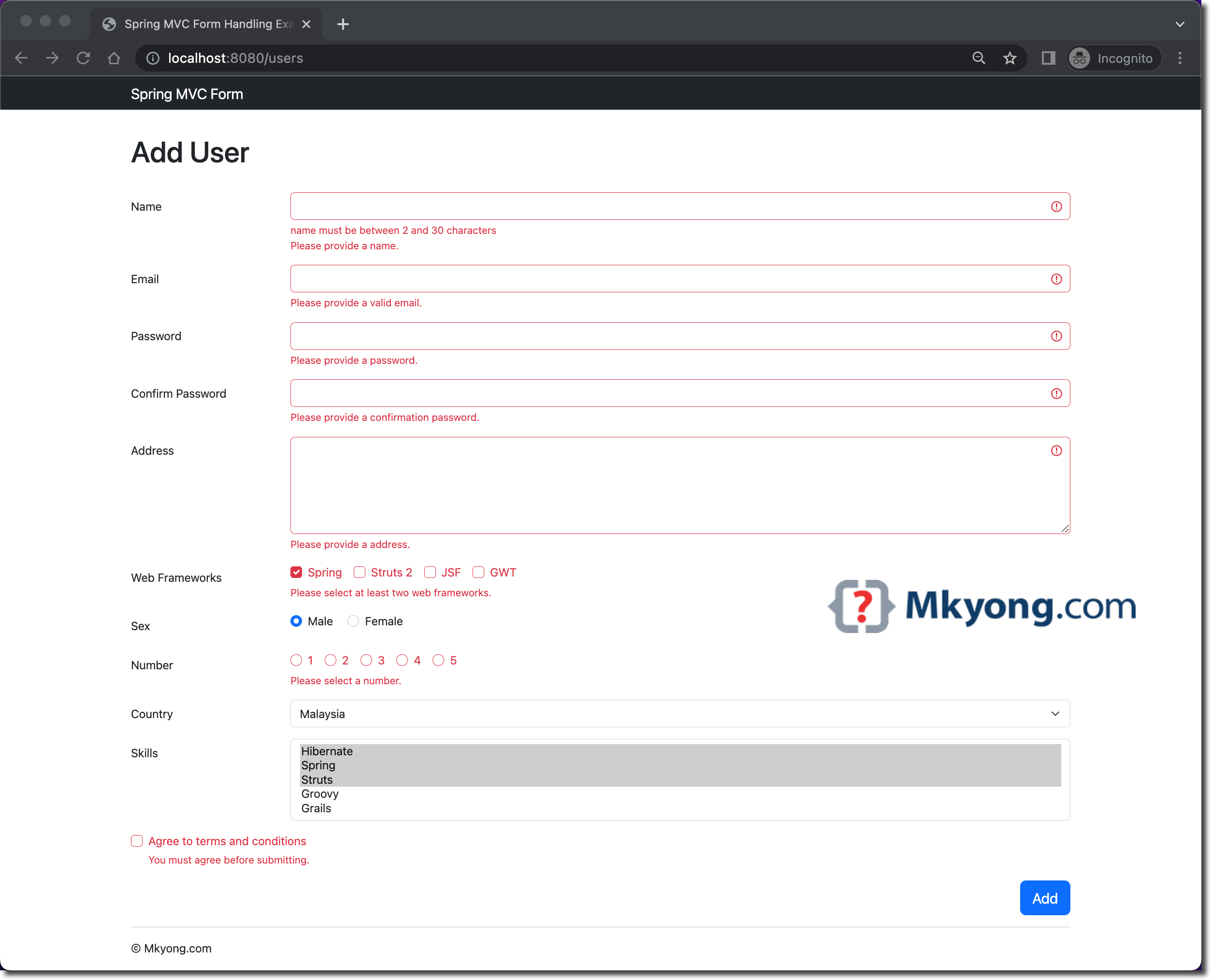
NotEmpty.userForm.name = Please provide a name.
NotEmpty.userForm.email = Please provide a valid email.
NotEmpty.userForm.address = Please provide a address.
NotEmpty.userForm.password = Please provide a password.
NotEmpty.userForm.confirmPassword = Please provide a confirmation password.
NotEmpty.userForm.country = Please select a country.
NotEmpty.userForm.sex = Please select your gender.
NotEmpty.userForm.number = Please select a number.
NotEmpty.userForm.acceptTOS = You must agree before submitting.
Valid.userForm.framework = Please select at least two web frameworks.
Valid.userForm.skill = Please select at least three skills.
Diff.userform.confirmPassword = Passwords do not match, please retype.
In Controller, we can use @InitBinder to register the above form validator.
  @Autowired
  private UserFormValidator formValidator;

  // register the form validator to this controller
  @InitBinder
  protected void initBinder(WebDataBinder binder) {
      // this will override the jsr303 validator
      //binder.setValidator(formValidator);

      // this support both spring validator and jsr303 validator
      binder.addValidators(formValidator);
  }
7. Spring Services and Responsitories
7.1 Spring @Service beans to handles the business logic.
package com.mkyong.user.service;

import com.mkyong.user.model.User;

import java.util.List;

public interface UserService {

  User findById(Integer id);

  List<User> findAll();

  void saveOrUpdate(User user);

  void delete(int id);

}
package com.mkyong.user.service;

import com.mkyong.user.dao.UserDao;
import com.mkyong.user.model.User;
import org.springframework.beans.factory.annotation.Autowired;
import org.springframework.stereotype.Service;

import java.util.List;

@Service("userService")
public class UserServiceImpl implements UserService {

  @Autowired
  private UserDao userDao;

  @Override
  public User findById(Integer id) {
      return userDao.findById(id);
  }

  @Override
  public List<User> findAll() {
      return userDao.findAll();
  }

  @Override
  public void saveOrUpdate(User user) {

      if (findById(user.getId()) == null) {
          userDao.save(user);
      } else {
          userDao.update(user);
      }

  }

  @Override
  public void delete(int id) {
      userDao.delete(id);
  }

}
7.2 Spring @Repository beans to handle the CRUD for the embedded database.
package com.mkyong.user.dao;

import com.mkyong.user.model.User;

import java.util.List;

public interface UserDao {

  User findById(Integer id);

  List<User> findAll();

  void save(User user);

  void update(User user);

  void delete(Integer id);

}
package com.mkyong.user.dao;

import com.mkyong.user.model.User;
import org.springframework.beans.factory.annotation.Autowired;
import org.springframework.dao.EmptyResultDataAccessException;
import org.springframework.jdbc.core.RowMapper;
import org.springframework.jdbc.core.namedparam.MapSqlParameterSource;
import org.springframework.jdbc.core.namedparam.NamedParameterJdbcTemplate;
import org.springframework.jdbc.core.namedparam.SqlParameterSource;
import org.springframework.jdbc.support.GeneratedKeyHolder;
import org.springframework.jdbc.support.KeyHolder;
import org.springframework.stereotype.Repository;
import org.springframework.util.StringUtils;

import java.sql.ResultSet;
import java.sql.SQLException;
import java.util.*;

@Repository
public class UserDaoImpl implements UserDao {

  NamedParameterJdbcTemplate namedParameterJdbcTemplate;

  @Autowired
  public void setNamedParameterJdbcTemplate(
          NamedParameterJdbcTemplate namedParameterJdbcTemplate) {
      this.namedParameterJdbcTemplate = namedParameterJdbcTemplate;
  }

  @Override
  public User findById(Integer id) {

      Map<String, Object> params = new HashMap<>();
      params.put("id", id);

      String sql = "SELECT * FROM users WHERE id=:id";

      User result = null;
      try {
          result = namedParameterJdbcTemplate
                  .queryForObject(sql, params, new UserMapper());
      } catch (EmptyResultDataAccessException e) {
          // do nothing, return null
      }

      return result;

  }

  @Override
  public List<User> findAll() {

      String sql = "SELECT * FROM users";
      List<User> result = namedParameterJdbcTemplate.query(sql, new UserMapper());
      return result;

  }

  @Override
  public void save(User user) {

      KeyHolder keyHolder = new GeneratedKeyHolder();

      String sql = "INSERT INTO USERS(NAME, EMAIL, ADDRESS, PASSWORD, NEWSLETTER, FRAMEWORK, SEX, NUMBER, COUNTRY, SKILL) "
              + "VALUES ( :name, :email, :address, :password, :newsletter, :framework, :sex, :number, :country, :skill)";

      namedParameterJdbcTemplate.update(sql, getSqlParameterByModel(user), keyHolder);
      user.setId(keyHolder.getKey().intValue());

  }

  @Override
  public void update(User user) {

      String sql = "UPDATE USERS SET NAME=:name, EMAIL=:email, ADDRESS=:address, "
              + "PASSWORD=:password, NEWSLETTER=:newsletter, FRAMEWORK=:framework, "
              + "SEX=:sex, NUMBER=:number, COUNTRY=:country, SKILL=:skill WHERE id=:id";

      namedParameterJdbcTemplate.update(sql, getSqlParameterByModel(user));

  }

  @Override
  public void delete(Integer id) {

      String sql = "DELETE FROM USERS WHERE id= :id";
      namedParameterJdbcTemplate.update(sql, new MapSqlParameterSource("id", id));

  }

  private SqlParameterSource getSqlParameterByModel(User user) {

      MapSqlParameterSource paramSource = new MapSqlParameterSource();
      paramSource.addValue("id", user.getId());
      paramSource.addValue("name", user.getName());
      paramSource.addValue("email", user.getEmail());
      paramSource.addValue("address", user.getAddress());
      paramSource.addValue("password", user.getPassword());
      paramSource.addValue("newsletter", user.isAcceptTOS());

      // join String
      paramSource.addValue("framework", convertListToDelimitedString(user.getFramework()));
      paramSource.addValue("sex", user.getSex());
      paramSource.addValue("number", user.getNumber());
      paramSource.addValue("country", user.getCountry());
      paramSource.addValue("skill", convertListToDelimitedString(user.getSkill()));

      return paramSource;
  }

  private static final class UserMapper implements RowMapper<User> {

      public User mapRow(ResultSet rs, int rowNum) throws SQLException {
          User user = new User();
          user.setId(rs.getInt("id"));
          user.setName(rs.getString("name"));
          user.setEmail(rs.getString("email"));
          user.setFramework(convertDelimitedStringToList(rs.getString("framework")));
          user.setAddress(rs.getString("address"));
          user.setCountry(rs.getString("country"));
          user.setAcceptTOS(rs.getBoolean("newsletter"));
          user.setNumber(rs.getInt("number"));
          user.setPassword(rs.getString("password"));
          user.setSex(rs.getString("sex"));
          user.setSkill(convertDelimitedStringToList(rs.getString("skill")));
          return user;
      }
  }

  private static List<String> convertDelimitedStringToList(String delimitedString) {

      List<String> result = new ArrayList<>();

      if (!StringUtils.isEmpty(delimitedString)) {
          result = Arrays.asList(StringUtils.delimitedListToStringArray(delimitedString, ","));
      }
      return result;

  }

  private String convertListToDelimitedString(List<String> list) {

      String result = "";
      if (list != null) {
          result = StringUtils.arrayToCommaDelimitedString(list.toArray());
      }
      return result;

  }

}
8. Spring Configuration
8.1 Below Spring config bean will configure a datasource and run the .sql file during the application start up.
package com.mkyong.config;

import org.springframework.beans.factory.annotation.Autowired;
import org.springframework.context.annotation.Bean;
import org.springframework.context.annotation.ComponentScan;
import org.springframework.context.annotation.Configuration;
import org.springframework.jdbc.core.namedparam.NamedParameterJdbcTemplate;
import org.springframework.jdbc.datasource.embedded.EmbeddedDatabase;
import org.springframework.jdbc.datasource.embedded.EmbeddedDatabaseBuilder;
import org.springframework.jdbc.datasource.embedded.EmbeddedDatabaseType;

import javax.sql.DataSource;

@Configuration
@ComponentScan({"com.mkyong.user"})
public class SpringCoreConfig {

  @Autowired
  DataSource dataSource;

  @Bean
  public NamedParameterJdbcTemplate getNamedParameterJdbcTemplate() {
      return new NamedParameterJdbcTemplate(dataSource);
  }

  @Bean
  public DataSource getDataSource() {
      EmbeddedDatabaseBuilder builder = new EmbeddedDatabaseBuilder();
      EmbeddedDatabase db = builder.setName("testdb")
              .setType(EmbeddedDatabaseType.HSQL)
              .addScript("db/create-db.sql")
              .addScript("db/insert-data.sql").build();
      return db;
  }

}
8.2 Below Spring Config bean will configure web resolver and message bundle and resource handler.
package com.mkyong.config;

import org.springframework.context.annotation.Bean;
import org.springframework.context.annotation.ComponentScan;
import org.springframework.context.annotation.Configuration;
import org.springframework.context.support.ResourceBundleMessageSource;
import org.springframework.web.servlet.config.annotation.EnableWebMvc;
import org.springframework.web.servlet.config.annotation.ResourceHandlerRegistry;
import org.springframework.web.servlet.config.annotation.WebMvcConfigurer;
import org.springframework.web.servlet.view.InternalResourceViewResolver;
import org.springframework.web.servlet.view.JstlView;

@EnableWebMvc
@Configuration
@ComponentScan({"com.mkyong.web", "com.mkyong.user"})
public class SpringWebConfig implements WebMvcConfigurer {

  @Override
  public void addResourceHandlers(ResourceHandlerRegistry registry) {
      registry.addResourceHandler("/resources/**").addResourceLocations("/assets/");
      registry.addResourceHandler("/webjars/**").addResourceLocations("/webjars/");
  }

  @Bean
  public InternalResourceViewResolver viewResolver() {
      InternalResourceViewResolver viewResolver = new InternalResourceViewResolver();
      viewResolver.setViewClass(JstlView.class);
      viewResolver.setPrefix("/WEB-INF/views/jsp/");
      viewResolver.setSuffix(".jsp");
      return viewResolver;
  }

  @Bean
  public ResourceBundleMessageSource messageSource() {
      ResourceBundleMessageSource rb = new ResourceBundleMessageSource();
      rb.setBasenames(new String[] { "messages/messages", "messages/validation" });
      return rb;
  }

}
9. Spring DispatcherServlet
We can extend AbstractAnnotationConfigDispatcherServletInitializer to register the DispatcherServlet so that the Servlet container knows where to find the above Spring configuration SpringWebConfig to load and start the Spring Web MVC application.
P.S This MyServletInitializer will be auto-detected by the Servlet container (e.g., Jetty or Tomcat).
package com.mkyong;

import com.mkyong.config.SpringCoreConfig;
import com.mkyong.config.SpringWebConfig;
import org.springframework.web.servlet.support.AbstractAnnotationConfigDispatcherServletInitializer;

public class MyServletInitializer
        extends AbstractAnnotationConfigDispatcherServletInitializer {

    // services and data sources
    @Override
    protected Class<?>[] getRootConfigClasses() {
        return new Class[]{SpringCoreConfig.class};
    }

    // controller, view resolver, handler mapping
    @Override
    protected Class<?>[] getServletConfigClasses() {
        return new Class[]{SpringWebConfig.class};
    }

    @Override
    protected String[] getServletMappings() {
        return new String[]{"/"};
    }
}
10. Database SQL Scripts
Below are some SQL scripts to create tables and insert some dummy data during the application start up.
CREATE TABLE users (
  id INTEGER GENERATED BY DEFAULT AS IDENTITY(START WITH 100, INCREMENT BY 1) PRIMARY KEY,
  name VARCHAR(30),
  email  VARCHAR(50),
  address VARCHAR(255),
  password VARCHAR(20),
  newsletter BOOLEAN,
  framework VARCHAR(500),
  sex VARCHAR(1),
  NUMBER INTEGER,
  COUNTRY VARCHAR(10),
  SKILL VARCHAR(500)
);
INSERT INTO users (name, email, framework) VALUES ('mkyong', '[email protected]', 'Spring MVC, GWT');
INSERT INTO users (name, email, framework) VALUES ('alex', '[email protected]', 'Spring MVC, GWT');
INSERT INTO users (name, email, framework) VALUES ('joel', '[email protected]', 'Spring MVC, GWT');
11. JSP Views
11.1 This JSP page is for add and update users’ data.
<%@ page session="false"%>
<%@ taglib prefix="spring" uri="http://www.springframework.org/tags"%>
<%@ taglib prefix="c" uri="http://java.sun.com/jsp/jstl/core"%>
<%@ taglib prefix="form" uri="http://www.springframework.org/tags/form"%>
<%@ taglib prefix="fmt" uri="http://java.sun.com/jsp/jstl/fmt"%>

<!DOCTYPE html>
<html lang="en">

<jsp:include page="fragments/header.jsp" />

<div class="container">

	<c:choose>
		<c:when test="${userForm['new']}">
			<h1>Add User</h1>
		</c:when>
		<c:otherwise>
			<h1>Update User</h1>
		</c:otherwise>
	</c:choose>

	<form:form method="post" modelAttribute="userForm" action="/users">

		<form:hidden path="id" />

        <spring:bind path="name">
            <div class="mb-3 row">
                <label for="name" class="col-sm-2 col-form-label">Name</label>
                <div class="col-sm-10">
                    <form:input path="name" type="text" id="name"
                        class="form-control ${status.error ? 'is-invalid' : ''}"
                        aria-describedby="validationNameFeedback" />
                    <form:errors path="name" id="validationNameFeedback" class="invalid-feedback" />
                </div>
            </div>
        </spring:bind>

        <spring:bind path="email">
            <div class="mb-3 row">
                <label for="email" class="col-sm-2 col-form-label">Email</label>
                <div class="col-sm-10">
                    <form:input path="email" type="text" id="email"
                        class="form-control ${status.error ? 'is-invalid' : ''}"
                        aria-describedby="validationEmailFeedback" />
                    <form:errors path="email" id="validationEmailFeedback" class="invalid-feedback" />
                </div>
            </div>
        </spring:bind>

        <spring:bind path="password">
            <div class="mb-3 row">
                <label for="password" class="col-sm-2 col-form-label">Password</label>
                <div class="col-sm-10">
                    <form:password path="password" id="password"
                        class="form-control ${status.error ? 'is-invalid' : ''}"
                        aria-describedby="validationPasswordFeedback" />
                    <form:errors path="password" id="validationPasswordFeedback" class="invalid-feedback" />
                </div>
            </div>
        </spring:bind>

        <spring:bind path="confirmPassword">
            <div class="mb-3 row">
                <label for="confirmPassword" class="col-sm-2 col-form-label">Confirm Password</label>
                <div class="col-sm-10">
                    <form:password path="confirmPassword" id="confirmPassword"
                        class="form-control ${status.error ? 'is-invalid' : ''}"
                        aria-describedby="validationConfirmPasswordFeedback" />
                    <form:errors path="confirmPassword" id="validationConfirmPasswordFeedback" class="invalid-feedback" />
                </div>
            </div>
        </spring:bind>

        <spring:bind path="address">
            <div class="mb-3 row">
                <label for="address" class="col-sm-2 col-form-label">Address</label>
                <div class="col-sm-10">
                    <form:textarea path="address" rows="5" id="address"
                        class="form-control ${status.error ? 'is-invalid' : ''}"
                        aria-describedby="validationAddressFeedback" />
                    <form:errors path="address" id="validationAddressFeedback" class="invalid-feedback" />
                </div>
            </div>
        </spring:bind>

        <spring:bind path="framework">
            <div class="mb-3 row">
                <label for="framework" class="col-sm-2 col-form-label">Web Frameworks</label>
                <div class="col-sm-10">
                    <form:checkboxes path="framework" class="form-check-input ${status.error ? 'is-invalid' : ''}"
                        items="${frameworkList}" element="div class='form-check form-check-inline'"
                        aria-describedby="validationFrameworkFeedback" />
                    <form:errors path="framework" id="validationFrameworkFeedback"
                        class="invalid-feedback-force-display" element="div" />
                </div>
			</div>
		</spring:bind>

		<spring:bind path="sex">
		    <div class="mb-3 row">
                <label for="sex" class="col-sm-2 col-form-label">Sex</label>
                <div class="col-sm-10">
                    <div class="form-check form-check-inline">
                      <form:radiobutton path="sex" value="M" id="sexM"
                        class="form-check-input ${status.error ? 'is-invalid' : ''}"
                        aria-describedby="validationSexFeedback" />
                      <label class="form-check-label" for="sexM">Male</label>
                    </div>
                    <div class="form-check form-check-inline">
                      <form:radiobutton path="sex" value="F" id="sexF"
                        class="form-check-input ${status.error ? 'is-invalid' : ''}"
                        aria-describedby="validationSexFeedback" />
                      <label class="form-check-label" for="sexF">Female</label>
                    </div>
                    <form:errors path="sex" id="validationSexFeedback"
                        class="invalid-feedback-force-display" element="div" />
                </div>
            </div>
		</spring:bind>

        <spring:bind path="number">
		  <div class="mb-3 row">
			<label for="number" class="col-sm-2 col-form-label">Number</label>
			<div class="col-sm-10">
				<form:radiobuttons path="number" items="${numberList}"
				      class="form-check-input ${status.error ? 'is-invalid' : ''}"
                      element="div class='form-check form-check-inline'"
                      aria-describedby="validationNumberFeedback" />
				<form:errors path="number" id="validationNumberFeedback"
				    class="invalid-feedback-force-display" element="div" />
			</div>
		  </div>
		</spring:bind>

        <spring:bind path="country">
		  <div class="mb-3 row">
			<label for="country" class="col-sm-2 col-form-label">Country</label>
			<div class="col-sm-10">
				<form:select path="country" id="country" class="form-select ${status.error ? 'is-invalid' : ''}"
				    aria-describedby="validationCountryFeedback" >
					<form:option value="NONE" label="-- Select --" />
					<form:options items="${countryList}" />
				</form:select>
				<form:errors path="country" id="validationCountryFeedback" class="invalid-feedback" />
			</div>
		  </div>
		</spring:bind>

        <spring:bind path="skill">
		  <div class="mb-3 row">
			<label for="skill" class="col-sm-2 col-form-label">Skills</label>
			<div class="col-sm-10">
				<form:select path="skill" items="${javaSkillList}" multiple="true" size="5"
				    aria-describedby="validationSkillFeedback"
				    class="form-select ${status.error ? 'is-invalid' : ''}" />
				<form:errors path="skill" id="validationSkillFeedback" class="invalid-feedback" />
			</div>
		  </div>
		</spring:bind>

        <spring:bind path="acceptTOS">
            <div class="mb-3 row">
                <div class="col-12">
                    <div class="form-check">
                        <form:checkbox path="acceptTOS" id="acceptTOS"
                            class="form-check-input ${status.error ? 'is-invalid' : ''}"
                            aria-describedby="validationAcceptTosFeedback" />
                        <label for="acceptTOS" class="form-check-label">Agree to terms and conditions</label>
                        <form:errors path="acceptTOS" id="validationAcceptTosFeedback" class="invalid-feedback" />
                    </div>
                </div>
            </div>
        </spring:bind>

		<div class="d-grid gap-2 d-md-flex justify-content-md-end">
			<c:choose>
			  <c:when test="${userForm['new']}">
			     <button type="submit" class="btn btn-primary btn-lg">Add</button>
			  </c:when>
			  <c:otherwise>
			     <button type="submit" class="btn btn-primary btn-lg">Update</button>
			  </c:otherwise>
			</c:choose>
		</div>

	</form:form>

</div>

<jsp:include page="fragments/footer.jsp" />

</body>
</html>
11.2 This JSP page is a listing page that display all the users.
<%@ page session="false"%>
<%@ taglib prefix="spring" uri="http://www.springframework.org/tags"%>
<%@ taglib prefix="c" uri="http://java.sun.com/jsp/jstl/core"%>
<%@ taglib prefix="fmt" uri="http://java.sun.com/jsp/jstl/fmt"%>

<!DOCTYPE html>
<html lang="en">

<jsp:include page="fragments/header.jsp" />

<body>

	<div class="container">

        <c:if test="${not empty msg}">
            <div class="alert alert-${alert} alert-dismissible fade show" role="alert">
                ${msg}
                <button type="button" class="btn-close" data-bs-dismiss="alert" aria-label="Close"></button>
            </div>
        </c:if>

		<h1>All Users</h1>

		<table class="table table-striped">
			<thead>
				<tr>
					<th>#ID</th>
					<th>Name</th>
					<th>Email</th>
					<th>framework</th>
					<th>Action</th>
				</tr>
			</thead>

			<c:forEach var="user" items="${users}">
			    <tr>
				<td>${user.id}</td>
				<td>${user.name}</td>
				<td>${user.email}</td>
				<td>
          <c:forEach var="framework" items="${user.framework}" varStatus="loop">
					    ${framework}
    				    <c:if test="${not loop.last}">,</c:if>
				    </c:forEach>
        </td>
				<td>
				  <spring:url value="/users/${user.id}" var="userUrl" />
				  <spring:url value="/users/${user.id}/delete" var="deleteUrl" />
				  <spring:url value="/users/${user.id}/update" var="updateUrl" />
				  <button class="btn btn-info" onclick="location.href='${userUrl}'">Query</button>
				  <button class="btn btn-primary" onclick="location.href='${updateUrl}'">Update</button>
				  <button class="btn btn-danger" onclick="this.disabled=true;post('${deleteUrl}')">Delete</button>
                </td>
			    </tr>
			</c:forEach>
		</table>

        <div class="d-grid gap-2 d-md-flex justify-content-md-end">
            <a class="btn btn-primary" href="/users/add" role="button">Add User</a>
		</div>

	</div>

	<jsp:include page="fragments/footer.jsp" />

</body>
</html>
11.3 This JSP page will display the user details.
<%@ page session="false"%>
<%@ taglib prefix="spring" uri="http://www.springframework.org/tags"%>
<%@ taglib prefix="c" uri="http://java.sun.com/jsp/jstl/core"%>
<%@ taglib prefix="form" uri="http://www.springframework.org/tags/form"%>
<%@ taglib prefix="fmt" uri="http://java.sun.com/jsp/jstl/fmt"%>

<!DOCTYPE html>
<html lang="en">

<jsp:include page="fragments/header.jsp" />

<div class="container">

	<c:if test="${not empty msg}">
		<div class="alert alert-${alert} alert-dismissible fade show" role="alert">
			${msg}
			<button type="button" class="btn-close" data-bs-dismiss="alert" aria-label="Close"></button>
		</div>
	</c:if>

	<h1>User Detail</h1>

    <div class="row">
        <label for="staticID" class="col-sm-2 col-form-label">ID</label>
        <div class="col-sm-10">
          <input type="text" readonly class="form-control-plaintext" id="staticID" value="${user.id}">
        </div>
    </div>

    <div class="row">
        <label for="staticName" class="col-sm-2 col-form-label">Name</label>
        <div class="col-sm-10">
          <input type="text" readonly class="form-control-plaintext" id="staticName" value="${user.name}">
        </div>
    </div>

    <div class="row">
        <label for="staticEmail" class="col-sm-2 col-form-label">Email</label>
        <div class="col-sm-10">
          <input type="text" readonly class="form-control-plaintext" id="staticName" value="${user.email}">
        </div>
    </div>

    <div class="row">
        <label for="staticAddress" class="col-sm-2 col-form-label">Address</label>
        <div class="col-sm-10">
          <input type="text" readonly class="form-control-plaintext" id="staticAddress" value="${user.address}">
        </div>
    </div>

    <div class="row">
        <label for="staticFramework" class="col-sm-2 col-form-label">Web Frameworks</label>
        <div class="col-sm-10">
          <input type="text" readonly class="form-control-plaintext" id="staticFramework" value="${user.framework}">
        </div>
    </div>

    <div class="row">
        <label for="staticSex" class="col-sm-2 col-form-label">Sex</label>
        <div class="col-sm-10">
          <input type="text" readonly class="form-control-plaintext" id="staticSex" value="${user.sex}">
        </div>
    </div>

    <div class="row">
        <label for="staticNumber" class="col-sm-2 col-form-label">Number</label>
        <div class="col-sm-10">
          <input type="text" readonly class="form-control-plaintext" id="staticNumber" value="${user.number}">
        </div>
    </div>

    <div class="row">
        <label for="staticCountry" class="col-sm-2 col-form-label">Country</label>
        <div class="col-sm-10">
          <input type="text" readonly class="form-control-plaintext" id="staticCountry" value="${user.country}">
        </div>
    </div>

    <div class="row">
        <label for="staticSkill" class="col-sm-2 col-form-label">Skill</label>
        <div class="col-sm-10">
          <input type="text" readonly class="form-control-plaintext" id="staticSkill" value="${user.skill}">
        </div>
    </div>

    <div class="d-grid gap-2 d-md-flex justify-content-md-end">
        <a class="btn btn-primary" href="/" role="button">Back To Home</a>
    </div>

</div>

<jsp:include page="fragments/footer.jsp" />

</body>
</html>
11.4 The JSP’s header and footer fragments.
<%@ taglib prefix="spring" uri="http://www.springframework.org/tags"%>

<head>
<title>Spring MVC Form Handling Example</title>

<spring:url value="/resources/core/css/main.css" var="coreCss" />
<spring:url value="/webjars/bootstrap/5.2.0/css/bootstrap.min.css" var="bootstrapCss" />
<link href="${bootstrapCss}" rel="stylesheet" />
<link href="${coreCss}" rel="stylesheet" />
</head>

<spring:url value="/" var="urlHome" />

<nav class="navbar navbar-expand-md navbar-dark bg-dark fixed-top">

    <div class="container">
		<div class="navbar-header">
			<a class="navbar-brand" href="${urlHome}">Spring MVC Form</a>
		</div>
	</div>

</nav>
<%@ taglib prefix="spring" uri="http://www.springframework.org/tags" %>
<div class="container">
<hr>
<footer>
<p>© Mkyong.com</p>
</footer>
</div>
<script src="https://ajax.googleapis.com/ajax/libs/jquery/1.11.2/jquery.min.js"></script>
<spring:url value="/resources/core/js/main.js" var="coreJs" />
<spring:url value="/webjars/bootstrap/5.2.0/js/bootstrap.min.js" var="bootstrapJs" />
<script src="${coreJs}"></script>
<script src="${bootstrapJs}"></script>
12. Demo
Go terminal, project folder, and run mvn jetty:run.
  mvn jetty:run

...
[INFO] Started ServerConnector@5b3755f4{HTTP/1.1, (http/1.1)}{0.0.0.0:8080}
[INFO] Started @3134ms
[INFO] Started Jetty Server
The Spring Web MVC application is default deployed to the embedded Jetty container at port 8080.
http://localhost:8080/
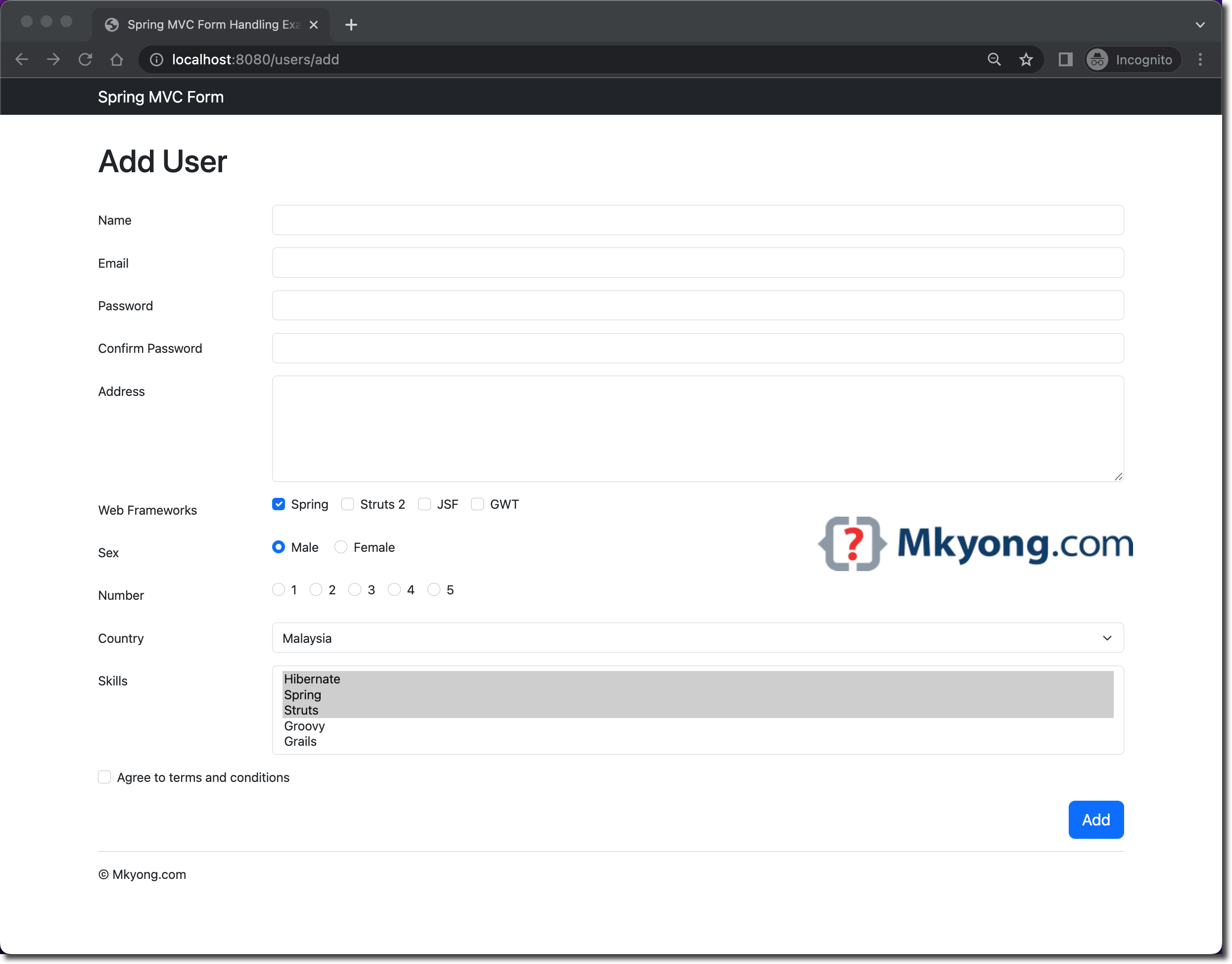
Add a user
User form validation
13. Download Source Code
$ git clone https://github.com/mkyong/spring-mvc/
$ cd spring-mvc-form-handling
$ mvn clean jetty:run
visit http://localhost:8080/

No comments yet. Be the first to leave a comment!