Spring uses MultipartResolver interface to handle the file uploads in web application, two of the implementation :
StandardServletMultipartResolver– Servlet 3.0 multipart request parsing.CommonsMultipartResolver– Classic commons-fileupload.jar
Tools used in this article :
- Spring 4.3.5.RELEASE
- Maven 3
- Tomcat 7 or 8, Jetty 9 or any Servlet 3.0 container
In a nutshell, this article shows you how to handle file upload in Spring MVC web application, and also how to handle the popular max exceeded file size exception.
This article will focus on the Servlet 3.0 multipart request parsing.
P.S Article is updated from Spring 2.5.x to Spring 4.3.x
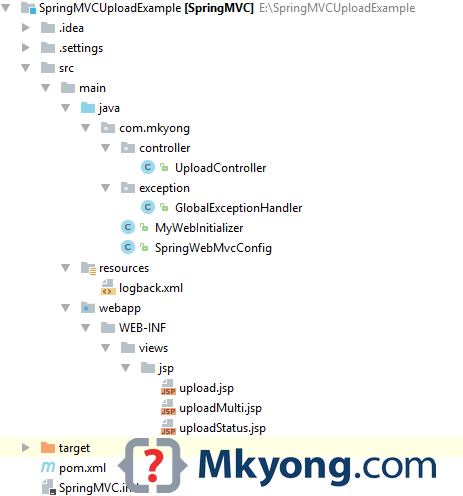
1. Project Structure
A standard Maven project structure.
2. Project Dependency
Standard Spring dependencies, no need extra library for file upload.
<project xmlns="http://maven.apache.org/POM/4.0.0"
         xmlns:xsi="http://www.w3.org/2001/XMLSchema-instance"
         xsi:schemaLocation="http://maven.apache.org/POM/4.0.0
  http://maven.apache.org/maven-v4_0_0.xsd">
    <modelVersion>4.0.0</modelVersion>
    <groupId>com.mkyong</groupId>
    <artifactId>spring-mvc-file-upload</artifactId>
    <packaging>war</packaging>
    <version>1.0-SNAPSHOT</version>
    <name>Spring MVC file upload</name>

    <properties>
        <jdk.version>1.8</jdk.version>
        <spring.version>4.3.5.RELEASE</spring.version>
        <jstl.version>1.2</jstl.version>
        <servletapi.version>3.1.0</servletapi.version>
        <logback.version>1.1.3</logback.version>
        <jcl.slf4j.version>1.7.12</jcl.slf4j.version>
    </properties>

    <dependencies>

        <dependency>
            <groupId>org.springframework</groupId>
            <artifactId>spring-webmvc</artifactId>
            <version>${spring.version}</version>
            <exclusions>
                <exclusion>
                    <groupId>commons-logging</groupId>
                    <artifactId>commons-logging</artifactId>
                </exclusion>
            </exclusions>
        </dependency>

        <dependency>
            <groupId>javax.servlet</groupId>
            <artifactId>jstl</artifactId>
            <version>${jstl.version}</version>
        </dependency>

        <!-- compile only, deployed container will provide this -->
        <dependency>
            <groupId>javax.servlet</groupId>
            <artifactId>javax.servlet-api</artifactId>
            <version>${servletapi.version}</version>
            <scope>provided</scope>
        </dependency>

		<!-- Logging -->
        <dependency>
            <groupId>org.slf4j</groupId>
            <artifactId>jcl-over-slf4j</artifactId>
            <version>${jcl.slf4j.version}</version>
        </dependency>

        <dependency>
            <groupId>ch.qos.logback</groupId>
            <artifactId>logback-classic</artifactId>
            <version>${logback.version}</version>
        </dependency>

    </dependencies>

    <build>
        <plugins>

            <plugin>
                <groupId>org.apache.maven.plugins</groupId>
                <artifactId>maven-compiler-plugin</artifactId>
                <version>3.3</version>
                <configuration>
                    <source>${jdk.version}</source>
                    <target>${jdk.version}</target>
                </configuration>
            </plugin>

            <!-- embedded Jetty server, for testing -->
            <plugin>
                <groupId>org.eclipse.jetty</groupId>
                <artifactId>jetty-maven-plugin</artifactId>
                <version>9.2.11.v20150529</version>
                <configuration>
                    <scanIntervalSeconds>10</scanIntervalSeconds>
                    <webApp>
                        <contextPath>/spring4upload</contextPath>
                    </webApp>
                </configuration>
            </plugin>

            <!-- configure Eclipse workspace -->
            <plugin>
                <groupId>org.apache.maven.plugins</groupId>
                <artifactId>maven-eclipse-plugin</artifactId>
                <version>2.9</version>
                <configuration>
                    <downloadSources>true</downloadSources>
                    <downloadJavadocs>true</downloadJavadocs>
                    <wtpversion>2.0</wtpversion>
                    <wtpContextName>/spring4upload</wtpContextName>
                </configuration>
            </plugin>

        </plugins>
    </build>

</project>
3. MultipartConfigElement
Create a Servlet initializer class and register a javax.servlet.MultipartConfigElement
package com.mkyong;

import org.springframework.web.servlet.support.AbstractAnnotationConfigDispatcherServletInitializer;

import javax.servlet.MultipartConfigElement;
import javax.servlet.ServletRegistration;
import java.io.File;

public class MyWebInitializer extends
        AbstractAnnotationConfigDispatcherServletInitializer {

    private int maxUploadSizeInMb = 5 * 1024 * 1024; // 5 MB

    @Override
    protected Class<?>[] getServletConfigClasses() {
        return new Class[]{SpringWebMvcConfig.class};
    }

    @Override
    protected String[] getServletMappings() {
        return new String[]{"/"};
    }

    @Override
    protected Class<?>[] getRootConfigClasses() {
        return null;
    }

    @Override
    protected void customizeRegistration(ServletRegistration.Dynamic registration) {

        // upload temp file will put here
        File uploadDirectory = new File(System.getProperty("java.io.tmpdir"));

        // register a MultipartConfigElement
        MultipartConfigElement multipartConfigElement =
                new MultipartConfigElement(uploadDirectory.getAbsolutePath(),
                        maxUploadSizeInMb, maxUploadSizeInMb * 2, maxUploadSizeInMb / 2);

        registration.setMultipartConfig(multipartConfigElement);

    }

}
Review the MultipartConfigElement method signature.
public MultipartConfigElement(java.lang.String location,
                              long maxFileSize,
                              long maxRequestSize,
                              int fileSizeThreshold)
4. Spring Configuration
Register a multipartResolver bean, and returns StandardServletMultipartResolver
package com.mkyong;

import org.springframework.context.annotation.Bean;
import org.springframework.context.annotation.ComponentScan;
import org.springframework.context.annotation.Configuration;
import org.springframework.web.multipart.MultipartResolver;
import org.springframework.web.multipart.support.StandardServletMultipartResolver;
import org.springframework.web.servlet.config.annotation.EnableWebMvc;
import org.springframework.web.servlet.config.annotation.WebMvcConfigurerAdapter;
import org.springframework.web.servlet.view.InternalResourceViewResolver;
import org.springframework.web.servlet.view.JstlView;

@EnableWebMvc
@Configuration
@ComponentScan({"com.mkyong"})
public class SpringWebMvcConfig extends WebMvcConfigurerAdapter {

	// Bean name must be "multipartResolver", by default Spring uses method name as bean name.
    @Bean
    public MultipartResolver multipartResolver() {
        return new StandardServletMultipartResolver();
    }

	/*
	// if the method name is different, you must define the bean name manually like this :
	@Bean(name = "multipartResolver")
    public MultipartResolver createMultipartResolver() {
        return new StandardServletMultipartResolver();
    }*/

    @Bean
    public InternalResourceViewResolver viewResolver() {
        InternalResourceViewResolver viewResolver = new InternalResourceViewResolver();
        viewResolver.setViewClass(JstlView.class);
        viewResolver.setPrefix("/WEB-INF/views/jsp/");
        viewResolver.setSuffix(".jsp");
        return viewResolver;
    }

}
At this stage, the Servlet 3.0 multipart request parsing is configured properly, and you can start uploading file.
4. Single File Upload
4.1 Normal HTML form tag.
<html>

<body>
<h1>Spring MVC file upload example</h1>

<form method="POST" action="${pageContext.request.contextPath}/upload" enctype="multipart/form-data">
    <input type="file" name="file" /><br/>
    <input type="submit" value="Submit" />
</form>

</body>
</html>
4.2 Another page to show the upload status.
<html>
<body>
<h1>Upload Status</h1>
<h2>Message : ${message}</h2>
</body>
</html>
4.3 In the Controller, map the uploaded file to MultipartFile
package com.mkyong.controller;

import org.springframework.stereotype.Controller;
import org.springframework.util.StringUtils;
import org.springframework.web.bind.annotation.GetMapping;
import org.springframework.web.bind.annotation.PostMapping;
import org.springframework.web.bind.annotation.RequestParam;
import org.springframework.web.multipart.MultipartFile;
import org.springframework.web.servlet.mvc.support.RedirectAttributes;

import java.io.IOException;
import java.nio.file.Files;
import java.nio.file.Path;
import java.nio.file.Paths;
import java.util.StringJoiner;

@Controller
public class UploadController {

	//Save the uploaded file to this folder
    private static String UPLOADED_FOLDER = "F://temp//";

    @GetMapping("/")
    public String index() {
        return "upload";
    }

    //@RequestMapping(value = "/upload", method = RequestMethod.POST)
    @PostMapping("/upload") // //new annotation since 4.3
    public String singleFileUpload(@RequestParam("file") MultipartFile file,
                                   RedirectAttributes redirectAttributes) {

        if (file.isEmpty()) {
            redirectAttributes.addFlashAttribute("message", "Please select a file to upload");
            return "redirect:uploadStatus";
        }

        try {

            // Get the file and save it somewhere
            byte[] bytes = file.getBytes();
            Path path = Paths.get(UPLOADED_FOLDER + file.getOriginalFilename());
            Files.write(path, bytes);

            redirectAttributes.addFlashAttribute("message",
                        "You successfully uploaded '" + file.getOriginalFilename() + "'");

        } catch (IOException e) {
            e.printStackTrace();
        }

        return "redirect:/uploadStatus";
    }

    @GetMapping("/uploadStatus")
    public String uploadStatus() {
        return "uploadStatus";
    }

}
5. Multiple File Upload
5.1 Just add more file input.
<html>

<body>
<h1>Spring MVC multi files upload example</h1>

<form method="POST" action="${pageContext.request.contextPath}/uploadMulti" enctype="multipart/form-data">
    <input type="file" name="files" /><br/>
    <input type="file" name="files" /><br/>
    <input type="file" name="files" /><br/>
    <input type="submit" value="Submit" />
</form>

</body>
</html>
5.2 In Spring Controller, maps the multiple uploaded files to MultipartFile []
    //...

    @PostMapping("/uploadMulti")
    public String multiFileUpload(@RequestParam("files") MultipartFile[] files,
                                  RedirectAttributes redirectAttributes) {

        StringJoiner sj = new StringJoiner(" , ");

        for (MultipartFile file : files) {

            if (file.isEmpty()) {
                continue; //next pls
            }

            try {

                byte[] bytes = file.getBytes();
                Path path = Paths.get(UPLOADED_FOLDER + file.getOriginalFilename());
                Files.write(path, bytes);

                sj.add(file.getOriginalFilename());

            } catch (IOException e) {
                e.printStackTrace();
            }

        }

        String uploadedFileName = sj.toString();
        if (StringUtils.isEmpty(uploadedFileName)) {
            redirectAttributes.addFlashAttribute("message",
                        "Please select a file to upload");
        } else {
            redirectAttributes.addFlashAttribute("message",
                        "You successfully uploaded '" + uploadedFileName + "'");
        }

        return "redirect:/uploadStatus";

    }

    @GetMapping("/uploadMultiPage")
    public String uploadMultiPage() {
        return "uploadMulti";
    }
    //...
6. Handle Max upload size exceeded
To handle the popular max upload size exceeded exception, declares a @ControllerAdvice and catch the MultipartException
package com.mkyong.exception;

import org.springframework.web.bind.annotation.ControllerAdvice;
import org.springframework.web.bind.annotation.ExceptionHandler;
import org.springframework.web.multipart.MultipartException;
import org.springframework.web.servlet.mvc.support.RedirectAttributes;

@ControllerAdvice
public class GlobalExceptionHandler {

    @ExceptionHandler(MultipartException.class)
    public String handleError1(MultipartException e, RedirectAttributes redirectAttributes) {

        redirectAttributes.addFlashAttribute("message", e.getCause().getMessage());
        return "redirect:/uploadStatus";

    }

	// For commons-fileupload solution
    /*@ExceptionHandler(MaxUploadSizeExceededException.class)
    public String handleError2(MaxUploadSizeExceededException e, RedirectAttributes redirectAttributes) {

        redirectAttributes.addFlashAttribute("message", e.getCause().getMessage());
        return "redirect:/uploadStatus";

    }*/
}
If you deployed to Tomcat, and unable to catch the file size exceeded exception, this may cause by the Tomcat
maxSwallowSize setting. Read this – Spring file upload and connection reset issue
7. DEMO
Get the source code below and test with the embedded Jetty server mvn jetty:run.
7.1 Review the pom.xml above, the embedded Jetty will deploy the web application on this /spring4upload context.
project $ mvn jetty:run
//...
[INFO] Started o.e.j.m.p.JettyWebAppContext@341672e{/spring4upload,
	file:/SpringMVCUploadExample/src/main/webapp/,AVAILABLE}{file:/SpringMVCUploadExample/src/main/webapp/}
[WARNING] !RequestLog
[INFO] Started ServerConnector@3ba1308d{HTTP/1.1}{0.0.0.0:8080}
[INFO] Started @3743ms
[INFO] Started Jetty Server
[INFO] Starting scanner at interval of 10 seconds.
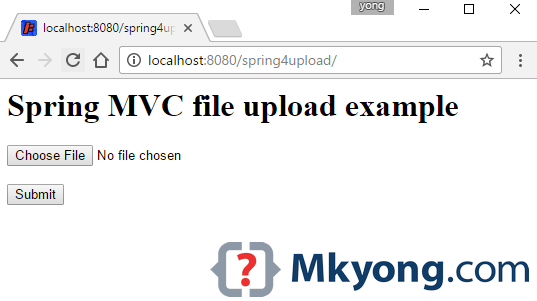
7.2 Access http://localhost:8080/spring4upload
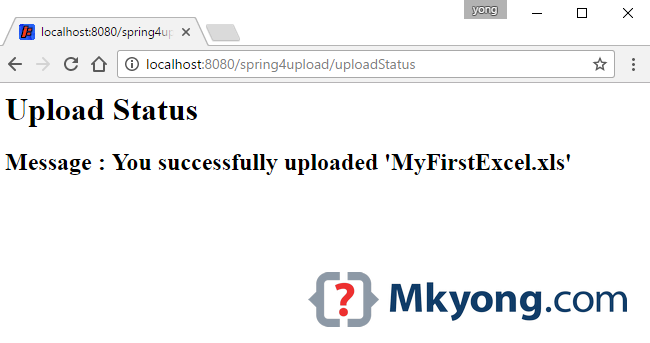
7.3 Select a file ‘MyFirstExcel.xml‘ and upload it.
7.4 Access http://localhost:8080/spring4upload/uploadMultiPage
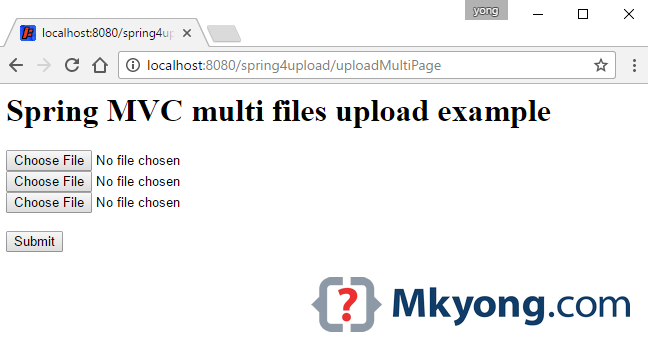
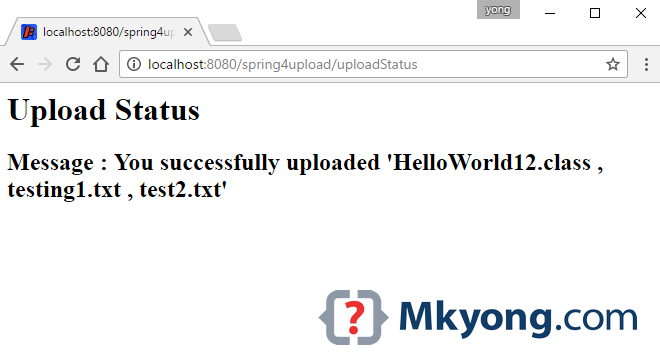
7.5 Select few files and upload it.
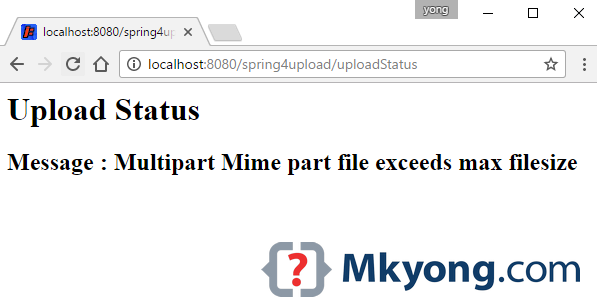
7.6 Select a file larger than 5mb, you will visit this page.
8. Download Source Code
P.S For Spring 2.5.x, try this Spring.2.5-file-upload-example.zip (10KB)

Hi, do you have a solution if we want to compress the image (reduce weight)
try imagemagick
tanx mkyong
Hi,
How to restrict upload based on file content type like I will allow only png and jpeg?
Thanks in advance.
Excellent tutorial.
Is there any way to restrict user to upload only files with some specific extensions?
I love this site ,help me a lot.
simple but effective
you are my god
Gran artículo, gracias por la explicación.
Facing Access denied issue
You failed to upload => E:Apacheapache-tomcat-7.0.57-windows-x86apache-tomcat-7.0.57tmpFiles (Access is denied)
Gave full permission using below command
cacls E:Apacheapache-tomcat-7.0.57-windows-x86apache-tomcat-7.0.57tmpFiles /t /e /g Everyone:f
processed dir: E:Apacheapache-tomcat-7.0.57-windows-x86apache-tomcat-7.0.57tmpFiles
and also given full permission form ui .
Still facing same issue
image upload module sir
hi,thanks for code but how can you validate above code in java script
Thank you! It was good advice for me!
Hello sir,
i want to create folder using Id. This is my task. Plz help me
Hi,thanks for your post, it was really helpfull. I have a question, where can I place the files, some permanent folder intead of a temporal. Thanks
Hello, I make all by you tutorial, but when a run jetty and trying open – http://localhost:8080/spring4upload/
I have:
HTTP ERROR 404
Problem accessing /spring4upload/WEB-INF/view/jsp/upload.jsp. Reason:
/spring4upload/WEB-INF/view/jsp/upload.jsp
What I doing wrong?
how i Upload multiple file with single submit button????
how i Upload multiple file with single browse button.?
Article is updated with multi file upload.
please help need ???
Awesome post sir very clean explanation
Hi,
I am getting the 400 – Bad request when uploading the file more than 2Mb in size. I am using Spring with web service.
Can you please help me out.
Thanks,
Have you set the max upload size in your dispatcher servlet xml? You can read more here: http://javapointers.com/tutorial/how-to-upload-file-in-spring-mvc/
Hey, thanks for nice code. I got it working, however i could not see where will exactly this uploaded file will be ? kindly let me know.. thanks again
I am getting Null pointer exception while uploading file.
/uploadFile
java.lang.NullPointerException
at java.io.File.(File.java:312)
at org.apache.commons.fileupload.disk.DiskFileItem.getTempFile(DiskFileItem.java:582)
at org.apache.commons.fileupload.disk.DiskFileItem.getOutputStream(DiskFileItem.java:528)
at org.apache.commons.fileupload.FileUploadBase.parseRequest(FileUploadBase.java:347)
at org.apache.commons.fileupload.servlet.ServletFileUpload.parseRequest(ServletFileUpload.java:115)
at org.springframework.web.multipart.commons.CommonsMultipartResolver.parseRequest(CommonsMultipartResolver.java:159)
at org.springframework.web.multipart.commons.CommonsMultipartResolver.resolveMultipart(CommonsMultipartResolver.java:142)
at org.springframework.web.servlet.DispatcherServlet.checkMultipart(DispatcherServlet.java:1072)
at org.springframework.web.servlet.DispatcherServlet.doDispatch(DispatcherServlet.java:914)
tom,
Did you find any solution for this null pointer exception?
Hi MKyong,
I am getting EVERE: Exception sending context initialized event to listener instance of class org.springframework.web.context.ContextLoaderListener
org.springframework.beans.factory.BeanCreationException: Error creating bean with name ‘org.springframework.web.servlet.mvc.support.ControllerClassNameHandlerMapping#0’ defined in ServletContext resource [/WEB-INF/mvc-dispatcher-servlet.xml]: Initialization of bean failed; nested exception is org.springframework.beans.factory.BeanCreationException: Error creating bean with name ‘com.mkyong.common.controller.FileUploadController#0’ defined in ServletContext resource [/WEB-INF/mvc-dispatcher-servlet.xml]: Initialization of bean failed; nested exception is java.lang.Error: Unresolved compilation problem:
The method supports(Class) of type FileUploadValidator must override a superclass method
Error, Could you please help me on this.
Description Resource Path Location Type
The method supports(Class) of type FileUploadValidator must override a superclass method FileUploadValidator.java /SpringMVC Maven Webapp/src/main/java/com/mkyong/common/validator line 11 Java Problem
Hi Can you tell me, how to upload large file like 200 and 300 MB in size.
Set the maxUploadSize in your dispatcher-servlet.xml. Read here: http://javapointers.com/tutorial/how-to-upload-file-in-spring-mvc/
Hi yong how to do image validation in spring3.0 can u explain
Hi,
I am getting error on image upload
In my application image upload functionality working properly on local side. When i upload war file on server that time image not show. what cause this problem occur
Can not find the tag library descriptor for “http://www.springframework.org/tags/
form”
????
The type javax.servlet.http.HttpServletResponse cannot be resolved. It is indirectly referenced from required .class files
fix
right click on project name -> Properties -> Java Build Path -> Libraries -> Add External JARs..
(~/.m2/repository/javax/servlet/servlet-api/2.5/servlet-api-2.5.jar)
Very good explained this tutorial . Bravo!
You’re the best man – keep it up.