In this tutorial, we show you how to output JSON data in Spring MVC framework.
Technologies used :
- Spring 3.2.2.RELEASE
- Jackson 1.9.10
- JDK 1.6
- Eclipse 3.6
- Maven 3
P.S In Spring 3, to output JSON data, just puts Jackson library in the project classpath.
1. Project Dependencies
Get Jackson and Spring dependencies.
pom.xml
<project xmlns="http://maven.apache.org/POM/4.0.0"
        xmlns:xsi="http://www.w3.org/2001/XMLSchema-instance"
	xsi:schemaLocation="http://maven.apache.org/POM/4.0.0
        http://maven.apache.org/maven-v4_0_0.xsd">
	<modelVersion>4.0.0</modelVersion>
	<groupId>com.mkyong.common</groupId>
	<artifactId>SpringMVC</artifactId>
	<packaging>war</packaging>
	<version>1.0-SNAPSHOT</version>
	<name>SpringMVC Json Webapp</name>
	<url>http://maven.apache.org</url>

	<properties>
		<spring.version>3.2.2.RELEASE</spring.version>
		<jackson.version>1.9.10</jackson.version>
		<jdk.version>1.6</jdk.version>
	</properties>

	<dependencies>

		<!-- Spring 3 dependencies -->
		<dependency>
			<groupId>org.springframework</groupId>
			<artifactId>spring-core</artifactId>
			<version>${spring.version}</version>
		</dependency>

		<dependency>
			<groupId>org.springframework</groupId>
			<artifactId>spring-web</artifactId>
			<version>${spring.version}</version>
		</dependency>

		<dependency>
			<groupId>org.springframework</groupId>
			<artifactId>spring-webmvc</artifactId>
			<version>${spring.version}</version>
		</dependency>

		<!-- Jackson JSON Mapper -->
		<dependency>
			<groupId>org.codehaus.jackson</groupId>
			<artifactId>jackson-mapper-asl</artifactId>
			<version>${jackson.version}</version>
		</dependency>

	</dependencies>

	<build>
		<finalName>SpringMVC</finalName>
		<plugins>
		  <plugin>
			<groupId>org.apache.maven.plugins</groupId>
			<artifactId>maven-eclipse-plugin</artifactId>
			<version>2.9</version>
			<configuration>
				<downloadSources>true</downloadSources>
				<downloadJavadocs>false</downloadJavadocs>
				<wtpversion>2.0</wtpversion>
			</configuration>
		  </plugin>
		  <plugin>
			<groupId>org.apache.maven.plugins</groupId>
			<artifactId>maven-compiler-plugin</artifactId>
			<version>2.3.2</version>
			<configuration>
				<source>${jdk.version}</source>
				<target>${jdk.version}</target>
			</configuration>
		  </plugin>
		</plugins>
	</build>

</project>
2. Model
A simple POJO, later output this object as formatted JSON data.
package com.mkyong.common.model;

public class Shop {

	String name;
	String staffName[];

	//getter and setter methods

}
3. Controller
Add @ResponseBody as return value. Wen Spring sees
- Jackson library is existed in the project classpath
- The
mvc:annotation-drivenis enabled - Return method annotated with @ResponseBody
Spring will handle the JSON conversion automatically.
JSONController.java
package com.mkyong.common.controller;

import org.springframework.stereotype.Controller;
import org.springframework.web.bind.annotation.PathVariable;
import org.springframework.web.bind.annotation.RequestMapping;
import org.springframework.web.bind.annotation.RequestMethod;
import org.springframework.web.bind.annotation.ResponseBody;
import com.mkyong.common.model.Shop;

@Controller
@RequestMapping("/kfc/brands")
public class JSONController {

	@RequestMapping(value="{name}", method = RequestMethod.GET)
	public @ResponseBody Shop getShopInJSON(@PathVariable String name) {

		Shop shop = new Shop();
		shop.setName(name);
		shop.setStaffName(new String[]{"mkyong1", "mkyong2"});

		return shop;

	}

}
4. mvc:annotation-driven
Enable mvc:annotation-driven in your Spring configuration XML file.
mvc-dispatcher-servlet.xml
<beans xmlns="http://www.springframework.org/schema/beans"
	xmlns:context="http://www.springframework.org/schema/context"
	xmlns:mvc="http://www.springframework.org/schema/mvc"
	xmlns:xsi="http://www.w3.org/2001/XMLSchema-instance"
	xsi:schemaLocation="
        http://www.springframework.org/schema/beans
        http://www.springframework.org/schema/beans/spring-beans-3.0.xsd
        http://www.springframework.org/schema/context
        http://www.springframework.org/schema/context/spring-context-3.0.xsd
        http://www.springframework.org/schema/mvc
        http://www.springframework.org/schema/mvc/spring-mvc-3.0.xsd">

	<context:component-scan base-package="com.mkyong.common.controller" />

	<mvc:annotation-driven />

</beans>
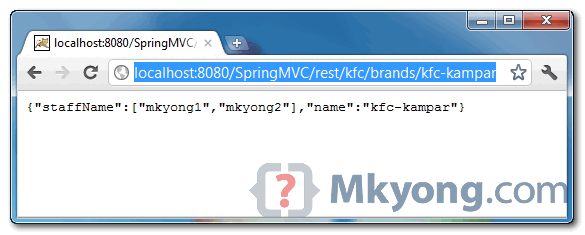
5. Demo
URL : http://localhost:8080/SpringMVC/rest/kfc/brands/kfc-kampar
Download Source Code
Download it – SpringMVC-Json-Example.zip (21 KB)

Hi!
I have some problem with jquery getJSON, can you help me?
Hello,
I am working on Spring MVC 3.0 JAXB & REST. I am new to these technologies. I am learning from your examples.
In the above examples I didn’t understand the URL format. Could you explain it. where was the “rest” configured (http://localhost:8080/SpringMVC/rest/kfc/brands/kfc-kampar)
I am getting 404 error when trying to execute this one in eclipse
SpringMVC is the webapp (directory name in the web server’s webapps directory)
In the webapp’s web.xml, the url mapping includes ‘rest’ as follows:
The controller takes you further in the url with the following annotation:
@RequestMapping(“kfc/brands”)
Whatever comes after that in the url is the ‘name’ PathVariable
I hosted his example in Tomcat and it works.
I discovered that the only misleading part in this example is the following in web.xml:
Since the servlet name, as defined in web.xml, is mvc-dispatcher, the default dispatcher servlet name is mvc-dispatcher-servlet.xml, which coincides with the given name in the web.xml
If you try to give any other name via this mechanism, the application will not work. You need to specify via servlet’s init-param as follows:
Any xml base config ? returning json
Hello, do you need the mvc-dispatcher-servlet.xml at Spring boot ?
com.fasterxml.jackson.core
jackson-databind
2.5.0
This is also needed.
What is this following exception
excetion occured : org.springframework.web.HttpMediaTypeNotAcceptableException: Could not find acceptable representation
tell me the flow and i imported project but it is not running, tell me how to run it
Add this plugin in to your plugins inside of your pom.xml
org.apache.tomcat.maven
tomcat7-maven-plugin
2.1
/
8080
true
Also add this dependency in your pom file:
org.apache.tomcat.maven
tomcat7-maven-plugin
2.2
if you are using eclipse run as>Maven build>under goals put “clean install tomcat7:run” (without quotations”)
Then in your browser navigate to http://localhost:8080/rest/kfc/brands/kfc-kampar
Thanks
How does the application know that it has to return the value in JSON format
what if i am getting 404 error?
Thanks for this post. I have a doubt in configuring JSON Response prefix string. I have configured jsonPrefix in my project to prefix the response json with )]}’,n in MappingJson2HTTPMessageConverter class to fix common vulnerability. How could I see the response prefixed with the above string to confirm that this is working. I tried checking in chrome in the response string F12 -> Networks-> Json Response, however I could not find the string appended to the output. Could you please help me out with this?
When I have a field of type String with over 1000 characters, all the characters are turned into u0000. Any ideas?
Hi,
I am getting this error :
java.lang.IllegalArgumentException: No converter found for return value of type: class com.mkyong.common.model.Shop
on upgrading spring version to 4.2.0 RELEASE.
replace in pom.xml the dependency of jackson:
<!– old dependency
org.codehaus.jackson
jackson-mapper-asl
${jackson.version}
–>
com.fasterxml.jackson.module
jackson-module-kotlin
${jackson.version}
see also “https://stackoverflow.com/questions/51259077/no-converter-found-for-return-value-of-type-class-java-util-arraylist-spring-b”
I got the same error any solution ?
Thanks for this post!!
I have a question, how do you configure your project ?
Do you use only annotations setting the configuration into the code or do you prefer use the XML to set the configuration of frameworks like Spring mvc, spring batch or hibernate?
Thank you mkyong.
P.S In Spring 3, to output JSON data, just puts Jackson library in the project classpath.
Whenever i am entering url,”http://localhost:8080/SpringMVC/rest/kfc/brands/kfc-kampar” in my web browser it show error page that “Resource is not available”. How can i solved it?
Here are couple of options
1. Try GET http://localhost:8080/kfc/brands/kfc-kampar and it should complete.
2. Change the URL mapping web.xml like this then GET http://localhost:8080/SpringMVC/rest/kfc/brands/kfc-kampar will work
mvc-dispatcher
/SpringMVC/rest/*
Why “rest” in URL what is represents?
http://localhost:8080/SpringMVC/rest/kfc/brands/test
Hi, what is the difference between ContentNegotiationManagerFactoryBean and ContentNegotiatingViewResolver ? We can also use ContentNegotiationManagerFactoryBean for the same purpose .
thanks mkyong for your wonderful tutorials, they are really helpful.
I have a small issue though, what should I do if the variable name is special to Java?
I am working with a bootstrap calendar (https://github.com/Serhioromano/bootstrap-calendar) that uses ‘class’ as one of JSON properties.
I’m back…
I needed to use jackson’s annotation @Jsonproperty(“class”) on the getter method.
Will the same work for jdk7 and spring 3.5?? Because I have created almost same project but its not working.I think there is some problem with jackson…I don’t think jackson 2.3 works with jdk7 correct me If I am wrong.
I am not getting any error message but the ‘alert’ in which I am displaying my data is not getting displayed. However If I just send a normal string instead of a complex object its works fine.
Can you please help?
Thanks a lot, all your post are great!!!!
Hi Eugen,
i added a sample project of Spring-boot with Jackson in “GIT hub Repository” .Here is the link to refer Sample Project https://github.com/karthikpamidimarri/sampleApp
For sql files here is the link http://pastebin.com/iRK7r2TL
Hi to all ,
I am new to Spring Boot ,i was face this problem of itteration but it’s resolved by using Jackson annotaions of @JsonBackReference and @JsonManagedReference and @JsonIdentityInfo after added these annotaions and bean configuration is everything fine .. but after i could not able to post the data as Json to a controller .Please suggest answer i am facing issue like
1)Requested URL is http://localhost:8080/custMast/state (POST) that time 405 method is coming and JSON is
{
“custmastCountry” : {
“id” : 1,
“name” : “INDIA”,
“customerAddresses” : [ ]
},
“name” : “MahaRashtra”,
“createdOn” : null,
“updatedOn” : null,
“”custmastDistricts” : [ ],
“customerAddresses” : [ ]
}
It’s giving this following error like
Caused by: java.lang.IllegalArgumentException: Multiple back-reference properties with name ‘defaultReference’
and my configuration is
Here is My Configuration file for JSON in Spring BOOT
@Bean
public MappingJackson2HttpMessageConverter jackson2Converter() {
MappingJackson2HttpMessageConverter converter = new MappingJackson2HttpMessageConverter();
converter.setObjectMapper(objectMapper());
return converter;
}
@Bean
public ObjectMapper objectMapper() {
Object objectMapper = new ObjectMapper();
// ((ObjectMapper) objectMapper).registerModule(new Hibernate4Module());
((ObjectMapper) objectMapper)
.enable(SerializationFeature.ORDER_MAP_ENTRIES_BY_KEYS);
// to allow serialization of “empty” POJOs (no properties to serialize)
// (without this setting, an exception is thrown in those cases)
((ObjectMapper) objectMapper)
.disable(SerializationFeature.FAIL_ON_EMPTY_BEANS);
// to write java.util.Date, Calendar as number (timestamp):
((ObjectMapper) objectMapper)
.disable(SerializationFeature.WRITE_DATES_AS_TIMESTAMPS);
// DeserializationFeature for changing how JSON is read as POJOs:
// to prevent exception when encountering unknown property:
((ObjectMapper) objectMapper)
.disable(DeserializationFeature.FAIL_ON_UNKNOWN_PROPERTIES);
// to allow coercion of JSON empty String (“”) to null Object value:
((ObjectMapper) objectMapper)
.enable(DeserializationFeature.ACCEPT_EMPTY_STRING_AS_NULL_OBJECT);
return (ObjectMapper) objectMapper;
}
the tutorial of this guy never works as so easy.
when we make a Spring MVC project in eclipse. It creates a default structure. How does that structure work? I have tried working on it but i am not able to trace the execution path
spring mvc force us to use maven its impossible to build a spring mvc project today without using it unfortunately.
Have you been able to pass a json string to a Post method in a controller?
We are having some issues with it. Let us know.
Here is a method to try:
@RequestMapping(method = RequestMethod.POST, headers = {“Content-type=application/json”})
public void setShopInJSON(@RequestBody final Shop shop) {
System.out.println(shop);
}
I have Successfully implemented in my local instance. But I facing issues in IE bowser unable to open json other then firefox ,chrome working fine. Why IE bowser not working JSon??
http://localhost:8080/SpringMVC/rest/kfc/brands/kfc-kampar
would it be possible to modify the example to include receving a JSON? I’m trying to merge you MVC/JSP example with a get/post json example, and am having issues with getting Spring config set correctly. Thanks!
Meant to add: I would like to have a controller that could do both: launch a jsp, and send/receive json. Thanks!
Same issue here.
Having issues passing a json string to a Post method in a controller?
Hi, Is it possible to specifiy the in a java file as an annotation?
Thanks
it’s perfect ! thank’s !