This article shows you how to upload files in Spring Boot web application (REST structure), using Ajax requests.
Tools used in this article :
- Spring Boot 1.4.3.RELEASE
- Spring 4.3.5.RELEASE
- Thymeleaf
- jQuery (webjars)
- Maven
- Embedded Tomcat 8.5.6
- Google Chrome Browser (Network Inspect)
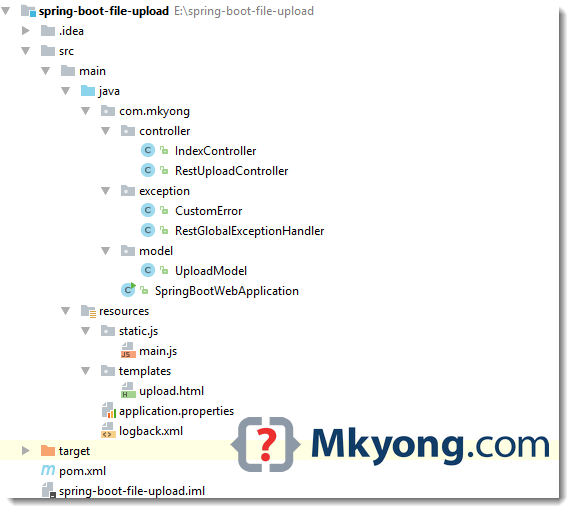
1. Project Structure
A standard Maven project structure.
2. Project Dependency
Declares an extra jQuery webjar dependency, for Ajax requests in HTML form.
<project xmlns="http://maven.apache.org/POM/4.0.0"
         xmlns:xsi="http://www.w3.org/2001/XMLSchema-instance"
         xsi:schemaLocation="http://maven.apache.org/POM/4.0.0
         http://maven.apache.org/maven-v4_0_0.xsd">
    <modelVersion>4.0.0</modelVersion>

    <groupId>com.mkyong</groupId>
    <artifactId>spring-boot-file-upload</artifactId>
    <packaging>jar</packaging>
    <version>1.0</version>

    <parent>
        <groupId>org.springframework.boot</groupId>
        <artifactId>spring-boot-starter-parent</artifactId>
        <version>1.4.3.RELEASE</version>
    </parent>

    <properties>
        <java.version>1.8</java.version>
    </properties>

    <dependencies>

        <dependency>
            <groupId>org.springframework.boot</groupId>
            <artifactId>spring-boot-starter-thymeleaf</artifactId>
        </dependency>

        <!-- hot swapping, disable cache for template, enable live reload -->
        <dependency>
            <groupId>org.springframework.boot</groupId>
            <artifactId>spring-boot-devtools</artifactId>
            <optional>true</optional>
        </dependency>

        <dependency>
            <groupId>org.webjars</groupId>
            <artifactId>jquery</artifactId>
            <version>2.2.4</version>
        </dependency>

    </dependencies>

    <build>
        <plugins>
            <!-- Package as an executable jar/war -->
            <plugin>
                <groupId>org.springframework.boot</groupId>
                <artifactId>spring-boot-maven-plugin</artifactId>
            </plugin>
        </plugins>
    </build>

</project>
3. File Upload
To support Ajax request and response, the easiest solution is returned a ResponseEntity.
3.1 The below example demonstrates three possible ways to upload files:
- Single file upload –
MultipartFile - Multiple file upload –
MultipartFile[] - Map file upload to a Model –
@ModelAttribute
package com.mkyong.controller;

import com.mkyong.model.UploadModel;
import org.slf4j.Logger;
import org.slf4j.LoggerFactory;
import org.springframework.http.HttpHeaders;
import org.springframework.http.HttpStatus;
import org.springframework.http.ResponseEntity;
import org.springframework.util.StringUtils;
import org.springframework.web.bind.annotation.ModelAttribute;
import org.springframework.web.bind.annotation.PostMapping;
import org.springframework.web.bind.annotation.RequestParam;
import org.springframework.web.bind.annotation.RestController;
import org.springframework.web.multipart.MultipartFile;

import java.io.IOException;
import java.nio.file.Files;
import java.nio.file.Path;
import java.nio.file.Paths;
import java.util.Arrays;
import java.util.List;
import java.util.stream.Collectors;

@RestController
public class RestUploadController {

    private final Logger logger = LoggerFactory.getLogger(RestUploadController.class);

    //Save the uploaded file to this folder
    private static String UPLOADED_FOLDER = "F://temp//";

    // 3.1.1 Single file upload
    @PostMapping("/api/upload")
    // If not @RestController, uncomment this
    //@ResponseBody
    public ResponseEntity<?> uploadFile(
            @RequestParam("file") MultipartFile uploadfile) {

        logger.debug("Single file upload!");

        if (uploadfile.isEmpty()) {
            return new ResponseEntity("please select a file!", HttpStatus.OK);
        }

        try {

            saveUploadedFiles(Arrays.asList(uploadfile));

        } catch (IOException e) {
            return new ResponseEntity<>(HttpStatus.BAD_REQUEST);
        }

        return new ResponseEntity("Successfully uploaded - " +
                uploadfile.getOriginalFilename(), new HttpHeaders(), HttpStatus.OK);

    }

    // 3.1.2 Multiple file upload
    @PostMapping("/api/upload/multi")
    public ResponseEntity<?> uploadFileMulti(
            @RequestParam("extraField") String extraField,
            @RequestParam("files") MultipartFile[] uploadfiles) {

        logger.debug("Multiple file upload!");

        // Get file name
        String uploadedFileName = Arrays.stream(uploadfiles).map(x -> x.getOriginalFilename())
                .filter(x -> !StringUtils.isEmpty(x)).collect(Collectors.joining(" , "));

        if (StringUtils.isEmpty(uploadedFileName)) {
            return new ResponseEntity("please select a file!", HttpStatus.OK);
        }

        try {

            saveUploadedFiles(Arrays.asList(uploadfiles));

        } catch (IOException e) {
            return new ResponseEntity<>(HttpStatus.BAD_REQUEST);
        }

        return new ResponseEntity("Successfully uploaded - "
                + uploadedFileName, HttpStatus.OK);

    }

    // 3.1.3 maps html form to a Model
    @PostMapping("/api/upload/multi/model")
    public ResponseEntity<?> multiUploadFileModel(@ModelAttribute UploadModel model) {

        logger.debug("Multiple file upload! With UploadModel");

        try {

            saveUploadedFiles(Arrays.asList(model.getFiles()));

        } catch (IOException e) {
            return new ResponseEntity<>(HttpStatus.BAD_REQUEST);
        }

        return new ResponseEntity("Successfully uploaded!", HttpStatus.OK);

    }

    //save file
    private void saveUploadedFiles(List<MultipartFile> files) throws IOException {

        for (MultipartFile file : files) {

            if (file.isEmpty()) {
                continue; //next pls
            }

            byte[] bytes = file.getBytes();
            Path path = Paths.get(UPLOADED_FOLDER + file.getOriginalFilename());
            Files.write(path, bytes);

        }

    }
}
3.2 A simple model for above example 3.1.3 – @ModelAttribute
package com.mkyong.model;

import org.springframework.web.multipart.MultipartFile;

public class UploadModel {

    private String extraField;

    private MultipartFile[] files;

    //getters and setters
}
4. The Views
HTML form for multiple file uploads.
<!DOCTYPE html>
<html xmlns:th="http://www.thymeleaf.org">
<body>
<h1>Spring Boot - Multiple file upload example - AJAX</h1>
<form method="POST" enctype="multipart/form-data" id="fileUploadForm">
<input type="text" name="extraField"/><br/><br/>
<input type="file" name="files"/><br/><br/>
<input type="file" name="files"/><br/><br/>
<input type="submit" value="Submit" id="btnSubmit"/>
</form>
<h1>Ajax Post Result</h1>
<pre>
<span id="result"></span>
</pre>
<script type="text/javascript"
src="webjars/jquery/2.2.4/jquery.min.js"></script>
<script type="text/javascript" src="js/main.js"></script>
</body>
</html>
5. jQuery – Ajax Request
jQuery to get the form via form #id, and send the multipart form data via Ajax request.
$(document).ready(function () {

    $("#btnSubmit").click(function (event) {

        //stop submit the form, we will post it manually.
        event.preventDefault();

        fire_ajax_submit();

    });

});

function fire_ajax_submit() {

    // Get form
    var form = $('#fileUploadForm')[0];

    var data = new FormData(form);

    data.append("CustomField", "This is some extra data, testing");

    $("#btnSubmit").prop("disabled", true);

    $.ajax({
        type: "POST",
        enctype: 'multipart/form-data',
        url: "/api/upload/multi",
        data: data,
        //http://api.jquery.com/jQuery.ajax/
        //https://developer.mozilla.org/en-US/docs/Web/API/FormData/Using_FormData_Objects
        processData: false, //prevent jQuery from automatically transforming the data into a query string
        contentType: false,
        cache: false,
        timeout: 600000,
        success: function (data) {

            $("#result").text(data);
            console.log("SUCCESS : ", data);
            $("#btnSubmit").prop("disabled", false);

        },
        error: function (e) {

            $("#result").text(e.responseText);
            console.log("ERROR : ", e);
            $("#btnSubmit").prop("disabled", false);

        }
    });

}
6. Exception Handler
To handle exception from Ajax request, just extends ResponseEntityExceptionHandler and return back a ResponseEntity.
package com.mkyong.exception;

import org.springframework.http.HttpStatus;
import org.springframework.http.ResponseEntity;
import org.springframework.web.bind.annotation.ControllerAdvice;
import org.springframework.web.bind.annotation.ExceptionHandler;
import org.springframework.web.bind.annotation.ResponseBody;
import org.springframework.web.multipart.MultipartException;
import org.springframework.web.servlet.mvc.method.annotation.ResponseEntityExceptionHandler;

import javax.servlet.http.HttpServletRequest;

//http://docs.spring.io/spring-boot/docs/current/reference/htmlsingle/#boot-features-error-handling
@ControllerAdvice
public class RestGlobalExceptionHandler extends ResponseEntityExceptionHandler {

    // Catch file size exceeded exception!
    @ExceptionHandler(MultipartException.class)
    @ResponseBody
    ResponseEntity<?> handleControllerException(HttpServletRequest request, Throwable ex) {

        HttpStatus status = getStatus(request);
        return new ResponseEntity(ex.getMessage(), status);

        // example
        //return new ResponseEntity("success", responseHeaders, HttpStatus.OK);

    }

    private HttpStatus getStatus(HttpServletRequest request) {
        Integer statusCode = (Integer) request.getAttribute("javax.servlet.error.status_code");
        if (statusCode == null) {
            return HttpStatus.INTERNAL_SERVER_ERROR;
        }
        return HttpStatus.valueOf(statusCode);
    }

}
7. DEMO
Start Spring Boot with the default embedded Tomcat mvn spring-boot:run.
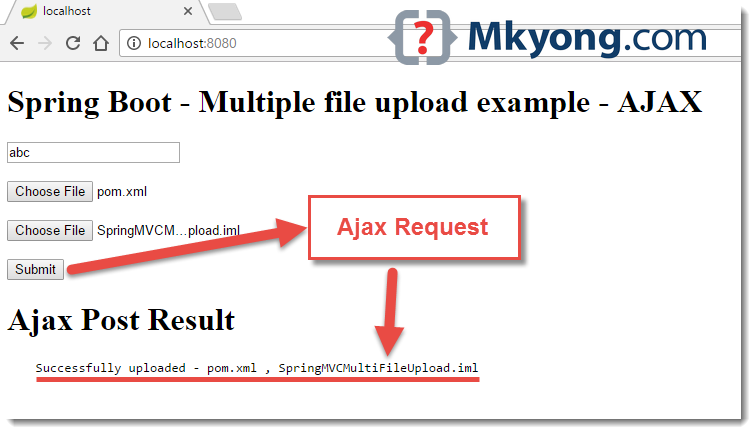
7.1 Access http://localhost:8080/, select few files and clicks submit to fire the ajax request.
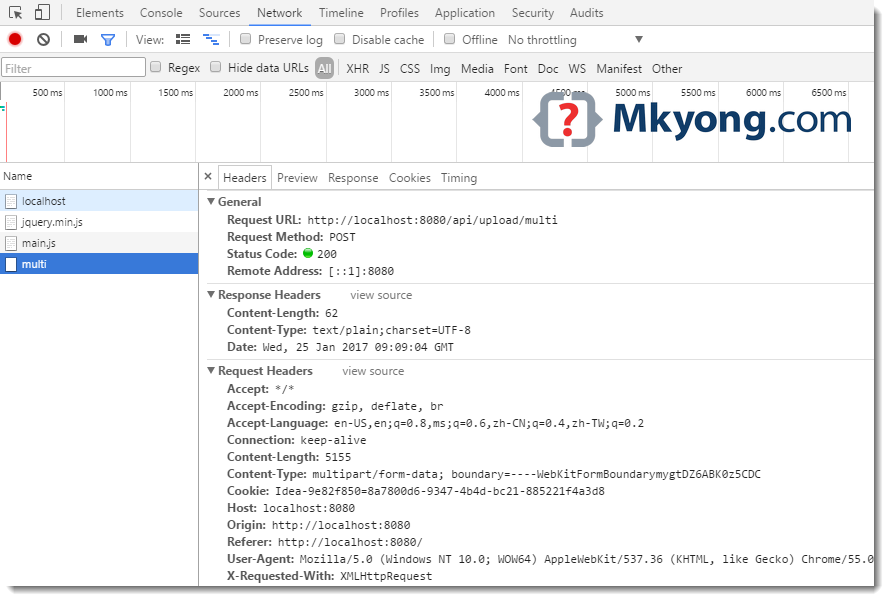
7.2 Google Chrome, review the request and response in the “Network Inspect”
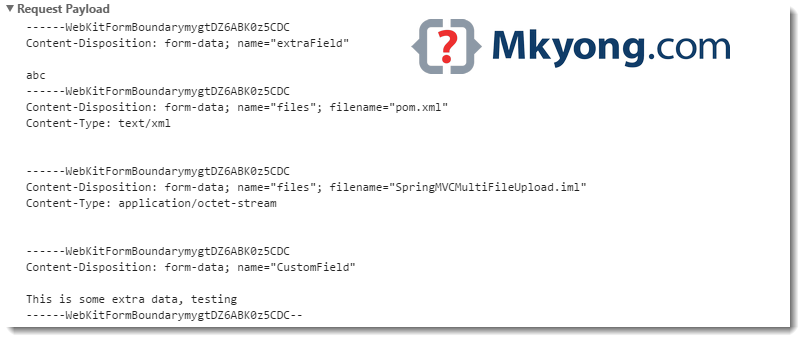
7.3 Google Chrome, “Request Payload”
8. cURL Testing
More testing with cURL command.
8.1 Test single file upload.
$ curl -F file=@"f:\\data.txt" http://localhost:8080/api/upload/
Successfully uploaded - data.txt
8.2 Test multiple file upload.
$ curl -F extraField="abc" -F files=@"f://data.txt" -F files=@"f://data2.txt"  http://localhost:8080/api/upload/multi/
Successfully uploaded - data.txt , data2.txt
8.3 Test multiple file upload, maps to Model.
$ curl -F extraField="abc" -F files=@"f://data.txt" -F files=@"f://data2.txt"  http://localhost:8080/api/upload/multi/model
Successfully uploaded!
8.4 Test a large movie file (100MB), the following error message will be displayed.
$ curl -F file=@"F://movies//300//Sample.mkv"  http://localhost:8080/api/upload/
Attachment size exceeds the allowable limit! (10MB)
9. cURL Testing + Custom Error object
9.1 Create an object to store the error detail.
package com.mkyong.exception;

public class CustomError {

    String errCode;
    String errDesc;

    public CustomError(String errCode, String errDesc) {
        this.errCode = errCode;
        this.errDesc = errDesc;
    }

    //getters and setters
}
9.2 Update the global exception handler to support CustomError object.
package com.mkyong.exception;

import org.springframework.http.HttpStatus;
import org.springframework.http.ResponseEntity;
import org.springframework.web.bind.annotation.ControllerAdvice;
import org.springframework.web.bind.annotation.ExceptionHandler;
import org.springframework.web.bind.annotation.ResponseBody;
import org.springframework.web.multipart.MultipartException;
import org.springframework.web.servlet.mvc.method.annotation.ResponseEntityExceptionHandler;

import javax.servlet.http.HttpServletRequest;

@ControllerAdvice
public class RestGlobalExceptionHandler extends ResponseEntityExceptionHandler {

    @ExceptionHandler(MultipartException.class)
    @ResponseBody
    ResponseEntity<?> handleControllerException(HttpServletRequest request, Throwable ex) {

        HttpStatus status = getStatus(request);

        return new ResponseEntity(new CustomError("0x000123",
                "Attachment size exceeds the allowable limit! (10MB)"), status);

        //return new ResponseEntity("Attachment size exceeds the allowable limit! (10MB)", status);

    }

    private HttpStatus getStatus(HttpServletRequest request) {
        Integer statusCode = (Integer) request.getAttribute("javax.servlet.error.status_code");
        if (statusCode == null) {
            return HttpStatus.INTERNAL_SERVER_ERROR;
        }
        return HttpStatus.valueOf(statusCode);
    }

}
9.3 cURL to upload a large file again.
$ curl -F file=@"F://movies//300//Sample.mkv"  http://localhost:8080/api/upload/

{"errCode":"0x000123","errDesc":"Attachment size exceeds the allowable limit! (10MB)"}
Done. Feedback is welcome.

how to developt rest client for above api?
Could you give example for rest client for above rest api?
Could you show rest client code for above api call?
FileUploadException: the request was rejected because no multipart boundary was found
when trying from postman
Hi mkyong, I am a big fan.
I feel <input type="file" name="files"/> should be changed to <input type="file" name="file"/> for this code to work.
how do you mapped the files in static and template folders
Hello, guys how do i upload file and student info object with ajax on spring boot ?? I need a Help guys
good article
Hi @mkyong, I have the same error as Diego André Colli.
I’ve posted my configuration here : https://stackoverflow.com/questions/47737003/spring-fileupload-required-request-part-file-is-not-present
spingboot + angularjs is really cool .. don’t you like it?
I don’t know why I receive: “Required request part ‘file’ is not present” Anyty help?
I am also facing the same issue. I am getting files as null.
please set file path to ur local drive
i guess you dont have “name = ‘’file‘ ’”
How to upload multiple files with a single file selection meaning assume that I have and I am trying to upload multiple files together along with some extra data in that case how to process the uploading of files
You awesome …….. you make me a happy sleep
Hi ,
I am getting this error.Could any one check this.
My Error :
{“code”:500,”description”:”Could not write content: No serializer found for class java.io.ByteArrayInputStream and
no properties discovered to create BeanSerializer (to avoid exception, disable SerializationFeature.FAIL_ON_EMPTY_BEANS)
(through reference chain: com.test.sample.CountryBean[“files”]->java.util.ArrayList[0]->org
.springframework.mock.web.MockMultipartFile[“inputStream”]); nested exception is com.fasterxml.jackson.databind.
JsonMappingException: No serializer found for class java.io.ByteArrayInputStream and no properties discovered to
create BeanSerializer (to avoid exception, disable SerializationFeature.FAIL_ON_EMPTY_BEANS)
(through reference chain: com.test.sample.CountryBean[“files”]
->java.util.ArrayList[0]->org.springframework.mock.web.MockMultipartFile[“inputStream”])”}
Hi Mkyong,
Thanks for the sharing the project on MultipartFile usage.I am stuckup with the retrieval process on this.My bean is look like below.
Class CountryBean{
private Country;
private List filesList;
//setters and getters
}
Class Country{
String countryName;
int population;
//setters and getters
}
I have to return the CountryBean in Controller for complete Country bean data and Files for updation process in UI.
Could you show any example on this.
Class CountryBean{
private Country;
private List filesList;
//setters and getters
}
Sorry I mistyped.
My Error :
{“code”:500,”description”:”Could not write content: No serializer found for class java.io.ByteArrayInputStream and
no properties discovered to create BeanSerializer (to avoid exception, disable SerializationFeature.FAIL_ON_EMPTY_BEANS)
(through reference chain: com.test.sample.CountryBean[“files”]->java.util.ArrayList[0]->org
.springframework.mock.web.MockMultipartFile[“inputStream”]); nested exception is com.fasterxml.jackson.databind.
JsonMappingException: No serializer found for class java.io.ByteArrayInputStream and no properties discovered to
create BeanSerializer (to avoid exception, disable SerializationFeature.FAIL_ON_EMPTY_BEANS)
(through reference chain: com.test.sample.CountryBean[“files”]
->java.util.ArrayList[0]->org.springframework.mock.web.MockMultipartFile[“inputStream”])”}
My Controller is like below :
@GetMapping(value=”/country/{id}”, produces=”application/json”)
public ResponseEntity getCountryDetails(@PathVariable(“id”)Integer id) {
log.debug(” Start getCountryDetails “);
CountryBean countryModel = null;
try{
countryModel = countryService.getInvestmentRequestById(id);
log.info(” :- Files Count -:::- “+countryModel.getFiles().size());
if(countryModel.getCountryId()==id){
return new ResponseEntity(countryModel,HttpStatus.OK);
}else if(countryModel.getCountryId()!=id){
return new ResponseEntity(countryModel,HttpStatus.NOT_FOUND);
}else{
return new ResponseEntity(countryModel,HttpStatus.BAD_REQUEST);
}
}catch(Exception ex){
log.error(ex.getMessage());
}
log.debug(” End getCountryDetails “);
return new ResponseEntity(countryModel,HttpStatus.BAD_REQUEST);
}
Hi Mkyong
i have this error
{“timestamp”:1494517860072,”status”:500,”error”:”Internal Server Error”,”exception”:”java.nio.file.InvalidPathException”,”message”:”Illegal char at index 7: /temp/D:\spring-boot-file-upload-ajax-rest\pom.xml”,”path”:”/api/upload/multi”}
thank you
This does not work when I included authentication, is there something I am missing that I need to add when I include authentication (jwt) that would make it work?
Hello, I have problem with this solution. When i try to upload bigger file than 10mb with curl (curl -F file=@”C://path//to//file” http://localhost:8080/api/upload/) I get error curl: (56) Recv failure: Connection was aborted
I was using portable curl.exe (dont know if that was problem) everything I needed to do was uncomment bean located in SpringBootWebApplication. Application is working great when using browser but curl is showing same error
This example is limited the uploaded file size to 10mb, try increase it.
Thanks for the example. How would you write a spring boot validator for request param MultipartFile[] in uploadFileMulti method. It would be difficult to pass MultipartFile[].
Regards,
B
Very good article and example mkyong.